1. Johdanto
This manual provides instructions for the Varmilo Koi 73 JIS Keyboard with Sakura Switches (Model: VMMA73A039SAKURA). This keyboard features a unique design inspired by traditional Chinese Koi fish and water elements, combined with a modern aesthetic. It is a compact 65% size keyboard with a Japanese Industrial Standard (JIS) layout, designed for both functionality and portability. The keyboard is equipped with Cherry-style stabilizers for a stable typing experience.
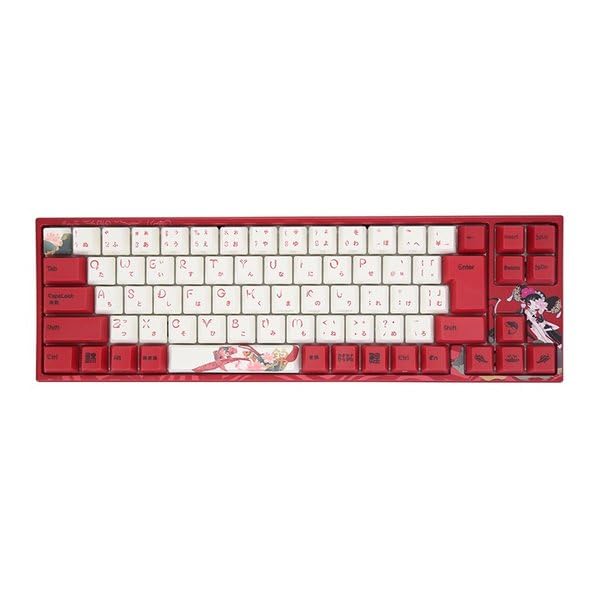
Image: Varmilo Koi 73 JIS Keyboard overview.
2. Tärkeimmät ominaisuudet
- Unique Koi Design: Features vibrant koi fish illustrations and a red aesthetic, developed in collaboration with illustrator Li Huan.
- JIS Layout: 73-key Japanese Industrial Standard layout for specific regional input needs.
- Compact 65% Size: Optimizes desk space while retaining essential function and arrow keys.
- Customizable Switches: Offers a choice of Varmilo mechanical electrostatic capacity switches to suit individual typing preferences.
- Cherry-Style Stabilizers: Ensures consistent and stable key presses, especially for larger keys.
- USB-liitäntä: Reliable wired connection for stable performance.
3. Asennusopas
3.1 Pakkauksen sisältö
Ennen kuin aloitat, varmista, että pakkauksessa on kaikki tarvittavat osat:
- Varmilo Koi 73 JIS Keyboard
- USB-kaapeli
- Käyttöopas (tämä asiakirja)
3.2 Näppäimistön kytkeminen
To connect your Varmilo Koi 73 keyboard to your computer, follow these steps:
- Paikanna näppäimistön takaosassa oleva USB-C-portti.
- Connect one end of the provided USB cable to the keyboard's USB-C port.
- Liitä USB-kaapelin toinen pää tietokoneen vapaaseen USB-porttiin.
- Käyttöjärjestelmän pitäisi tunnistaa näppäimistö automaattisesti.
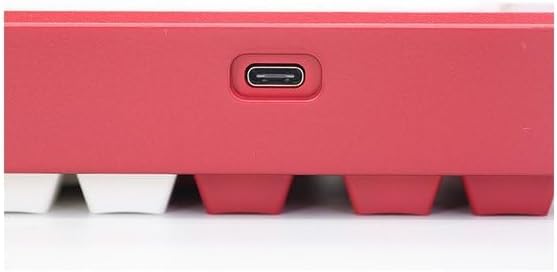
Image: USB-C port for keyboard connection.
3.3 Ohjaimen asennus (valinnainen)
For advanced customization and optimal performance, it is recommended to install the Varmilo driver software. This software allows you to remap keys, adjust performance settings, and customize lighting effects.
Video: This video demonstrates the driver installation process and software usage for Varmilo keyboards. While it features the Muse65 model, the steps for driver installation and basic software navigation are generally applicable to other Varmilo keyboards like the Koi 73.
Please visit the official Varmilo website for the latest driver downloads specific to your keyboard model. Follow the on-screen instructions during installation.
4. Käyttöohjeet
4.1 Perusnäppäintoiminnot
The Varmilo Koi 73 keyboard features a standard JIS layout. Most keys function as labeled. For special functions, refer to the combination keys below.
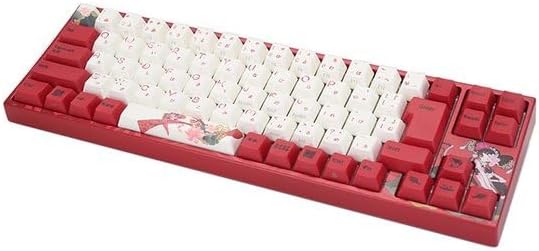
Kuva: Yliview of the Varmilo Koi 73 JIS Keyboard layout.
4.2 Toimintonäppäinyhdistelmät (Fn)
Since this is a 73-key layout, some functions are accessed via the Fn key. Hold down the Fn key and press the corresponding key to activate its secondary function. Common Fn combinations include:
- Fn + F1–F12: Multimedian säätimet (esim. äänenvoimakkuus, toisto/tauko).
- Fn + nuolinäppäimet: Page Up/Down, Home/End (specific to model, refer to keycap legends).
- Fn + Win Key: Locks/unlocks the Windows key.

Image: Left side keys, often used with Fn for additional functions.
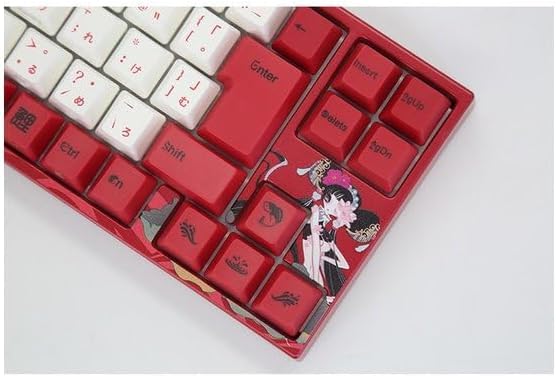
Image: Right side keys, including navigation and utility keys.
4.3 Valotehosteet
The Varmilo Koi 73 keyboard supports various RGB lighting effects. You can cycle through different modes and adjust brightness using specific key combinations. Refer to your keyboard's specific keycap legends or the driver software for detailed lighting controls.
Video: This video showcases various RGB lighting effects on a Varmilo keyboard. While the model shown is Muse65, it provides a general idea of the dynamic lighting capabilities available on Varmilo keyboards, including the Koi 73.
5. Huolto ja hoito
Proper maintenance ensures the longevity and optimal performance of your Varmilo Koi 73 keyboard.
- Näppäinhattujen puhdistus: Gently remove keycaps using a keycap puller. Clean the keycaps with a soft cloth dampmiedolla saippualla ja vedellä. Varmista, että ne ovat täysin kuivia ennen takaisin kiinnittämistä.
- Näppäimistön rungon puhdistaminen: Pyyhi näppäimistön runko pehmeällä, kuivalla liinalla. Pinttyneeseen likaan käytä hieman kuivaa liinaa.amp cloth with a small amount of isopropyl alcohol can be used. Avoid excessive moisture.
- Pölynpoisto: Poista pöly ja roskat näppäinten välistä paineilmalla.
- Vältä nesteitä: Pidä nesteet poissa näppäimistöltä vaurioiden välttämiseksi.
- Kaapelihuolto: Älä taivuta tai purista USB-kaapelia liikaa.
6. Vianmääritys
If you encounter issues with your Varmilo Koi 73 keyboard, try the following solutions:
- Näppäimistö ei vastaa:
- Varmista, että USB-kaapeli on kytketty kunnolla sekä näppäimistöön että tietokoneeseen.
- Kokeile kytkeä näppäimistö tietokoneen toiseen USB-porttiin.
- Käynnistä tietokone uudelleen.
- Jos käytät USB-keskitintä, kokeile liittää se suoraan tietokoneeseen.
- Avaimet eivät rekisteröidy:
- Check for any debris or foreign objects under the keycaps.
- If specific keys are not working, consider reinstalling the keyboard driver.
- Valaistusongelmat:
- Ensure the keyboard driver is installed and up to date.
- Use the Fn key combinations or driver software to adjust lighting modes and brightness.
- Windows-näppäin lukittu:
- Paina Fn + Win Key Windowsin näppäinlukon kytkemiseksi päälle/pois.
If the problem persists, please contact Varmilo customer support for further assistance.
7. Tekniset tiedot
| Merkki | Varmilo |
| Mallinumero | VMMA73A039SAKURA |
| Näppäimistön asettelu | 73-key JIS (Japanese Industrial Standard) |
| Yhteydet | USB langallinen |
| Kytkimen tyyppi | Mechanical (Linear) |
| Yhteensopivat laitteet | Kannettava tietokone |
| Tuotteen mitat | 34.2 cm (P) x 34.2 cm (L) x 5.1 cm (K) |
| Mukana olevat komponentit | USB-kaapeli |
8. Takuu ja tuki
Varmilo products typically come with a manufacturer's warranty. Please refer to the warranty card included with your product or visit the official Varmilo websivustolta tarkemmat takuuehdot.
For technical support, driver downloads, or further inquiries, please visit the official Varmilo support page or contact their customer service.
Official Varmilo Websivusto: www.varmilo.com


