1. Tuote ohiview
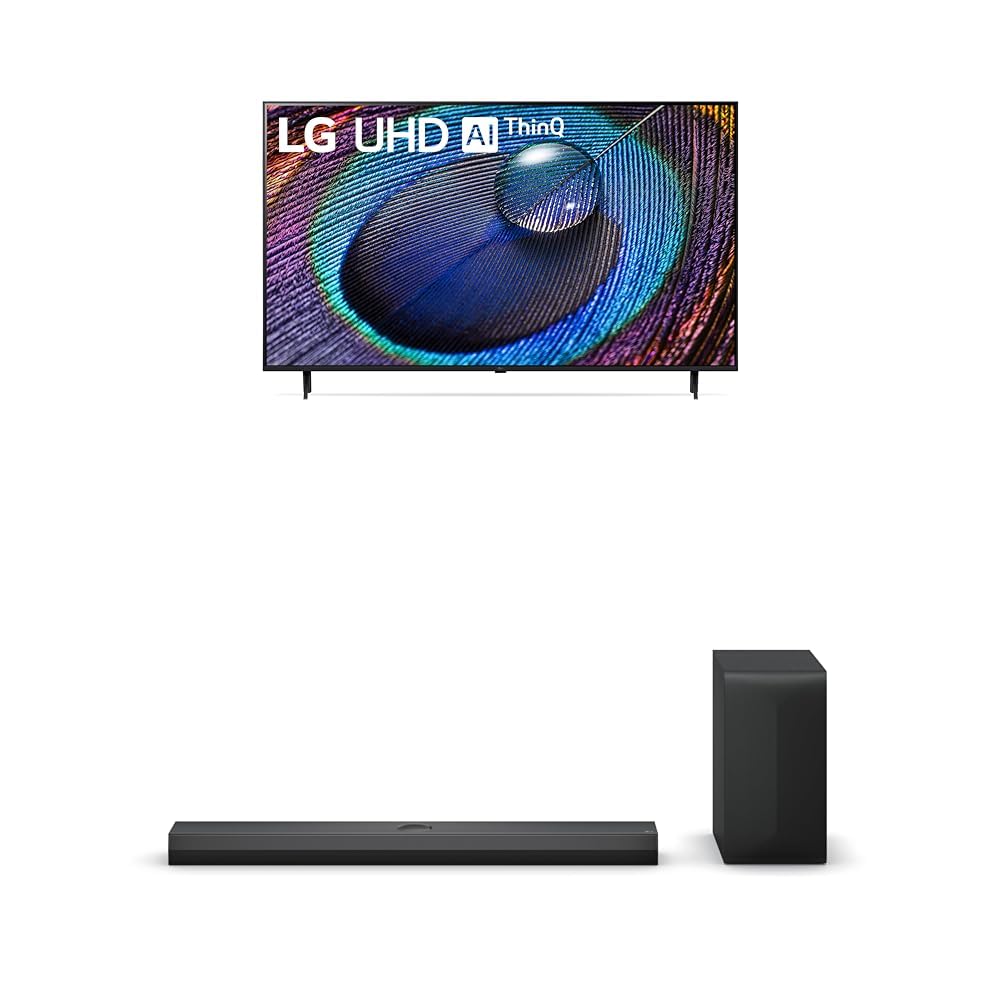
The LG 50-Inch Class UR9000 Series 4K Smart TV offers an immersive home cinema experience with its 3840 x 2160 resolution and AI-Powered 4K upscaling. Enjoy enhanced picture detail and improved sound, along with a suite of smart features including Alexa Built-in, Bluetooth, Wi-Fi, USB, and Ethernet connectivity. This model is designed for optimal viewing and integration into your home entertainment system.
Tärkeimmät ominaisuudet:
- Kotiteatterikokemus: Enjoy movies and TV shows upscaled to 4K for a sharper image and more lifelike details. FILMMAKER MODE ensures content is viewed as the director intended. HDR10 Pro provides extended contrast for vibrant visuals.
- a5-tekoälyprosessori Gen6: This AI-powered processor enhances picture detail and improves sound, upscaling content to 4K and adjusting color and picture contrast based on room lighting for optimal settings.
- LG QNED Matching: While a great sound enhancer for any LG TV, its smaller width and depth allows it to nest perfectly beneath a stand-mounted QNED TV. It is also fully compatible with the LG QNED Synergy Bracket for wall mounting.
- Vaakunasuunnittelu: Features LG’s new crest design for a sleek and stylish look. The metal grill helps keep dust and debris out for worry-free audio enjoyment.
2. Mitä laatikossa on
Upon unpacking your LG UR9000 Series 4K Smart TV, ensure all components are present:
- LG 50-Inch Class UR9000 Series 4K Smart TV
- Tv taso
- Kaukosäädin
- Virtakaapeli
- Documentation (User Manual, Quick Start Guide, Warranty Information)
3. Asennus
3.1 Jalustan kiinnitys
- Aseta televisio varovasti näyttö alaspäin pehmeälle ja tasaiselle alustalle vaurioiden välttämiseksi.
- Kohdista television jalusta television pohjassa oleviin kiinnitysreikiin.
- Kiinnitä jalusta mukana toimitetuilla ruuveilla. Varmista, että se on tukevasti kiinni.
3.2 Seinäkiinnitys (valinnainen)
If you choose to wall mount your TV, ensure you use a VESA-compatible wall mount (sold separately) and follow the instructions provided with the wall mount. Professional installation is recommended for safety.
3.3 Virran kytkeminen
- Liitä virtajohto television virransyöttöporttiin.
- Kytke virtajohdon toinen pää maadoitettuun pistorasiaan.
3.4 Ulkoisten laitteiden liittäminen
The LG UR9000 Series TV offers multiple connectivity options:
- HDMI: Connect Blu-ray players, gaming consoles, or soundbars using HDMI cables. The TV supports multiple HDMI inputs.
- USB: Liitä USB-asemat median toistoa varten.
- Ethernet: Vakaan internetyhteyden saamiseksi kytke Ethernet-kaapeli reitittimestä television LAN-porttiin.
- Bluetooth: Connect compatible wireless devices such as headphones or soundbars.
3.5 Alkuasetukset
- Kytke televisio päälle kaukosäätimellä.
- Valitse kieli, maa ja aikavyöhyke näytön ohjeiden mukaisesti.
- Connect to your Wi-Fi network or confirm your Ethernet connection.
- Accept the terms and conditions and perform any available software updates.
- Set up your Alexa Built-in features as prompted.
4. LG Smart TV:n käyttö
4.1 Kaukosäätimen käyttö
The LG remote control features dedicated buttons for popular streaming services like Netflix, Disney+, and Prime Video for quick access. It also includes a scroll wheel and a mouse-like pointer function for intuitive navigation of the WebOS käyttöliittymä.
4.2 Älytelevision käyttöliittymän käyttö (Webkäyttöjärjestelmä)
The WebOS interface provides a user-friendly experience. Use the remote's directional buttons or pointer to select apps, settings, and content. The home screen displays trending content and your installed applications.
4.3 Sovellusten käyttö
Pre-installed apps include Netflix, Prime Video, Hulu, and YouTube. Additional apps can be downloaded from the LG Content Store. Simply select the app icon from the home screen to launch.
4.4 Screen Mirroring and AirPlay
You can display content from your mobile device directly on your TV screen. Use the built-in screen mirroring feature for Android devices or AirPlay for Apple devices. This allows you to share photos, videos, or even workout routines on a larger display.
4.5 Voice Control with Alexa Built-in
Utilize the integrated Alexa voice assistant for hands-free control. Press the microphone button on your remote and speak commands to change channels, adjust volume, search for content, or control smart home devices.
4.6 Peliominaisuudet
The TV's AI-Powered 4K and 60Hz refresh rate provide a responsive gaming experience. Connect your gaming consoles via HDMI for high-quality visuals and smooth gameplay.
5. Huolto
5.1 Television puhdistaminen
- Irrota aina televisio pistorasiasta ennen puhdistamista.
- Pyyhi näyttö ja kehys varovasti pehmeällä, kuivalla mikrokuituliinalla.
- Pinttyneisiin tahroihin, dörzsöi kevyestiampKostuta liina vedellä tai erikoisnäytönpuhdistusaineella (vältä voimakkaita kemikaaleja).
5.2 Ohjelmistopäivitykset
Regularly check for and install software updates to ensure optimal performance, security, and access to the latest features. Updates can usually be found in the TV's settings menu under 'Support' or 'About This TV'.
6. Vianmääritys
6.1 Ei virtaa
- Ensure the power cable is securely plugged into both the TV and the electrical outlet.
- Tarkista, toimiiko pistorasia kytkemällä toinen laite.
- Kokeile toista pistorasiaa.
6.2 Ei kuvaa / Huono kuvanlaatu
- Varmista, että oikea tulolähde on valittu (esim. HDMI 1, HDMI 2).
- Tarkista kaikki kaapeliliitännät (HDMI, antenni jne.) löysyyden tai vaurioiden varalta.
- Adjust picture settings (brightness, contrast, color) in the TV's menu.
- Jos käytät ulkoista laitetta, varmista, että se on päällä ja toimii oikein.
6.3 Ei ääntä / Huono äänenlaatu
- Lisää äänenvoimakkuutta sekä televisiosta että kaikista liitetyistä ulkoisista äänilaitteista.
- Check audio output settings in the TV's menu to ensure the correct output (e.g., TV Speakers, Optical, Bluetooth) is selected.
- Varmista, että kaikki äänikaapelit on kytketty kunnolla.
6.4 Kaukosäädin ei toimi
- Vaihda kaukosäätimen paristot.
- Varmista, ettei kaukosäätimen ja television sensorin välissä ole esteitä.
- Try re-pairing the remote control if it's a smart remote (refer to the TV's on-screen guide for instructions).
7. Tekniset tiedot
| Ominaisuus | Yksityiskohta |
|---|---|
| Merkki | LG |
| Malli | UR9000-sarja |
| Näytön koko | 50 tuumaa |
| Näyttötekniikka | LED |
| Resoluutio | 4K (3840 2160 x XNUMX XNUMX) |
| Päivitystaajuus | 60 Hz |
| Erikoisominaisuudet | Alexa Built-in, AI-Powered 4K, FILMMAKER MODE, HDR10 Pro, Flat Screen |
| Yhteystekniikka | Bluetooth, Ethernet, USB, Wi-Fi |
| Tuetut Internet-palvelut | Browser, YouTube (and various streaming apps) |
| Mukana olevat komponentit | Stand, TV, Remote Control, Power Cable |
| Väri | Musta |
| Ensimmäinen vapaapäivä | 8. huhtikuuta 2024 |
8. Takuu ja tuki
For detailed warranty information and customer support, please refer to the warranty card included in your product packaging or visit the official LG website. You can also contact LG customer service for assistance with any product-related inquiries or technical support.