1. Johdanto
Thank you for choosing the ATTACK SHARK X85 Gasket Mechanical Keyboard. This manual provides detailed instructions on how to set up, operate, and maintain your new keyboard. Please read this manual thoroughly before use to ensure optimal performance and longevity of your device.

The ATTACK SHARK X85 Gasket Mechanical Keyboard, featuring a compact 75% layout with a multi-function knob.
2. Pakkauksen sisältö
Varmista, että pakkauksessasi on kaikki alla luetellut tuotteet:
- ATTACK SHARK X85 Gasket Mechanical Keyboard
- USB-C-USB-A-kaapeli
- 2.4 GHz:n langaton vastaanotin
- Näppäinhattu- ja kytkinvetotyökalu
- Additional Keycaps (Purple accent keycaps)
- Käyttöopas (tämä asiakirja)
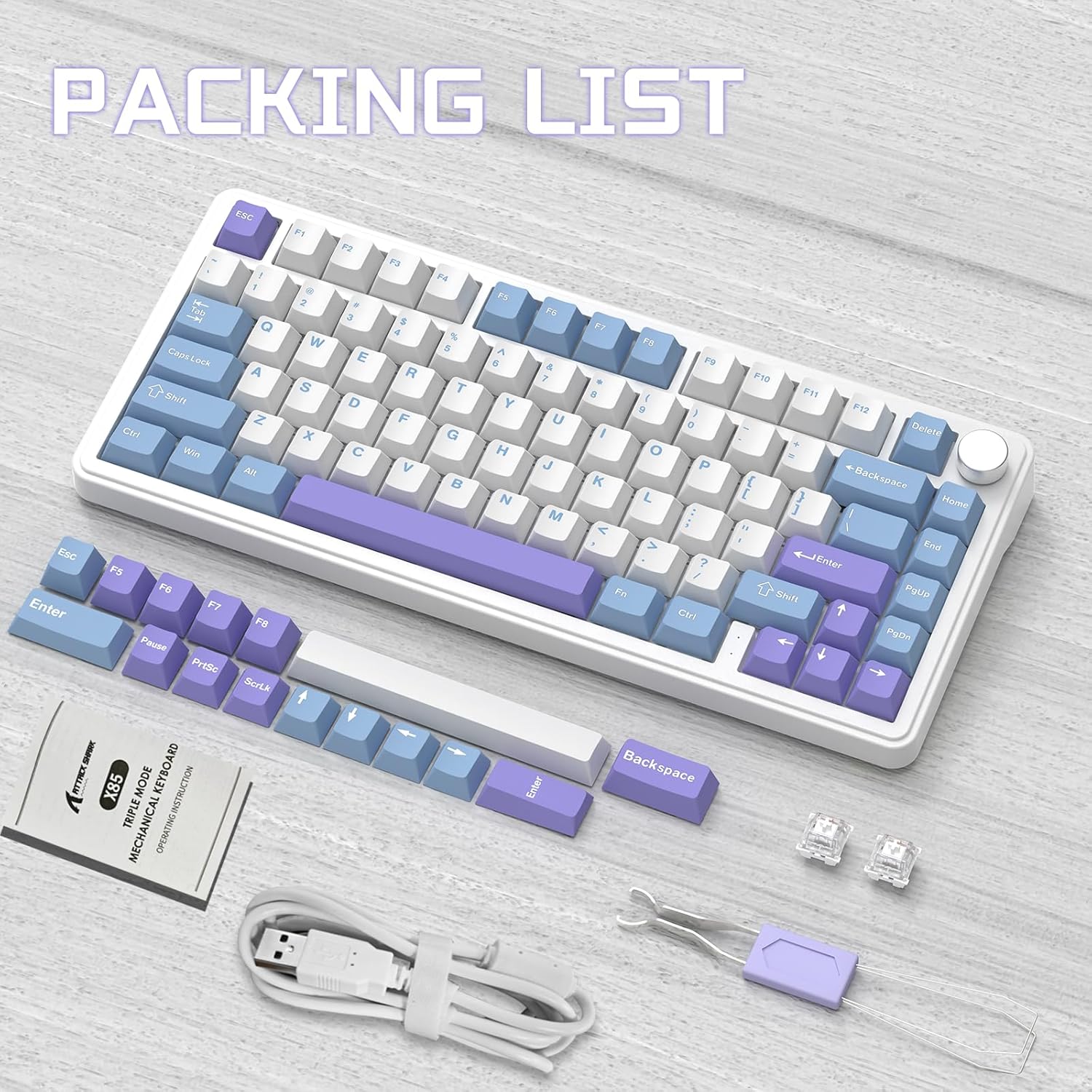
Contents of the ATTACK SHARK X85 keyboard package, including the keyboard, cables, tools, and extra keycaps.
3. Tuote ohiview
3.1 Tärkeimmät ominaisuudet
- 75 % kompakti asettelu: 81-key design maximizing desk space.
- Kolmitilayhteys: Supports Bluetooth 5.0, 2.4 GHz wireless, and USB-C wired connections.
- Tiivisteen kiinnitysmalli: Five-layer sound and shock-absorbing internal padding (PORON foam, IXPE switch pad, PET sound enhancement pad, bottom silicone pad) for a soft, flexible typing feel.
- Vaihdettavat kytkimet: Compatible with most 3-pin mechanical switches for easy customization.
- Monitoiminuppi: Controls computer volume and keyboard backlight settings.
- PBT-näppäinhatut: Durable, wear-resistant keycaps with thick walls.
- RGB-taustavalo: 19 RGB modes, 7 monochrome modes, and full-color backlight with adjustable speed and intensity. Customizable via software.
- 5000mAh akku: High-capacity battery for extended wireless use with auto-sleep power saving.
- 100 % haamukuvien esto: Ensures all key presses are registered accurately during fast typing or gaming.
- Laaja yhteensopivuus: Fully compatible with Windows and Mac operating systems.
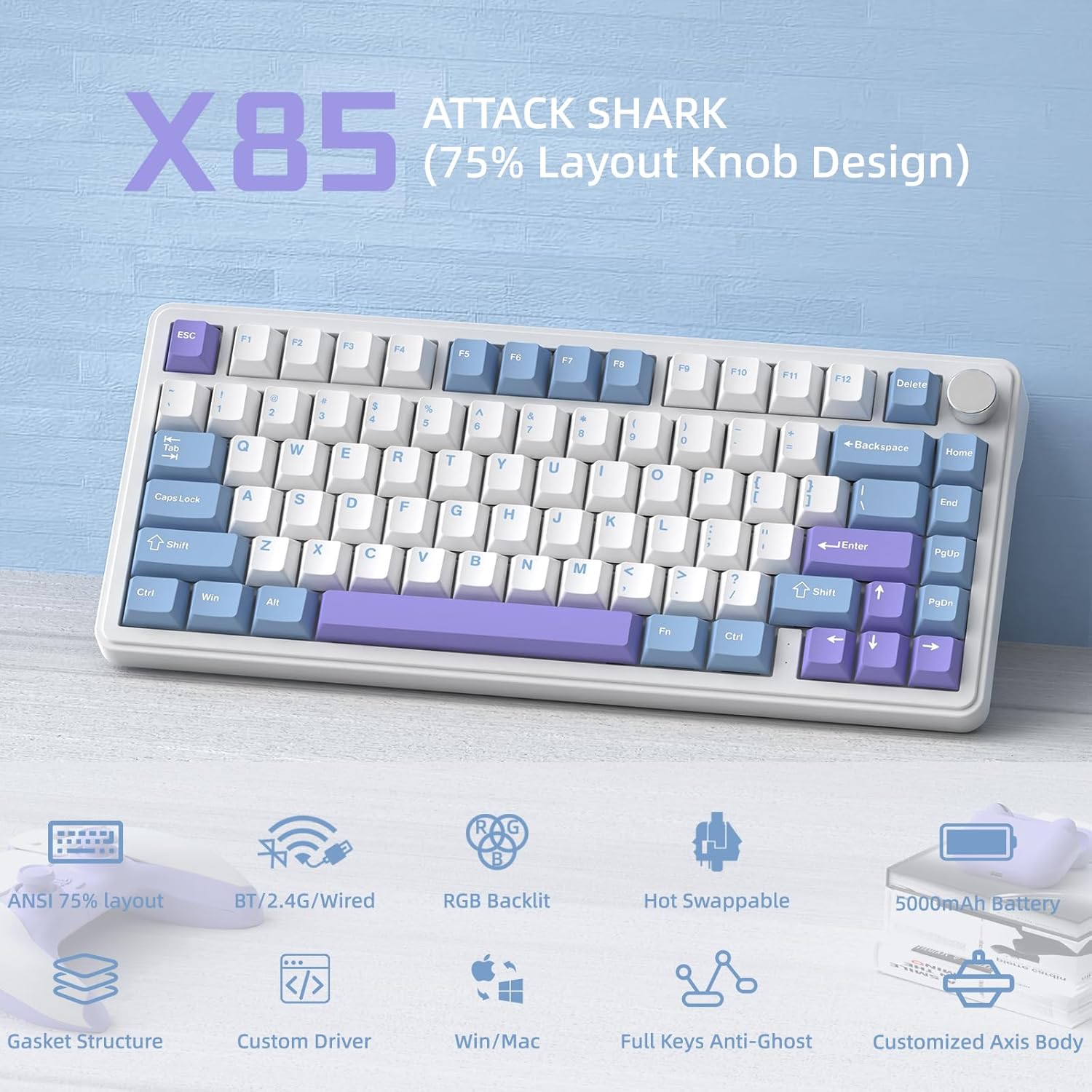
Yliview of the ATTACK SHARK X85's key features, including its 75% layout, tri-mode connectivity, RGB lighting, and hot-swappable design.
3.2 Internal Structure (Gasket Mount)
The X85 features an advanced gasket mount design with multiple layers for enhanced acoustics and typing feel:
- Nuppi
- PBT-näppäimet
- Yläkansi
- Kytkin
- PC Horizontal Slotted Positioning Plate
- PORON Quilted Cotton
- IXPE-kytkinlevy
- PET Sound Enhancement Pad
- Single Key Slotted PCB
- Switch Seat Silencer Bottom Cotton
- Silikoni Pad
- Pohjakotelo

Diagram illustrating the five-layer padding and gasket mount structure of the X85 keyboard, showing its various internal components.
4. Asennus
4.1 Kolmitilaliitäntä
The ATTACK SHARK X85 keyboard supports three connection modes: Bluetooth, 2.4 GHz wireless, and USB-C wired. The connection mode can be easily switched using the toggle switch on the back of the keyboard.

Visual guide for connecting the ATTACK SHARK X85 keyboard via Bluetooth, 2.4G wireless, and USB-C wired modes.
4.1.1 Bluetooth-yhteys
- Toggle the switch on the back of the keyboard to the "BT" position.
- Pitkä painallus Fn + Q, Fn + W, tai Fn + E for more than three seconds until the corresponding key's backlight flashes rapidly. This indicates pairing mode.
- On your device (computer, tablet, or smartphone), enable Bluetooth and search for "ATTACK SHARK X85".
- Select the keyboard to connect. Once connected, the key's backlight will stop flashing and remain solid.
- Voit yhdistää pariliitoksella jopa kolme Bluetooth-laitetta ja vaihtaa niiden välillä painamalla Fn + Q, Fn + W, tai Fn + E.
4.1.2 2.4 GHz:n langaton yhteys
- Locate the 2.4 GHz wireless receiver (dongle) in the package.
- Toggle the switch on the back of the keyboard to the "2.4G" position.
- Plug the 2.4 GHz wireless receiver into an available USB port on your computer.
- Näppäimistön pitäisi muodostaa yhteys automaattisesti. Jos ei, varmista, että vastaanotin on asetettu oikein ja näppäimistö on 2.4G-tilassa.
4.1.3 USB-C-langallinen yhteys
- Toggle the switch on the back of the keyboard to the "Line" (wired) position.
- Liitä mukana toimitetun USB-C-kaapelin toinen pää näppäimistön USB-C-porttiin.
- Liitä USB-A-kaapelin toinen pää tietokoneen vapaana olevaan USB-porttiin.
- Näppäimistö tunnistetaan tavallisena USB-näppäimistönä ja on käyttövalmis.
4.2 Käyttöjärjestelmän yhteensopivuus
The ATTACK SHARK X85 keyboard is fully compatible with both Windows and Mac operating systems. Use the toggle switch on the back of the keyboard to select between "Win" and "Mac" modes for optimal key mapping.
5. Käyttöohjeet
5.1 Multi-Function Rotary Knob
The knob on the top right of the keyboard serves multiple functions, controlling both volume and backlight settings.

Instructions for using the multi-function rotary knob to control lighting and sound settings on the X85 keyboard.
- Vaihtotilat: Press and hold the knob for more than three seconds to switch between Light Mode and Sound Mode.
- Valotila:
- Press once to cycle through different backlight modes.
- Turn left to decrease backlight brightness.
- Turn right to increase backlight brightness.
- Äänitila:
- Press once to play/mute audio.
- Turn left to decrease volume.
- Turn right to increase volume.
5.2 RGB-taustavalaistuksen mukauttaminen
The X85 keyboard offers extensive RGB lighting options. You can adjust settings directly on the keyboard or through the dedicated software.
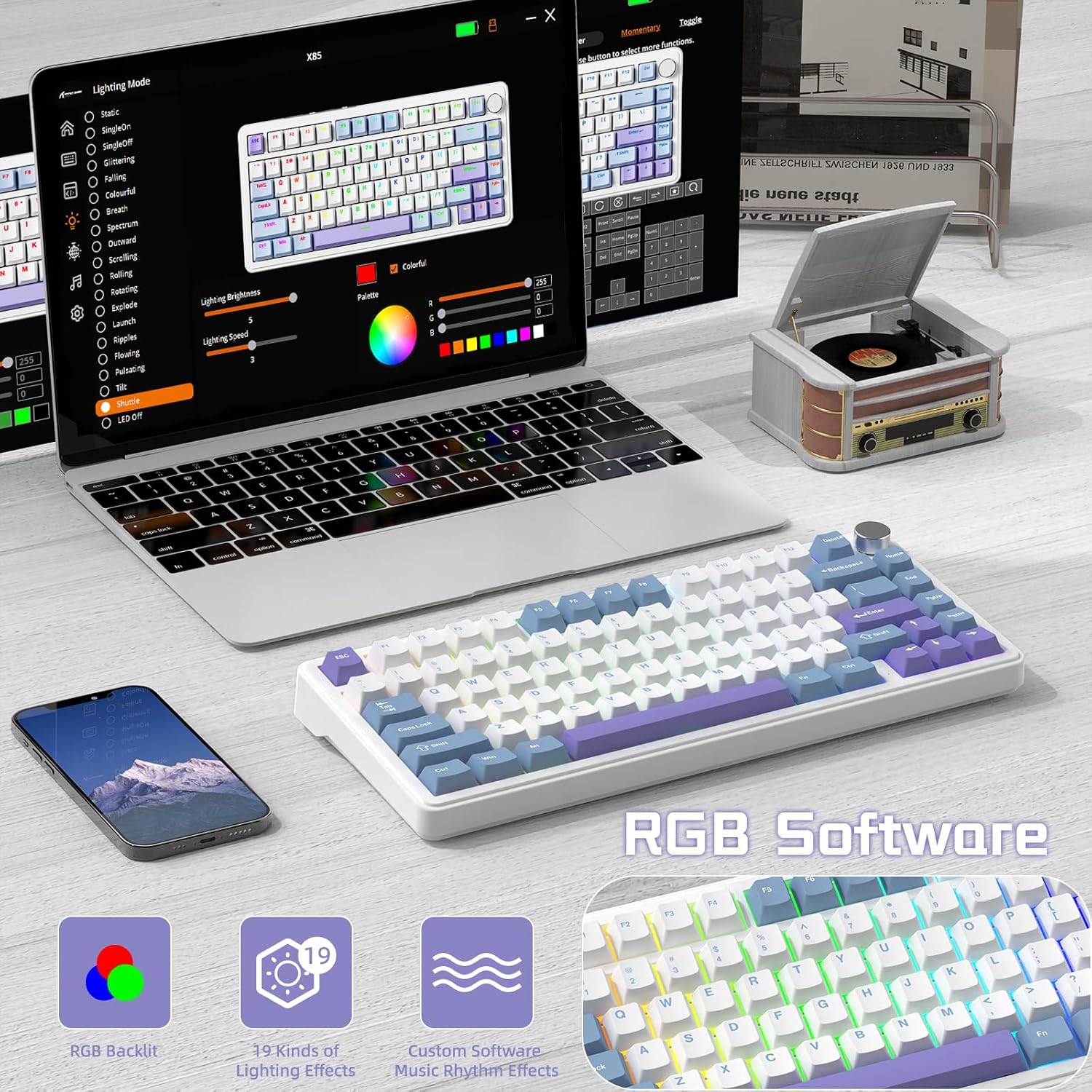
The software interface for customizing RGB lighting and other settings on the ATTACK SHARK X85 keyboard.
- On-Keyboard Controls:
- Use the knob in Light Mode to cycle modes and adjust brightness.
- Refer to the keyboard's quick function keys (usually Fn combinations) for additional lighting effects and speed adjustments.
- Ohjelmiston räätälöinti:
- Download the official ATTACK SHARK software from the manufacturer's websivusto.
- The software allows for advanced customization of RGB effects, colors, speed, and brightness. It may also offer key remapping and macro creation.
- Note: The software may default to Chinese. Please navigate to settings within the software to change the language to English if needed.
5.3 Käytön aikana vaihdettavat kytkimet
The X85 features a hot-swappable PCB, allowing you to easily change mechanical switches without soldering. This enables customization of your typing experience.

Demonstration of the hot-swappable feature of the X85 keyboard, showing how switches can be easily removed and replaced.
- Irrota näppäinhattu: Irrota haluamasi näppäinhattu varovasti näppäinhatun ulosvetäjällä.
- Irrota kytkin: Use the switch puller tool to grasp the top and bottom clips of the switch and gently pull it straight up.
- Aseta uusi kytkin: Align the pins of the new 3-pin mechanical switch with the holes on the PCB. Gently push the switch straight down until it clicks into place. Ensure the pins are not bent.
- Vaihda näppäinhattu: Aseta näppäinhattu takaisin uuteen kytkimen varteen.
The X85 supports 3-pin mechanical switches. Ensure the replacement switches are compatible to avoid damage.
5.4 100% Anti-Ghosting
The keyboard features 100% anti-ghosting, meaning all simultaneous key presses are registered accurately, which is crucial for fast-paced gaming and typing.
6. Huolto
6.1 Näppäimistön puhdistaminen
- Irrota näppäimistö tietokoneesta ennen puhdistamista.
- Puhalla pöly ja roskat näppäinhattujen välistä paineilmapullolla.
- For surface cleaning, gently wipe the keycaps and chassis with a soft, slightly damp, nukkaamattomalla liinalla. Vältä liiallista kosteutta.
- Älä käytä voimakkaita kemikaaleja, hankaavia puhdistusaineita tai liuottimia.
6.2 Akun hoito
The X85 keyboard is equipped with a 5000mAh high-capacity battery. To maximize battery life and performance:

Battery life estimates for the ATTACK SHARK X85 keyboard: 35 hours with backlight on, 75 hours with backlight off.
- Lataa näppäimistö täyteen ennen ensimmäistä käyttöä.
- When the battery is low, connect the USB-C cable to charge.
- The keyboard features an auto-sleep power saving technology to conserve battery when idle.
- Vältä altistamasta näppäimistöä äärimmäisille lämpötiloille.
7. Vianmääritys
| Ongelma | Mahdollinen ratkaisu |
|---|---|
| Näppäimistö ei muodosta yhteyttä Bluetoothin kautta. |
|
| 2.4 GHz wireless connection is unstable or not working. |
|
| Näppäimet eivät reagoi tai ne painavat väärin. |
|
| RGB backlighting is not working or behaving unexpectedly. |
|
| Multi-function knob is not responding. |
|
8. Tekniset tiedot
| Ominaisuus | Yksityiskohta |
|---|---|
| Merkki | HYÖKKIHAI |
| Malli | X85 |
| Layout | 75 % (81-näppäin) |
| Yhteydet | Bluetooth 5.0, 2.4 GHz Wireless, USB-C Wired |
| Akun kapasiteetti | 5000 mAh |
| Avaimenperän materiaali | PBT (polybuteenitereftalaatti) |
| Kytkimen tyyppi | Hot-swappable (supports 3-pin mechanical switches) |
| Taustavalo | RGB (19 modes, 7 monochrome, full color) |
| Anti-Ghosting | 100 % haamukuvan esto |
| Yhteensopivuus | Windows, Mac |
| Tuotteen paino | 1.03 kg |
| Pakkauksen mitat | 35.6 x 18.6 x 4.9 cm |
9. Takuu ja tuki
The ATTACK SHARK X85 Gasket Mechanical Keyboard comes with a standard manufacturer's warranty. Please refer to the warranty card included in your package or visit the official ATTACK SHARK websivustolta tarkemmat takuuehdot.
For technical support, troubleshooting assistance, or any inquiries regarding your product, please contact ATTACK SHARK customer service through their official websivustoa tai ostoksesi yhteydessä annettuja yhteystietoja.


