Johdanto
This manual provides essential instructions for setting up, operating, maintaining, and troubleshooting your Acer Nitro 50 N50-656 desktop computer. Please read this guide thoroughly before using your new system to ensure proper function and longevity.
Turvallisuustiedot
- Virtalähde: Use only the power adapter provided with your computer. Ensure the power outlet is properly grounded.
- Ilmanvaihto: Do not block ventilation openings. Ensure adequate airflow around the computer to prevent overheating.
- Nestealtistus: Keep the computer away from liquids. Do not operate with wet hands.
- Sijoitus: Place the computer on a stable, flat surface. Avoid placing it in direct sunlight or near heat sources.
- Huolto: Do not attempt to service the computer yourself. Refer all servicing to qualified service personnel.
1. Asennusopas
1.1 Pakkauksesta purkaminen
Carefully remove the computer and all accessories from the packaging. Verify that all components listed in the packing list are present.
1.2 Oheislaitteiden liittäminen
- Monitori: Connect your monitor to the graphics card's display output (HDMI or DisplayPort) on the rear of the computer.
- Näppäimistö ja hiiri: Liitä näppäimistö ja hiiri käytettävissä oleviin USB-portteihin.
- Teho: Connect the power cable to the power supply unit (PSU) on the rear of the computer, then plug the other end into a grounded electrical outlet.
- Verkko (valinnainen): For a wired internet connection, connect an Ethernet cable from your router to the LAN port on the computer.
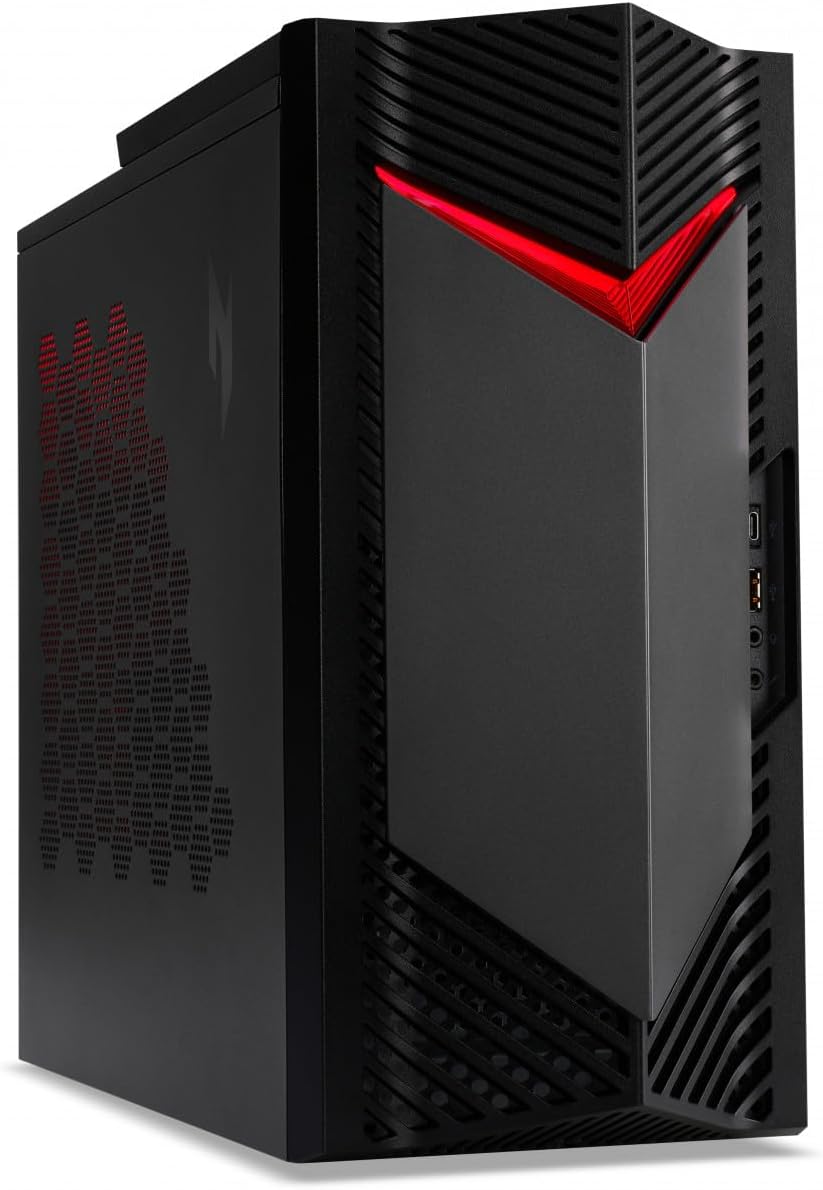
Kuva 1: Etuosa view of the Acer Nitro 50 N50-656 desktop PC, showing the power button and front ports.
1.3 Ensimmäinen käynnistys ja Windowsin asennus
- Press the power button located on the front of the computer.
- Suorita Windows 11:n alkuasennus loppuun noudattamalla näytön ohjeita, mukaan lukien kielen, alueen, verkkoyhteyden ja käyttäjätilin luominen.
2. Käyttöohjeet
2.1 Virta päälle/pois
- Virran kytkeminen: Paina virtapainiketta kerran.
- Sammuttaa: Click the Start button in Windows, then select Power > Shut down. Do not force shut down by holding the power button unless necessary to prevent data loss.
- Käynnistää uudelleen: Napsauta Windowsin Käynnistä-painiketta ja valitse sitten Virta > Käynnistä uudelleen.
2.2 Using Ports and Connectivity
Your Acer Nitro 50 N50-656 is equipped with various ports for connecting external devices. Refer to the image below for common port locations.
Kuva 2: Takaosa view of the Acer Nitro 50 N50-656, illustrating the arrangement of USB ports, audio jacks, HDMI, DisplayPort, and Ethernet port.
- USB-portit: For connecting keyboards, mice, external drives, and other USB devices.
- HDMI/Näyttöportti: For connecting monitors. Use the ports on the dedicated graphics card (NVIDIA GeForce RTX 4060) for optimal performance.
- Ääniliitännät: Kaiuttimien, kuulokkeiden tai mikrofonien kytkemiseen.
- Ethernet-portti: Kiinteää verkkoyhteyttä varten.
- Bluetooth: Langattomaan yhteyteen yhteensopiviin laitteisiin, kuten kuulokkeisiin tai peliohjaimiin.
2.3 Järjestelmäpäivitykset
Regularly check for and install Windows updates and driver updates for your graphics card and other components to ensure optimal performance and security. You can find Windows updates in the Settings app under "Windows Update". Graphics card drivers can be updated via the NVIDIA GeForce Experience application or NVIDIA's official websivusto.
3. Huolto
3.1 Puhdistus
- Ulkopuoli: Käytä pehmeää, damp liinalla ulkopintojen puhdistamiseen. Vältä voimakkaita kemikaaleja.
- Pöly: Periodically clean dust from the ventilation grilles and internal components using compressed air. Ensure the computer is powered off and unplugged before cleaning.

Kuva 3: Sivu view of the Acer Nitro 50 N50-656, showing the side panel and ventilation areas.
3.2 Ohjelmiston ylläpito
- Käyttöjärjestelmä: Keep Windows 11 updated to the latest version.
- Virustorjunta: Install and regularly update antivirus software to protect against malware.
- Levyn siivous: Periodically run disk cleanup tools to remove temporary fileja optimoi tallennustilaa.
3.3 Hardware Considerations
- Ilmavirta: Ensure the computer is placed in an area with good airflow to prevent heat buildup, which can affect performance and component lifespan.
- Kaapelin hallinta: Organize cables to prevent obstruction of vents and to maintain a tidy setup.

Kuva 4: Sisäinen view of the Acer Nitro 50 N50-656, showing the main components like the CPU cooler, RAM, and graphics card.
4. Vianmääritys
4.1 Yleiset ongelmat ja ratkaisut
- Ei virtaa:
- Check if the power cable is securely connected to both the computer and the wall outlet.
- Ensure the power switch on the PSU (if present) is in the 'On' position.
- Testaa pistorasia toisella laitteella.
- Ei näyttöä:
- Ensure the monitor is powered on and the video cable is securely connected to the graphics card's output on the PC and the monitor's input.
- Varmista, että näytön tulolähde on valittu oikein.
- Kokeile eri videokaapelia tai näyttöä, jos sellainen on saatavilla.
- Hidas suorituskyky:
- Sulje taustalla käynnissä olevat tarpeettomat sovellukset.
- Tarkista ja asenna kaikki odottavat Windows-päivitykset tai ohjainpäivitykset.
- Suorita levyn puhdistus ja eheytys (kiintolevyille, ei välttämätöntä SSD-levyille).
- Tarkista haittaohjelmien tai virusten varalta.
- Järjestelmä jumiutuu/kaatuu:
- Varmista, että järjestelmässä on riittävä ilmanvaihto eikä se ylikuumene.
- Update drivers, especially graphics drivers.
- Check for Windows updates.
- If issues persist, consider running system diagnostics or contacting support.
5. Tekniset tiedot
| Ominaisuus | Yksityiskohta |
|---|---|
| Merkki | acer |
| Tuotteen mallinumero | DG.E3UEG.001 |
| Sarja | Nitro 50 N50-656 |
| Käyttöjärjestelmä | Windows 11 |
| Näppäimistön kuvaus | langallinen |
| Prosessorin merkki | Intel o AMD |
| Prosessorin tyyppi | Core i5 |
| Prosessorin nopeus | 6 |
| Ydinten lukumäärä | 1 |
| RAM-muistin koko | 16 Gt |
| Maksimi muisti | 16 Gt |
| Kiintolevytekniikka | SSD |
| Kiintolevyn käyttöliittymä | Serial ATA |
| Näytön resoluutio | 1920 x 1080 |
| Resoluutio | 1920x1080 |
| Grafiikkapiirisarjan merkki | Intel |
| Grafiikkakortin kuvaus | Omistettu |
| GPU | NVIDIA GeForce RTX 4060 |
| Graphics Card RAM | 8 Gt |
| Grafiikka RAM-tyyppi | GDDR6X Memory |
| Suorittimen liitäntä | LGA 1700 |
| Yhteystyyppi | Bluetooth |
| Laitteistorajapinta | SSD |
| HDMI-porttien lukumäärä | 1 |
| Liittimen tyyppi | Bluetooth, USB |
| Varaosien saatavuus | Information not available on spare parts |
| Ohjelmistopäivitykset taattu asti | Tietoja ei ole saatavilla |
| ASIN | B0CXLZ7LLQ |
| Päivämäärä ensimmäinen saatavilla | 8. maaliskuuta 2024 |
| CPU malli | Core i5 |
| Prosessorin nopeus | 6 |
| Grafiikka rinnakkaisprosessori | NVIDIA GeForce RTX 4060 |
| Muistin tallennuskapasiteetti | 16 Gt |
| Tuotteen erityiset käyttötarkoitukset | liiketoimintaa |
| PC-tyyppi | Tietokoneen torni |
| Asennetun RAM-muistin koko | 16 Gt |
6. Takuu ja tuki
Takuutiedot löytyvät tuotteen mukana toimitetusta takuukortista tai käymällä Acerin virallisella tukisivustolla. website. For technical assistance, driver downloads, or further troubleshooting, please contact Acer customer support or visit their online support portal. Keep your product's serial number (located on a sticker on the chassis) handy when contacting support.
Acer tuki Websivusto: www.acer.com/support


