1. Johdanto
Thank you for choosing the Gosund SP111 Smart WiFi Plug. This device allows you to control your electronic appliances remotely via a smartphone application or voice commands, and to set schedules for automated operation. Please read this manual carefully before use to ensure proper installation and operation.
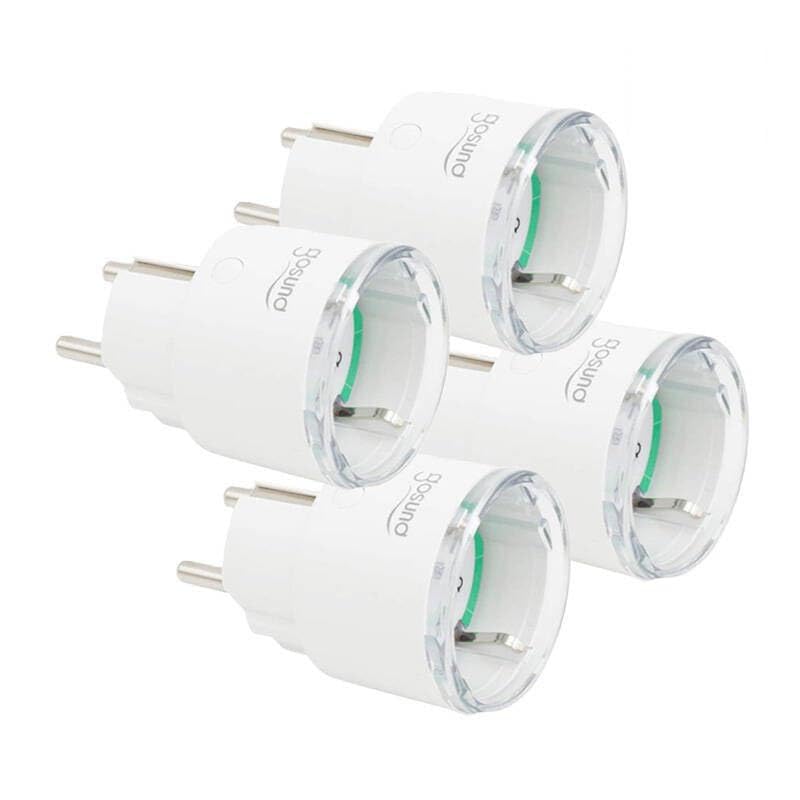
This image displays four white Gosund SP111 Smart WiFi Plugs. Each plug features a standard European Type F (Schuko) plug on one side and a corresponding socket on the other, with the Gosund logo printed on the side. A small indicator light and a button are visible on the top surface of each plug.
2. Turvallisuustiedot
- Do not exceed the maximum load current of 16A or power of 3680W.
- Älä pura tai muokkaa laitetta.
- Pidä laite poissa vedestä, kosteudesta ja korkeista lämpötiloista.
- Vain sisäkäyttöön.
- Varmista, että pistoke on työnnetty kokonaan pistorasiaan.
- Do not connect appliances that could cause a fire hazard if left unattended (e.g., irons, heaters).
3. Pakkauksen sisältö
Paketti sisältää seuraavat tuotteet:
- 4 x Gosund SP111 Smart WiFi Plugs
- 1 x Käyttöohje (tämä asiakirja)
4. Tuote ohiview
Familiarize yourself with the components of your Gosund SP111 Smart WiFi Plug:
- Virtapainike: Press to manually turn the plug on/off. Press and hold for 5 seconds to enter pairing mode.
- Merkkivalo: Indicates the status of the plug (e.g., solid blue for ON, flashing blue for pairing mode, off for OFF).
- Type F (Schuko) Socket: Laitteen liittämistä varten.
- Type F (Schuko) Plug: For inserting into a wall outlet.
5. Asennus
5.1 Lataa sovellus
The Gosund SP111 Smart WiFi Plug works with the Tuya Smart or Smart Life app. Download the app from the App Store (iOS) or Google Play Store (Android).
- Etsi "Tuya Smart" or "Smart Life".
- Asenna sovellus ja rekisteröi tili.
5.2 Lisää laite
- Plug the Gosund SP111 Smart WiFi Plug into a wall outlet.
- The indicator light should flash rapidly (approximately twice per second), indicating it's in pairing mode. If not, press and hold the power button for 5 seconds until it flashes rapidly.
- Avaa Tuya Smart tai Smart Life -sovellus.
- Lisää laite napauttamalla oikeassa yläkulmassa olevaa "+"-kuvaketta.
- Valitse "Sähköpistoke" tai "Pistorasia (Wi-Fi)".
- Confirm that the indicator light is flashing rapidly.
- Enter your 2.4 GHz Wi-Fi network password (5 GHz Wi-Fi is not supported).
- Wait for the device to connect. Once connected, you can rename the plug.
6. Käyttö
6.1 Manuaalinen ohjaus
Press the power button on the plug to manually turn the connected appliance on or off.
6.2 Sovellusten hallinta
- Kaukosäädin päällä/pois: Tap the plug icon in the app to turn it on or off from anywhere.
- Ajoitus: Set timers or schedules for the plug to turn on or off automatically at specific times.
- Lähtölaskenta: Set a countdown timer for the plug to turn off after a set duration.
- Energianvalvonta: (If supported by the specific SP111 variant) View real-time and historical power consumption.
6.3 Ääniohjaus
The Gosund SP111 Smart WiFi Plug can be integrated with voice assistants like Amazon Alexa and Google Assistant via the Tuya Smart or Smart Life app. Follow the instructions within the app to link your smart home assistant account.
- Example komennot:
- "Alexa, turn on [Plug Name]"
- "Hey Google, turn off [Plug Name]"
7. Huolto
- Irrota laite pistorasiasta ennen puhdistamista.
- Pyyhi pinta pehmeällä, kuivalla liinalla. Älä käytä nestemäisiä puhdistusaineita tai hankaavia aineita.
- Säilytä viileässä, kuivassa paikassa, kun sitä ei käytetä pitkiin aikoihin.
8. Vianmääritys
| Ongelma | Ratkaisu |
|---|---|
| Plug cannot connect to Wi-Fi. |
|
| Merkkivalo ei pala. |
|
| Appliance connected to the plug does not turn on. |
|
9. Tekniset tiedot
| Malli: | SP111-4 |
| Tulo Voltage: | AC 230V, 50/60Hz |
| Maksimikuormitusvirta: | 16A |
| Suurin teho: | 3680W |
| Langaton tyyppi: | Wi-Fi 2.4 GHz (802.11 b/g/n) |
| Sovellustuki: | Tuya Smart / Älykäs elämä |
| Käyttölämpötila: | 0 °C - 40 °C (32 °F - 104 °F) |
10. Takuu ja tuki
Gosund products are designed and manufactured to the highest quality standards. For warranty information and technical support, please refer to the official Gosund websivustolta tai ota yhteyttä jälleenmyyjään. Säilytä ostokuitti ostotodistuksena.
Lisäapua varten käy osoitteessa: www.gosund.com/support