Johdanto
This manual provides detailed instructions for the setup, operation, maintenance, and troubleshooting of your Rapoo E9310M Multi-Device Wireless Keyboard. This keyboard is designed for versatile use across multiple operating systems and devices, offering a seamless typing experience.

Image: The Rapoo E9310M Multi-Device Wireless Keyboard, showcasing sen tyylikäs muotoilu.
Mitä laatikossa on
- 1 x Rapoo E9310M Wireless Keyboard
- 1 x Käyttöopas
- 2 x AAA-paristoa (esiasennettu tai toimitetaan erikseen)
Asennus
1. Akun asennus
The Rapoo E9310M keyboard operates on 2 AAA batteries. Ensure batteries are correctly inserted according to polarity markings. The keyboard is designed for extended battery life, lasting up to 12 months with upgraded low-energy Bluetooth technology.

Image: The Rapoo E9310M keyboard on a desk, highlighting its extended battery life feature.
2. Yhteysasetukset
The keyboard supports multi-device connectivity via two methods:
- Bluetooth 5.0/4.0: For wireless connection to up to three devices.
- 2.4GHz USB Receiver: For a stable wireless connection to one device.

Image: Diagram illustrating multi-device and multi-OS connectivity options for the keyboard.
3. Pariliitos laitteiden kanssa
- For 2.4GHz USB Receiver: Insert the USB receiver into an available USB port on your computer. The keyboard should connect automatically.
- For Bluetooth Pairing (up to 3 devices):
- Paina ja pidä painettuna fn+1, fn+2, tai fn+3 key combination for 3 seconds to enter Bluetooth pairing mode for the desired channel. The indicator light above the '1', '2', or '3' key will flash rapidly.
- On your device (PC, tablet, smartphone), navigate to Bluetooth settings and search for new devices.
- Select "Rapoo E9310M" from the list of available devices to complete the pairing process. The indicator light will stop flashing once connected.

Kuva: Lähikuva view of the USB receiver being inserted into a laptop, demonstrating 2.4GHz connectivity.
4. Vaihtaminen yhdistettyjen laitteiden välillä
To switch between paired Bluetooth devices or the 2.4GHz connection, simply press the corresponding key:
- Paina fn+1, fn+2, tai fn+3 to switch to a Bluetooth-connected device.
- Paina fn+4 to switch to the device connected via the 2.4GHz USB receiver.
5. Järjestelmän vaihtaminen (Windows/Mac)
The keyboard layout is optimized for both Windows and Mac OS. To switch between operating system modes:
- Paina Fn + Q for Mac OS mode.
- Paina Fn + W for Windows OS mode.
This ensures that function keys and modifier keys (like Command/Alt) operate correctly for your specific operating system.
Käyttöohjeet
1. 99-Key Compact Layout
The E9310M features a compact 99-key layout that includes a full number pad, providing essential functionality without occupying excessive desk space.

Kuva: Yläpuolella view of the Rapoo E9310M keyboard, illustrating its compact 99-key layout with integrated number pad.
2. Low-Profile Chiclet Keycaps
Näppäimistö on varustettu matalaprosessoritekniikallafile chiclet keycaps and an incurve rounded design, offering a quiet, precise, and comfortable typing experience similar to a laptop keyboard.

Image: A close-up detail of the low-profile chiclet keycaps, showing their design and spacing.
3. Multimedianäppäimet
Access 12 widely used function keys for multimedia control (e.g., play/pause, volume up/down, mute) by pressing the Fn key in combination with the corresponding F1-F12 keys. These shortcuts are supported on both Windows and Mac OS.
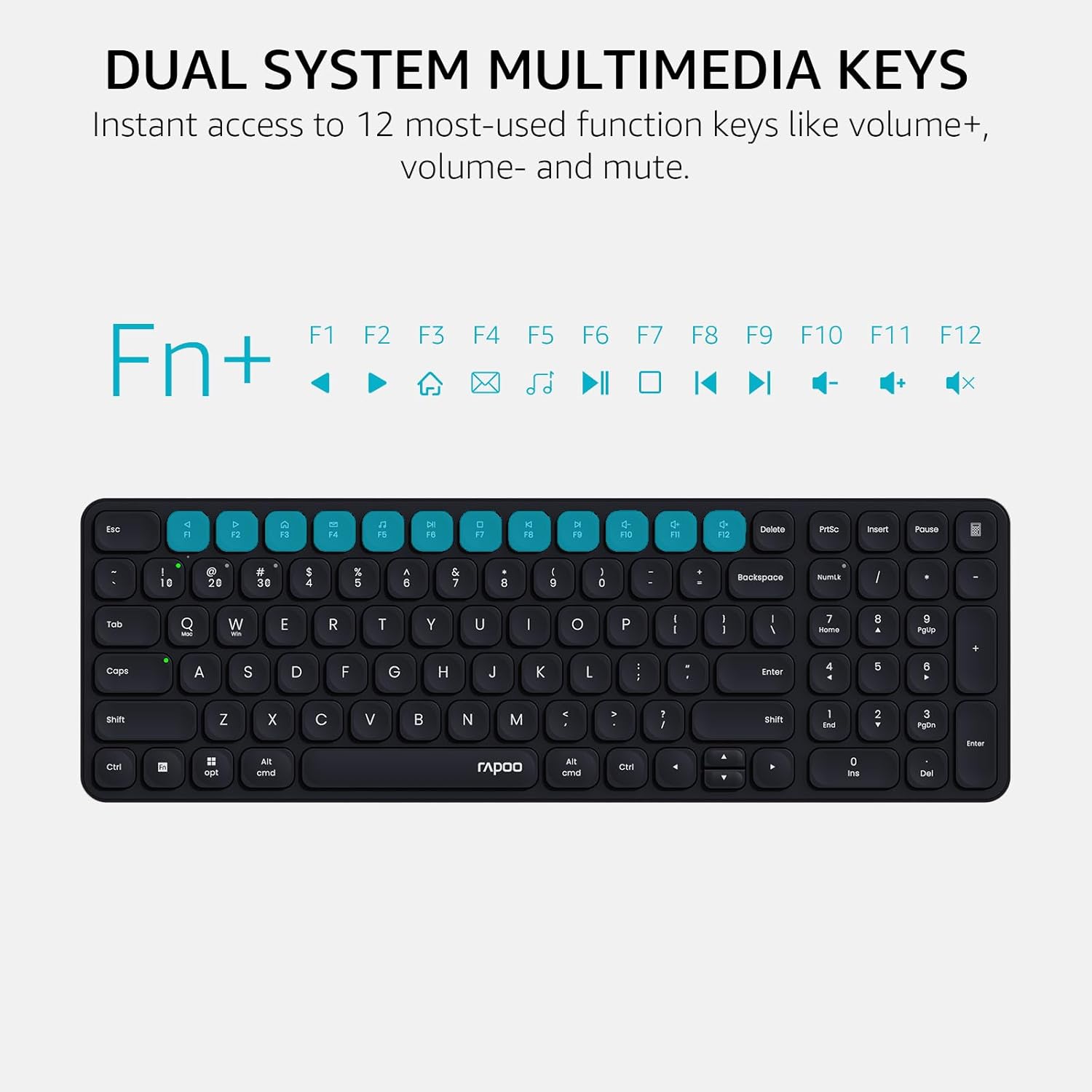
Image: A visual guide highlighting the multimedia functions accessible via the Fn key combinations.
4. Device and Capitalization Indicator Lights
The keyboard includes indicator lights to show which device channel is currently active and whether Caps Lock is engaged. This provides immediate visual feedback on the keyboard's status.

Kuva: Lähikuva view of the keyboard's indicator lights for device connection and Caps Lock status.
Huolto
- Puhdistus: Use a soft, dry cloth to clean the keyboard surface. For deeper cleaning, a slightly damp voidaan käyttää miedolla saippualla kostutettua liinaa varmistaen, ettei nestettä pääse avainkytkimiin tai sisäisiin komponentteihin.
- Akun vaihto: Replace AAA batteries when the low battery indicator appears or when connectivity issues arise due to power.
- Varastointi: Säilytä näppäimistöä viileässä, kuivassa paikassa, poissa suorasta auringonvalosta ja äärimmäisistä lämpötiloista, kun sitä ei käytetä pitkään aikaan.
Vianetsintä
| Ongelma | Mahdollinen syy | Ratkaisu |
|---|---|---|
| Näppäimistö ei muodosta yhteyttä Bluetoothin kautta. | Näppäimistö ei ole pariliitostilassa; laitteen Bluetooth pois päältä; häiriö; akku vähissä. | Ensure keyboard is in pairing mode (Fn + 1/2/3 for 3s). Check device Bluetooth settings. Move closer to the device. Replace batteries. |
| 2.4GHz connection not working. | USB receiver not properly inserted; driver issue; low battery. | Re-insert USB receiver into a different port. Ensure keyboard is switched to 2.4GHz mode (Fn + 4). Replace batteries. |
| Keys not responding or typing incorrectly. | Low battery; incorrect operating system mode; physical obstruction. | Replace batteries. Switch to correct OS mode (Fn + Q for Mac, Fn + W for Windows). Clean under keycaps. |
| Multimedianäppäimet eivät toimi. | Incorrect operating system mode; software conflict. | Ensure correct OS mode is selected. Check if any software on your device is overriding keyboard functions. |
Tekniset tiedot
| Ominaisuus | Yksityiskohta |
|---|---|
| Malli | E9310m |
| Yhteydet | Bluetooth 5.0/4.0, 2.4GHz RF (USB Receiver) |
| Usean laitteen tuki | Up to 4 devices (3 via Bluetooth, 1 via 2.4GHz) |
| Yhteensopivat käyttöjärjestelmät | Windows, Mac OS, Linux, Chrome OS, iOS, Android |
| Avaimen asettelu | 99-Key Compact with Number Pad |
| Avaimen tyyppi | Low-Profile Chiclet Keycaps |
| Erikoisominaisuudet | Multimedia Hotkeys, Device & Caps Lock Indicators, Portable |
| Virtalähde | 2 x AAA paristot (mukana) |
| Akun kesto | Jopa 12 kuukautta (arvio) |
| Materiaali | Alumiini |
| Mitat (P x L x K) | 11.18 x 4.69 x 0.79 tuumaa (28.39 x 11.91 x 2.01 cm) |
| Paino | 10.9 unssia (309 grammaa) |
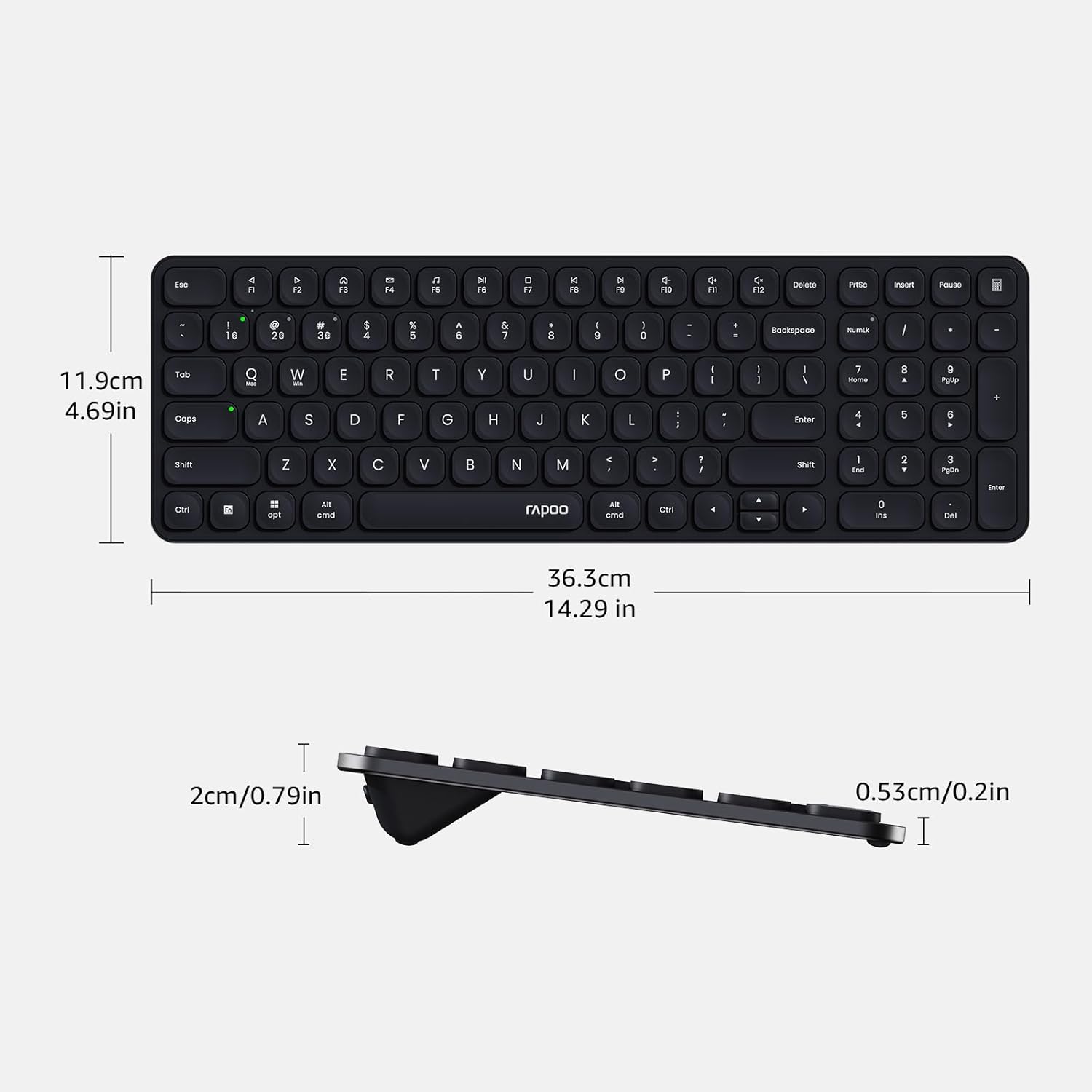
Image: Diagram showing the precise dimensions of the Rapoo E9310M keyboard in both centimeters and inches.
Takuu ja tuki
Rapoo products are designed for reliability and performance. For any issues or inquiries, please refer to the following:
- Palautusikkuna: A 30-day return window is typically offered for product returns. Please check your purchase details for specific terms.
- Asiakastuki: For technical assistance or product support, please contact Rapoo customer service. Refer to the official Rapoo webyhteystiedot löytyvät verkkosivustolta tai ostodokumentaatiostasi.
Turvallisuustiedot
- Älä altista näppäimistöä nesteille tai liialliselle kosteudelle.
- Vältä äärimmäisiä lämpötiloja tai suoraa auringonvaloa.
- Älä yritä purkaa tai muokata näppäimistöä.
- Pidä poissa lasten ulottuvilta.


