1. Johdanto
The HIKMICRO ECO-V Handheld Thermography Camera is a versatile thermal imaging device designed for various professional applications. It offers thermal, bi-spectrum image fusion, and visible light modes to meet diverse business needs. This manual provides essential information for the safe and effective operation of your ECO-V camera.
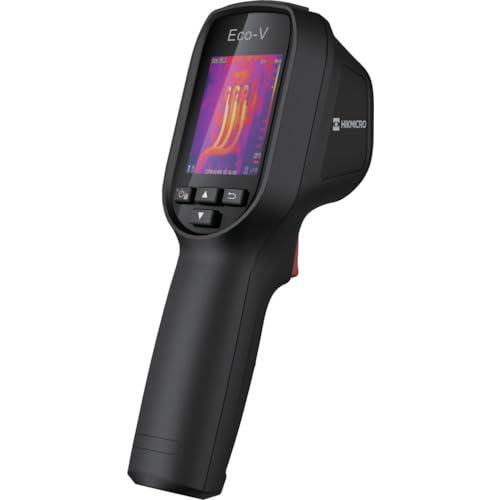
Figure 1: HIKMICRO ECO-V Handheld Thermography Camera
2. Turvallisuustiedot
Lue ja ymmärrä kaikki turvallisuusvaroitukset ja ohjeet ennen tämän tuotteen käyttöä. Näiden ohjeiden noudattamatta jättäminen voi aiheuttaa sähköiskun, tulipalon tai vakavan vamman.
Yleiset turvallisuusohjeet
- Älä käytä laitetta räjähdysvaarallisissa tiloissa, kuten syttyvien nesteiden, kaasujen tai pölyn läsnä ollessa.
- Pidä laite poissa vedestä ja muista nesteistä.
- Älä yritä avata tai muokata laitetta. Jätä kaikki huoltotyöt pätevän henkilöstön tehtäväksi.
- Use only HIKMICRO-approved accessories.
- Avoid direct exposure of the thermal lens to strong light sources (e.g., sun, laser) as this may damage the detector.
Akun turvallisuus
- The device contains a built-in Lithium-ion battery. Do not expose the battery to excessive heat, direct sunlight, or fire.
- Älä puhkaise, avaa tai pura akkua.
- Charge the battery only with the provided USB cable and a compatible power adapter.
- Hävitä paristot paikallisten määräysten mukaisesti.
3. Pakkauksen sisältö
The HIKMICRO ECO-V package includes the following items:
- HIKMICRO Handheld Thermography Camera ECO-V
- C-tyypin USB-kaapeli
- Pikaopas (ei erikseen mainittu, mutta vakio-ohje)
- Calibration Certificate (not explicitly mentioned but standard)
Video 3.1: Unboxing the HIKMICRO M-Series (similar to ECO-V, showing typical package contents and device appearance).
4. Laite loppuview
Familiarize yourself with the physical components and interface of your HIKMICRO ECO-V camera.
Ulkonäkö ja käyttöliittymä
The ECO-V features a compact, ergonomic design for comfortable handheld use. Key components include the thermal lens, optical lens, laser indicator, white light, trigger button, navigation buttons, and a 2.4-inch display.
Video 4.1: This video demonstrates the physical appearance and interface of a HIKMICRO M-Series camera, which shares similar design elements and interface components with the ECO-V.
5. Asennus
5.1 Laitteen lataaminen
Before initial use, fully charge the device's built-in Lithium-ion battery.
- Liitä laitteen mukana toimitettu USB Type-C -kaapeli laitteen USB-porttiin.
- Connect the other end of the USB cable to a compatible power adapter (5V2A recommended) and plug it into a power outlet.
- The charging indicator will show red during charging and turn green when fully charged.
Video 5.1: This HIKMICRO ECO operation video demonstrates the charging process for the device.
5.2 Virta päälle/pois
To power on the device, press and hold the power button for more than 6 seconds. To power off, press and hold the power button again until the device shuts down.
Video 5.2: This HIKMICRO ECO operation video demonstrates how to power on the device.
6. Käyttöohjeet
This section covers the basic and advanced operational features of your ECO-V camera.
6.1 Image Capture and Display
To capture a thermal image, aim the camera at the target and press the trigger button. The captured image will be saved to the internal EMMC storage. To view saved images, navigate to the 'Albums' section in the menu.
Video 6.1: This HIKMICRO ECO operation video demonstrates image capture and viewing saved snapshots.
6.2 Mittaustyökalut
The ECO-V provides various measurement tools to analyze thermal images:
- Kuuma kohta: Automatically identifies and displays the highest temperature point.
- Kylmä kohta: Automatically identifies and displays the lowest temperature point.
- Keskipiste: Näyttää lämpötilan näytön keskellä.
Video 6.2: This HIKMICRO ECO operation video demonstrates the use of measurement tools like hot, cold, and center spots.
6.3 SuperIR-kuvanparannus
SuperIR technology enhances the thermal image resolution, providing more detail for analysis. You can enable or disable this feature in the settings menu.
Video 6.3: This HIKMICRO ECO operation video demonstrates how to enable and use the SuperIR image enhancement feature.
6.4 kuvatilaa
The ECO-V supports multiple image modes for different inspection needs:
- Lämpö: Näyttää vain lämpökuvan.
- Fuusio: Blends the thermal and visible light images for enhanced detail.
- PIP (kuva kuvassa): Overlays a smaller thermal image on a visible light image.
- Optinen: Displays only the visible light image.
Video 6.4: This HIKMICRO B10S product video demonstrates switching between different image modes, including Thermal, Fusion, PIP, and Optical.
6.5 Parallax Correction
When using fusion modes, adjust the parallax correction based on the distance to the target to ensure accurate alignment between thermal and visible images.
Video 6.5: This HIKMICRO B10S product video demonstrates how to adjust parallax correction for accurate image fusion.
6.6 Palette Adjustment
Select from various color palettes (e.g., White Hot, Black Hot, Rainbow, Ironbow) to visualize temperature differences more effectively. This can be adjusted in the settings menu.
Video 6.6: This HIKMICRO B10S product video demonstrates how to adjust color palettes.
6.7 Emissivity and Distance Settings
For accurate temperature measurements, it is crucial to set the correct emissivity value for the target material and the distance to the target. Refer to the general emissivity reference table in the specifications section.
Video 6.7: This HIKMICRO ECO operation video demonstrates setting emissivity and distance for accurate temperature readings.
6.8 Laserosoitin
The built-in laser pointer helps to precisely identify the measurement target. It can be enabled or disabled in the settings menu.
Video 6.8: This HIKMICRO ECO operation video demonstrates how to enable and use the laser pointer.
6.9 Korkean lämpötilan hälytys
Set a high temperature alarm threshold to be notified when temperatures exceed a predefined limit. This feature is useful for identifying potential overheating issues.
Video 6.9: This HIKMICRO B10S product video demonstrates how to set a high temperature alarm.
6.10 Hotspot-yhteys
The ECO-V can connect to a mobile device via Wi-Fi hotspot for live viewing and data transfer. Enable the Wi-Fi hotspot function in the device settings and connect your mobile device.
Video 6.10: This HIKMICRO M-Series video demonstrates how to establish a hotspot connection with a mobile device.
6.11 HIKMICRO Viewer App Connection
Lataa HIKMICRO Viewer app on your mobile device to access live view, manage images and videos, and generate reports. Connect the device to your phone via Wi-Fi.
Video 6.11: This HIKMICRO Pocket series video demonstrates connecting the device to the HIKMICRO Viewer app for various functions.
7. Huolto
7.1 Puhdistus
- Pyyhi laitteen runko pehmeällä,amp kangas. Älä käytä hankaavia puhdistusaineita tai liuottimia.
- Puhdista linssit varovasti linssinpuhdistusliinalla. Vältä linssin pinnan koskettamista paljain käsin.
7.2 Varastointi
- Säilytä laitetta viileässä, kuivassa paikassa, poissa suorasta auringonvalosta ja äärimmäisistä lämpötiloista.
- Jos akkua säilytetään pitkään, varmista, että se on osittain ladattu (noin 50 %) ja lataa se muutaman kuukauden välein akun kunnon ylläpitämiseksi.
8. Vianmääritys
If you encounter issues with your HIKMICRO ECO-V, refer to the following common problems and solutions:
| Ongelma | Mahdollinen syy | Ratkaisu |
|---|---|---|
| Laite ei käynnisty | Akun varaus vähissä; Laitteen toimintahäiriö | Charge the battery; Contact support |
| Epätarkat lämpötilalukemat | Incorrect emissivity/distance settings; Dirty lens | Adjust emissivity/distance; Clean the lens |
| Cannot connect to Wi-Fi hotspot | Incorrect password; Hotspot not enabled | Verify password; Enable hotspot in settings |
9. Tekniset tiedot
Detailed technical specifications for the HIKMICRO ECO-V camera:
| Ominaisuus | Erittely |
|---|---|
| Malli | ECO-V |
| Mittauslämpötila-alue | -20 °C - 550 °C |
| Minimum Temperature Display | 0.1 °C |
| Kenttä View (FOV) | 50° × 50° |
| Spatial Resolution (IFOV) | 8.89 mrad |
| Käyttölämpötila-alue | -10 °C - 50 °C |
| Varastointilämpötila-alue | -40 °C - 70 °C |
| Näytön koko | 2.4 tuumaa |
| Virtalähde | Sisäänrakennettu litiumioniakku |
| Akun käyttöaika | 8 tuntia |
| Wi-Fi | Ei saatavilla |
| Suojaustaso | IP54 |
| Käyttöliittymä | USB Type-C |
| Pixel Pitch | 12μm |
| Measuring Wavelength | 7.5-14μm |
| NETD | < 40 mK (@ 25 °C, F# = 1.0) |
| Polttoväli | 1.35 mm |
| Aukko | F1.0 XNUMX |
| Minimitarkennusetäisyys | 0.1 m (0.33 jalkaa) |
| Kuvataajuus | 25 Hz |
| Tarkennusjärjestelmä | Tarkennus vapaa |
| Tallennusmedia | EMMC (4GB) |
| Kuvien tallennuskapasiteetti | 30,000 kuvaa |
| Kuva File Muoto | BMP (includes measurement data) |
| Lämpökuvan resoluutio | 96×96 (9,216 pixels) |
| Visible Image Resolution | 640×480 |
| Tarkkuus | ±2°C or ±2% (whichever is greater), when ambient temperature is 15°C to 35°C and target temperature is 0°C or above. |
| Materiaalit | Polykarbonaatti, ABS-hartsi |
| Paino | 360 g |
General Emissivity Reference
| Materiaali | emissiokertoimen |
|---|---|
| Ihmisen iho | 0.98 |
| PCB | 0.91 |
| Sementtibetoni | 0.95 |
| Keramiikka | 0.92 |
| Kumi | 0.95 |
| Maali | 0.93 |
| Puu | 0.85 |
| Tiili | 0.96 |
| Hiekka | 0.90 |
| Maaperä | 0.92 |
| Puuvilla | 0.98 |
| Pahvi | 0.90 |
| Valkoinen kirja | 0.96 |
| Vesi | 0.96 |
10. Takuu ja tuki
HIKMICRO products are covered by a limited warranty. For detailed warranty terms and conditions, please refer to the official HIKMICRO websivustolta tai ota yhteyttä paikalliseen jälleenmyyjään.
Asiakastuki
If you require technical assistance, troubleshooting, or have questions about your ECO-V camera, please contact HIKMICRO customer support through their official websivustolla tai tuotepakkauksessa olevissa yhteystiedoissa.


