Johdanto
The Keychron Q6 Max is a full-size, wireless custom mechanical keyboard designed for versatility and performance. This barebone knob version features a full-metal body, multi-mode connectivity (2.4 GHz, Bluetooth, and Type-C wired), QMK/VIA programmability, and a hot-swappable design. It is compatible with macOS, Windows, and Linux operating systems.
This manual provides detailed instructions to help you set up, operate, and maintain your Keychron Q6 Max keyboard.

Image: Keychron Q6 Max keyboard highlighting its key features.
Pakkauksen sisältö
Verify that all items are present in your Keychron Q6 Max package:
- Keyboard Kit (Without Keycaps & Switches):
- 1x alumiinikotelo
- 1x piirilevy (piirilevy)
- 1x PC-levy
- 1x ääntä vaimentava vaahto
- 1x IXPE Foam
- 1x PET-kalvo
- 1 x Latex-pohjatyyny
- 1x pohjakotelo akustinen vaahto
- 1x pohjakotelo PET-kalvo
- 16x tiivisteet (12 asennettuna ja 4 laatikossa)
- 8 sarjaa x stabilisaattorit
- Kaapeli:
- 1x Type-C - Type-C -kaapeli
- 1x Type-A–C-sovitin
- 1x laajennussovitin vastaanottimelle
- Vastaanotin:
- 1x Type-A 2.4 GHz vastaanotin
- Työkalut:
- 1x avainsuojus ja kytkimen vedin
- 1x ruuvimeisseli
- 1x kuusioavain

Image: Detailed list of included items for the Keychron Q6 Max.
Asennus
1. Kytkinten ja näppäinhattujen asentaminen
The Keychron Q6 Max is a barebone keyboard, meaning switches and keycaps are not pre-installed. You will need to purchase these separately.
- The keyboard supports 3-pin and 5-pin MX-style mechanical switches.
- Use the included switch puller to carefully insert switches into the hot-swappable sockets on the PCB. Ensure the pins align correctly to avoid bending.
- Once switches are installed, place your desired keycaps onto the switches.

Image: Keychron Q6 Max barebone keyboard, ready for switch and keycap installation.

Image: Hot-swappable socket supporting 3-pin and 5-pin mechanical switches.
2. Yhteysasetukset
The Keychron Q6 Max offers three connection modes: 2.4 GHz wireless, Bluetooth 5.1, and Type-C wired.
- 2.4 GHz:n langaton: Insert the included 2.4 GHz receiver into a USB-A port on your computer. Ensure the keyboard's mode switch (located on the back or side) is set to 2.4G.
- Bluetooth 5.1: Set the keyboard's mode switch to BT. On your computer or device, search for Bluetooth devices and select 'Keychron Q6 Max'. You can pair up to three devices.
- C-tyypin johdotus: Connect the keyboard to your computer using the provided Type-C to Type-C cable (or Type-A to Type-C adapter). Set the keyboard's mode switch to Cable.

Image: Tri-Mode Connection options for the Keychron Q6 Max.
3. QMK/VIA Software Configuration
The Keychron Q6 Max supports QMK/VIA for advanced customization. VIA is a graphical user interface that allows you to remap keys, create macros, and adjust lighting without flashing firmware.
- Lataa VIA-ohjelmisto Keychronin viralliselta sivustolta websivusto.
- Liitä näppäimistösi Type-C-kaapelilla.
- Launch VIA. The software should automatically detect your keyboard.
- Use the interface to remap any key, assign macro commands, create shortcuts, or combine key functions.
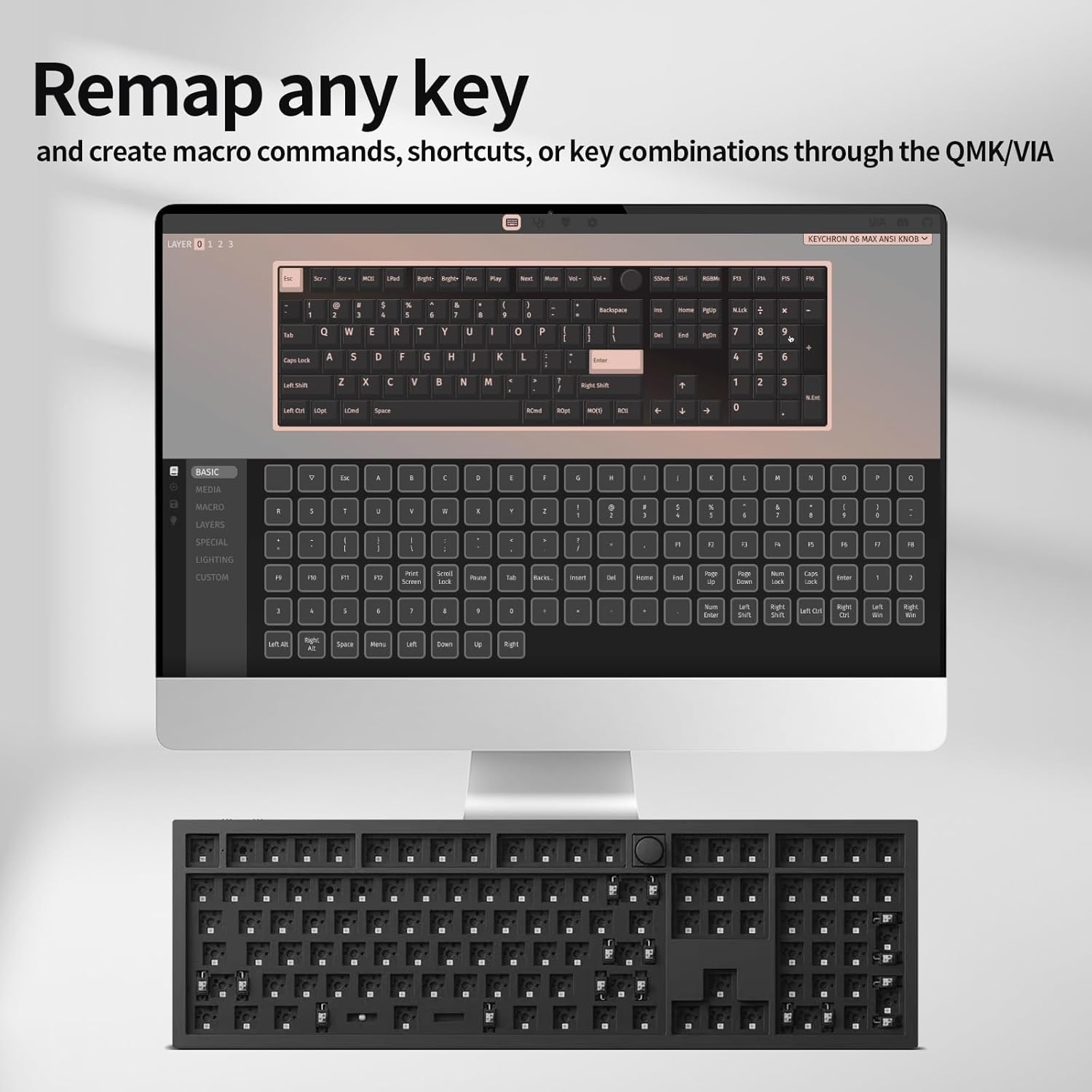
Image: VIA software interface for key remapping and customization.
Toiminta
1. Yhteystilojen vaihtaminen
Use the physical switch on the keyboard to toggle between 2.4 GHz, Bluetooth, and wired (Cable) modes. Ensure the switch is set to the desired mode for proper functionality.
2. Key Customization with QMK/VIA
As detailed in the setup section, the VIA software allows for extensive key customization. You can create multiple layers of keymaps, enabling different functions for the same physical keys, which is useful for various applications or operating systems.
3. RGB-taustavalo
The Keychron Q6 Max features south-facing RGB backlighting. You can adjust lighting effects, colors, and brightness directly on the keyboard using key combinations (refer to the keyboard's quick start guide for specific key commands) or through the VIA software for more granular control.

Image: South-Facing RGB Backlight illumination.
4. Kiertosäätimen toiminnallisuus
The rotary knob typically controls media functions such as volume up/down and mute. Its functionality can also be customized via the QMK/VIA software to perform other actions.
Huolto
1. Puhdistus
- Irrota näppäimistö kaikista virtalähteistä ennen puhdistamista.
- Käytä pehmeää, nukkaamatonta liinaa hieman dampened with water or a mild cleaning solution to wipe the keyboard surface. Avoid harsh chemicals.
- Näppäinhattuvälien puhdistamiseen käytä paineilmaa pölyn ja roskien poistamiseen.
- To deep clean, remove keycaps using the included keycap puller and clean the switches and plate area.
2. Kytkimen vaihto
Thanks to the hot-swappable design, individual switches can be replaced without soldering. Use the switch puller to gently remove a switch and insert a new one, ensuring the pins are straight and align with the PCB sockets.
Vianetsintä
- Näppäimistö ei vastaa:
- Varmista, että näppäimistö on ladattu tai kytketty USB-C:n kautta.
- Check the mode switch (2.4G, BT, Cable) is set correctly for your connection type.
- For 2.4G, ensure the receiver is properly inserted. For Bluetooth, re-pair the device.
- Kokeile yhdistää USB-C-kaapelilla sulkeaksesi pois langattoman verkon ongelmat.
- Avaimet eivät rekisteröidy tai kirjoitetaan kahteen kertaan:
- This can sometimes be due to a faulty switch. Use the switch puller to remove the problematic switch and replace it with a new one.
- Varmista, että kytkimet ovat kokonaan paikoillaan pistorasioissaan.
- Puhdista kytkimen ympäriltä kaikki roskat.
- Bluetooth-yhteysongelmat:
- Varmista, että näppäimistö on Bluetooth-tilassa ja löydettävissä.
- Poista näppäimistö laitteesi Bluetooth-luettelosta ja muodosta pariliitos uudelleen.
- Varmista, ettei mikään muu laite häiritse Bluetooth-signaalia.
- QMK/VIA Software Not Detecting Keyboard:
- Ensure the keyboard is connected via USB-C cable.
- Verify that the keyboard's mode switch is set to 'Cable'.
- Restart the VIA software and/or your computer.
- RGB-taustavalo ei toimi:
- Check keyboard brightness settings using onboard controls or VIA software.
- Ensure the keyboard is not in a low-power mode.
Tekniset tiedot
| Ominaisuus | Yksityiskohta |
|---|---|
| Mallinumero | Q6M-M1 |
| Tuotteen mitat | 17.56 x 5.39 x 12.83 tuumaa (44.6 x 13.7 x 32.6 cm) |
| Tuotteen paino | 5.39 puntaa (2.44 kg) |
| Valmistaja | Keychron |
| Paristot | 1 litiumpolymeeriakku (mukana) |
| Yhteensopivat laitteet | macOS, Windows, Linux |
| Yhteystekniikka | 2.4 GHz Wireless, Bluetooth 5.1, Type-C Wired |
| Erikoisominaisuus | Taustavalaistu (RGB) |
| Näppäimistön taustavalon värituki | RGB |
| Äänestysprosentti | 1000 Hz (2.4 GHz & Wired), 90 Hz (Bluetooth) |
| Räätälöinti | QMK/VIA-ohjelmoitava |
| Kytkimen yhteensopivuus | 3-pin and 5-pin MX style mechanical switches (hot-swappable) |
| Rakentaminen | Full-metal body, Double-gasket design |

Image: Response speed comparison for 2.4G and Bluetooth modes.

Kuva: Räjähtänyt view illustrating the internal layers and components of the keyboard.
Takuu ja tuki
Warranty information for your Keychron Q6 Max keyboard is typically provided with the product packaging or can be found on the official Keychron website. For technical support, troubleshooting assistance, or warranty claims, please refer to the manufacturer's official support channels.
Manufacturer: Keychron
Saat ajantasaisimmat tukiresurssit osoitteesta Keychronin virkamies Websivusto.


