Johdanto
This manual provides essential information for setting up, operating, and maintaining your HP 17.3 Inch Laptop. Designed for productivity and entertainment, this laptop features a 13th Gen Intel Core i7 processor, a vibrant 17.3-inch HD+ touchscreen, 36GB RAM, and a 1TB SSD, running on Windows 11 Pro.
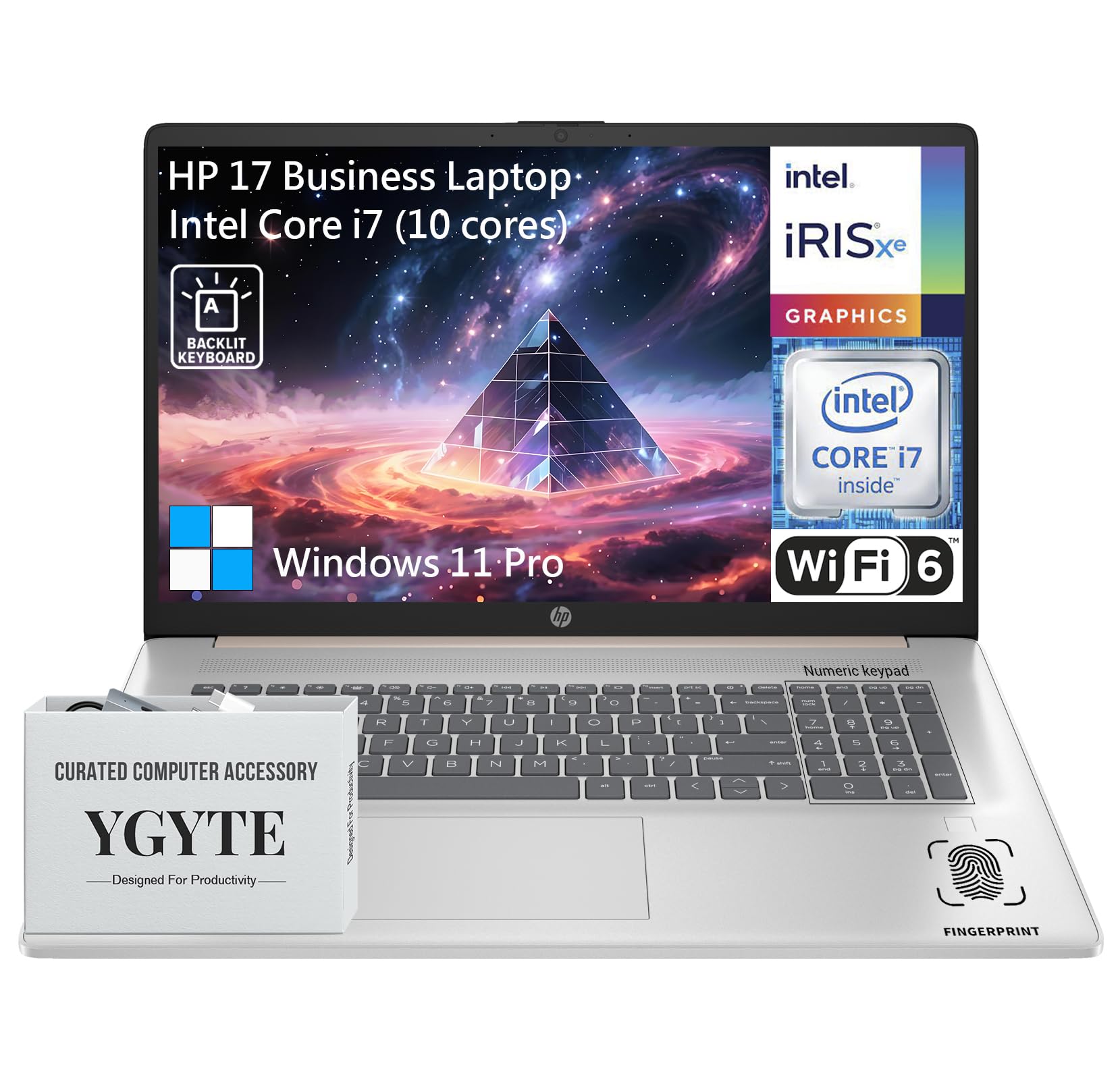
Kenraali view of the HP 17.3 Inch Laptop, showcasing its design and large display.

Yliview of the HP 17.3 Inch Laptop, highlighting its core components: Intel Core i7 processor, Intel Iris Xe Graphics, and Windows 11 Pro operating system.
Mitä laatikossa on
Upon unpacking your HP 17.3 Inch Laptop, ensure all the following items are present:
- HP 17.3 Inch Laptop
- Verkkolaite
- Dokumentaatio (pikaopas, takuutiedot)
Asennus
1. Ensimmäinen käynnistys ja lataus
- Liitä virtalähde: Plug the AC power adapter into the laptop's power port and then into a wall outlet.
- Lataa akku: Anna kannettavan tietokoneen latautua vähintään 30 minuuttia ennen ensimmäistä käyttökertaa tai kunnes akun merkkivalo näyttää riittävää varausta.
- Virta päälle: Avaa kannettavan tietokoneen kansi ja paina virtapainiketta, joka sijaitsee yleensä näppäimistön kannella.
2. Windows 11 Pron asennus
Follow the on-screen instructions to complete the Windows 11 Pro setup process. This includes:
- Alueen ja näppäimistöasettelun valitseminen.
- Yhdistetään Wi-Fi-verkkoon.
- Kirjautuminen sisään Microsoft-tilillä tai uuden tilin luominen.
- PIN-koodin tai salasanan määrittäminen.
- Tietosuoja-asetusten määrittäminen.
3. Verkkoyhteys
Your laptop supports Wi-Fi 6 for fast wireless connectivity. During Windows setup, you will be prompted to connect to a Wi-Fi network. If you need to connect later:
- Napsauta tehtäväpalkin Wi-Fi-kuvaketta.
- Valitse haluamasi verkko luettelosta.
- Anna verkon suojausavain (salasana), jos sitä pyydetään.
- Napsauta Yhdistä.
Kannettavan tietokoneen käyttö
Näyttö
The HP 17.3 Inch Laptop features a 17.3-inch HD+ (1600 x 900) BrightView Touchscreen. This display offers crisp details and vibrant colors, providing amptilaa moniajoon ja immersiiviseen toimintaan viewkokemuksia.

The 17.3-inch HD+ touchscreen display offers a resolution of 1600x900 pixels with BrightView technology for enhanced visual clarity.
Suorituskyky
Your laptop is equipped with a 13th Gen Intel Core i7 processor (10 cores, 12 threads, up to 5.0GHz) and Intel Iris Xe Graphics. This configuration provides robust performance for demanding applications, multitasking, and immersive entertainment.

Details of the Intel Core i7-1355U processor, including its 10 cores, 12 threads, 12MB cache, and a maximum turbo frequency of 5.0 GHz, designed for fast response and processing speed.
Storage and Multitasking
With 36GB of high-bandwidth DDR4 RAM, the laptop allows for seamless switching between applications. The 1TB high-speed SSD provides rapid boot times, quick application loading, and ampsäilytystilaa sinulle files.

The laptop features 36GB DDR4 RAM for swift multitasking efficiency, a 1TB SSD for fast access and ample storage, and Wi-Fi 6 for faster wireless connectivity.
Yhteydet
The HP 17.3 Inch Laptop offers a range of ports and wireless technologies to keep you connected:
- USB-C: SuperSpeed USB-C (5Gbps signaling rate) for data transfer and power delivery.
- USB-A: Two SuperSpeed USB-A ports (5Gbps signaling rate).
- HDMI 1.4b: Ulkoisten näyttöjen liittämistä varten.
- Wi-Fi 6: Advanced wireless networking for faster and more reliable internet.
- Bluetooth: Langattomien oheislaitteiden liittämiseen.
- Kuuloke-/mikrofoniliitäntä: Äänituloa ja -lähtöä varten.
- AC-älypinni: Virtasovittimen liitäntää varten.

Side profile of the HP 17.3 Inch Laptop illustrating the placement of USB Type-A, HDMI 1.4b, headphone/microphone combo, USB Type-C, and AC smart pin ports, along with its dimensions and weight.
Ääni ja kamera
Engage in clear video calls and enjoy immersive audio with the integrated features:
- HP Wide Vision 720p HD Camera: Provides clear visuals for video conferencing.
- Kaksoismatriisi-digitaaliset mikrofonit: Ensures your voice is captured clearly.
- B&O Dual Speakers: Delivers rich, authentic audio tuned by Bang & Olufsen.

The HP 17.3 Inch Laptop features an HP True Vision 720p HD camera, dual array digital microphones, and B&O dual speakers for enhanced communication and audio experience.
Näppäimistö ja kosketuslevy
The full-size backlit keyboard includes a 10-key number pad for comfortable and efficient typing. The larger trackpad provides precise navigation.
Sormenjälkilukija
For enhanced security and quick login, utilize the integrated fingerprint reader. You can set this up through Windows Hello in your laptop's settings.
Huolto
Asianmukainen huolto varmistaa HP-kannettavan tietokoneesi pitkän käyttöiän ja optimaalisen suorituskyvyn:
- Puhdistus: Puhdista näyttö ja ulkopinta pehmeällä, nukkaamattomalla liinalla. Pinttyneiden tahrojen poistamiseksi, dampKostuta liina vedellä tai näytönpuhdistusaineella. Vältä voimakkaita kemikaaleja.
- Ohjelmistopäivitykset: Tarkista ja asenna säännöllisesti Windows-päivitykset ja HP:n ohjainpäivitykset varmistaaksesi järjestelmän vakauden ja turvallisuuden.
- Akun hoito: To prolong battery life, avoid extreme temperatures. If storing the laptop for an extended period, charge the battery to about 50-70%.
- Ilmanvaihto: Varmista, että kannettavan tietokoneen tuuletusaukot eivät ole tukossa ylikuumenemisen estämiseksi. Käytä kannettavaa tietokonetta kovalla ja tasaisella alustalla.
- Tietojen varmuuskopiointi: Varmuuskopioi tärkeät tiedot säännöllisesti ulkoiselle asemalle tai pilvitallennustilaan tietojen menetyksen estämiseksi.
Vianetsintä
Tässä on joitain yleisiä ongelmia ja niiden ratkaisuja:
| Antaa | Ratkaisu |
|---|---|
| Kannettava tietokone ei käynnisty. | Varmista, että virtalähde on kytketty kunnolla sekä kannettavaan tietokoneeseen että toimivaan pistorasiaan. Tarkista, toimiiko pistorasia. Kokeile toista pistorasiaa. |
| Näyttö on tyhjä tai musta. | Press the power button to ensure the laptop is on. Connect an external monitor to check if the display output is working. Adjust screen brightness using function keys. |
| Wi-Fi-yhteysongelmat. | Ensure Wi-Fi is enabled in Windows settings. Restart your router and modem. Check for updated Wi-Fi drivers. Try connecting to a different network if available. |
| Hidas suorituskyky. | Close unnecessary applications. Check for background processes consuming high resources (Task Manager). Ensure Windows and drivers are up to date. Run a disk cleanup. |
| Näppäimistö tai kosketuslevy ei reagoi. | Restart the laptop. Check for any physical obstructions. Ensure drivers are updated. |
Tekniset tiedot
| Ominaisuus | Yksityiskohta |
|---|---|
| Merkki | HP |
| Mallin nimi | Essential 17 (HP 17) |
| Näytön koko | 17.3 tuumaa |
| Näytön resoluutio | 1600 x 900 pikseliä (HD+) |
| Prosessori | 13th Gen Intel Core i7 (10 Cores, up to 5.0 GHz) |
| RAM | 36GB DDR4 |
| Varastointi | 1 TB SSD (PCIe x 16 interface) |
| Grafiikka rinnakkaisprosessori | Intel Iris Xe -näytönohjain (integroitu) |
| Käyttöjärjestelmä | Windows 11 Pro |
| Langaton tyyppi | 802.11ax (Wi-Fi 6) |
| Yhteydet | USB-C (5Gbps), 2x USB-A (5Gbps), HDMI 1.4b, Headphone/Microphone Combo |
| Erikoisominaisuudet | Backlit Keyboard, Fingerprint Reader, Touchscreen |
| Tuotteen paino | 4.61 kiloa |
| Tuotteen mitat (PxLxK) | 15.78 x 10.15 x 0.78 tuumaa |
| Väri | Ruusukulta |
| Paristot | 1 litiumioniakku (mukana) |
Takuu ja tuki
Your HP 17.3 Inch Laptop comes with a standard manufacturer's warranty. For detailed warranty terms and conditions, please refer to the documentation included with your product or visit the official HP support websivusto.
Jos tarvitset teknistä apua, ajurilatauksia tai muuta tukea, käy HP:n virallisella tukisivustolla. websivusto:
You may also find helpful resources and community forums on the HP websivusto.