1. Johdanto
This manual provides essential information for the installation, operation, and maintenance of your Qolsys IQ Panel 4. The IQ Panel 4 is an all-in-one touchscreen security and smart home control panel designed for comprehensive connectivity and reliability.
It features a 7-inch HD touchscreen, an 8-megapixel panel camera with Flex-Tilt, and a QuadSound speaker system. The panel supports various wireless technologies including LTE, Wi-Fi, Z-Wave, Bluetooth, PowerG, and legacy security wireless protocols.
2. Turvallisuustiedot
- Virtalähde: Only use the specified power adapter provided with the device. Using an incorrect power source may damage the unit and void the warranty.
- Sijoitus: Install the panel in a dry, indoor location away from direct sunlight, extreme temperatures, and high humidity. Ensure proper ventilation around the device.
- Puhdistus: Irrota virtajohto ennen puhdistamista. Käytä pehmeää, kuivaa liinaa. Älä käytä nestemäisiä puhdistusaineita tai aerosolisuihkeita.
- Huolto: Älä yritä huoltaa tätä tuotetta itse. Anna kaikki huoltotoimenpiteet pätevän huoltohenkilöstön tehtäväksi.
- Kamera: The integrated camera is for security and monitoring purposes. Ensure privacy settings are configured according to your preferences.
3. Pakkauksen sisältö
Varmista, että pakkauksessa on kaikki tarvittavat osat:
- Qolsys IQ Panel 4 (IQP4004)
- Virtalähde
- Kiinnitystarvikkeet (ruuvit, ankkurit)
- Pikaopas (jos sovellettavissa)
4. Asennus
4.1 Paneelin asennus
The IQ Panel 4 can be wall-mounted or placed on a table using the SmartMount installation system. For wall mounting, ensure the chosen location is central and within Wi-Fi range.
- Identify a suitable location for the panel.
- Use the mounting bracket (if included) as a template to mark drill holes.
- Poraa ohjausreiät ja aseta tarvittaessa seinäankkurit.
- Kiinnitä kiinnitysteline seinään mukana toimitetuilla ruuveilla.
- Carefully attach the IQ Panel 4 to the mounting bracket.
4.2 Virran kytkeminen päälle
Connect the power supply to the panel's power input port and then plug it into a standard electrical outlet. The panel will automatically power on and begin its boot sequence.
4.3 Alkukokoonpano
Suorita alkuasetukset loppuun noudattamalla näytön ohjeita. Yleensä asennus sisältää seuraavat vaiheet:
- Kielen valitseminen.
- Yhdistetään Wi-Fi-verkkoon.
- Päivämäärän ja kellonajan asettaminen.
- Creating a master user code.
5. Operating the IQ Panel 4
The 7-inch touchscreen provides intuitive control over your security system and smart home devices.
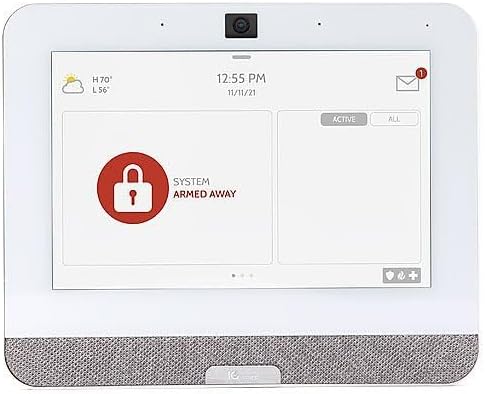
Figure 5.1: The IQ Panel 4 display when the system is armed in 'Away' mode, indicated by a red padlock icon and corresponding text.
5.1 Viritä ja pois päältä
- Arm Stay: Arms the perimeter sensors while allowing movement inside. Tap the "Arm Stay" icon and enter your code.
- Arm Away: Arms all sensors, including interior motion detectors. Tap the "Arm Away" icon and enter your code.
- Poista aseista: To disarm the system, tap the "Disarm" icon and enter your master code.
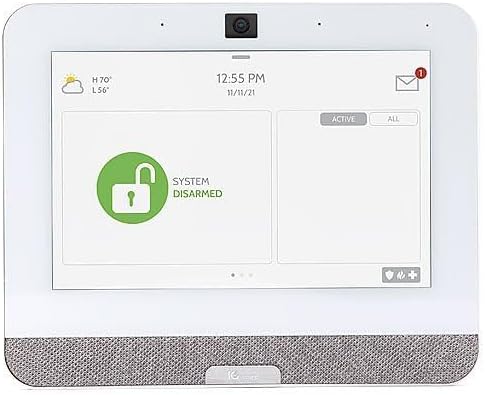
Figure 5.2: The IQ Panel 4 display when the system is disarmed, indicated by a green unlocked padlock icon and corresponding text.
5.2 Kameran ominaisuudet
The 8-megapixel panel camera supports various functions:
- Disarm Photos: The camera can capture an image when the system is disarmed.
- Peek-in: Mahdollistaa etäkäytön viewing of the panel's camera feed.
- Alarm Videos: Records video clips during alarm events.
- Flex-Tilt: Säädä kameran kulma optimaaliseksi viewing.
5.3 Älykodin ohjaus
The IQ Panel 4 integrates with Z-Wave devices, allowing control of lights, locks, thermostats, and more directly from the panel or a connected smartphone app.
5.4 Bluetooth Touchless Disarming
Enable Bluetooth Touchless Disarming in settings to automatically disarm your system when your paired smartphone is detected within range.
6. Huolto
- Näytön puhdistus: Puhdista kosketusnäyttö pehmeällä, nukkaamattomalla liinalla. Pinttyneisiin tahroihin hankaa kevyesti.ampKostuta liina vedellä. Älä suihkuta puhdistusaineita suoraan näytölle.
- Ohjelmistopäivitykset: The IQ Panel 4 receives over-the-air (OTA) software updates. Ensure your panel is connected to Wi-Fi to receive these updates, which provide new features and security enhancements.
- Akun varmuuskopiointi: The panel includes a backup battery. Periodically check the battery status in the system settings. If the battery needs replacement, contact qualified service personnel.
7. Vianmääritys
| Ongelma | Mahdollinen syy | Ratkaisu |
|---|---|---|
| Paneeli ei käynnisty | No power from outlet; power supply disconnected or faulty. | Check power outlet; ensure power supply is securely connected to panel and outlet. |
| Ei voi muodostaa yhteyttä Wi-Fi-verkkoon | Incorrect Wi-Fi password; out of range; router issue. | Verify password; move panel closer to router; restart router. |
| Järjestelmä ei virity | Open sensor (door/window); system error. | Check all sensors are closed; review system messages for errors. |
| Kosketusnäyttö ei reagoi | Väliaikainen ohjelmistohäiriö. | Perform a soft reboot (refer to system settings for option) or power cycle the device. |
8. Tekniset tiedot
- Malli: IQP4004
- Näytön koko: 7 Inches (HD, Capacitive glass multi-touch)
- Kamera: 8 Megapixel Panel Camera with Flex-Tilt
- Varastointi: 16 Gt NAND Flash
- Audio: QuadSound 4x front-facing 4W speakers, 85-decibel siren
- Langaton yhteys: LTE, Wi-Fi, Z-Wave, Bluetooth, PowerG, 319.5MHz
- Mitat (paketti): 12.32 x 7.24 x 2.13 tuumaa
- Paino (tuote): 1.72 kiloa
- Väri: Valkoinen
- Yhteensopivat laitteet: Älypuhelin (sovellusohjausta varten)
9. Takuu ja tuki
Qolsys products are covered by a limited warranty. For specific warranty terms and conditions, please refer to the warranty card included with your product or visit the official Qolsys websivusto.
For technical support, troubleshooting assistance, or service inquiries, please contact your authorized Qolsys dealer or installer. You may also find additional resources, FAQs, and support documentation on the Qolsys official websivusto.
Note: Unauthorized modifications or repairs to the device will void the warranty.


