Johdanto
This manual provides comprehensive instructions for the setup, operation, maintenance, and troubleshooting of your SABLUTE KL3 PRO Wireless Keyboard and Mouse Combo. Please read this manual thoroughly before using the product to ensure optimal performance and longevity.
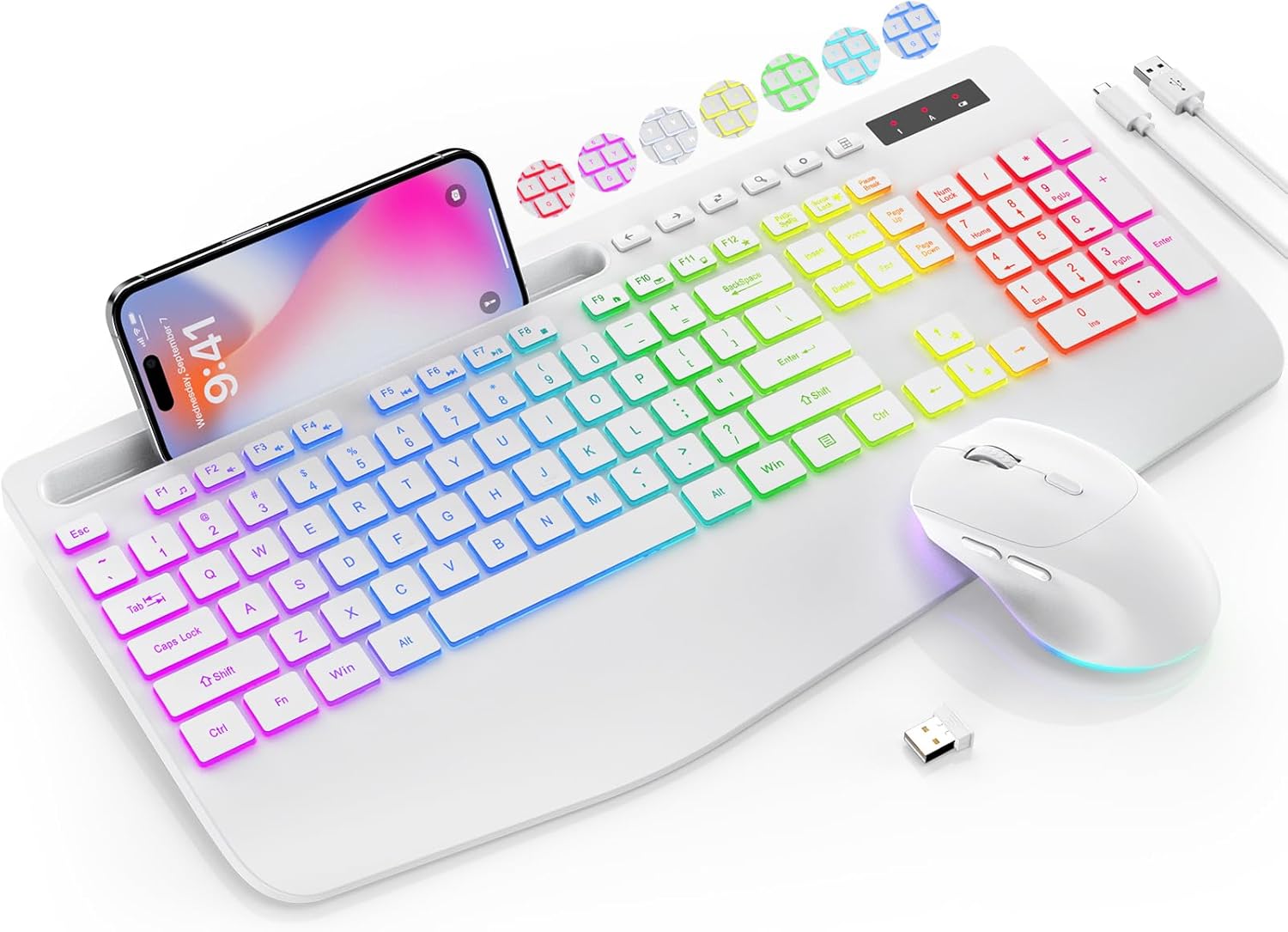
Image: The SABLUTE KL3 PRO Wireless Keyboard and Mouse Combo, featuring a full-size keyboard with a phone holder, a wireless mouse, and a USB receiver.
Pakkauksen sisältö
Kun avaat paketin, tarkista, että kaikki seuraavat osat ovat mukana:
- SABLUTE KL3 PRO Wireless Keyboard
- SABLUTE Wireless Mouse
- 2.4G USB Receiver (Dongle)
- USB Type-C -latauskaapeli
- Käyttöopas (tämä asiakirja)

Image: The SABLUTE KL3 PRO keyboard and mouse, along with the USB receiver and charging cables, as they appear in the package.
Asennusohjeet
1. Laitteiden lataaminen
Both the keyboard and mouse are rechargeable. Before initial use, it is recommended to fully charge both devices.
- Connect the provided USB Type-C charging cable to the charging port on the keyboard and mouse.
- Kytke kaapelin toinen pää USB-virtalähteeseen (esim. tietokoneen USB-porttiin tai USB-seinäsovittimeen).
- Charging typically takes 2-3 hours for a full charge. The indicator light will change to show charging status.
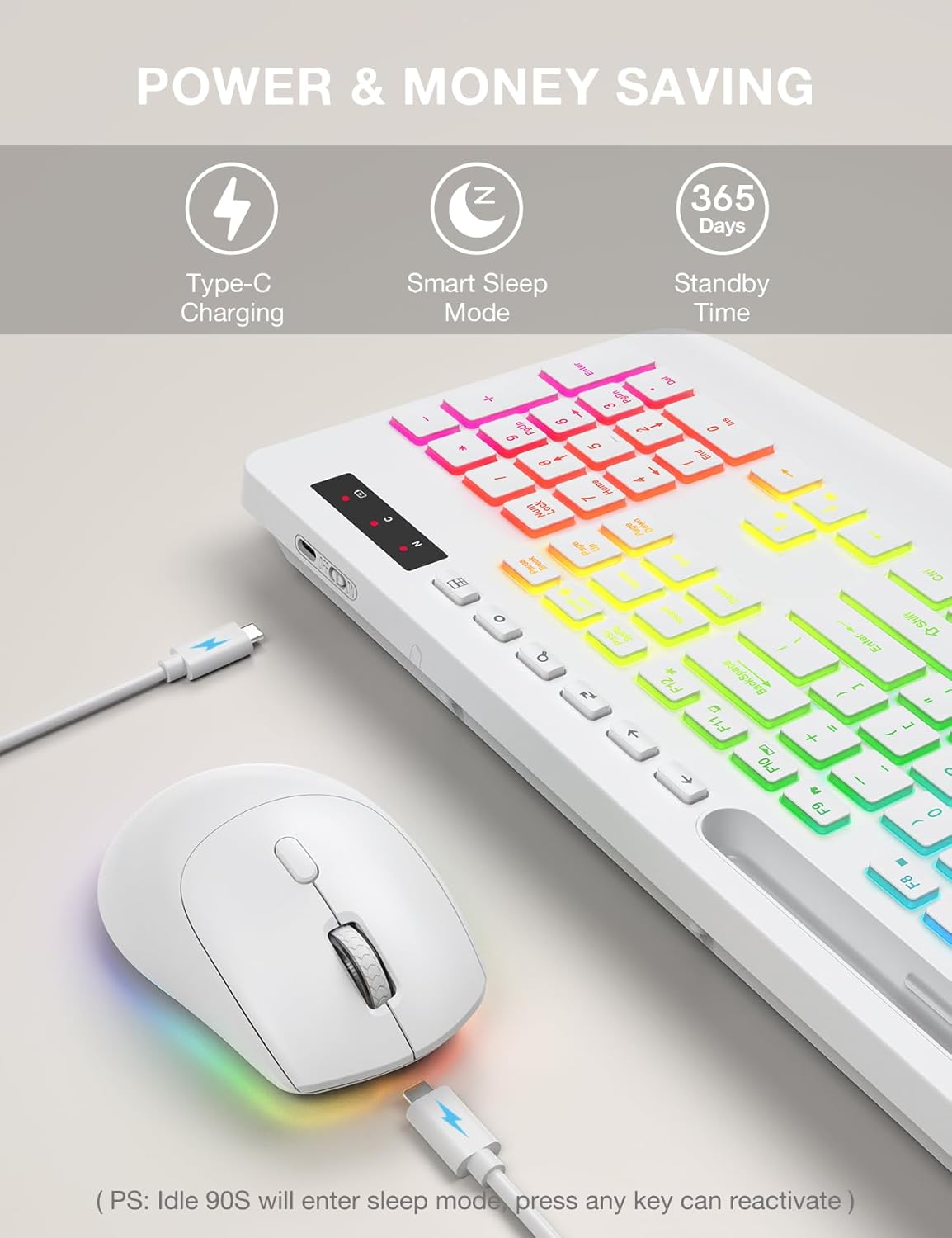
Image: The SABLUTE keyboard and mouse connected to charging cables, illustrating the Type-C charging ports.
2. Yhteyden muodostaminen laitteeseen
The SABLUTE KL3 PRO combo uses a 2.4G wireless connection via a single USB receiver.
- Locate the 2.4G USB receiver. It is typically stored in the mouse's battery compartment or within the product packaging.
- Plug the USB receiver into an available USB-A port on your computer or laptop.
- Käynnistä näppäimistö ja hiiri niiden virtakytkimillä.
- The devices should connect automatically within seconds. No additional drivers are usually required for most operating systems.
Yhteensopivuus: This combo is compatible with Windows, Chrome OS, Linux, and Mac devices. Please note that multimedia keys may have limited functionality on Mac operating systems.
Tärkeä huomautus: A USB-C dongle is not included. This keyboard and mouse combo cannot connect directly to tablets or phones without a compatible USB-A adapter (not included).

Image: The keyboard and mouse operating wirelessly with a laptop and monitor, demonstrating the 2.4G wireless connectivity and plug-and-play setup.
Käyttöohjeet
Näppäimistön ominaisuudet
- Taustavalotehosteet: Choose from 7 solid colors and 1 rainbow backlight color. There are 3 distinct backlight modes available.
- Taustavalon ohjaus:
- Paina Fn + PrtSc/SysRq kytkeäksesi taustavalon päälle tai pois päältä.
- Paina Fn + Scroll Lock to switch between different backlight modes.
- Paina Fn + ylänuoli or Fn + alanuoli säätääksesi taustavalon kirkkautta (3 tasoa).
- Ergonominen rannetuki: The keyboard features an extra-wide 2.8-inch wrist rest designed to reduce wrist fatigue during extended use.
- Integroitu puhelinteline: A built-in holder accommodates devices up to 11.9 inches, allowing for convenient multitasking.
- Multimediaavaimet: Access 6 one-touch media keys and F1-F12 shortcuts for streamlined daily tasks.
- Hiljainen kirjoittaminen: The keyboard is designed for silent operation, minimizing disturbance in shared environments.
- Low-Profile Näppäimet: Features 1mm low-profile keycaps for easier cleaning and quieter typing.

Image: Illustration of the keyboard's 7 color options and the key combinations for controlling backlight on/off, mode switching, and brightness adjustment.
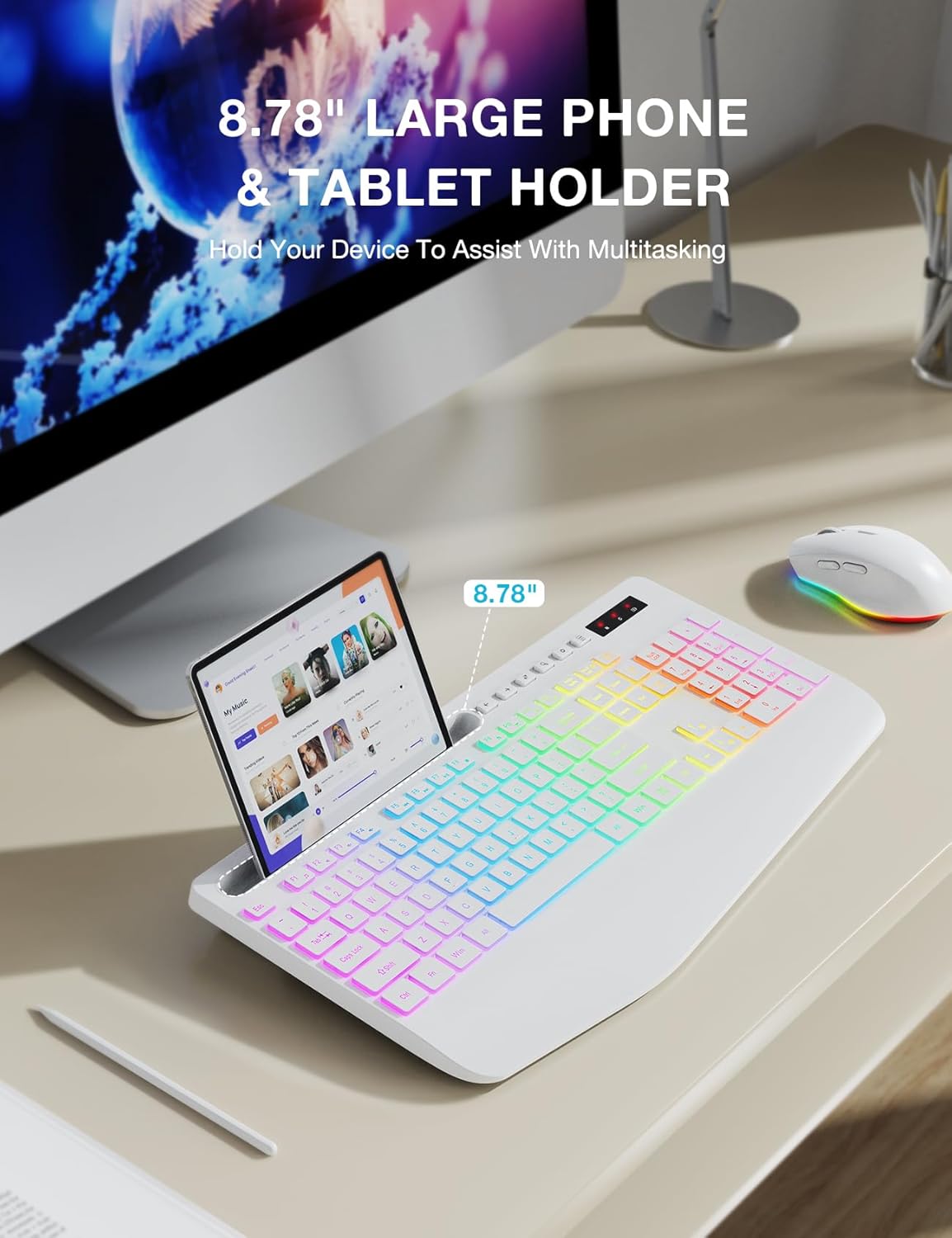
Image: The keyboard displaying a phone securely placed in its integrated holder, highlighting the 8.78-inch capacity for multitasking.
Hiiren ominaisuudet
- 6-painikkeinen muotoilu: Includes standard left/right click, scroll wheel, DPI button, and forward/backward buttons for enhanced navigation.
- Säädettävä DPI: Cycle through 3 DPI levels (800/1200/1600) to adjust tracking speed for different tasks.
- Hiljainen naksahtelu: The mouse is designed for silent clicks, providing a quiet working environment.
- Taustavalotehosteet: Features 15 light effects that can be switched or turned off.

Kuva: Yksityiskohtainen view of the SABLUTE wireless mouse, labeling its 6 buttons including the scroll wheel, left/right click, DPI button, and forward/backward buttons.
Virranhallinta
The SABLUTE KL3 PRO combo is designed with energy-saving features to extend battery life.
- Älykäs unitila: If idle for 90 seconds, the devices will enter a smart sleep mode to conserve power. Press any key on the keyboard or move the mouse to reactivate.
- Pitkä valmiusaika: With the backlight off, the devices can achieve up to 365 days of standby time on a full charge.

Image: An illustration highlighting the energy-saving features of the SABLUTE keyboard and mouse, including 365 days standby time and smart sleep mode activation after 90 seconds of inactivity.
Huolto ja hoito
To ensure the longevity and optimal performance of your SABLUTE KL3 PRO combo, follow these maintenance guidelines:
- Puhdistus: Pyyhi näppäimistön ja hiiren pinnat pehmeällä, kuivalla liinalla. Pinttyneeseen likaan käytä hieman kuivaa liinaa.amp voidaan käyttää miedolla saippualla kostutettua liinaa varmistaen, ettei nestettä pääse laitteeseen.
- Näppäinkansien puhdistus: Matala profile keycaps are designed for easier cleaning. Use compressed air to remove debris from between keys.
- Varastointi: Säilytä laitteita viileässä, kuivassa paikassa, poissa suorasta auringonvalosta ja äärimmäisistä lämpötiloista.
- Vältä nesteitä: Do not expose the keyboard or mouse to excessive moisture or liquids.
- Käsittele varovasti: Vältä laitteiden pudottamista tai altistamista voimakkaille iskuille.
Vianetsintä
If you encounter any issues with your SABLUTE KL3 PRO combo, please refer to the following common solutions:
| Ongelma | Mahdollinen ratkaisu |
|---|---|
| Näppäimistö/hiiri ei reagoi |
|
| Viive tai viivästynyt vastaus |
|
| Taustavalo ei toimi |
|
| Missing USB receiver |
|
| Devices enter sleep mode too quickly |
|
Tekniset tiedot
| Ominaisuus | Yksityiskohta |
|---|---|
| Mallinumero | KL3 PRO |
| Tuotteen mitat | 16.85 x 8.46 x 1.38 tuumaa |
| Tuotteen paino | 2 kiloa |
| Paristot | Vaatii 1 litiummetallipariston (mukana) |
| Yhteystekniikka | Langaton 2.4G USB |
| Erikoisominaisuudet | 3-level DPI, Backlit, Ergonomic Wrist Rest, Phone Holder, Shortcut Keys, Low-profile näppäinsuojus |
| Yhteensopivat laitteet | Henkilökohtainen tietokone, kannettava tietokone |
| Valmistaja | SABLUTE |
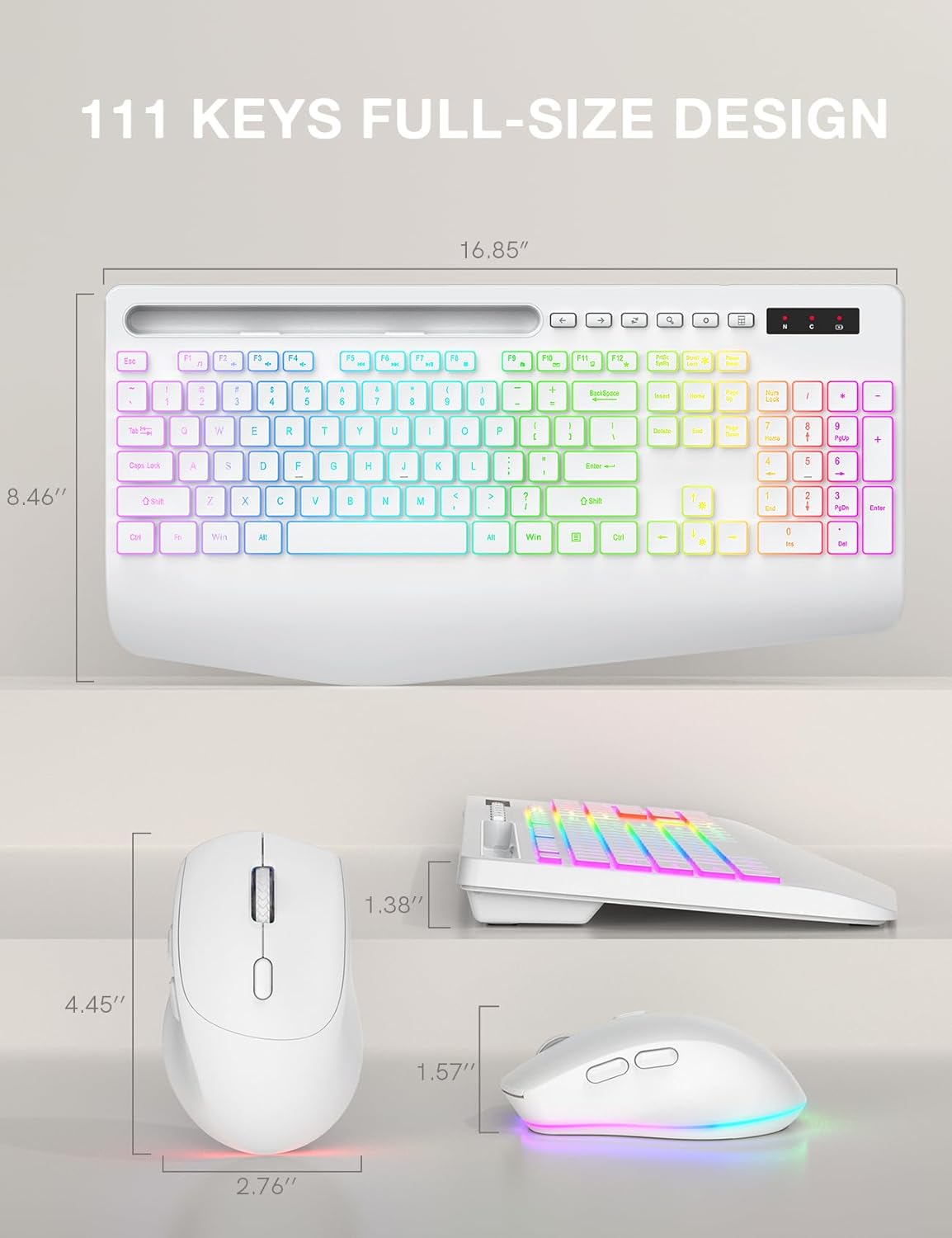
Image: Technical drawing showing the dimensions of the SABLUTE KL3 PRO keyboard and mouse.
Takuu ja tuki
SABLUTE is committed to providing quality products and customer satisfaction. Your KL3 PRO Wireless Keyboard and Mouse Combo comes with the following support:
- 90 päivän korvaus: Valmistusvirheistä tai ongelmista 90 päivän kuluessa ostosta.
- 360 päivän valmistajan takuu: Covers defects in materials and workmanship for 360 days from the date of purchase.
Ota yhteyttä tukeen
For pre-sales questions, troubleshooting assistance, accessory reissue, or returns and exchanges, please contact us:
- Sähköpostituki: sabluteservices@outlook.com
- Puhelintuki (Yhdysvallat): +1-888-858-1618 (Monday-Friday, 9 AM - 1 PM PST, 2 PM - 6 PM PST)


