1. Johdanto
This manual provides essential information for the safe and efficient operation of your BLUETTI AC70 Portable Power Station. Please read this manual thoroughly before using the product and keep it for future reference. The BLUETTI AC70 is a versatile power solution designed for various applications, including outdoor activities, emergency backup, and mobile power needs.
2. Turvallisuusohjeet
Turvallisen käytön varmistamiseksi noudata aina näitä ohjeita:
- Älä pura, korjaa tai muokkaa yksikköä.
- Pidä laite poissa tulesta, vedestä ja äärimmäisistä lämpötiloista.
- Käytä vain BLUETTI-hyväksyttyjä lisävarusteita ja latauskaapeleita.
- Varmista asianmukainen ilmanvaihto käytön ja latauksen aikana ylikuumenemisen estämiseksi.
- Säilytä poissa lasten ja lemmikkieläinten ulottuvilta.
- Vältä laitteen pudottamista tai voimakkaiden iskujen kohteeksi altistamista.
3. Pakkauksen sisältö
Varmista, että pakkauksessasi on kaikki tarvittavat osat:
- Kannettava BLUETTI AC70 voimalaitos
- 100W Solar Panel (Ships Separately)
- Vaihtovirtalaturi
- Auton latauskaapeli
- Aurinkoenergian latauskaapeli
- Käyttöopas

Figure 1: BLUETTI AC70 Portable Power Station with its standard accessories.
4. Tuote ohiview
4.1 Etupaneeli
The front panel features the main display, input/output ports, and control buttons.
- LCD-näyttö: Näyttää akun varaustason, tulo-/lähtövirrantage, remaining runtime, and error indicators.
- DC/PV-tulo: For connecting solar panels or other DC charging sources.
- Tasavirtalähtö (12 V / 10 A): Standard car-style outlet.
- USB-C Ports (100W): Two ports for fast charging compatible devices.
- USB-A Ports (12W): Two ports for standard USB charging.
- AC Outlets (120V/1000W): Kaksi vakiomallista pistorasiaa.
- Virtapainike: Kytkee laitteen päälle/pois päältä.
- DC Output Button: Aktivoi/deaktivoi tasavirtalähdön.
- AC-lähtöpainike: Aktivoi/deaktivoi verkkovirran.

Figure 2: Front panel layout of the BLUETTI AC70.
4.2 Takapaneeli
The rear panel includes the AC input port and ventilation.
- AC-tulo: AC-latauskaapelin kytkemistä varten.
- Tuuletusritilät: Varmistaa asianmukaisen ilmankierron jäähdytykseen.
4.3 Yläpaneeli
The top panel features a sturdy handle for portability.

Figure 3: Top handle for easy portability.
5. Asennus
5.1 Ensimmäinen lataus
Before first use, fully charge the BLUETTI AC70. Connect the AC charging cable to the AC input port on the rear of the unit and plug it into a wall outlet. The LCD display will show the charging status. A full charge from 0% to 100% typically takes about 1.5 hours.
5.2 Aurinkopaneelien liitäntä
If using the included 100W solar panel, unfold it and position it in direct sunlight. Connect the solar charging cable to the solar panel and then to the DC/PV input port on the front of the AC70. The display will indicate solar input wattage.
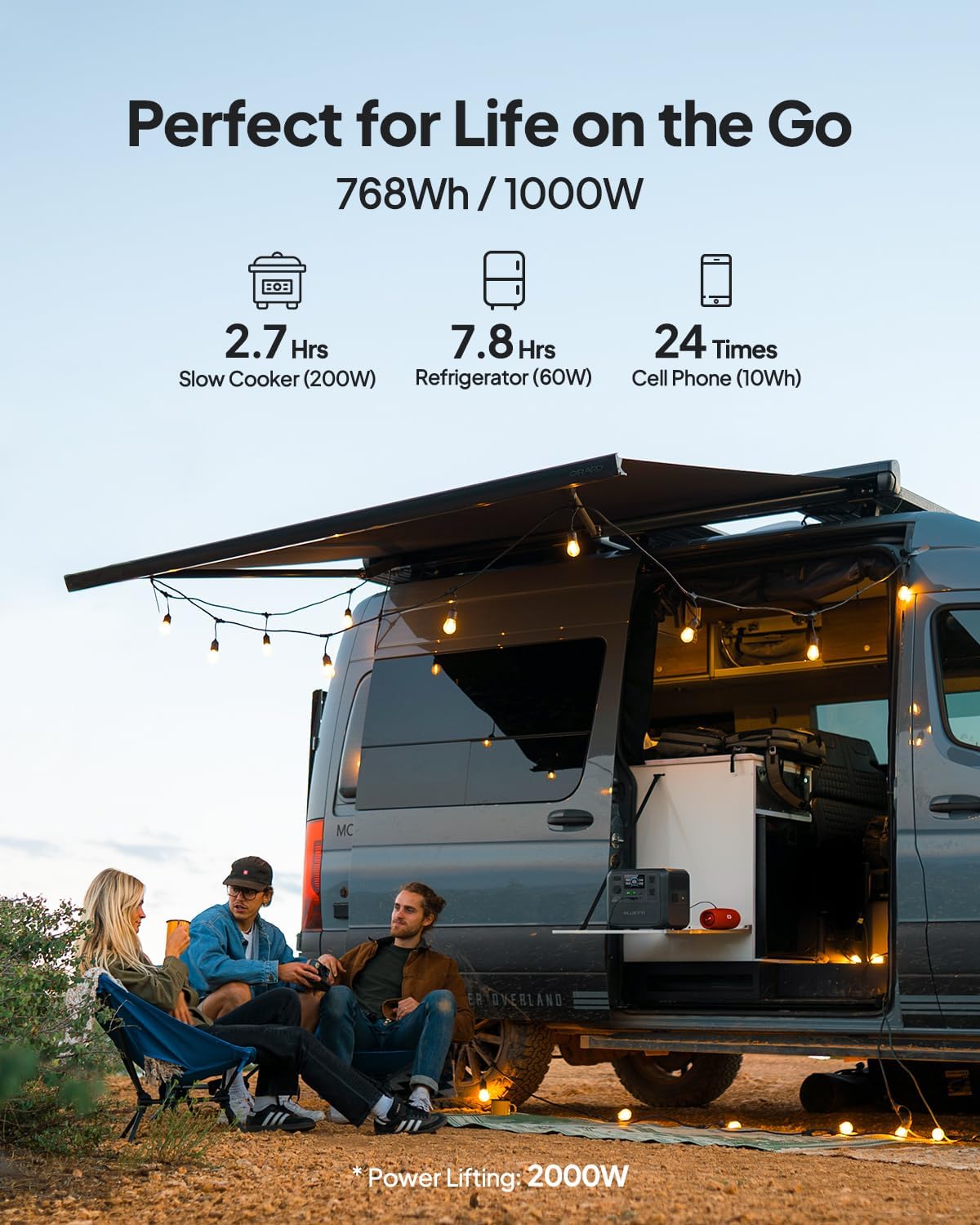
Figure 4: Connecting the BLUETTI AC70 to a solar panel.
6. Käyttöohjeet
6.1 Virran kytkeminen päälle/pois
Press and hold the main Power Button for 2-3 seconds to turn the unit on or off.
6.2 Tulosteiden käyttö
Press the respective DC Output Button or AC Output Button to activate the desired output ports. The corresponding icons on the LCD display will illuminate.

Figure 5: Various output ports of the BLUETTI AC70 in use.
6.3 BLUETTI APP Control
Download the BLUETTI APP from your smartphone's app store. Connect your AC70 via Bluetooth to monitor its status, adjust settings (like charging mode), and update firmware remotely.

Figure 6: Monitoring and controlling the AC70 using the BLUETTI App.
6.4 Voimanostotila
The Power Lifting mode allows the AC70 to handle high-power resistive loads up to 2000W, exceeding its rated 1000W output. This is particularly useful for devices like hair dryers or electric kettles. Activate this mode via the BLUETTI APP.
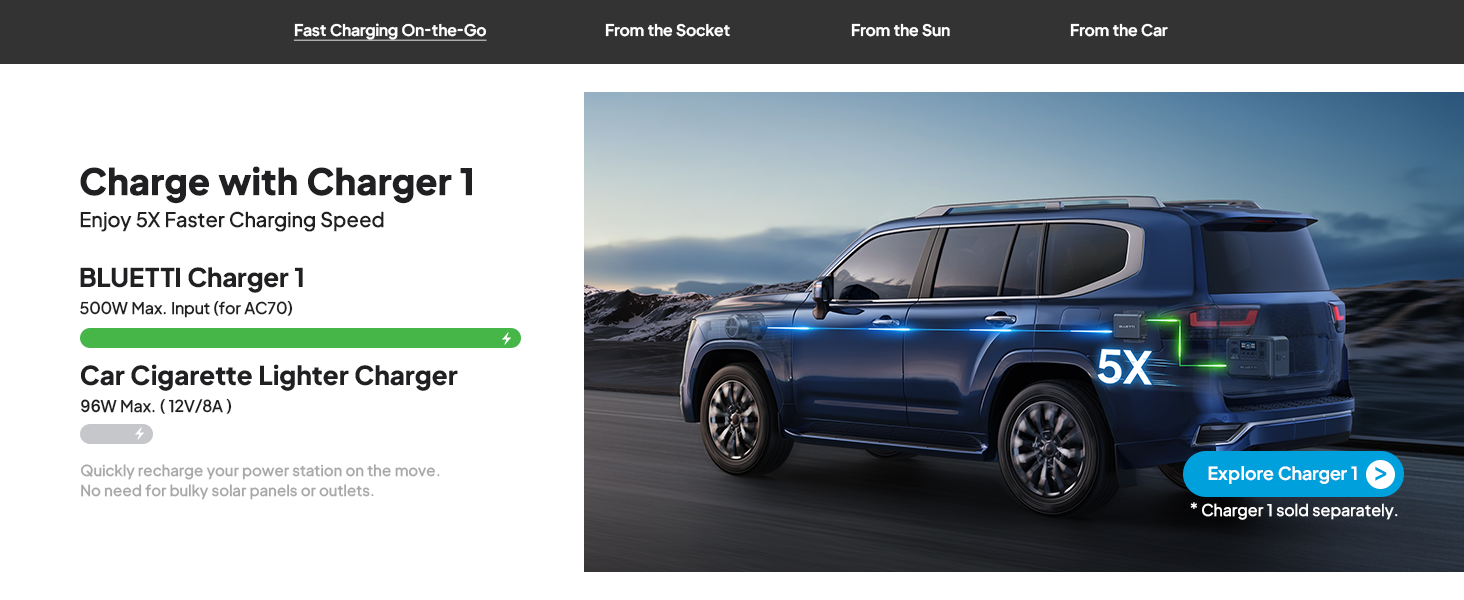
Figure 7: AC70 utilizing Power Lifting mode for higher wattage laitteet.
6.5 UPS:n toiminnallisuus
The AC70 features an Uninterruptible Power Supply (UPS) function with a switching time of ≤20ms. When connected to a wall outlet and powering devices, it can automatically switch to battery power in the event of a power outage, varmistaen verkkoon kytketyn elektroniikan jatkuvan toiminnan.
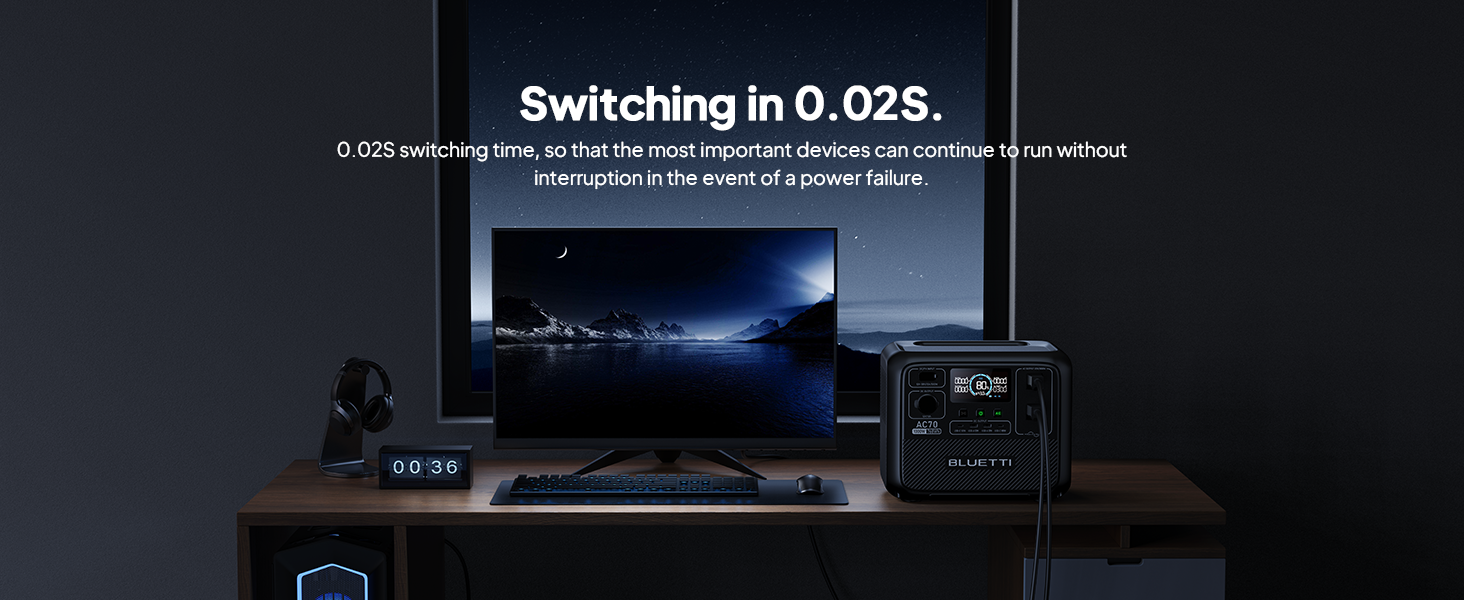
Figure 8: AC70 acting as an Uninterruptible Power Supply (UPS).
7. Charging the AC70
7.1 AC-lataus
Connect the AC charging cable to the AC input port and a wall outlet. The AC70 supports up to 950W fast charging, reaching 80% in 45 minutes and 100% in 1.5 hours.

Figure 9: AC70 charging from a standard wall outlet.
7.2 Aurinkolataus
Connect compatible solar panels (up to 500W) to the DC/PV input port using the solar charging cable. The AC70 can be fully charged via solar power in 1.9-2.4 hours under optimal sunlight conditions.

Figure 10: AC70 charging using solar panels.
7.3 Auton lataus
Use the car charging cable to connect the AC70 to your vehicle's 12V/24V cigarette lighter port. This allows for convenient charging while on the go, with a full charge taking approximately 3.2-7 hours.
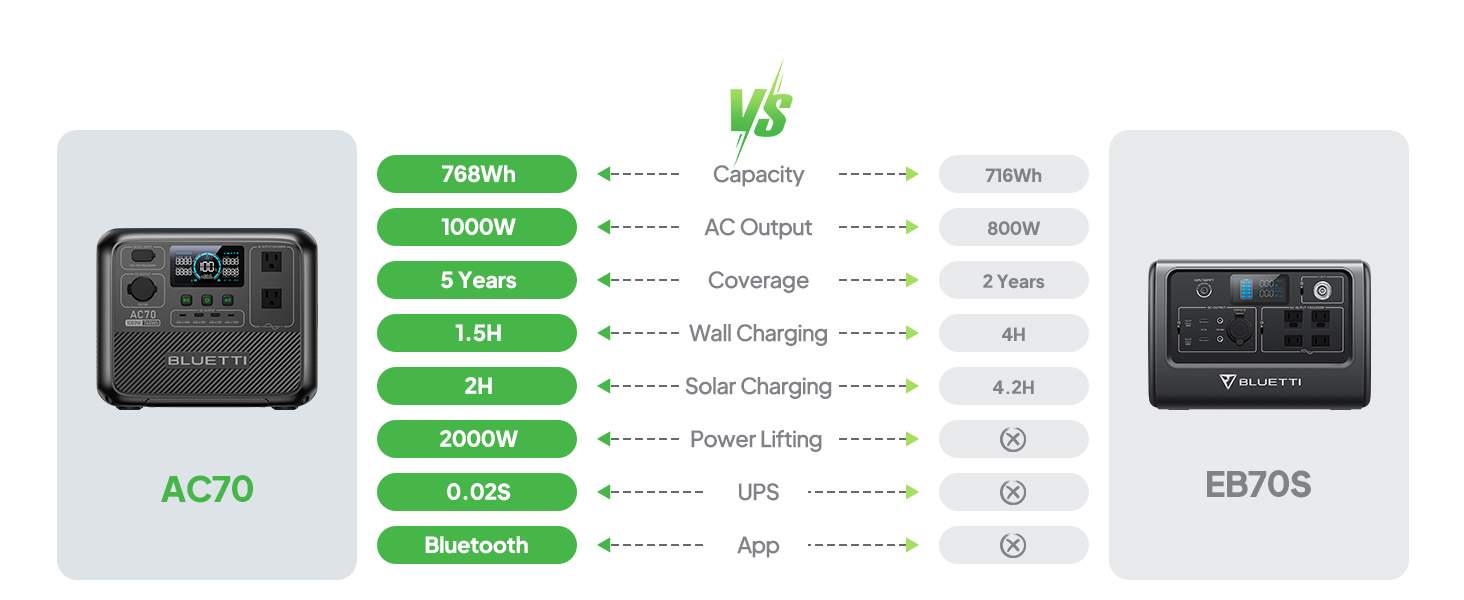
Figure 11: AC70 charging from a vehicle's 12V/24V outlet.
8. Huolto
Proper maintenance ensures the longevity and performance of your AC70:
- Säilytä yksikköä viileässä, kuivassa paikassa, poissa suorasta auringonvalosta.
- Lataa laite 3–6 kuukauden välein, jos sitä ei käytetä säännöllisesti, akun kunnon ylläpitämiseksi.
- Clean the exterior with a dry, soft cloth. Do not use harsh chemicals or abrasives.
- Pidä tuuletusaukot vapaina pölystä ja roskista.
9. Vianmääritys
If you encounter issues with your AC70, refer to the following common problems and solutions:
| Ongelma | Mahdollinen syy | Ratkaisu |
|---|---|---|
| Yksikkö ei käynnisty | Akku on vähissä tai laite on pois päältä. | Charge the unit. Press and hold the power button for 2-3 seconds. |
| AC-lähtö ei toimi | AC output is off or overloaded. | Press the AC output button. Reduce the load or check for short circuits. |
| Aurinkolataus ei toimi | Insufficient sunlight, incorrect connection, or incompatible panel. | Ensure direct sunlight, check cable connections, verify panel compatibility. |
| APP ei muodosta yhteyttä | Bluetooth is off or unit is too far. | Ensure Bluetooth is enabled on your phone and AC70. Move closer to the unit. |
10. Tekniset tiedot
| Ominaisuus | Yksityiskohta |
|---|---|
| Merkki | BLUETTI |
| Mallin nimi | AC70 |
| Akun kapasiteetti | 768 Wh (LiFePO4) |
| AC-lähtö | 2 x 1000 W (2000 W nostovoima) |
| DC-lähtö | 1 x 12V/10A |
| USB-C-lähtö | 2 x 100W Max |
| USB-A-lähtö | 2 x 12W Max |
| AC-tulo | 950W Max (0-80% in 45 min, 0-100% in 1.5 hrs) |
| Aurinkosyöttö | 500W Max (0-100% in 1.9-2.4 hrs) |
| Auton lataus | 12V/24V, 10A (0-100% in 3.2-7 hrs) |
| Akkujaksot | 3000+ - 80 % kapasiteetti |
| UPS-kytkentäaika | ≤20ms |
| Tuotteen paino | 22.5 lbs |
| Tuotteen mitat | 12.4 cm P x 8.2 cm L x 10.1 cm K |
11. Takuu ja tuki
The BLUETTI AC70 Portable Power Station comes with a 5-year warranty. For technical support, troubleshooting assistance, or warranty claims, please contact BLUETTI customer service through their official website or the BLUETTI APP.
Video 1: Virallinen BLUETTI AC70 -tuote esilläview highlighting its features and portability.


