1. Johdanto
Thank you for choosing the ERICAT Digital Angle Gauge Inclinometer. This precision tool is designed for highly accurate angle measurements in various applications, including woodworking, construction, machine manufacturing, and automotive repair. Its user-friendly interface, backlit display, and robust design ensure reliable performance.
Keskeisiä ominaisuuksia ovat:
- High precision and accuracy for critical measurements.
- User-friendly digital display for quick and accurate readings.
- Upgraded LCD display with high visibility reverse contrast for clear reading in various lighting conditions.
- Durable, thick plastic case for protection against drops and impacts.
- Wide range of applications across multiple industries.
2. Turvallisuustiedot
Please read and understand all safety instructions before using this device. Failure to do so may result in injury or damage to the product.
- Akun turvallisuus: Use only specified batteries (2 AA batteries, not included). Do not mix old and new batteries, or different types of batteries. Ensure correct polarity. Remove batteries if the device will not be used for an extended period.
- Yleinen käsittely: Avoid dropping the device from excessive heights. Keep the device clean and dry. Do not expose to extreme temperatures or direct sunlight for prolonged periods.
- Laserturvallisuus (jos sovellettavissa): If your model includes a laser, do not stare directly into the laser beam. Avoid pointing the laser at people or animals.
3. Tuote ohiview ja komponentit
The ERICAT Digital Angle Gauge Inclinometer is a compact and versatile tool. The package typically includes:
- 1x Digital Inclinometer
- Käyttöopas (tämä asiakirja)
Huomautus: Paristot eivät sisälly toimitukseen ja ne on ostettava erikseen.
Laitteen ominaisuudet:
- Digitaalinen näyttö: Backlit LCD for clear readings.
- Ohjauspainikkeet: ON/OFF, ZERO, MODE, HOLD.
- Magneettinen pohja: For secure attachment to metal surfaces.
- Spirit Level Vial: For quick visual leveling.

Kuva 1: Etuosa view of the ERICAT Digital Angle Gauge Inclinometer.
4. Asennus
4.1 Akun asennus
- Paikanna laitteen takaosassa oleva paristolokeron kansi.
- Avaa kansi.
- Aseta 2 AA-paristoa varmistaen oikea napaisuus (+/-).
- Sulje paristolokeron kansi kunnolla.
4.2 Ensimmäinen käynnistys
Paina ON/OFF button to power on the device. The backlit LCD display will illuminate, showing the current angle reading.
5. Käyttöohjeet
5.1 Virta päälle/pois
- Virran kytkeminen: Paina lyhyesti ON/OFF -painiketta.
- Virran sammuttaminen: Paina ja pidä painettuna ON/OFF -painiketta noin 3 sekunnin ajan.
5.2 Measurement Modes (Absolute vs. Relative)
The inclinometer supports both absolute and relative measurement modes.
- Absoluuttinen mittaustila: Measures the angle relative to a true horizontal surface.
- Suhteellinen mittaustila: Allows you to set any surface as a temporary zero reference point for measuring subsequent angles.
Vaihda tilojen välillä painamalla NOLLA button. In relative mode, the display will show '0.00°' after pressing NOLLA, indicating the new reference point.

Figure 2: Illustration of Absolute and Relative Measurement Modes.
5.3 Yksikön vaihto
The device can display measurements in four different units: Degrees (°), Percentage (%), mm/m, and in/ft.
- To cycle through the measurement units, short press the MODE -painiketta.
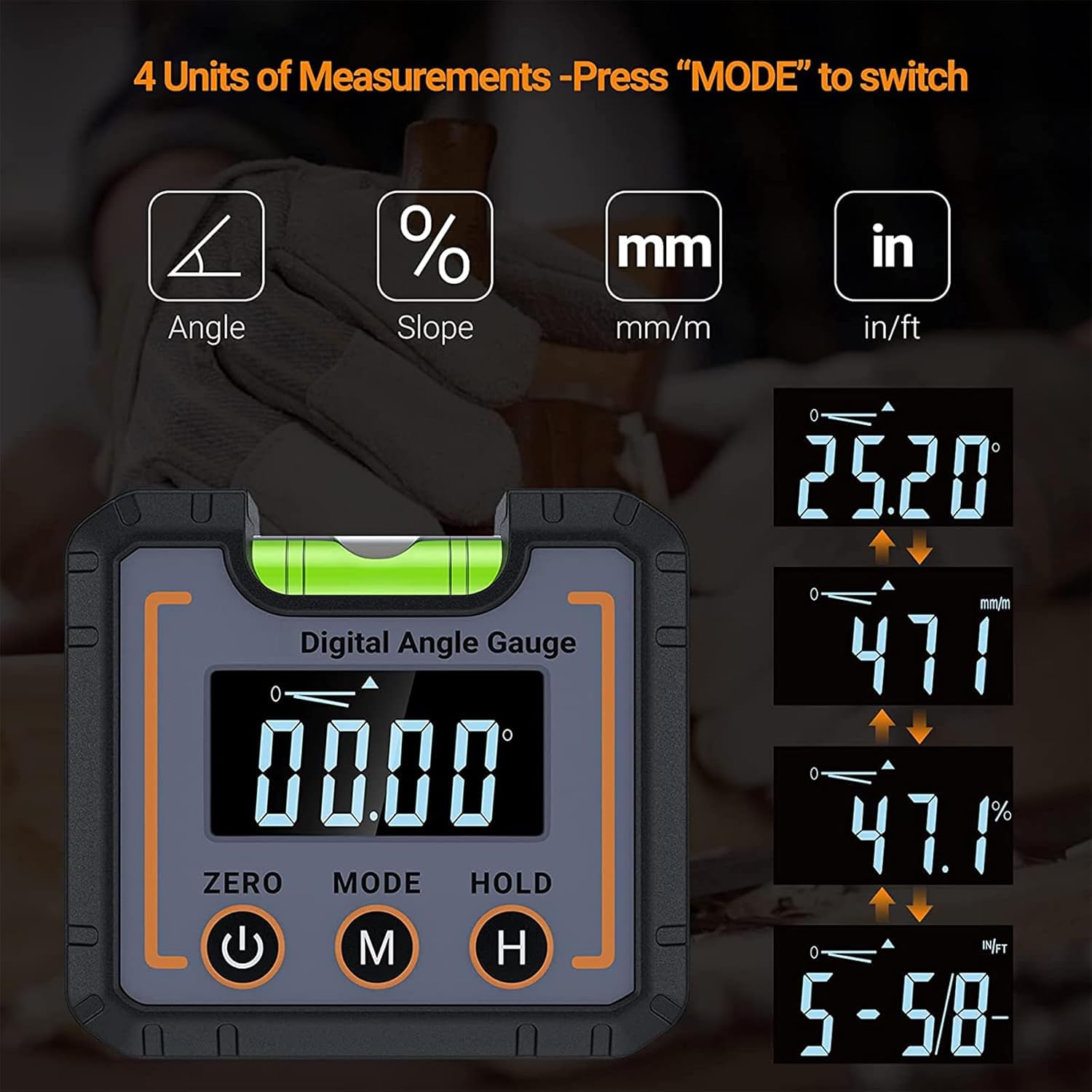
Figure 3: Switching between the four available measurement units.
5.4 Hold-toiminto
The PIDÄ function allows you to freeze the current reading on the display for easier viewing, especially in hard-to-reach areas.
- To activate the HOLD function, short press the PIDÄ button. The reading will freeze, and a 'HOLD' indicator may appear on the screen.
- To release the HOLD function and resume live readings, short press the PIDÄ painiketta uudelleen.
5.5 Automatic Screen Flip
The display automatically rotates 180° when the device is inverted, ensuring the numbers are always upright and easy to read from any orientation.

Figure 4: The large LCD display with backlight and automatic screen flip for enhanced readability.
5.6 Magneettisen jalustan käyttö
The strong magnetic base allows the inclinometer to be securely attached to metal surfaces, providing hands-free operation and stable measurements.

Figure 5: The inclinometer in use, demonstrating its versatility.
5.7 Esimample Sovellukset
The ERICAT Digital Angle Gauge is suitable for a variety of tasks:
- Setting blade angles on table saws and miter saws.
- Measuring slopes for drainage or construction.
- Aligning machinery and equipment.
- Checking angles in automotive repair.
- General leveling and angle finding in home decoration and DIY projects.

Figure 6: Multi-scenario usage of the digital angle gauge, including timber processing, home decoration, and car repair.
5.8 Illustrative Videos
The following videos demonstrate common features and uses of digital angle gauges. Please note that the specific device shown in these videos may vary from your ERICAT model, but the principles of operation are similar.
Video 1: Demonstration of a digital angle finder with electronic laser, showing angle measurement and laser line projection.
Video 2: Yliview of a digital angle gauge, highlighting its multi-functional aspects, angle range, measurement modes, and backlight display.
Video 3: Features and operation of a digital magnetic angle gauge, including its laser function, measurement modes, and magnetic base.
6. Huolto
- Puhdistus: Pyyhi laite pehmeällä, kuivalla liinalla. Älä käytä hankaavia puhdistusaineita tai liuottimia.
- Varastointi: Store the inclinometer in a cool, dry place away from direct sunlight and extreme temperatures. Remove batteries if storing for extended periods to prevent leakage.
- Akun vaihto: Vaihda paristot, kun heikon pariston ilmaisin ilmestyy näyttöön tarkkojen lukemien varmistamiseksi.
7. Vianmääritys
- Laite ei käynnisty: Tarkista paristojen asennus ja varmista, että paristot ovat tuoreita.
- Epätarkat lukemat: Ensure the device is placed on a stable surface. Perform calibration if necessary.
- Näytössä näkyy 'Err': This may indicate an out-of-range measurement or a calibration issue. Re-position the device or perform calibration.
8. Tekniset tiedot
| Ominaisuus | Erittely |
|---|---|
| Tuotteen nimi | Digitaalinen kallistusmittari |
| Näyttöalue | 0-90° |
| Resoluutio | 0.05° |
| Tarkkuus | ±0.1° |
| Virtalähde | 2 AA-paristoa (eivät sisälly) |
| Käyttölämpötila | 0°C - 40°C |
| Varastointilämpötila | -10°C - 50°C |
| Tuotteen koko | 68x32x62mm |
| Valmistaja | ERICAT |
9. Takuu ja tuki
For warranty information, technical support, or service inquiries, please refer to the contact information provided with your purchase or visit the official ERICAT websivusto. Säilytä ostokuitti ostotodistuksena takuuvaatimuksia varten.


