Johdanto
This manual provides essential instructions for the setup, operation, and maintenance of your Telefunken TDV-322 DVD Player. Please read this manual thoroughly before using the device to ensure proper functionality and to prevent damage.
The Telefunken TDV-322 is designed to play various disc formats, offering versatile entertainment options for your home. It includes multiple output options for connecting to different television and audio systems.
Tuote loppuview
The Telefunken TDV-322 DVD Player is a compact device for playing DVDs and CDs. It features a front-loading disc tray, a digital display, and front-panel controls. Connectivity options are located on the rear panel.
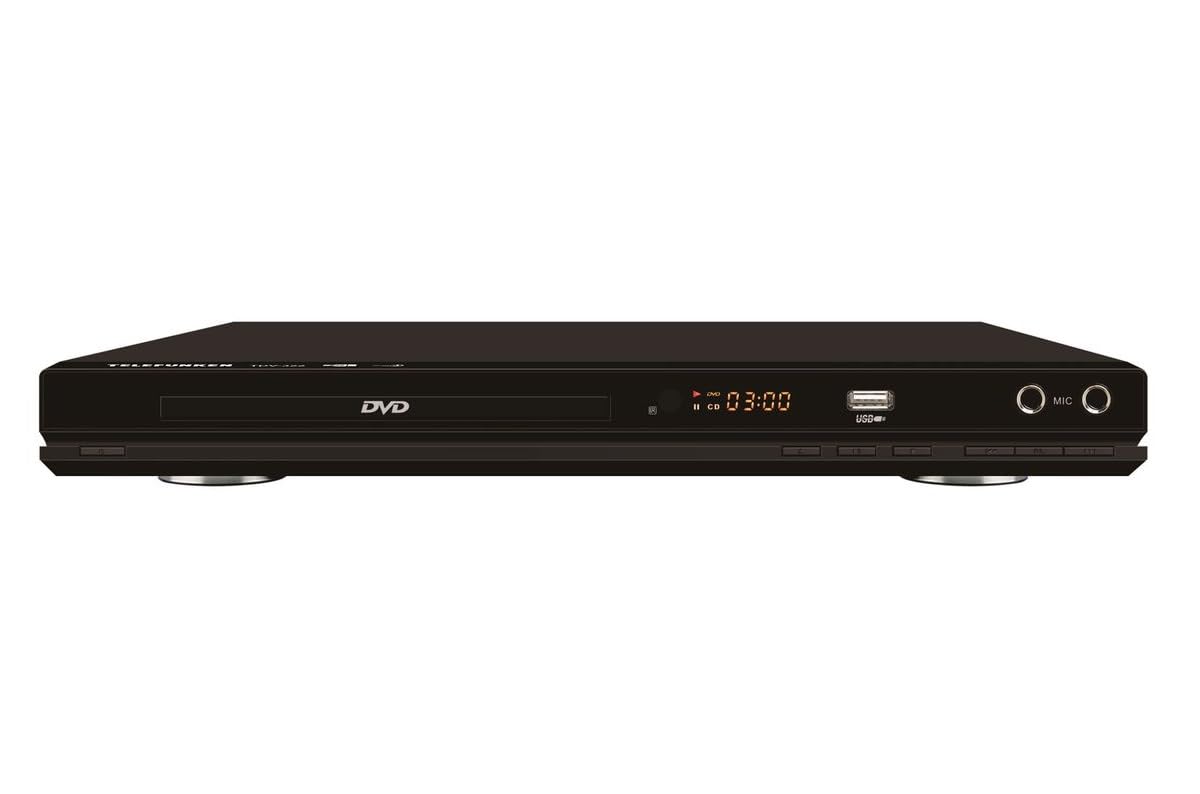
Kuva 1: Edessä view of the Telefunken TDV-322 DVD Player. The image displays the black unit with a central disc tray, a digital time display, a USB port, and two microphone input jacks on the right side. Below the disc tray are several control buttons.
Tärkeimmät ominaisuudet
- Full DVD player functionality for various disc types.
- Helppokäyttöinen kaukosäädin mukavaan käyttöön.
- Component video output for standard-definition television connections.
- Composite video output for older television models.
- Coaxial and optical digital audio outputs for surround sound system integration.
- Parental control features for content management.
- Compatibility with DVD, DVD-R, DVD-RW, VCD, SVCD, CD, CD-R, CD-RW, MP3, WMA, JPEG, and MPEG4 files.
Asennusohjeet
1. Purkaminen
Carefully remove the DVD player and all accessories from the packaging. Retain the packaging for future transport or storage.
2. Liittäminen televisioon
The TDV-322 offers several video output options:
- Komponenttivideolähtö: Use a component video cable (red, green, blue connectors) to connect the DVD player's component output jacks to the corresponding input jacks on your standard-definition TV.
- Komposiittivideolähtö: Use a composite video cable (yellow connector) to connect the DVD player's composite video output jack to the video input jack on an older TV.
Note: This DVD player does not feature an HDMI port. Ensure your television has compatible input ports.
3. Äänentoistojärjestelmään kytkeminen
For enhanced audio, connect the DVD player to an external audio system:
- Koaksiaalinen digitaalinen audiolähtö: Use a coaxial digital audio cable to connect the DVD player's coaxial output to a compatible input on your surround sound receiver.
- Optinen digitaalinen äänilähtö: Use an optical digital audio cable to connect the DVD player's optical output to a compatible input on your surround sound receiver.
4. Virtaliitäntä
Connect the power cord to the DVD player's power input and then plug it into a standard electrical outlet.
Käyttöohjeet
1. Perustoisto
- Paina POWER -painiketta etupaneelissa tai kaukosäätimessä soittimen käynnistämiseksi.
- Paina AUKI/KIINNI -painiketta avataksesi levykelkan.
- Aseta levy (DVD, CD jne.) varovasti levykelkkaan tekstipuoli ylöspäin.
- Paina AUKI/KIINNI -painiketta uudelleen sulkeaksesi lokeron.
- The player will automatically begin playback or display a menu.
- Käytä TOISTA/TAUKO, STOP, ETEENPÄIN, ja KÄÄNTÄ kaukosäätimen tai etupaneelin painikkeilla toiston hallintaan.
2. Kaukosäätimen käyttäminen
The included remote control provides full functionality for the DVD player. Refer to the remote control diagram (not provided in this manual) for specific button layouts. Ensure batteries are correctly inserted.
3. USB-toisto
Insert a USB flash drive into the USB port on the front panel. The player will detect the drive and allow you to browse and play compatible media files (MP3, WMA, JPEG, MPEG4).
4. Lapsilukko
The DVD player includes parental control features to restrict playback of certain content. Access these settings through the system menu using the remote control. A password may be required to enable or disable these features.
Huolto
- Laitteen puhdistus: Pyyhi DVD-soittimen ulkopinta pehmeällä, kuivalla liinalla. Älä käytä nestemäisiä puhdistusaineita tai hankaavia aineita.
- Levyn hoito: Käsittele levyjä reunoista. Pidä ne puhtaina ja naarmuuntumattomina. Pyyhi levyjä pehmeällä, nukkaamattomalla liinalla keskeltä ulospäin.
- Ilmanvaihto: Ensure the DVD player has adequate ventilation. Do not block any ventilation openings.
- Varastointi: Kun laitetta ei käytetä pitkään aikaan, irrota virtajohto pistorasiasta ja säilytä laitetta viileässä ja kuivassa paikassa.
Vianetsintä
| Ongelma | Mahdollinen syy | Ratkaisu |
|---|---|---|
| Ei virtaa | Virtajohtoa ei ole kytketty; pistorasia ei ole aktiivinen. | Ensure power cord is securely connected. Check power outlet with another device. |
| Ei videolähtöä | Video cables incorrectly connected; Incorrect TV input selected. | Verify component or composite video cables are securely connected to the correct input on your TV. Select the correct input source on your TV. |
| Ei äänilähtöä | Audio cables incorrectly connected; Incorrect audio input selected on receiver/TV; Volume too low. | Check coaxial/optical audio connections. Ensure the correct audio input is selected on your audio system or TV. Increase volume. |
| Levyä ei toisteta | Disc is dirty or scratched; Disc is inserted incorrectly; Unsupported disc format. | Clean the disc. Reinsert the disc with the label side up. Verify the disc format is supported (DVD, CD, VCD, SVCD). |
| Kaukosäädin ei toimi | Paristot ovat tyhjentyneet tai asetettu väärin päin; kaukosäätimen ja soittimen välillä on este. | Replace batteries. Ensure correct battery polarity. Remove any obstructions. Point remote directly at the player's sensor. |
Tekniset tiedot
| Ominaisuus | Yksityiskohta |
|---|---|
| Mallinumero | TDV-322 |
| Merkki | Telefunken |
| Väri | Musta |
| Tuetut levymuodot | DVD, DVD-R, DVD-RW, VCD, SVCD, CD, CD-R, CD-RW |
| Tuettu File Muodot | MP3, WMA, JPEG, MPEG4 (via USB) |
| Videolähdöt | Komponenttivideo, komposiittivideo |
| Äänilähdöt | Coaxial Digital Audio, Optical Digital Audio |
| Lisäportit | USB port, Microphone inputs |
Takuutiedot
The Telefunken TDV-322 DVD Player comes with a 1 vuoden valmistajan takuu. Please retain your proof of purchase for warranty claims. For details regarding warranty terms and conditions, refer to the warranty card included with your product or contact Telefunken customer support.
Asiakastuki
If you encounter any issues not covered in the troubleshooting section or require further assistance, please contact Telefunken customer support. Contact information can typically be found on the product packaging, the official Telefunken websivustolla tai takuuasiakirjoissa.
When contacting support, please have your model number (TDV-322) and purchase details ready.


