1. Johdanto
The Qolsys IQ Lock-PG Push Button Deadbolt provides enhanced security and convenient access to your property. This smart motorized deadbolt integrates PowerG wireless communication for reliable and stable connectivity, compatible with IQ Panel 4, IQ4 Hub, and IQ4 NS systems. It offers multiple access methods, including a pushbutton keypad, traditional key, thumb-turn, and remote control via the Alarm.com app.
Designed for durability, the IQ Lock-PG meets ANSI Grade 2 certifications and features an attractive oil-rubbed bronze finish to complement various door styles.
2. Tärkeimmät ominaisuudet
- Motorized Deadbolt: Push button operation with an attractive finish.
- Useita käyttötapoja: Lock/unlock via PowerG wireless communication (App and Panel), user code, thumb-turn, or physical key.
- Käyttäjäkoodin kapasiteetti: Supports up to 250 user codes (4 to 8 digits) for family, friends, or temporary guests.
- Etähallinta: Create or remove individual codes remotely via the Alarm.com app.
- Helppo asennus: Battery-powered (AA batteries, not included), requiring no complex wiring.
- Kestävä rakenne: ANSI/BHMA Grade 2 certified for strong, reliable security.
3. Pakkauksen sisältö
Varmista, että pakkauksessa on kaikki tarvittavat osat ennen asennuksen aloittamista:
- Qolsys IQ Lock-PG Deadbolt Assembly
- (2) Avaimet käteen -periaatteella
- Asennuslaitteisto
- Käyttöohje (tämä asiakirja)
4. Asennus ja asennus
The Qolsys IQ Lock-PG motorized deadbolt is designed for straightforward installation. All necessary hardware and detailed instructions are included. Please read these instructions carefully before proceeding.
4.1 Yhteensopivuus ja vaatimukset
- Oven paksuus: Installs on standard doors measuring 1-3/8 inches to 2-1/4 inches (35-58mm) thick.
- upotussyvyysvaatimus: Adjustable latch fits existing backsets of either 2-3/8 inches or 2-3/4 inches (60/70mm).
- Oven luovutus: Suitable for both right-handed and left-handed door operations.
- Järjestelmäintegraatio: Requires an IQ Panel 4, IQ4 Hub, or IQ4 NS (sold separately) and an active Internet connection for smart features.
- Teho: Requires four (4) AA alkaline batteries (not included).
4.2 Asennusvaiheet (yliview)
While detailed steps are provided in the included physical manual, here is a general overview:
- Prepare the door: Ensure the door bore holes and backset are compatible with the lock.
- Asenna salpa ja vastakappale.
- Asenna ulkoinen näppäimistökokoonpano.
- Asenna sisäpuolinen kiinnityslevy.
- Liitä kaapeli ulkokokoonpanosta sisäkokoonpanoon.
- Asenna sisäkokoonpano.
- Insert four (4) AA alkaline batteries into the battery compartment.
- Suorita oven avaus- ja avausprosessi (automaattinen säätö).
- Test the lock's functionality with the keypad and thumb-turn.
- Pair the lock with your IQ Panel system and Alarm.com app for smart features.

Kuva 4.1: Etuosa view of the Qolsys IQ Lock-PG Deadbolt, showcasing näppäimistö ja avaimenreikä.
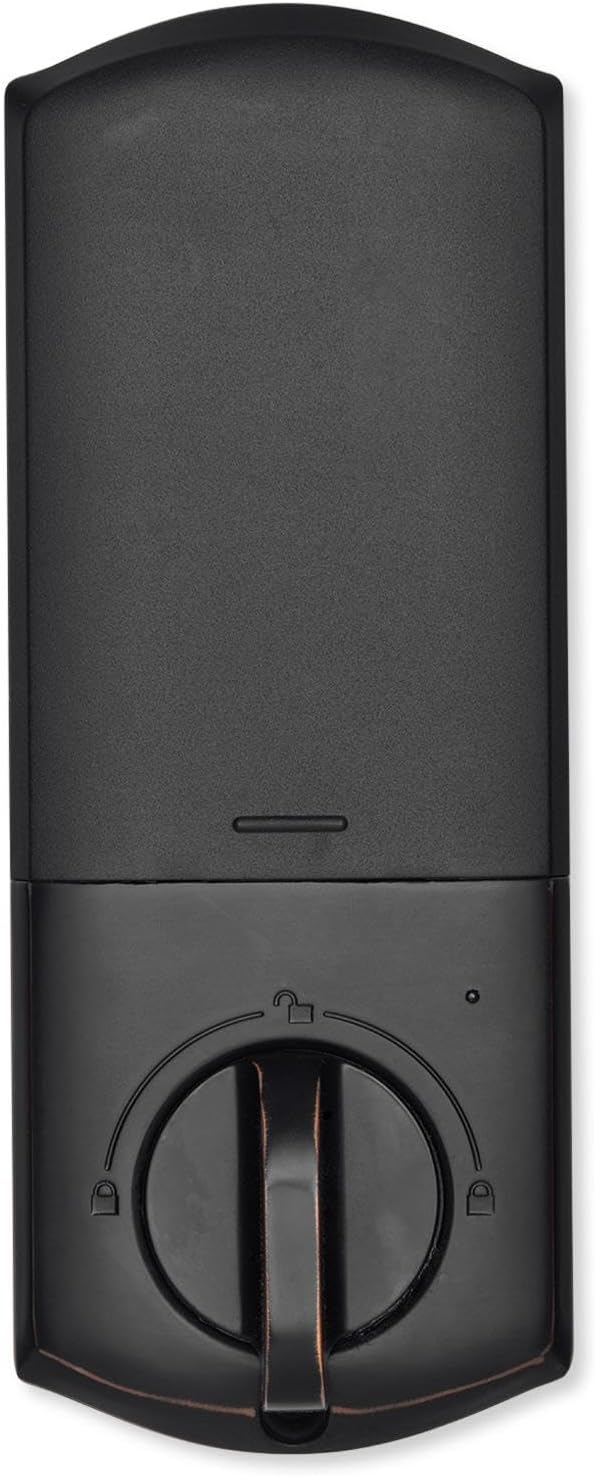
Kuva 4.2: Sisustus view of the Qolsys IQ Lock-PG Deadbolt, highlighting the thumb-turn and battery cover.

Figure 4.3: Qolsys IQ Lock-PG Deadbolt installed on a door, illustrating its appearance in a real-world setting.
5. Käyttöohjeet
Qolsys IQ Lock-PG tarjoaa useita käteviä tapoja lukita ja avata oven.
5.1 Käyttötavat
- Pushbutton Keypad: Enter a valid 4-to-8 digit user code on the exterior keypad to unlock the deadbolt. The lock will automatically engage when closed.
- Fyysinen avain: Use one of the provided turnkeys in the exterior key cylinder for manual unlocking and locking.
- Thumb-Turn: From the interior, rotate the thumb-turn to manually lock or unlock the deadbolt.
- PowerG Wireless Communication (Alarm.com App/Panel):
The Alarm.com mobile app allows for remote monitoring and control of your Qolsys devices. Once paired with your IQ Panel, you can:
- Lock or unlock your smart doors from anywhere.
- Create, modify, or delete up to 250 individual user codes. User codes are managed through the Alarm.com app and sent to the lock.
- Receive notifications regarding lock status and activity.
The Alarm.com app is available for Android, iOS, Windows, and Blackberry devices.
6. Huolto
Regular maintenance ensures the longevity and optimal performance of your Qolsys IQ Lock-PG deadbolt.
6.1 Pariston vaihto
The deadbolt is powered by four (4) AA alkaline batteries. Battery life is approximately 12 months, based on typical usage (6 user code unlock events and 10 locking/unlocking cycles per day). The lock features a low battery alarm to notify you when replacement is needed.
- When the low battery alarm sounds or is indicated, replace all four AA batteries simultaneously.
- Remove the interior cover to access the battery compartment.
- Remove old batteries and dispose of them according to local regulations.
- Aseta uudet AA-alkaliparistot paikoilleen varmistaen oikea napaisuus.
- Vaihda sisäkansi.
6.2 Puhdistus
Clean the exterior and interior surfaces of the lock with a soft, damp liinalla. Vältä hankaavien puhdistusaineiden tai liuottimien käyttöä, sillä ne voivat vahingoittaa pintaa.
7. Vianmääritys
This section addresses common issues you might encounter with your Qolsys IQ Lock-PG deadbolt.
7.1 Näppäimistön lukitus
If 10 consecutive invalid user codes are entered, the keypad will enter a lockout mode for 3 minutes. During this time, no codes can be entered. Wait for the lockout period to expire before attempting to enter a valid code again.
7.2 Lukko ei vastaa
- Check the batteries: Ensure they are correctly installed and not depleted. Replace all four AA batteries if necessary.
- Verify connection to IQ Panel: Ensure the lock is properly paired with your IQ Panel 4, IQ4 Hub, or IQ4 NS. Check the panel's status for the lock.
- Check door alignment: Ensure the door and frame are properly aligned and there is no obstruction preventing the deadbolt from extending or retracting smoothly.
7.3 Issues with Alarm.com App Control
- Ensure your IQ Panel has an active Internet connection.
- Verify your smartphone or tablet has a stable internet connection.
- Log out and log back into the Alarm.com app.
- Ensure the lock is properly enrolled in your Alarm.com account.
8. Tekniset tiedot
| Ominaisuus | Erittely |
|---|---|
| Valmistajan osanumero | IQ Lock-PGK-ORB |
| UPC | 7290109986104 |
| Valmis | Öljy-hierottu pronssi |
| Itse luovutus | Tuettu |
| Pultin tyyppi | Moottoroitu/vakiosalpa |
| upotussyvyysvaatimus | 2-3/8" / 2-3/4" säädettävä (60/70 mm) |
| Oven valmistelu | 1-1/2" / 2-1/8" (38/54mm) |
| Oven paksuus | 1-3/8" - 2-1/4" (35-58 mm) automaattinen säätö |
| Avausmenetelmä | PowerG wireless communication (App and Panel), Button keypad, key, thumb-turn |
| Koodikapasiteetti | Käyttäjäkoodi x 250 |
| Koodin pituus | 4-8 numeroa |
| Ohitusavaimen sylinteri | Kyllä |
| Sylinteri | KW1-kiilaura |
| Työvoimatage | DC 6V |
| Akku (ei sisälly toimitukseen) | AA x 4 |
| Käyttölämpötila ulkotiloissa | -31 °F - 150 °F (-35 °C - 65 °C) |
| Käyttölämpötila sisätiloissa | 32°F - 140°F (0°C - 60°C) |
| IP-luokitus Ulkopuolinen kokoonpano | IP54 |
| Lukitustila (väärä sisäänpääsyraja) | Näppäimistön lukitus 3 minuutiksi 10 väärän käyttäjäkoodin syötön jälkeen |
| Alhaisen akun hälytys | Kyllä |
| Akun kesto | Vähintään 12 kuukautta (6 käyttäjäkoodin lukituksen avaustapahtumaa ja 10 lukituksen avaus- ja lukitusjaksoa päivässä) |
| Sertifikaatit | FCC, IC, ANSI BHMA A156.36 Grade 2, UL10C (20 minuutin paloluokitus) |
| IoT-yhteys | PowerG |
| Tuotteen paino | 1.6KG (3.6 LB) |
| Käyttökosteus ulkopuolelta | 100 % kondensoituva |
| Käyttökosteus Sisätilat | 20 % ~ 95 % ei kondensoituvaa |
9. Takuu ja tuki
9.1 Takuutiedot
The Qolsys IQ Lock-PG Push Button Deadbolt comes with a warranty of Twelve months from the date of purchaseSäilytä ostokuittisi takuuvaatimuksia varten.
9.2 Asiakastuki
For technical assistance, troubleshooting beyond this manual, or warranty inquiries, please contact Qolsys customer support. Refer to the Qolsys official webKatso ajantasaisimmat yhteystiedot verkkosivustoltasi tai tuotepakkauksesta.