Johdanto
Kiitos ostoksestasiasing the i-box Stylus N10 Record Player. This manual provides essential information for setting up, operating, and maintaining your new turntable. Please read it thoroughly before use to ensure optimal performance and longevity of your device. The i-box Stylus N10 combines vintage aesthetics with modern features, offering a high-quality audio experience for your vinyl collection and seamless Bluetooth connectivity for digital music.

Image: The i-box Stylus N10 Record Player, showcasing its elegant design in a home environment.
Tärkeitä turvallisuustietoja
- Lue kaikki ohjeet ennen laitteen käyttöä.
- Säilytä tämä käyttöopas myöhempää tarvetta varten.
- Älä altista laitetta sateelle, kosteudelle tai suoralle auringonvalolle.
- Varmista asianmukainen ilmanvaihto; älä tuki mitään tuuletusaukkoja.
- Käytä vain valmistajan määrittelemiä lisälaitteita/lisävarusteita.
- Irrota laite verkkovirrasta ukkosmyrskyjen aikana tai kun sitä ei käytetä pitkään aikaan.
- Anna kaikki huoltotoimenpiteet pätevän huoltohenkilöstön tehtäväksi.
Pakkauksen sisältö
Tarkista, että pakkauksessasi on kaikki alla luetellut tuotteet:
- i-box Stylus N10 Record Player
- Virtajohto ja sovitin
- Käyttöopas (tämä asiakirja)
- Slipmat (pre-installed on platter)
Tuote loppuview
Familiarize yourself with the components of your i-box Stylus N10 Record Player:
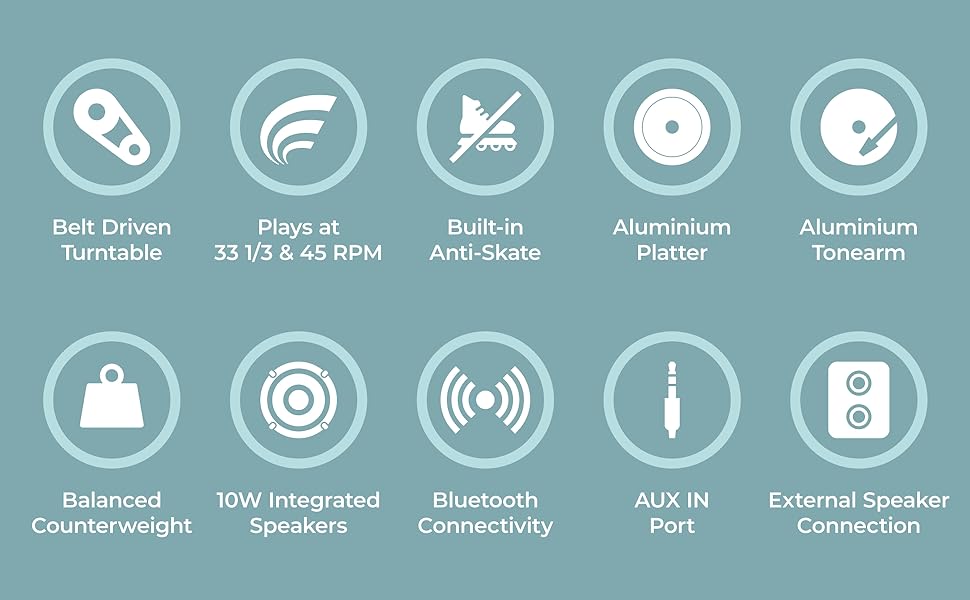
Image: Detailed diagram showing the various parts of the i-box Stylus N10, including the dust cover, spindle, counterweight, tonearm, lift lever, auto-off control, speed & Bluetooth selector, volume control, headshell, stylus & cartridge, slipmat, aluminum platter, power switch, line out ports, and AUX in port.
- 1. Dust Cover: Suojaa levylautasta ja äänivartta pölyltä.
- 2. Spindle: Pitää ennätyksen paikoillaan.
- 3. Counterweight: Tasapainottaa äänivarren ja säätää seurantavoimaa.
- 4. Nostovipu: Nostaa ja laskee äänivarren.
- 5. Äänivarsi: Holds the headshell and stylus.
- 6. Auto Off Control: Ottaa käyttöön tai poistaa käytöstä levylautasen automaattisen pysäytyksen levyn lopussa.
- 7. Speed & BT Selector: Selects playback speed (33/45 RPM) or Bluetooth mode.
- 8. Äänenvoimakkuuden säätö: Säätää sisäänrakennettujen kaiuttimien äänenvoimakkuutta.
- 9. Headshell: Holds the stylus and cartridge.
- 10. Stylus & Cartridge: Reads the grooves of the record. (Audio-Technica integrated)
- 11. Slipmat: Provides a soft surface for records and reduces static.
- 12. Aluminum Platter: The rotating surface on which records are placed.
- 13. Virtakytkin: Kytkee laitteen päälle/pois päältä.
- 14. Phono Line Out Switch: (Not explicitly labeled in diagram but implied by Line Out Ports) Switches between Phono and Line output levels if applicable.
- 15. Line Out Ports (RCA): Ulkoiseen liitäntään amppelastuslaitteita tai kaiuttimia.
- 16. AUX In Port: Ulkoisten äänilaitteiden liittämiseen 3.5 mm:n kaapelilla.
- 17. 10W Integrated Speakers: Built-in stereo speakers for direct audio playback.
Asennus
1. Pakkauksen purkaminen ja sijoittaminen
- Poista levysoitin varovasti pakkauksestaan.
- Place the unit on a flat, stable surface away from direct sunlight, heat sources, or excessive dust.
- Varmista, että laitteen ympärillä on riittävästi tilaa ilmanvaihtoa varten.
2. Levylautasen ja hihnan asennus
The aluminum platter and drive belt are typically pre-installed. If not, follow these steps:
- Gently place the aluminum platter onto the spindle.
- Locate the drive belt, usually found around the inner rim of the platter.
- Carefully stretch the belt around the motor pulley, which is a small brass cylinder located near the spindle.
- Place the slipmat on top of the platter.
3. Counterweight Adjustment
Proper counterweight adjustment is crucial for optimal sound and to prevent damage to your records and stylus.

Image: The adjustable counterweight on the tonearm, used for precise pressure.
- Irrota kynän suojus.
- Gently hold the tonearm and release the tonearm clamp.
- Rotate the counterweight at the rear of the tonearm until the tonearm is balanced horizontally and floats freely.
- Kun vastapaino on tasapainossa, pidä sitä paikallaan ja kierrä numerorengas asentoon '0'.
- Rotate the counterweight (including the numbered ring) counter-clockwise to the recommended tracking force, typically between 2.0 and 3.0 grams for the integrated Audio-Technica cartridge. Refer to the cartridge manufacturer's specifications for the exact recommended force.
4. Luisteluneston säätö
The i-box Stylus N10 features built-in anti-skating to minimize distortion and ensure optimal tracking accuracy. No manual adjustment is typically required for this feature.
5. Pölysuojuksen asennus
Insert the hinges of the dust cover into the slots at the back of the turntable. The dust cover protects the unit when not in use.
6. Virtaliitäntä
- Connect the power adapter to the DC IN port on the back of the turntable.
- Kytke virtalähde sopivaan pistorasiaan.
Käyttöohjeet

Kuva: Lähikuva view of the control dials on the i-box Stylus N10, including volume, speed, and auto-off controls.
1. Vinyylilevyn soittaminen

Image: The i-box Stylus N10 Record Player with its dust cover open, ready for playing a record.
- Käynnistä laite virtakytkimellä.
- Aseta levy vadille.
- Select the appropriate speed (33 RPM or 45 RPM) using the Speed & BT Selector. For 45 RPM records, place the included 45 RPM adapter on the spindle if needed.
- Lift the tonearm using the Lift Lever.
- Siirrä äänivarsi manuaalisesti levyn halutun aloitusuran yli.
- Gently lower the tonearm using the Lift Lever. The stylus will descend onto the record and playback will begin.
- Adjust the volume using the Volume Control dial.
- At the end of the record, if Auto Off Control is enabled, the platter will stop spinning. You will need to manually return the tonearm to its rest. If Auto Off Control is disabled, the platter will continue to spin.
- When finished, lift the tonearm, return it to its rest, and secure it with the tonearm clamp. Turn off the unit.
2. Bluetooth-yhteys

Image: A couple enjoying music, demonstrating the Bluetooth connectivity feature of the i-box Stylus N10, allowing wireless streaming from a smartphone.
The i-box Stylus N10 can receive audio wirelessly from your Bluetooth-enabled devices.
- Kytke laite päälle.
- Set the Speed & BT Selector to the 'BT' position. The unit will enter Bluetooth pairing mode, indicated by a flashing light (refer to indicator light section if available).
- Ota Bluetooth käyttöön Bluetooth-laitteessasi (esim. älypuhelimessa tai tabletissa) ja hae käytettävissä olevia laitteita.
- Select "i-box Stylus N10" from the list of devices.
- Once paired, the indicator light will become solid (refer to indicator light section if available), and you can play audio from your device through the turntable's speakers.
- Adjust volume using the Volume Control on the turntable or on your connected device.
3. Lisälaitetulo (AUX IN)
Connect external audio sources like MP3 players or CD players using the AUX IN port.
- Connect a 3.5mm audio cable (not included) from your external audio device's headphone or line-out jack to the AUX IN port on the turntable.
- The turntable will automatically switch to AUX IN mode when a cable is connected.
- Toista ääntä ulkoisesta laitteestasi.
- Adjust volume using the Volume Control on the turntable or on your connected device.
4. Connecting to External Speakers (Line Out)

Image: The i-box Stylus N10 Record Player connected to an external speaker, demonstrating its versatility for enhanced audio output.
For enhanced audio, you can connect the i-box Stylus N10 to external powered speakers or an amplifier using the RCA Line Out ports.
- Ensure both the turntable and your external audio system are turned off.
- Connect an RCA cable (not included) from the Line Out ports (red for right, white for left) on the turntable to the corresponding audio input jacks on your ampnostin tai teholliset kaiuttimet.
- Turn on your external audio system, then turn on the turntable.
- Play a record. The audio will now be routed through your external speakers.
- Adjust the volume using the controls on your external audio system. The turntable's volume control will not affect the Line Out audio.
Huolto
1. Laitteen puhdistaminen
- Irrota laite aina pistorasiasta ennen puhdistamista.
- Pyyhi ulkopinnat pehmeällä, kuivalla liinalla. Älä käytä hankaavia puhdistusaineita, vahoja tai liuottimia.
- The dust cover can be cleaned with a soft, damp kangas.
2. Kynän puhdistaminen

Kuva: Lähikuva view of the Audio-Technica stylus and cartridge, highlighting its precision component.
- Käytä pehmeää harjaa, joka on tarkoitettu kynän puhdistukseen, ja harjaa varovasti takaa eteenpäin.
- Vältä koskettamasta kynää sormillasi.
3. Kynän vaihto
The stylus has a limited lifespan (typically 300-500 hours of playback) and should be replaced when sound quality deteriorates or the stylus is visibly damaged. The i-box Stylus N10 uses an Audio-Technica cartridge, and replacement styli for this type are widely available.
- Gently pull the old stylus assembly downwards and forwards to remove it from the cartridge body.
- Kohdista uusi neulakokoonpano äänirasiaan ja työnnä sitä ylös- ja taaksepäin, kunnes se napsahtaa paikalleen.
- Ensure the new stylus is securely seated before use.
Vianetsintä
| Ongelma | Mahdollinen syy | Ratkaisu |
|---|---|---|
| Ei virtaa | Virtasovitin ei ole kytketty; Pistorasia ei ole aktiivinen. | Varmista, että virtalähde on kytketty kunnolla. Kokeile toista pistorasiaa. |
| Kaiuttimista ei kuulu ääntä | Volume too low; Incorrect mode selected (e.g., BT when playing record); Stylus protector still on; Stylus damaged. | Increase volume. Ensure correct mode is selected. Remove stylus protector. Inspect stylus for damage; replace if necessary. |
| Ääni vääristynyt tai hyppivä | Record is dirty or scratched; Stylus is dirty or worn; Tracking force incorrect; Turntable not level. | Clean record. Clean or replace stylus. Re-adjust counterweight. Place turntable on a level surface. |
| Bluetooth ei muodosta yhteyttä | Turntable not in BT mode; Device too far; Device already connected to another Bluetooth unit. | Ensure Speed & BT Selector is in 'BT' position. Move device closer to turntable. Disconnect device from other Bluetooth units. |
| Lautasento ei pyöri | Drive belt dislodged or broken; Auto Off Control activated at end of record. | Check and re-seat the drive belt. If at end of record, this is normal behavior; manually return tonearm. |
Tekniset tiedot
- Mallin nimi: Stylus N10
- Tuotteen mallinumero: 79339PI/1
- Merkki: i-box
- Yhteystekniikka: Bluetooth, lisälaite
- Mukana tulevat komponentit: Virtajohto ja sovitin
- Erikoisominaisuudet: Built-in Bluetooth, Belt Driven Turntable, Precise Counterweight, Built-in Anti-Skating, RCA/Phono Sockets for External Speaker Connection
- Materiaali: Wood (Walnut Veneer)
- Tyyli: Moderni
- Väri: Pähkinä
- Yhteensopivat laitteet: Kaiutin
- Moottorityyppi: DC moottori
- Lähtöteho: 10W (Integrated Speakers)
- Toistonopeudet: 33 1/3 RPM, 45 RPM
- Lautasen materiaali: Alumiini
- Tonearm Material: Alumiini
- Patruunan tyyppi: Audio-Technica (Moving Magnet)
- Virrankulutus (päällä-tilassa): 20 wattia
- Tuotteen paino: 14.62 kiloa
- Paketin mitat: 20.4 x 19.2 x 11.6 tuumaa
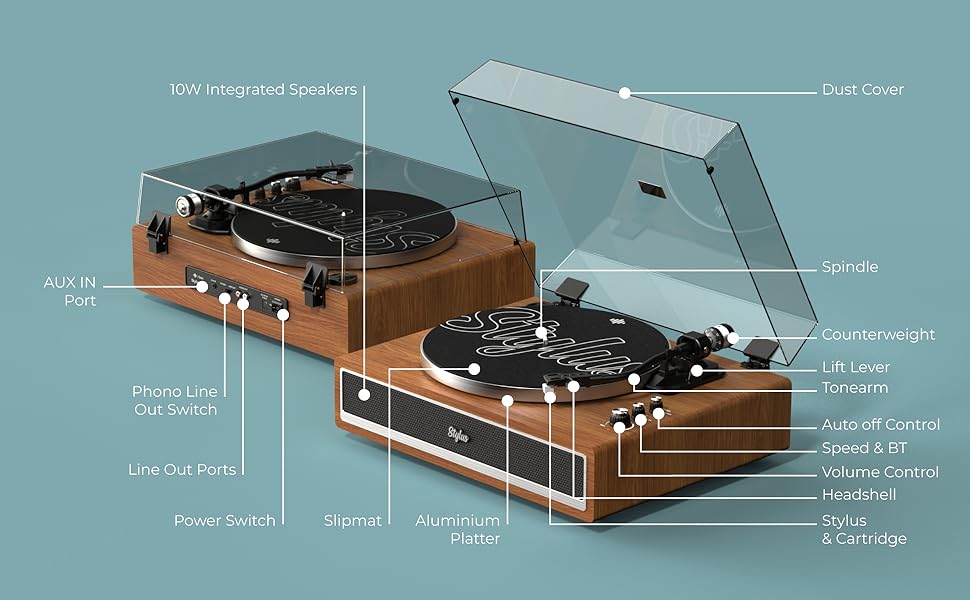
Image: Visual representation of key features including belt-driven, 33/45 RPM, built-in anti-skate, aluminum platter, aluminum tonearm, balanced counterweight, 10W integrated speakers, Bluetooth connectivity, AUX in port, and external speaker connection.
Takuu ja tuki
i-box is a proud British brand committed to quality. This product comes with a 3 vuoden takuu. For any support inquiries, troubleshooting assistance, or warranty claims, please contact our friendly UK-based customer service team.
Please visit the official i-box websivustolta ajantasaisimmat yhteystiedot ja tukiresurssit.Visit the i-box Store on Amazon