1. Johdanto
This manual provides detailed instructions for the installation, operation, and maintenance of your Shanrya 12.3-inch Car Stereo Radio Navigation GPS Player. Please read this manual thoroughly before using the product to ensure proper function and to prevent damage. This device is designed to enhance your driving experience with advanced navigation, entertainment, and connectivity features.
2. Turvallisuustiedot
- Ammattimainen asennussuositus: Due to the complexity of car electrical systems, professional installation is strongly advised to avoid damage to the unit or your vehicle.
- Ajoturvallisuus: Älä käytä laitetta tavalla, joka häiritsee ajamista. Aseta aina liikenneturvallisuus etusijalle.
- Virtalähde: Varmista, että laite on kytketty oikeaan ajoneuvon virtalähteeseen (12 V DC). Väärä äänenvoimakkuustagvoi aiheuttaa vahinkoa.
- Lämpötila: Vältä laitteen altistamista äärimmäisille lämpötiloille tai suoralle auringonvalolle pitkiä aikoja.
- Kosteus: Pidä laite poissa vedestä ja liiallisesta kosteudesta.
- Puhdistus: Käytä puhdistukseen pehmeää, kuivaa liinaa. Älä käytä hankaavia puhdistusaineita tai liuottimia.
3. Pakkauksen sisältö
Varmista, että pakkauksessa on kaikki tarvittavat osat:
- 1 x Main Head Unit (12.3-inch display)
- 1 x Air Vent Assembly
- 1 x GPS-antenni
- 1 x Virtajohtosarja
- 2 x USB-kaapelit
- 1 x ulkoinen mikrofoni
- 1 x RCA-kaapelisetti
- 1 x Käyttöohje (tämä asiakirja)
- Other necessary installation accessories (brackets, trim tools, etc.)
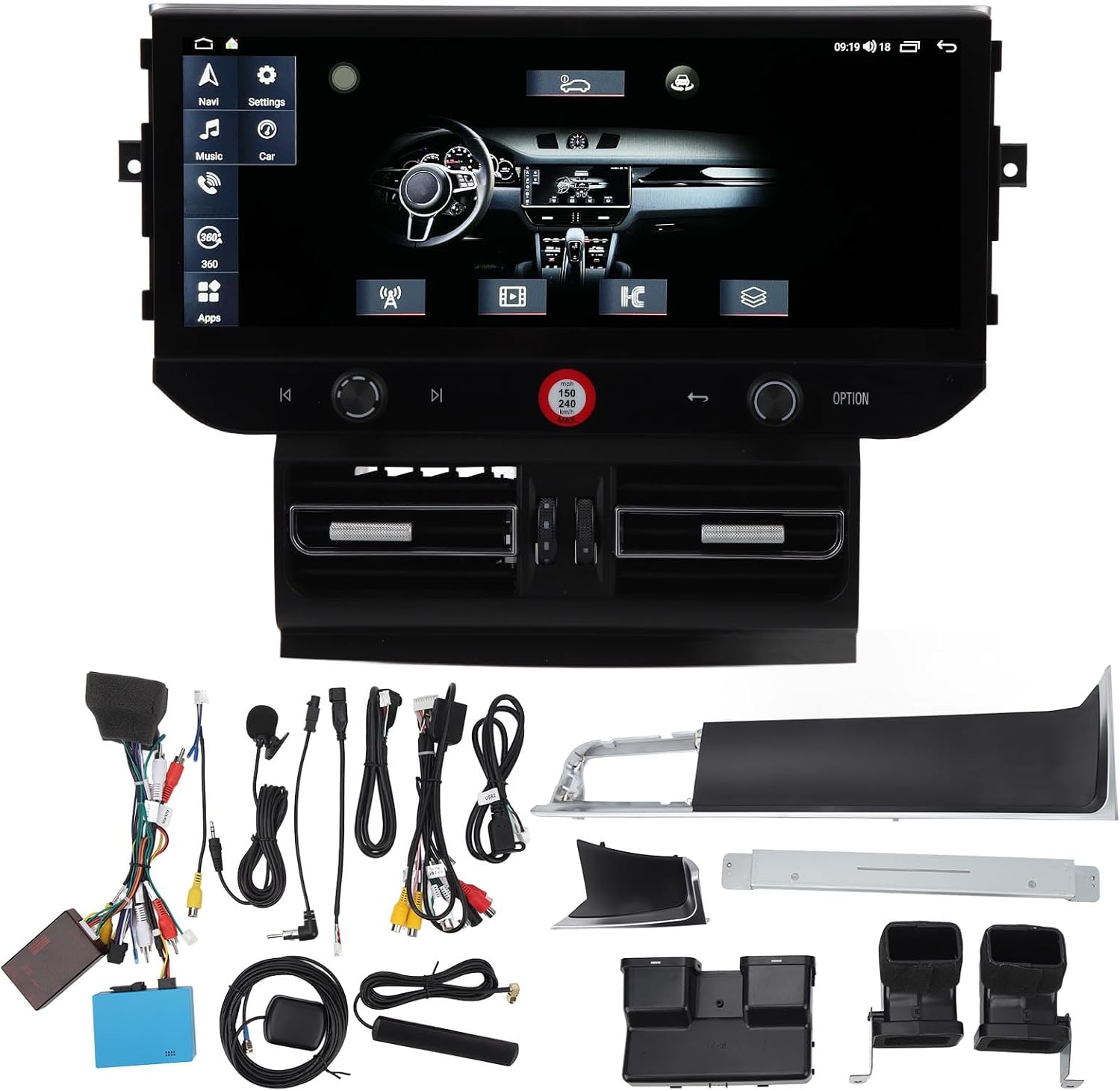
Kuva 3.1: All components of the Shanrya car stereo system, including the main head unit, wiring harnesses, GPS antenna, USB cables, and other accessories.
4. Tuote ohiview
Tutustu tärkeimpiin osiin ja niiden toimintoihin.
4.1 Main Head Unit

Kuva 4.1.1: Edessä view of the Shanrya 12.3-inch car stereo head unit, showing the large display and integrated controls.
- 12.3-tuumainen kosketusnäyttö: High-resolution display for navigation, media, and applications.
- Ohjauspainikkeet: Located on the lower bezel for volume, tuning, and menu navigation.
- Fyysiset painikkeet: For quick access to functions like navigation, music, car settings, and apps.
4.2 Air Vent Assembly

Kuva 4.2.1: Close-up of the integrated air vents and controls located directly below the main screen.
- Integroidut tuuletusaukot: Designed to seamlessly replace the original vehicle air vents.
- Ilmastointisäätimet: May include integrated controls for vehicle climate functions, depending on the specific vehicle model.
5. Asennusopas (asetus)
Tämä osio tarjoaa yleiskuvanview of the installation process. Due to variations in vehicle models and electrical systems, professional installation is highly recommended.
5.1 Asennusta edeltävät tarkastukset
- Varmista, että ajoneuvon sytytysvirta on katkaistu ja akku on irrotettu.
- Confirm compatibility with your vehicle model (Macan LHD 2014-2016).
- Gather all necessary tools (trim removal tools, screwdrivers, wire cutters, etc.).
5.2 Alkuperäisen yksikön poistaminen
- Carefully remove the existing car stereo and air vent assembly using appropriate trim removal tools.
- Irrota kaikki johtosarjat alkuperäisestä yksiköstä.
5.3 Johdotusliitännät
- Connect the provided power harness to the vehicle's wiring. Ensure all connections are secure.
- Liitä GPS-antenni ja reititä se paikkaan, jossa on esteetön yhteys. view taivaasta (esim. kojelauta).
- Connect USB cables and route them to a convenient location for external devices.
- Liitä ulkoinen mikrofoni handsfree-puheluita varten.
- Connect any other auxiliary inputs/outputs as required (e.g., reverse camera, external ampelävämpi).
5.4 Mounting the New Unit
- Integrate the new air vent assembly and main head unit into the dashboard opening.
- Kiinnitä laite mukana toimitetuilla kiinnitysruuveilla ja kannattimilla.
- Ensure all cables are neatly tucked away and not pinched.

Kuva 5.4.1: The Shanrya car stereo unit seamlessly installed in a Macan dashboard, demonstrating its fit and appearance.
5.5 Asennuksen jälkeiset toimet
- Kytke ajoneuvon akku takaisin.
- Turn on the ignition and test all functions of the unit (power, audio, navigation, Bluetooth, etc.).
- Säädä asetuksia tarpeen mukaan.
6. Käyttöohjeet
6.1 Virta päälle/pois ja äänenvoimakkuus
- Virta päälle: The unit typically powers on automatically with the vehicle's ignition.
- Virta pois: The unit powers off with the vehicle's ignition. A long press on the power button (if available) may put it into standby.
- Äänenvoimakkuuden säätö: Use the dedicated knob or touchscreen controls to adjust the audio volume.
6.2 Navigointi
- Tap the 'Navi' icon on the main screen to access the navigation application.
- Syötä määränpääsi näyttönäppäimistöllä.
- Follow the voice prompts and visual directions for your route.
6.3 Bluetooth 5.0 -yhteydet
- Siirry kohtaan 'Asetukset' > 'Bluetooth'.
- Ota Bluetooth käyttöön mobiililaitteellasi ja etsi käytettävissä olevia laitteita.
- Select the car stereo from the list and pair. Confirm the pairing code if prompted.
- Kun yhteys on muodostettu, voit soittaa/vastaanottaa puheluita ja suoratoistaa ääntä.

Kuva 6.3.1: A user interacting with the car stereo's touchscreen, demonstrating the on-screen dialer for Bluetooth calls.
6.4 Langaton CarPlay / Android Auto
- Ensure your iPhone or Android device has CarPlay/Android Auto enabled.
- Connect your device via Bluetooth or USB (for initial setup or wired connection).
- The unit should automatically detect and launch CarPlay/Android Auto.
- Access phone contacts, navigation, music, and voice assistants directly from the car stereo screen.

Kuva 6.4.1: The car stereo display showing the CarPlay interface, allowing access to mobile phone features.
6.5 Radio and Media Playback
- Radio: Select the 'Radio' application to access FM/AM stations. Use the scan function or manual tuning.
- Musiikki/video: Play media from USB drives, Bluetooth streaming, or internal storage via the 'Music' or 'Video' applications.
7. Ominaisuudet ja toiminnot
- 12.3 tuuman teräväpiirtonäyttö: Tarjoaa selkeän ja laajan view kaikille toiminnoille.
- Integroitu GPS-navigointi: Supports various navigation apps for accurate routing.
- Bluetooth 5.0: For stable and fast wireless connection to mobile devices for calls and audio streaming.
- Langaton CarPlay ja Android Auto: Seamless integration with smartphones for enhanced functionality.
- Panoramic Image Support: May refer to support for 360-degree camera systems (if installed separately).
- Multimedian toisto: Supports various audio and video formats from multiple sources.
- Ohjauspyörän ohjauksen integrointi: Yhteensopiva nykyisten ohjauspyörän säätimien kanssa mukavuuden takaamiseksi.
8. Huolto
- Näytön puhdistus: Use a soft, lint-free cloth specifically designed for electronics screens. Do not spray cleaners directly onto the screen.
- Ohjelmistopäivitykset: Periodically check for software updates from the manufacturer or seller to ensure optimal performance and access to new features. Updates are typically performed via USB.
- Yleishoito: Avoid placing heavy objects on the unit or exposing it to sharp objects that could scratch the screen.
9. Vianmääritys
Jos kohtaat ongelmia, tutustu seuraaviin yleisiin ongelmiin ja ratkaisuihin:
| Ongelma | Mahdollinen syy | Ratkaisu |
|---|---|---|
| Ei Virtaa | Löysät johdot, palanut sulake, ajoneuvon akkuongelma. | Tarkista kaikki virtaliitännät. Tarkista ajoneuvon sulakkeet. Varmista, että ajoneuvon akku on ladattu. |
| Ei ääntä | Äänenvoimakkuus liian alhainen, väärä äänilähde, kaiuttimien johdotusongelma. | Lisää äänenvoimakkuutta. Valitse oikea äänilähde. Tarkista kaiuttimien liitännät. |
| GPS ei toimi | GPS antenna not connected or poorly positioned, no satellite signal. | Varmista, että GPS-antenni on tukevasti kiinni ja että sillä on esteetön yhteys. view taivaalta. |
| Bluetooth-pariliitosongelmat | Bluetooth ei ole käytössä, laite ei löydy, virheellinen pariliitoskoodi. | Ensure Bluetooth is on for both devices. Make device discoverable. Re-enter pairing code. |
| Kosketusnäyttö ei reagoi | Ohjelmistohäiriö, näytön vaurio. | Restart the unit (if possible). If issue persists, contact support. |
If these solutions do not resolve the issue, please contact customer support.
10. Tekniset tiedot
- Näytön koko: 12.3 tuumaa
- Näyttötyyppi: Kosketusnäyttö
- Liitettävyys: Bluetooth 5.0, USB
- Navigointi: Integroitu GPS
- Älypuhelimen integrointi: Langaton CarPlay, Android Auto
- Yhteensopivuus: Macan LHD 2014-2016
- Virtalähde: 12V DC (Vehicle specific)
- Muisti/tallennustila: (6+128G) - 6GB RAM, 128GB Internal Storage
11. Takuu ja tuki
Takuutietoja ja teknistä tukea varten katso ostohetkellä toimitettuja asiakirjoja tai ota yhteyttä suoraan myyjään. Säilytä ostokuitti ostotodistuksena.


