Amazon Echo Show 21 -käyttöopas
Model: Echo Show 21
1. Johdanto
Welcome to your new Amazon Echo Show 21. This smart display is designed to be the central hub for your home, offering a large Full HD screen for entertainment, organization, and communication. With built-in Fire TV and Alexa, you can stream content, manage your smart home, make video calls, and keep your family organized with customizable widgets.

Figure 1.1: Amazon Echo Show 21 Overview
The Echo Show 21 integrates seamlessly into your daily life, providing a visual and interactive experience for all your Alexa commands.
2. Aloittaminen: Asennus
2.1 Pakkauksen sisältö
- Echo Show 21 -laite
- Alexa Voice Remote with batteries (2 AAA included)
- Power adapter (30W) and 5 ft. cord (white)
- Wall mount, anchors, screws, mounting template
- Pika-aloitusopas
2.2 Alkuasetukset
The Echo Show 21 is designed for simple setup. You will need a Wi-Fi connection.
- Virta päälle: Kytke virtalähde Echo Show 21:een ja kytke se pistorasiaan. Laite käynnistyy automaattisesti.
- Wi-Fi-yhteys: Follow the on-screen instructions to connect your device to your Wi-Fi network. Amazon Wi-Fi simple setup can automatically connect your device if you are a Prime member and have previously saved your Wi-Fi credentials.
- Amazon-tilin kirjautuminen: Log in with your Amazon account credentials.
- Personointi: Customize your home screen, set up profiles, and configure your preferred settings.
- Etäpariliitos: The included Alexa Voice Remote should pair automatically. If not, follow the on-screen instructions or refer to the quick start guide for manual pairing.
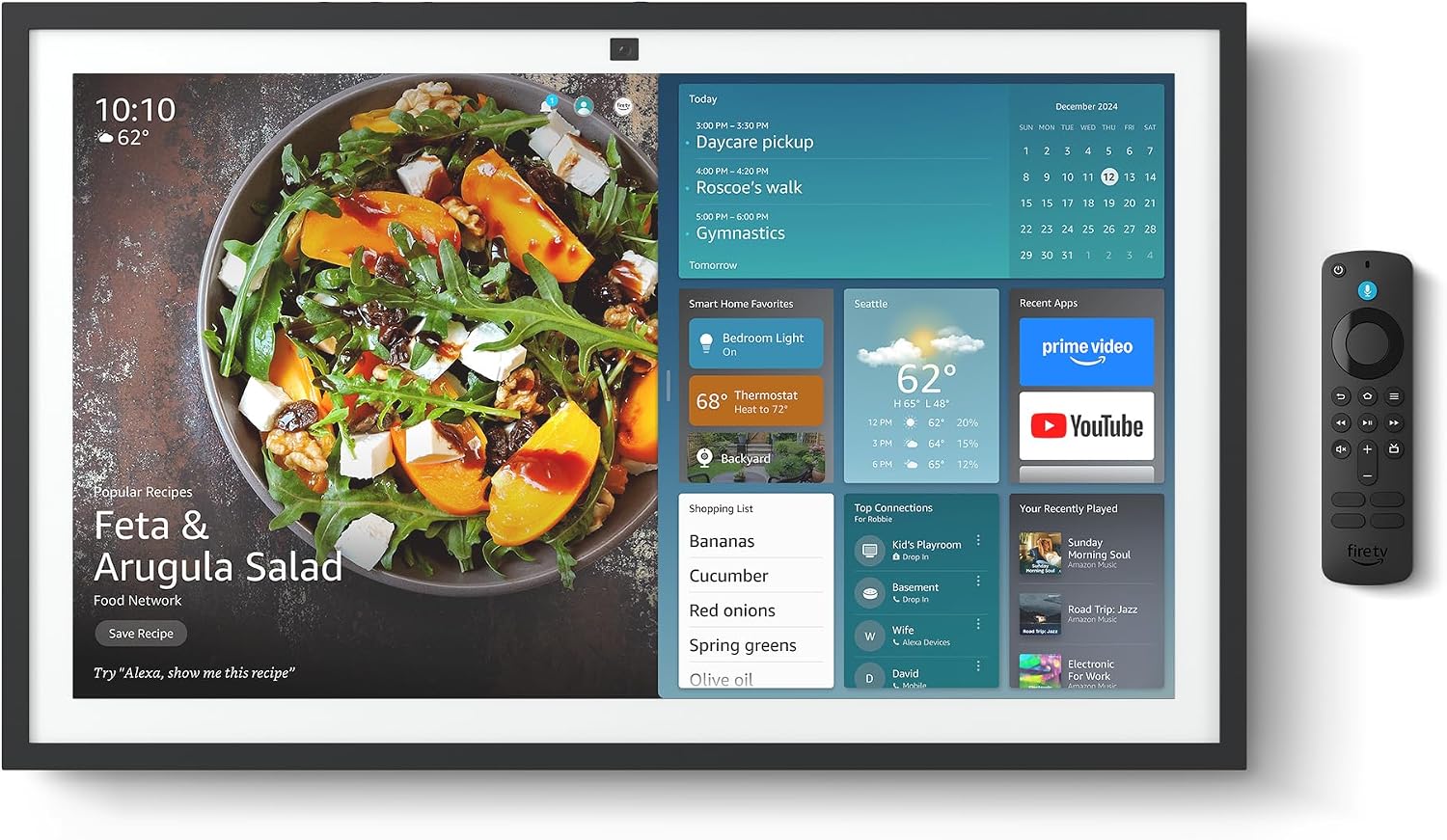
Figure 2.1: Echo Show 21 with Alexa Voice Remote
2.3 Asennusvaihtoehdot
The Echo Show 21 can be wall-mounted using the included hardware or placed on a stand (sold separately). Wall mounting requires an electric drill.
3. Echo Show'n käyttö 21
3.1 Ääniohjaus Alexan avulla
Your Echo Show 21 is primarily controlled by voice using Alexa. Simply say the wake word "Alexa" followed by your command or question.
- Yleiset komennot: "Alexa, what's the weather?", "Alexa, set a timer for 10 minutes."
- Musiikki ja ääni: "Alexa, play pop music," "Alexa, play my morning playlist."
- Video & Entertainment: "Alexa, open Prime Video," "Alexa, play The Boys on Netflix."
3.2 Fire TV -integraatio
Enjoy endless entertainment with built-in Fire TV. Use the included Alexa Voice Remote or voice commands to navigate.

Figure 3.1: Fire TV Interface
- Access thousands of apps like Prime Video, Netflix, YouTube, Apple TV.
- Stream movies, TV shows, and live content.
- The Fire TV remote allows for traditional navigation and playback control.
3.3 Home Screen & Widgets
The 21-inch display is ideal for organizing your day with customizable widgets.

Figure 3.2: Customizable Home Screen Widgets
- Keep important information like calendars, shopping lists, and weather in view.
- Personalize your home screen with family photos.
3.4 Älykodin ohjaus
Control compatible smart devices using your voice or the smart home dashboard.

Figure 3.3: Smart Home Dashboard
- Turn lights on/off, adjust thermostats, or view live-kamerasyötteitä.
- Supports Zigbee, Matter, and Thread Border Router for broad compatibility.
3.5 Videopuhelut
Connect with family and friends using the 13 MP camera with auto-framing, wide field of vision, 3.3x zoom, and noise reduction.

Figure 3.4: Echo Show 21 as a Digital Photo Frame
The camera can also be used to display your favorite memories as a digital photo frame.
4. Huolto
Varmistaaksesi Echo Show 21:n pitkän käyttöiän ja optimaalisen suorituskyvyn, noudata näitä huolto-ohjeita:
- Näytön puhdistaminen: Pyyhi näyttö varovasti pehmeällä, nukkaamattomalla liinalla. Pinttyneisiin tahroihin hankaa kevyesti.ampKostuta liina vedellä. Vältä hankaavia puhdistusaineita tai suihkeita suoraan näytölle.
- Laitteen rungon puhdistaminen: Wipe the exterior surfaces with a dry, soft cloth. Do not use harsh chemicals or solvents.
- Ilmanvaihto: Varmista, että laitteen tuuletusaukot eivät ole tukossa ylikuumenemisen estämiseksi.
- Ohjelmistopäivitykset: Your Echo Show 21 receives automatic software security updates. Ensure your device is connected to Wi-Fi to receive these updates.
5. Vianmääritys
If you encounter issues with your Echo Show 21, try the following common solutions:
- Laite ei vastaa: Try saying "Alexa" again clearly. If unresponsive, unplug the power adapter for a few seconds and then plug it back in to restart the device.
- Ei Wi-Fi-yhteyttä: Check your router and modem to ensure they are working correctly. Restart your router. On the Echo Show 21, go to Settings > Network to re-select your Wi-Fi network and re-enter the password.
- Ääniongelmat: Ensure the volume is not muted or too low. Say "Alexa, turn up the volume." Check audio settings in the device menu.
- Kamera ei toimi: Ensure the physical camera shutter is open and the mic/camera-off button is not activated (red light indicates off).
- Kaukosäädin ei vastaa: Check the batteries in the Alexa Voice Remote. If necessary, replace them. Re-pair the remote if it becomes disconnected.
6. Tekniset tiedot
| Ominaisuus | Erittely |
|---|---|
| Koko | 21.4" L x 13.2" K x 1.5" S |
| Paino | 10.7 lb |
| Näyttö | 21” with 1920 x 1080 resolution (landscape or portrait) |
| Kamera | 13 MP + Shutter |
| Audio | Two 2” woofers + two 0.6” tweeters |
| Wi-Fi-yhteys | Wi-Fi 6E (802.1ax), Tri-band, dual-antenna (MIMO). Supports 802.11a/b/g/n/ac. |
| Smart Home Hub | Zigbee + Matter + langanreunusreititin |
| Prosessori | Octa-core SoC with Amazon AZ2 neural network engine |
| Anturit | ALS RGB + Accelerometer |
| Kieli | Englanti ja espanja |

Figure 6.1: Echo Show 15 vs. Echo Show 21 Dimensions
7. Tietosuojaominaisuudet
Echo Show 21 on suunniteltu useilla yksityisyyden suojauskerroksilla:
- Mic/Camera-Off Button: Fyysinen painike mikrofonien ja kameran elektroniseen irrottamiseen.
- Kameran suljin: A built-in physical shutter to cover the camera lens.
- Wake Word -teknologia: Alexa devices only begin recording and sending audio to the cloud after detecting the wake word.
- Suoratoiston indikaattorit: Visuaaliset ilmaisimet näyttävät, milloin ääntä tai videota suoratoistetaan pilveen.
- Voice Recording Control: Kyky view ja poista äänitallenteesi.

Figure 7.1: Mic/Camera-Off Button and Camera Shutter
Lisätietoja on Alexan tietosuojakeskuksessa.
8. Esteettömyysominaisuudet
The Echo Show 21 includes various accessibility features to personalize Alexa to your abilities:
- Napauta Alexaa varten: Access Alexa via touch through on-screen tiles or a keyboard.
- Adaptiivinen kuuntelu: Antaa enemmän aikaa puhua loppuun ennen kuin Alexa vastaa.
- Toivottu puhenopeus: Hallitse Alexan puhenopeutta.
- Tekstitys: Alexa Captioning, Call Captioning, and Closed Captioning provide text for supported content.
- Näytä ja kerro: Helps users who are blind or visually impaired identify products.
- ÄäniView Näytönlukija: Enables access for customers who are blind or visually impaired.
- Näytön suurennuslasi: Lähennä/loitonna ja panoroi näytöllä.
- Kindle Lue ääneen: Anna Alexan lukea Kindle-kirjasi ääneen.
- Reaaliaikainen teksti: Kirjoita reaaliaikaista tekstiä videopuhelussa.
These features can be enabled via Settings > Accessibility on your device.
9. Takuu ja tuki
9.1 Tuotetakuu
Your Echo Show 21 comes with a Yhden vuoden rajoitettu takuu ja huolto. Optional 1-year, 2-year, and 3-year extended warranties are available for U.S. customers, sold separately.
Use of Echo Show 21 and Fire TV on Echo Show 21 is subject to their respective terms of service.
9.2 Asiakastuki
For further assistance, troubleshooting, or to learn more about your device, please visit the Amazon support websivustolta tai ota yhteyttä Amazonin asiakaspalveluun.


