Johdanto
This manual provides detailed instructions for the setup, operation, and maintenance of your ATTACK SHARK M71 75% TKL Wireless Mechanical Keyboard. Please read this guide thoroughly to ensure proper use and to maximize your keyboard's performance and lifespan.

Image: The ATTACK SHARK M71 keyboard showcasing its 68% layout and key features like aluminum alloy body, three-mode connection, and RGB backlight.
Pakkauksen sisältö
Varmista, että pakkauksessa on kaikki tarvittavat osat:
- ATTACK SHARK M71 Wireless Mechanical Keyboard
- Type-C kaapeli
- 2.4G langaton vastaanotin
- Keycap Puller / Switch Puller (Two-in-one tool)
- Complimentary 61 additional PBT OEM keycaps (different color layout)
- Käyttöopas

Image: A visual representation of the items included in the ATTACK SHARK M71 keyboard package, including the keyboard, cables, and extra keycaps.
Video: Unboxing the Blueberry version of the M71 keyboard, showing the package contents and a demonstration of its typing sound.
Tuote loppuview
The ATTACK SHARK M71 is a 75% TKL wireless mechanical keyboard featuring a full aluminum CNC chassis, multi-mode connectivity, hot-swappable switches, and RGB lighting. Its compact design and robust construction are engineered for both gaming and productivity.
Tärkeimmät ominaisuudet:
- Full Aluminum CNC Body: Constructed from international standard 6063 aluminum alloy for durability and a premium feel.
- Kolmitilayhteys: Supports Bluetooth 5.0/3.0, 2.4G wireless, and wired USB-C connections.
- Vaihdettavat kytkimet: Compatible with 3/5-pin switches, allowing for easy customization without soldering.
- Gasket Mount Structure: Incorporates anti-static IPEX switch pads, PORON sound-absorbing cotton, and PET acoustic switch pads to enhance typing feel and reduce noise.
- RGB LED valaistus: Features customizable RGB backlighting and a side LED light strip.
- 4600mAh akku: Provides extended wireless usage.
- PBT OEM Keycaps: Durable keycaps with GMK-like characters.
Komponentit:
Familiarize yourself with the main components of your keyboard:
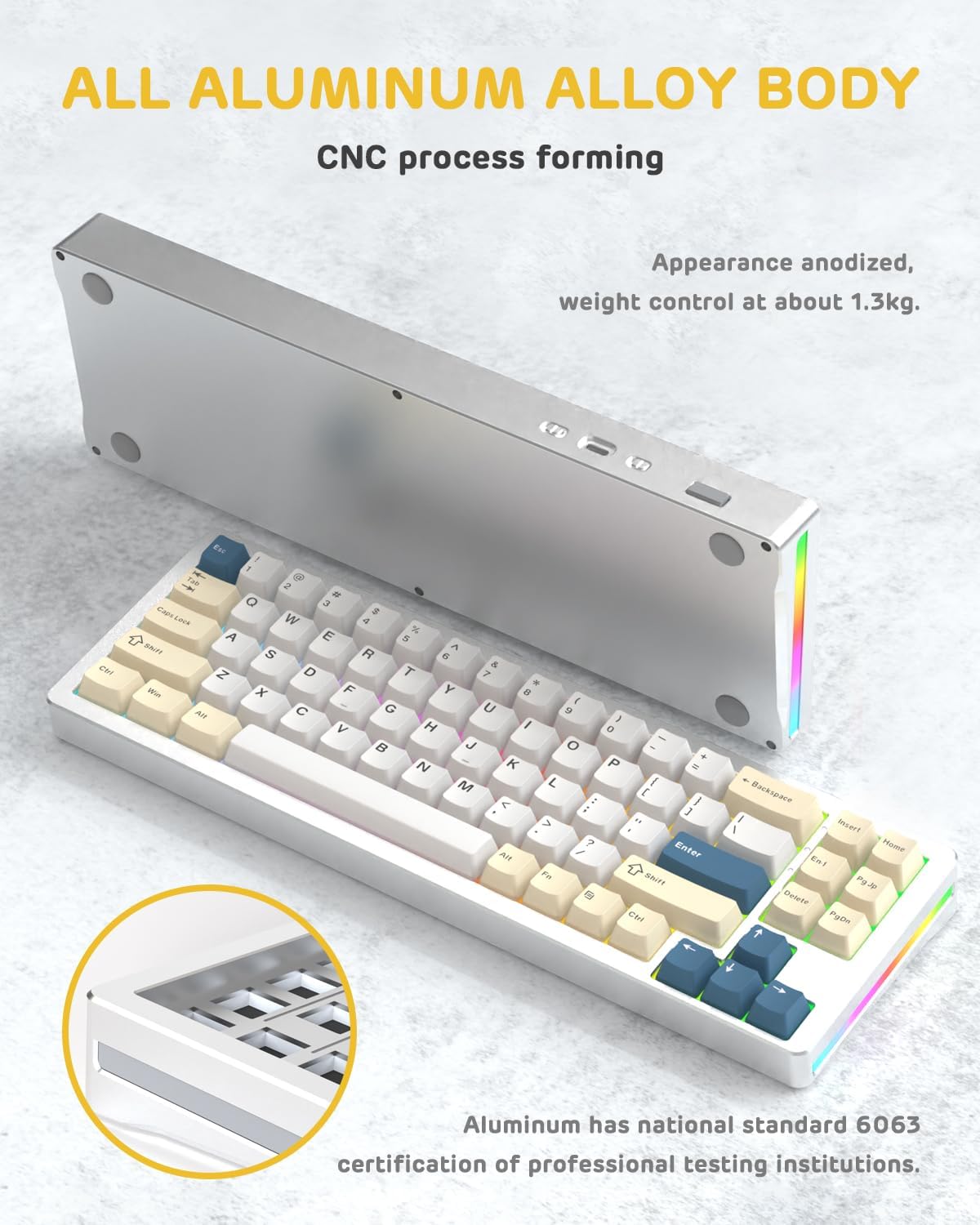
Kuva: Puoli view of the M71 keyboard highlighting its full aluminum alloy body and CNC process forming.

Kuva: Räjähtänyt view illustrating the multi-layered gasket mount structure, including the PBT keycaps, aluminum alloy upper cover, customized switch body, PC positioning board, PORON filled cotton, anti-static IPEX switch underpad, PET singing pad, PCB board, PORON shaft seat cushion, PET sound backing pad, wing light strip, and aluminum alloy base.
Asennus
1. Connectivity Modes:
The M71 keyboard supports three connection modes: Bluetooth, 2.4G wireless, and wired USB-C.
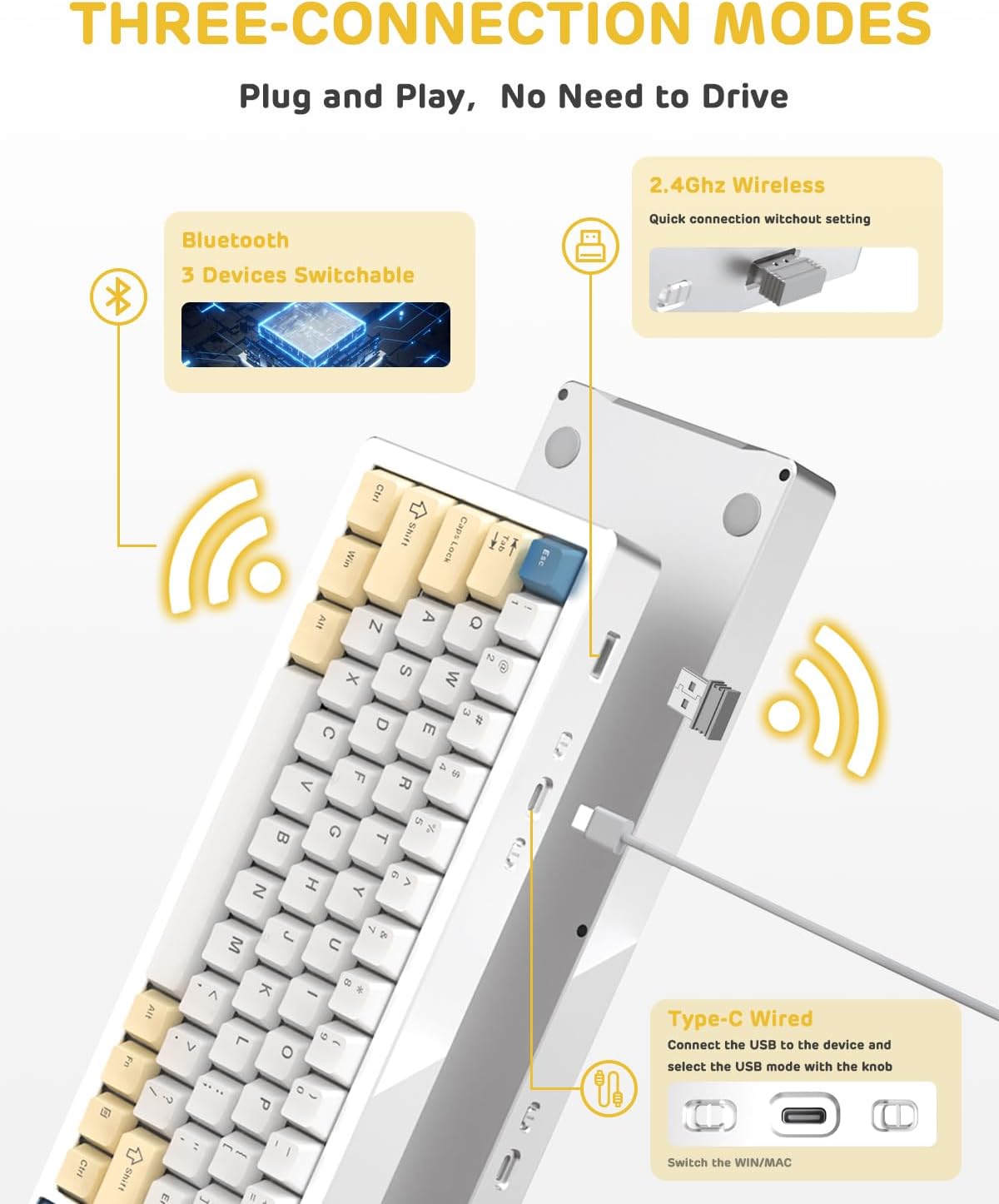
Image: A visual guide to the three connectivity options: Bluetooth for up to 3 devices, 2.4GHz wireless with a receiver, and wired Type-C connection.
Kiinteä yhteys:
- Liitä mukana toimitettu Type-C-kaapeli näppäimistön USB-C-porttiin ja tietokoneen USB-porttiin.
- Ensure the mode switch on the keyboard is set to the wired (USB-C) position.
- Järjestelmä tunnistaa näppäimistön automaattisesti.
2.4G langaton yhteys:
- Locate the 2.4G wireless receiver (dongle) in the package.
- Kytke 2.4G-vastaanotin tietokoneesi vapaaseen USB-porttiin.
- Aseta näppäimistön tilanvalitsin 2.4G:n langattoman verkon asentoon.
- Näppäimistön pitäisi muodostaa yhteys automaattisesti.
Bluetooth-yhteys:
- Aseta näppäimistön tilanvalitsin Bluetooth-asentoon.
- Avaa tietokoneellasi tai laitteellasi Bluetooth-asetukset ja hae uusia laitteita.
- The keyboard should appear as "ATTACK SHARK M71" or similar. Select it to pair.
- The keyboard can connect to up to 3 Bluetooth devices. Use Fn + 1/2/3 vaihtaaksesi laiteparin välillä.
2. Battery Charging and Status:
The M71 keyboard is equipped with a 4600mAh battery. To charge, connect the keyboard via the USB-C cable to a power source (e.g., computer USB port, USB wall adapter).

Image: A diagram showing how to check the battery level using Fn+ALT(R) and the visual indicators on the keyboard's side LED strip.
- Tarkistaaksesi akun varaustason langattomassa tilassa, paina Fn + ALT (Right). The side LED strip will indicate the charge level.
- Battery life is approximately 1-2 weeks with lighting enabled and up to 4 weeks with lighting disabled.
Käyttöohjeet
1. Multimedia Keys:
The keyboard features 12 multimedia keys accessible via the Fn näppäinyhdistelmät:
- Fn + F1–F12: Access various multimedia functions (e.g., volume control, play/pause, calculator, email).
- Fn + 1/2: Hallitse näytön kirkkautta.
2. RGB-valaistuksen ohjaus:
Customize the keyboard's RGB backlight and side LED strip:

Image: The M71 keyboard displaying its RGB backlight and side LED strip, along with a close-up of the PBT keycaps.
- Fn + Ctrl (Right): Switch between different side LED light strip modes.
- Fn + Tab: Toggle white light mode.
- Refer to the full user manual for additional lighting effect controls and customization options via the programmable software.
3. Programmable Software:
The keyboard supports a dedicated driver program for advanced customization. You can download the software from the official ATTACK SHARK website to personalize lighting effects, key assignments, and macros. The keyboard is compatible with Windows 2000/XP/Vista/7/8/10/11, Android, and iOS.
Huolto
1. Puhdistus:
- Pyyhi näppäimistön pinta pehmeällä, kuivalla liinalla.
- Perusteellisempaa puhdistusta varten irrota näppäinhatut mukana toimitetulla ulosvetimellä ja poista roskat kytkimien välistä paineilmalla.
- Vältä kovien kemikaalien tai hankaavien materiaalien käyttöä.
2. Hot-Swapping Switches:
The M71 keyboard features hot-swappable sockets, allowing you to change switches without soldering.

Kuva: Lähikuva view of the hot-swappable White Jade linear switches on the M71 keyboard, demonstrating how they can be easily removed and replaced.
- Sammuta näppäimistö tai irrota se laitteestasi.
- Käytä kytkimen ulosvetäjää ja tartu varovasti kytkimeen ja vedä sitä suoraan ylöspäin.
- Kohdista uuden kytkimen nastat piirilevyn reikiin ja paina sitä varovasti, kunnes se napsahtaa paikalleen. Varmista, etteivät nastat ole taipuneet.
- The PCB supports both 3-pin and 5-pin switches.
Video: A demonstration of the disassembly process for the M71 keyboard, showing how to remove keycaps and switches, revealing the gasket mount structure.
Vianetsintä
| Antaa | Mahdollinen ratkaisu |
|---|---|
| Näppäimistö ei vastaa langattomassa tilassa. |
|
| Avaimet eivät rekisteröidy tai niitä kirjoitetaan kahteen kertaan. |
|
| RGB-valaistus ei toimi tai on virheellinen. |
|
| Bluetooth-pariliitosongelmat. |
|
Tekniset tiedot
| Ominaisuus | Yksityiskohta |
|---|---|
| Malli | M71 |
| Layout | 75% TKL (71 keys) |
| Yhteydet | Bluetooth 5.0/3.0, 2.4G Wireless, USB-C Wired |
| Kytkimet | Hot-swappable (3/5-pin compatible), Pre-lubed Linear White Jade Switch |
| näppäinten yläpuolelle | PBT OEM Keycaps |
| Asennustyyli | Tiivistekiinnitys |
| Alustan materiaali | Full Aluminum CNC (6063 alloy) |
| Akun kapasiteetti | 4600 mAh |
| Valaistus | RGB Backlight, RGB LED Side Light Strip |
| Yhteensopivuus | Windows 2000/XP/Vista/7/8/10/11, Android, iOS, Mac |
| Tuotteen mitat | 13.78 cm P x 4.53 cm L x 1.22 cm K |
| Tuotteen paino | 2.86 kiloa |
Takuu ja tuki
Takuutietoja ja teknistä tukea varten ota yhteyttä viralliseen ATTACK SHARK -sivustoon. websivustolta tai ota yhteyttä suoraan heidän asiakaspalveluunsa. Säilytä ostokuitti ostotodistuksena mahdollisten takuuvaatimusten varalta.
Valmistaja: HYÖKKIHAI
Myyjä: Ajazz US
Päivämäärä, kun ensimmäinen saatavilla: 4. elokuuta 2023


