1. Johdanto
This manual provides detailed instructions for the installation, operation, and maintenance of your Tiandy TC-C32XN 2MP Fixed IP Dome Turret Camera. Please read this manual thoroughly before using the product to ensure correct usage and optimal performance. Keep this manual for future reference.
2. Turvallisuustiedot
- Ensure the power supply matches the camera's requirements to prevent damage.
- Älä altista kameraa äärimmäisille lämpötiloille, kosteudelle tai syövyttäville ympäristöille.
- Vältä kameran osoittamista suoraan voimakkaisiin valonlähteisiin pitkiä aikoja, sillä se voi vahingoittaa kuvakennoa.
- Käsittele kameraa varoen. Älä pudota sitä tai altista sitä voimakkaille tärinöille.
- All installation and service should be performed by qualified personnel.
- Katkaise virta ennen puhdistusta tai huoltoa.
3. Pakkauksen sisältö
Varmista, että pakkauksessasi on kaikki tarvittavat osat:
- Tiandy TC-C32XN 2MP Fixed IP Dome Turret Camera
- Sovitin
- Kiinnitysruuvit ja seinätulpat
- Pikaopas (jos mukana)
4. Tuote ohiview
The Tiandy TC-C32XN is a 2MP Fixed IP Dome Turret Camera designed for reliable surveillance. It features Smart IR for clear night vision up to 30 meters, a built-in microphone, and an SD card slot for local storage.

Kuva 4.1: Etuosa view of the Tiandy TC-C32XN camera, showing the lens and IR illuminators.
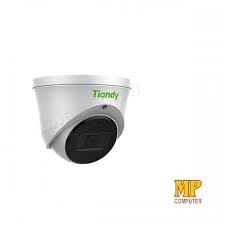
Kuva 4.2: Sivu view of the Tiandy TC-C32XN camera, highlighting its dome turret form factor.
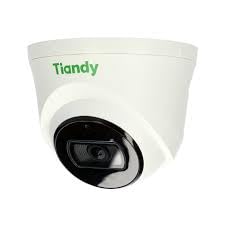
Kuva 4.3: Kulmassa view of the Tiandy TC-C32XN camera, showcasing sen kompakti muotoilu.
5. Asennus ja asennus
5.1 Asennus
- Valitse sijainti: Choose a suitable outdoor or indoor location (IP67 rated for outdoor use) that provides the desired viewing angle and is within reach of power and network connections. The camera is designed for protruding mounting.
- Poraa reikiä: Use the provided mounting template (if applicable) to mark and drill holes for the mounting screws.
- Suojaa kamera: Attach the camera base securely to the mounting surface using the provided screws and wall plugs.
5.2 Johdotus
- Virtaliitäntä: Connect the provided adapter to the camera's power input and then to a power outlet. The camera operates on corded electric power.
- Verkkoyhteys: Connect an Ethernet cable from your network router or PoE switch to the camera's Ethernet port. This camera supports Ethernet connectivity for data transmission.
5.3 Alkukokoonpano
- Virta päälle: Once wired, power on the camera.
- Network Discovery: Use the Tiandy client software or a network scanner tool to discover the camera's IP address on your local network.
- Kameran käyttö: Avaa a web selaimessa ja anna kameran IP-osoite päästäksesi siihen web interface. Log in using the default credentials (refer to the quick start guide for default username/password).
- Vaihda oletussalasana: Turvallisuussyistä vaihda oletussalasana välittömästi ensimmäisen kirjautumisen yhteydessä.
- NVR-integraatio: If using with an NVR, add the camera to your NVR system following the NVR's instructions. This camera is compatible with all brand NVRs.
- Mobiilisovelluksen asetukset: Download the official Tiandy mobile application (available for Android and iOS) and follow the in-app instructions to add your camera for remote viewvalvontaa.
6. Käyttöohjeet
6.1 Livenä View ja Tallennus
Käytä kameran reaaliaikaista kuvaa view kautta web interface, NVR, or mobile app. Configure recording schedules and methods (continuous, motion-triggered) via the camera's settings.
6.2 Smart IR and Night Vision
The camera features Smart IR technology, which automatically adjusts the intensity of its infrared LEDs to prevent overexposure of objects close to the camera, ensuring clear images in low-light conditions up to 30 meters. It also supports 'Night Color' low light technology for enhanced visibility.
6.3 Liiketunnistus ja hälytykset
Configure motion detection zones and sensitivity in the camera settings. The camera supports 'Motion Only' alert types. When motion is detected, the camera can trigger recordings, send notifications to your mobile device, or activate other configured actions. It also supports advanced features like tripwire and perimeter intrusion detection.
6.4 Äänitoiminnot
The built-in microphone allows for audio monitoring of the surveillance area. Audio settings can be adjusted in the camera's web käyttöliittymä tai NVR.
6.5 SD-kortin tallennustila
Insert a compatible SD card into the camera's SD card slot for local storage of recordings. Ensure the card is formatted correctly via the camera's settings. The camera supports SD flash memory type.
6.6 Nollauspainike
A reset button is included for restoring the camera to its factory default settings. Consult the quick start guide for the exact location and procedure for your model.
7. Huolto
- Puhdistus: Pyyhi kameran linssi ja runko varovasti pehmeällä, kuivalla liinalla. Älä käytä voimakkaita kemikaaleja tai hankaavia puhdistusaineita.
- Laiteohjelmistopäivitykset: Regularly check the Tiandy official website for firmware updates. Keeping your camera's firmware up-to-date ensures optimal performance and security.
- Kaapelin tarkastus: Tarkista kaikki kaapelit säännöllisesti kulumisen tai vaurioiden varalta, erityisesti ulkoasennuksissa.
8. Vianmääritys
- Ei virtaa: Varmista, että virtalähde on kytketty kunnolla ja että pistorasia toimii.
- Ei videota: Check network cable connections. Verify the camera's IP address and network settings. Ensure the camera is properly added to your NVR or viewohjelmistoja.
- Huono kuvanlaatu: Clean the camera lens. Adjust focus if applicable. Check lighting conditions and camera placement.
- Verkkoyhteysongelmat: Verify router and network cable functionality. Restart the camera and network devices.
- Ei pääse Web Käyttöliittymä: Ensure your computer is on the same network segment as the camera. Verify the camera's IP address. Try resetting the camera to factory defaults if necessary (this will erase all settings).
9. Tekniset tiedot
| Ominaisuus | Erittely |
|---|---|
| Malli | TC-C32XN |
| Tehokas Still-resoluutio | 2 megapikseliä (1920x1080) |
| Kuvataajuus | 30 kuvaa sekunnissa |
| Valokuvatunnistintekniikka | CMOS (1/2.8") |
| Yönäköalue | 30 Metres (Smart IR) |
| Low Light -tekniikka | Yöväri |
| Optinen zoom | 3 XNUMX x |
| Sisäänrakennettu mikrofoni | Kyllä |
| SD-korttipaikka | Yes (Flash Memory Type: SD) |
| Hälytystyyppi | Motion Only (supports tripwire and perimeter) |
| Yhteystekniikka | Wireless (IR), Ethernet |
| Virtalähde | Johdollinen sähkö |
| Kansainvälinen turva-arviointi | IP67 |
| Muototekijä | Dome Turret |
| Asennustyyppi | ulkoneva |
| Käyttöjärjestelmän yhteensopivuus | Android, iOS |
| Tuotteen mitat (P x L x K) | 50 x 50 x 70 millimetriä |
| Tuotteen paino | 20 grammaa |
| Mukana olevat komponentit | Sovitin |
| Väri | Valkoinen |
10. Takuu ja tuki
For warranty information and technical support, please refer to the warranty card included with your product or visit the official Tiandy website. Contact the seller or manufacturer directly for assistance with product issues or inquiries.


