1. Johdanto
This user manual provides detailed instructions for the installation, operation, and maintenance of your Xprinter XP-D200N Thermal Receipt Printer. The XP-D200N is a high-speed thermal printer designed for reliable and efficient receipt printing in various business environments. Please read this manual thoroughly before using the printer to ensure proper functionality and to prevent damage.
2. Turvallisuustiedot
To ensure safe operation and prevent damage to the printer or injury to yourself, please observe the following safety precautions:
- Always use the provided power adapter. Using an incorrect adapter may damage the printer and void the warranty.
- Älä altista tulostinta vedelle, kosteudelle tai äärimmäisille lämpötiloille.
- Vältä tulostimen sijoittamista suoraan auringonvaloon tai lämmönlähteiden lähelle.
- Älä yritä purkaa tai korjata tulostinta itse. Jätä kaikki huoltotyöt pätevän henkilöstön tehtäväksi.
- Varmista, että tulostin on asetettu vakaalle ja tasaiselle alustalle.
- Keep the printer away from dust and debris to maintain optimal performance.
3. Pakkauksen sisältö
Please check the contents of your package. If any items are missing or damaged, contact your vendor immediately.
- Xprinter XP-D200N Thermal Receipt Printer
- Virtalähde
- Virtajohto
- USB-kaapeli
- Lämpöpaperirulla (aloituspakkaus)
- Käyttöopas (tämä asiakirja)
4. Tuote ohiview
The Xprinter XP-D200N is a compact and efficient thermal receipt printer. Below are images illustrating its key components and design.
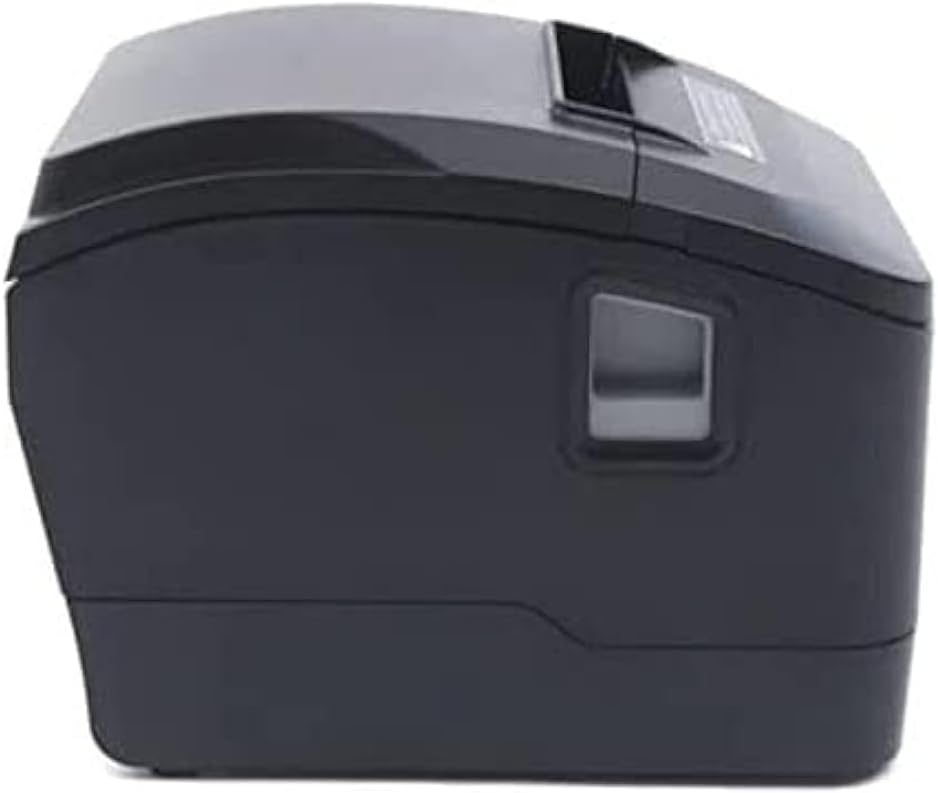
Kuva 4.1: Etupuoli view of the Xprinter XP-D200N Thermal Receipt Printer. This image shows the sleek, black casing and the paper output slot.
Kuva 4.2: Sivu view of the Xprinter XP-D200N Thermal Receipt Printer. This perspective highlights the compact design and the power switch on the right side.

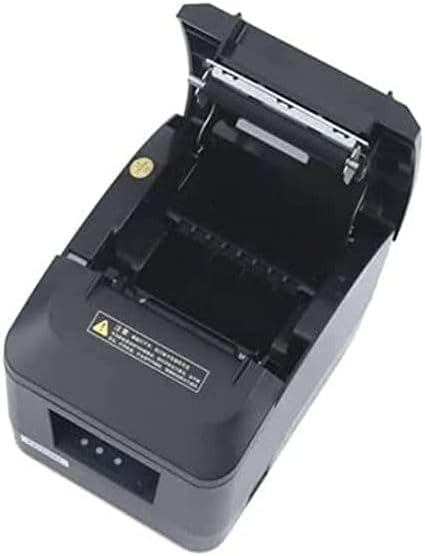
Kuva 4.3: Yläosa view of the Xprinter XP-D200N Thermal Receipt Printer with the cover open, revealing the thermal paper roll compartment and the print head mechanism. This view is essential for paper loading and maintenance.
5. Asennus
5.1 Virran kytkeminen
- Varmista, että tulostimen virtakytkin on OFF-asennossa.
- Connect the power adapter to the power input port on the back of the printer.
- Plug the power cord into the power adapter, then into a standard electrical outlet.
5.2 Liittäminen tietokoneeseen
The XP-D200N supports both USB and LAN connectivity.
USB-liitäntä:
- Liitä USB-kaapelin toinen pää tulostimen USB-porttiin.
- Liitä USB-kaapelin toinen pää tietokoneen vapaaseen USB-porttiin.
LAN (Ethernet) -yhteys:
- Connect an Ethernet cable to the LAN port on the printer.
- Liitä Ethernet-kaapelin toinen pää verkkoreitittimeen tai kytkimeen.
- Refer to the printer's advanced settings or driver utility for network configuration (e.g., IP address settings).
5.3 Lämpöpaperin lisääminen
- Open the printer cover by pressing the release button or lifting the cover latch. (Refer to Figure 4.3).
- Insert the thermal paper roll into the compartment with the paper feeding from the bottom and the leading edge extending towards the front of the printer. Ensure the paper is aligned correctly.
- Vedä pieni määrä paperia ulos leikkurin ohi.
- Sulje tulostimen kansi tiiviisti, kunnes se napsahtaa paikalleen.
5.4 Ohjaimen asennus
After connecting the printer, you will need to install the appropriate drivers on your computer. Drivers are typically provided on a CD included with the printer or can be downloaded from the official Xprinter websivusto. Noudata näytön ohjeita asennuksen aikana.
6. Käyttöohjeet
6.1 Virran kytkeminen päälle/pois
- To power on: Ensure the power cord is connected, then flip the power switch to the ON position. The indicator light will illuminate.
- To power off: Flip the power switch to the OFF position.
6.2 Perustulostus
Once the printer is connected and drivers are installed, you can print receipts from your point-of-sale (POS) software or other applications. Select the Xprinter XP-D200N as your default printer in your application's print settings.
6.3 Tilailmaisimet
The printer features indicator lights (usually on the front panel) that provide information about its status:
- Virran ilmaisin: Solid light indicates the printer is powered on.
- Virheilmaisin: Flashing or solid light indicates an error (e.g., paper out, cover open, print head overheat). Refer to the troubleshooting section.
- Paperin loppumisen ilmaisin: Illuminates when the paper roll is empty or nearly empty.
7. Huolto
7.1 Tulostuspään puhdistaminen
Tulostuspään säännöllinen puhdistus varmistaa optimaalisen tulostuslaadun ja pidentää tulostimen käyttöikää.
- Sammuta tulostin ja irrota virtajohto.
- Avaa tulostimen kansi.
- Käytä vanupuikkoa kevyesti dampened with isopropyl alcohol (70% or higher) to gently wipe the thermal print head surface. Avoid touching the print head with bare hands.
- Allow the print head to dry completely before closing the cover and reconnecting power (approximately 2-3 minutes).
7.2 Yleinen puhdistus
Pyyhi tulostimen ulkopinta pehmeällä,amp kangas. Älä käytä hankaavia puhdistusaineita tai liuottimia.
7.3 Replacing the Paper Roll
When the paper out indicator illuminates or print quality degrades, it's time to replace the paper roll. Follow the steps in Section 5.3 "Loading Thermal Paper".
8. Vianmääritys
| Ongelma | Mahdollinen syy | Ratkaisu |
|---|---|---|
| Tulostin ei käynnisty. | No power, faulty power adapter/cord. | Check power connections. Ensure power switch is ON. Test outlet. |
| Ei tulostusta. | Paper out, cover open, incorrect driver, incorrect printer selected, cable disconnected. | Load paper, close cover, check USB/LAN connection, verify driver installation, select correct printer in software. |
| Huono tulostuslaatu (heikkoja, tyhjiä viivoja). | Dirty print head, low quality thermal paper, print head damage. | Clean print head (Section 7.1). Replace thermal paper. If problem persists, contact support. |
| Paperitukos. | Paperin virheellinen lataus, vieras esine. | Turn off printer, open cover, carefully remove jammed paper. Reload paper correctly. |
| Error indicator light is on/flashing. | General error, paper out, cover open. | Check for paper out, ensure cover is closed. Power cycle the printer. If error persists, consult manufacturer's support. |
9. Tekniset tiedot
| Merkki: | Xprinter |
| Malli: | XP-D200N |
| Tulostimen tyyppi: | Lämpökuititulostin |
| Tulostusmenetelmä: | Suora lämpö |
| Tulostusnopeus: | 220 mm/sec (as per product description) |
| Suurin mediakoko: | 8 cm (80 mm) |
| Liitettävyys: | USB, LAN (Ethernet) |
| Tehon syöttö: | 24V-2.5A |
| Tulostimen lähtö: | Yksivärinen |
| Erikoisominaisuudet: | Sleek, Compact, Lightweight Design, High Print Quality, Durability, Low Noise, Automatic Paper Cutting |
| Tuotteen mitat: | 18.4 x 14 x 13.5 cm |
| Tuotteen paino: | 1.63 kg |
10. Takuu ja tuki
The Xprinter XP-D200N Thermal Receipt Printer comes with a standard manufacturer's warranty. For specific warranty terms and conditions, please refer to the warranty card included with your product or visit the official Xprinter website. For technical support, driver downloads, or service inquiries, please contact your local dealer or the Xprinter customer support team through their official channels.
Saat uusimmat tiedot ja tukiresurssit osoitteesta: www.xprinter.net


