Johdanto
This user manual provides detailed instructions for the operation and maintenance of your MOBI Connect Smart 4 in 1 Wi-Fi Air Purifier & Humidifier. This device is designed to improve indoor air quality by purifying and humidifying the air, offering a healthier and more comfortable living environment. Please read this manual thoroughly before use to ensure proper function and safety.

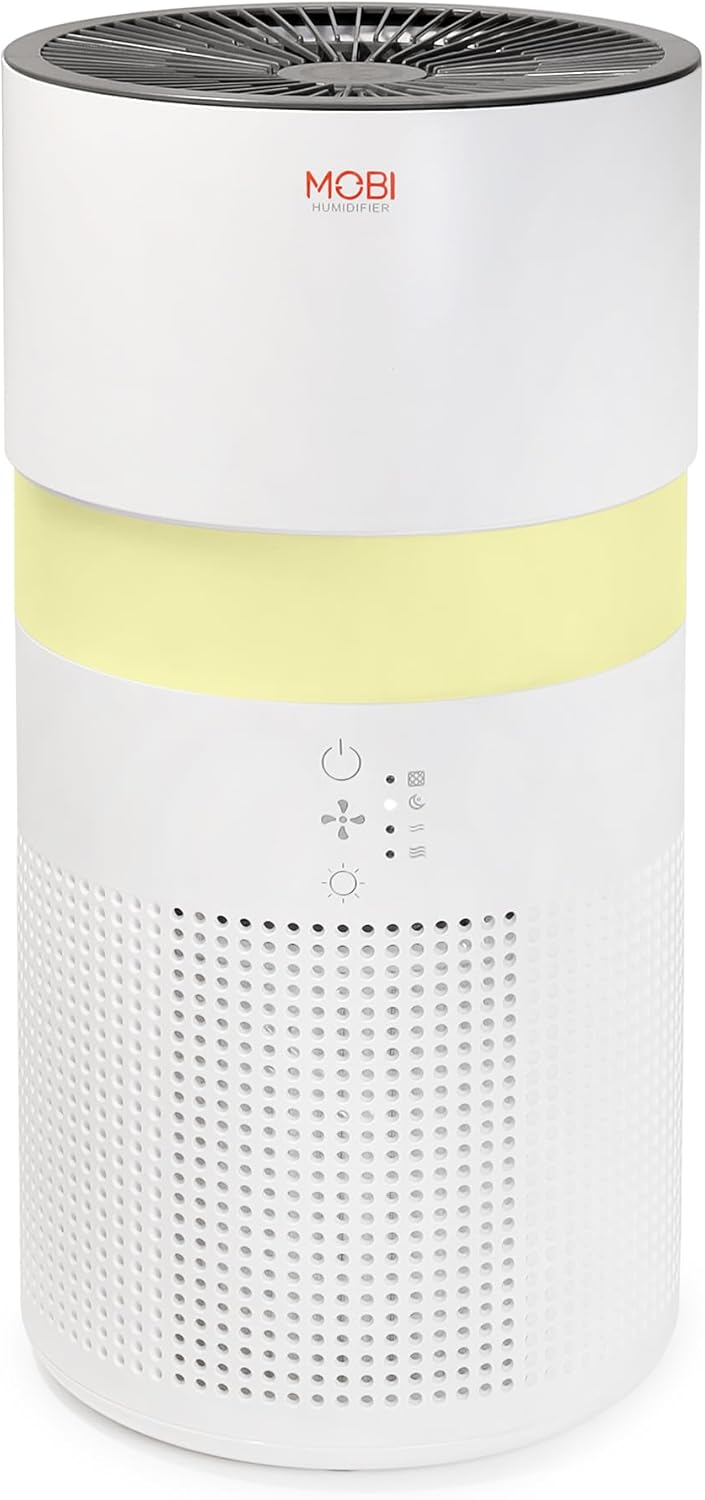
Image: The MOBI Connect Smart 4 in 1 Wi-Fi Air Purifier & Humidifier, a compact white cylindrical device with a light band and control panel.
Tärkeitä turvallisuustietoja
Vähentääksesi tulipalon, sähköiskun tai loukkaantumisen riskiä, noudata aina perusturvallisuusohjeita tätä laitetta käyttäessäsi.
- Aseta laite aina tukevalle ja tasaiselle alustalle.
- Älä tuki ilman sisään- tai ulostuloaukkoja.
- Pidä laite poissa vedestä ja kosteudesta.
- Irrota laite pistorasiasta ennen puhdistusta tai huoltoa.
- Älä käytä laitetta, jos virtajohto tai pistoke on vaurioitunut.
- Säilytä poissa lasten ja lemmikkieläinten ulottuvilta.
- Only use original MOBI replacement filters.
Tuote loppuview
Familiarize yourself with the components and controls of your air purifier and humidifier.
Kuva: Lähikuva view of the control panel on the MOBI Air Purifier, showing power, fan speed, light, and humidifier icons.
Ohjauspaneelin ominaisuudet:
- Virtapainike: Turns the unit on/off and activates pairing mode.
- Tuulettimen nopeuden ilmaisin: Displays current fan speed (Sleep, Medium, High).
- Humidifier Indicator: Shows humidifier status.
- Valotilan painike: Cycles through light modes (Off, Gradient, Fixation).
- Suodattimen vaihdon ilmaisin: Syttyy, kun suodatin on vaihdettava.
Asennusopas
Follow these steps to set up your MOBI Connect Smart 4 in 1 Wi-Fi Air Purifier & Humidifier and connect it to the MOBI Smart App.
Alkuasennus:
- Pura laite pakkauksesta ja poista kaikki pakkausmateriaalit.
- Ensure the filter is correctly installed inside the unit. Refer to the 'Maintenance' section for filter installation.
- Aseta laite vakaalle, tasaiselle alustalle.
- Plug the power adapter into the device and then into a wall outlet. The device will enter pairing mode, indicated by a red blinking LED.
Sovellusyhteys:
- Lataa MOBI Smart -sovellus laitteesi sovelluskaupasta.
- Open the app and sign up for an account if you don't have one.
- Accept all requested permissions (Bluetooth, Location, Notifications) for full functionality.
- On the app's home screen, tap 'Add Device' or the '+' icon in the top right corner.
- The app will search for nearby devices. If your device is blinking red, it should appear in the 'Discovering devices' area. Tap 'Add'.
- If not automatically discovered, select 'Mobi Air Purifier' from the 'Add Manually' list.
- Enter your 2.4GHz Wi-Fi network username and password. (Note: 5GHz networks are not supported).
- Follow the on-screen instructions to activate the device for pairing. If the red LED is not blinking, press and hold the power button until it starts blinking.
- Once the device is blinking red, tap 'Finish network configuration' and then 'Next' in the app.
- The app will connect to the device. Once connected, tap the blue button with the white plus sign next to 'MOBI Smart Air Care 4 IN 1' and then 'Done' in the top right corner.
Video: A detailed guide on how to connect and set up the MOBI Smart 4-in-1 Air Purifier & Humidifier using the MOBI Smart App, including app permissions, device discovery, Wi-Fi setup, and pairing instructions.
Käyttöohjeet
Control your MOBI Connect Smart 4 in 1 Wi-Fi Air Purifier & Humidifier using the physical buttons on the device or through the MOBI Smart App.
Using the Device Buttons:
- Virta päälle/pois: Press the power button once to turn the unit on or off.
- Säädä tuulettimen nopeutta: Press the fan speed button to cycle through Sleep, Medium, and High settings.
- Yövalon ohjaus: Press the light button to cycle through Off, Gradient (color flow), and Fixation (single color) modes.
- Ilmankostuttimen toiminto: Press the humidifier button to activate or deactivate the humidification feature.
Using the MOBI Smart App:
The app provides comprehensive control and additional features.
- Kytkin: Power the device on or off remotely.
- Tuulen nopeus: Select Sleep, Medium, or High wind speed options.
- Ajastin: Set a timer for 2, 4, or 6 hours for automatic shut-off.
- Asetukset: Access advanced options:
- UV-desinfiointi: Enable or disable the UV disinfection feature.
- Nollaa suodatin: Reset the filter life indicator after replacing the filter.
- Valotila: Choose between Off, Gradient (cycling colors), or Fixation (select a single color).
- Ajoittaa: Create custom schedules for when the device should turn on or off.
- Älykkään kodin integrointi: Monitor your home's air quality and integrate with other MOBI Smart devices.
- Aromatherapy Pad: Add essential oils to the designated pad to diffuse scents into the air.

Image: The MOBI Air Purifier showcasing its 7 color-changing LED night light feature, adding ambiance to any room.

Image: The MOBI Air Purifier next to a smartphone displaying the MOBI Smart App interface, highlighting smart home control features.
Huolto
Säännöllinen huolto varmistaa laitteen optimaalisen suorituskyvyn ja pidentää sen käyttöikää.
Suodattimen vaihto:
The MOBI Connect Smart 4 in 1 Wi-Fi Air Purifier & Humidifier uses a 3-stage filtration system (Pre-Filter, Carbon, and HEPA filter). The filter replacement alert will notify you when it's time to change the filter.

Image: A visual representation of the 3-stage HEPA filtration system, showing the layers of the filter.
- Irrota laite pistorasiasta.
- Remove the bottom cover of the unit.
- Irrota vanha suodatin varovasti.
- Insert the new MOBI replacement filter, ensuring it is seated correctly.
- Vaihda pohjakansi.
- Kytke laite takaisin pistorasiaan.
- In the MOBI Smart App, go to 'Settings' and select 'Reset Filter' to reset the filter life indicator.

Image: The MOBI Air Purifier with a new filter, illustrating the filter replacement alert system.
Laitteen puhdistaminen:
- Pyyhi laitteen ulkopuoli pehmeällä, damp kangas. Älä käytä hankaavia puhdistusaineita.
- Clean the water tank regularly to prevent mineral buildup and mold growth. Use a mild detergent and rinse thoroughly.
- Varmista, että kaikki osat ovat täysin kuivia ennen laitteen kokoamista ja käyttöä.
Vianetsintä
Jos laitteessasi ilmenee ongelmia, katso seuraavat yleiset ongelmat ja ratkaisut.
| Ongelma | Mahdollinen syy | Ratkaisu |
|---|---|---|
| Laite ei käynnisty. | Ei kytketty pistorasiaan; pistorasiaongelma; vaurioitunut johto. | Ensure power cord is securely plugged in. Test outlet with another device. Check for cord damage. |
| Laite ei muodosta yhteyttä Wi-Fi-verkkoon. | Incorrect Wi-Fi password; 5GHz network; device not in pairing mode. | Verify Wi-Fi password. Ensure you are connecting to a 2.4GHz network. Press and hold power button to enter pairing mode (red blinking LED). |
| Ilmanlaatu ei parane. | Dirty filter; incorrect fan speed; room size too large. | Check filter indicator and replace if necessary. Increase fan speed. Ensure device is suitable for your room size. |
| Ilmankostutin ei tuota sumua. | Water tank empty; humidifier function off; mineral buildup. | Refill water tank. Activate humidifier function via app or button. Clean water tank and humidifier components. |
Tekniset tiedot
| Ominaisuus | Yksityiskohta |
|---|---|
| Tuotteen mitat | 6.5"S x 6.5"L x 13"K (6.5 x 6.5 x 13 tuumaa) |
| Tuotteen mallinumero | 70692 |
| Paino | 3 puntaa |
| Väri | Valkoinen |
| Lattia-alan kattavuus | Jopa 350 XNUMX neliöjalkaa |
| Suodatusjärjestelmä | 3-Stage (Pre-Filter, Activated Carbon, HEPA) |
| Ilmankostuttimen tyyppi | Forced-air water tank method |
| Yövalo | 7 Unique LED Colors, Adjustable Modes (Off, Gradient, Fixation) |
| Melutaso | 24 dB (lepotila) |
| Ilman kiertonopeus | 5x per hour |
| Yhteydet | Wi-Fi (vaaditaan 2.4 GHz) |
| Sertifikaatit | UL Certified, RoHS Certified |
| Wattage | 680 wattia |
Takuu ja tuki
MOBI products are designed with quality and reliability in mind. For warranty information and customer support, please refer to the official MOBI websivustolta tai ota yhteyttä suoraan heidän asiakaspalveluunsa.
For frequently asked questions (FAQ) and feedback, you can also access these sections within the MOBI Smart App under the device settings.


