1. Johdanto
Welcome to the user manual for your Hoppstar Expert Digital Camera. This manual provides essential information on how to set up, operate, and maintain your camera, ensuring a fun and creative experience for young photographers. Please read this manual carefully before using the camera and keep it for future reference.
The Hoppstar Expert is designed specifically for children, offering a user-friendly interface, durable construction with interchangeable silicone covers, and a range of exciting features including a selfie camera, video recording, picture frames, photo filters, and face detection.
2. Turvallisuustiedot
- This product is intended for children aged 3 years and older. Adult supervision is recommended during use.
- Älä altista kameraa vedelle tai liialliselle kosteudelle.
- Avoid dropping the camera or subjecting it to strong impacts, even with the protective silicone cover.
- Keep small parts, such as memory cards, out of reach of very young children to prevent choking hazards.
- Use only the charging cable provided or a compatible USB charger.
- Älä yritä purkaa tai korjata kameraa itse. Ota yhteyttä asiakastukeen, jos ongelmia ilmenee.
3. Pakkauksen sisältö
Valitse seuraavat kohdat rastittamalla ruutu:
- Hoppstar Expert Digital Camera
- Käyttöohje
- USB-latauskaapeli
- Hihna/kaulanauha
- USB-C-USB-A-sovitin
- USB-C to Micro-USB Adapter
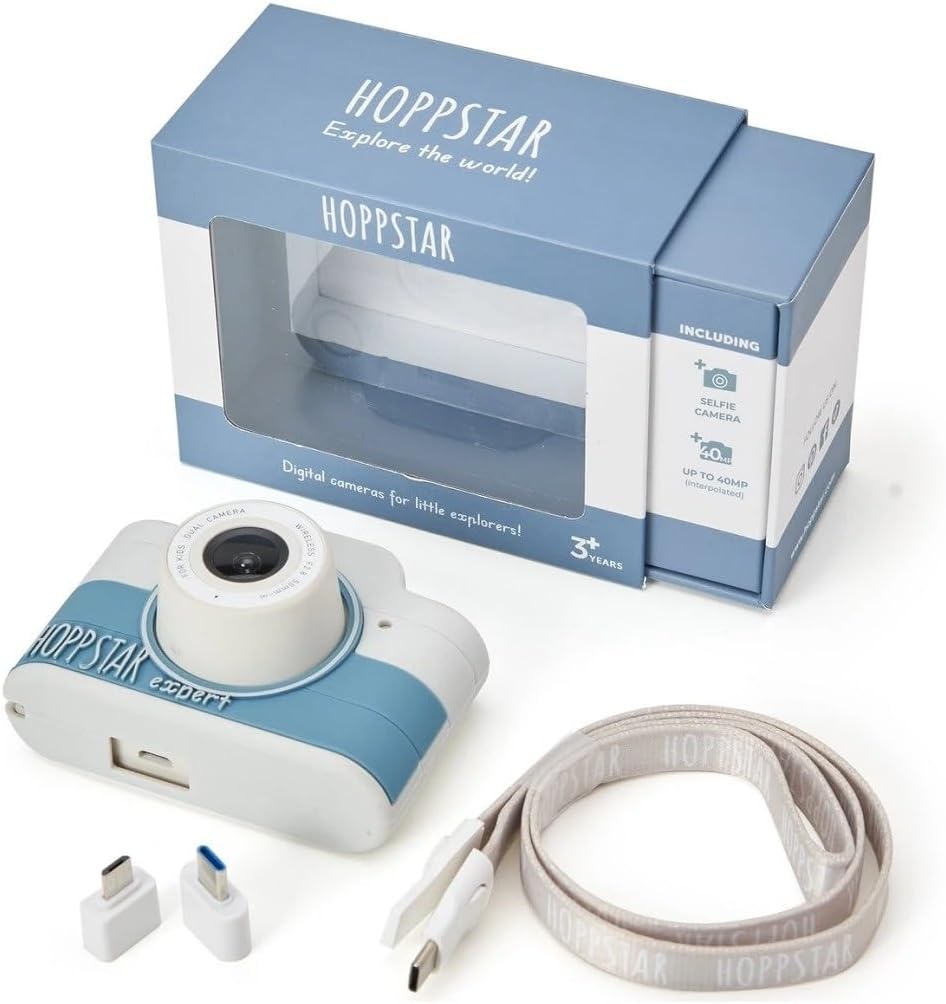
Image: Hoppstar Expert camera shown with its retail packaging, USB charging cable, lanyard, and two USB adapters.
4. Tuote ohiview
Edessä View

Image: The front of the Hoppstar Expert camera, featuring the main lens, flash, and the 'Hoppstar Expert' branding on the blue and white body.
- Päälinssi: For taking standard photos and videos.
- Flash/Light: Tarjoaa valaistusta hämärässä.
- Mikrofoni: Kaappaa ääntä videotallennuksen aikana.
Takaosa View

Image: The back of the Hoppstar Expert camera, displaying the LCD screen and the control buttons on either side.
- LCD-näyttö: Displays menus, live view, and playback.
- Selfie-kamera: Sijaitsee näytön yläpuolella omakuvia varten.
- Ohjauspainikkeet: Navigation, OK, Menu, and other function buttons.
5. Asennus
5.1 Kameran lataaminen
Before first use, fully charge the camera's internal battery. Connect the provided USB charging cable to the camera's USB port and to a USB power source (e.g., computer, wall adapter). The charging indicator light will show the charging status and turn off when fully charged.
5.2 Muistikortin asettaminen
The Hoppstar Expert comes with 16 GB of internal storage. If you wish to expand storage, locate the memory card slot (usually on the side or bottom) and insert a compatible microSD card (not included) until it clicks into place. Ensure the camera is powered off before inserting or removing the card.
5.3 Virran kytkeminen päälle/pois
Press and hold the Power button (usually located on the top or side) for a few seconds to turn the camera on or off.
6. Käyttöohjeet
6.1 Perusohjaimet
- OK -painike: Confirms selections in menus, takes photos, or starts/stops video recording.
- Navigointipainikkeet: Used to move through menu options (Up, Down, Left, Right).
- Valikkopainike: Accesses the camera's settings and feature options.
- Tilapainike: Vaihtaa valokuva-, video- ja toistotilojen välillä.
6.2 Valokuvien ottaminen
In photo mode, frame your shot using the LCD screen. Press the OK button to capture a photo. The camera supports both front and selfie cameras. To switch between cameras, navigate to the camera settings in the menu or use a dedicated button if available.
6.3 Videoiden tallentaminen
Switch to video mode. Press the OK button once to start recording and press it again to stop. Videos are saved to the internal memory or inserted memory card.
6.4 Using Creative Features
The Hoppstar Expert includes several creative features:
- Picture Frames: Apply fun borders to your photos. Access this feature through the camera's menu.
- Photo Filters: Change the look and feel of your photos with various color and effect filters.
- Kasvojentunnistus: The camera can automatically detect faces in the frame, assisting with focus.
Explore these options within the camera's menu settings to enhance your photos and videos.
7. Huolto
- Puhdistus: Use a soft, dry cloth to clean the camera body and screen. For the lens, use a specialized lens cleaning cloth. Do not use liquid cleaners.
- Silikoni kansi: The interchangeable silicone cover can be removed and cleaned with mild soap and water if necessary. Ensure it is completely dry before reattaching.
- Akun hoito: Akun käyttöiän pidentämiseksi vältä akun usein tapahtuvaa täydellistä tyhjentymistä. Lataa kamera säännöllisesti, vaikka sitä ei käytettäisi pitkään aikaan.
- Varastointi: Säilytä kameraa viileässä, kuivassa paikassa, poissa suorasta auringonvalosta ja äärimmäisistä lämpötiloista.
8. Vianmääritys
Kamera ei käynnisty
- Varmista, että akku on ladattu. Liitä kamera virtalähteeseen ja yritä uudelleen.
- Paina virtapainiketta pitkään (5–10 sekuntia).
Huono kuvan-/videonlaatu
- Varmista, että linssi on puhdas eikä siinä ole tahroja tai pölyä.
- Check lighting conditions. Optimal results are achieved in well-lit environments.
- Ensure the camera is held steady during capture.
Camera Freezes/Unresponsive
- Try resetting the camera by pressing the reset button (if available, often a small pinhole) or by holding the Power button until it turns off and then restarting.
Cannot Save Photos/Videos
- Check if the internal memory or inserted memory card is full. Delete unnecessary filetai aseta uusi kortti.
- Ensure the memory card is properly inserted and not corrupted.
If you encounter issues not listed here or if troubleshooting steps do not resolve the problem, please contact Hoppstar customer support.
9. Tekniset tiedot
| Ominaisuus | Erittely |
|---|---|
| Tuotemerkki | Hoppstar |
| Mallin nimi | Hoppstar Expert Yale |
| Mallinumero | 76893 |
| Väri | Yale |
| Pakkauksen mitat | 14.3 x 8.7 x 5.1 cm |
| Jatkuva kuvausnopeus | 30 fps |
| Sisäänrakennetut komponentit | Camera + Instruction Manual |
| Mallin vuosi | 2023 |
| Filmin väri | Väri |
| Exposure Control Type | Automaattinen |
| Suljintyyppi | Elektroninen |
10. Takuu ja tuki
The Hoppstar Expert Digital Camera comes with a standard manufacturer's warranty. Please refer to the warranty information provided with your purchase or visit the official Hoppstar websivustolta takuuehtojen tiedot.
For technical support, product inquiries, or warranty claims, please contact Hoppstar customer service through their official websivustolla tai ostodokumentaatiossasi annetuissa yhteystiedoissa.


