Johdanto
This manual provides detailed instructions for the setup, operation, and maintenance of your ATTACK SHARK Wireless Bluetooth/USB Wired Gaming Mechanical Keyboard. This compact 100-key keyboard features RGB backlighting, hot-swappable switches, and multiple connectivity options for versatile use across various devices.

Image: The ATTACK SHARK Wireless Mechanical Keyboard, showcasing its 100-key layout, RGB backlighting, orange coiled USB-C cable, and a cloud-shaped wrist rest.
Pakkauksen sisältö
Varmista, että pakkauksessasi on kaikki tarvittavat osat:
- ATTACK SHARK Wireless Mechanical Keyboard
- Cloud Keyboard Wrist Rest
- USB-C to USB-A Data Cable (Coiled)
- Avaimenkorkki ja kytkimen vedin
- 2.4 GHz: n USB-vastaanotin
- Additional Switches (Red Switch type)
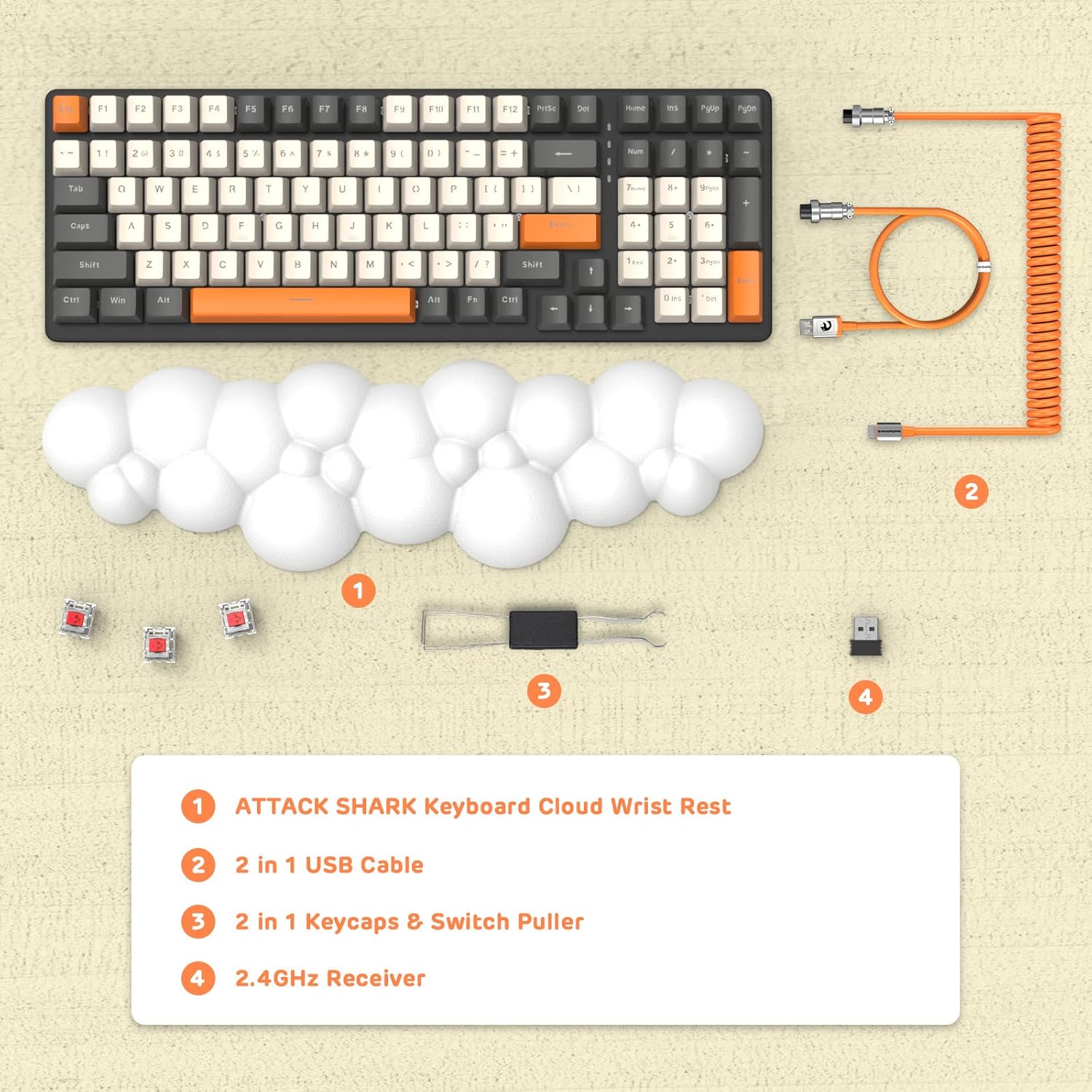
Kuva: Yläpuolinen view displaying the keyboard, cloud wrist rest, coiled USB cable, keycap and switch puller, and 2.4GHz USB receiver, along with spare switches.
Asennus
The keyboard supports three connection modes: Bluetooth 5.0, 2.4GHz Wireless, and USB-C Wired.
1. Langallinen yhteys (USB-C)
- Connect the USB-C end of the provided coiled cable to the keyboard's USB-C port.
- Liitä kaapelin USB-A-pää tietokoneen vapaaseen USB-porttiin.
- The keyboard will automatically switch to wired mode (indicated by FN+5).

Image: A visual representation of the keyboard connecting to various devices (laptop, tablet, desktop, smartphone) via wired USB, 2.4GHz wireless, and Bluetooth.
2. 2.4 GHz:n langaton yhteys
- Paikanna 2.4 GHz:n USB-vastaanotin.
- Liitä USB-vastaanotin tietokoneesi vapaaseen USB-porttiin.
- Paina FN + 4 on the keyboard to activate 2.4GHz wireless mode. The indicator light will show the connection status.
3. Bluetooth-yhteys
The keyboard can store up to three Bluetooth devices.
- Paina ja pidä painettuna FN + 1, FN + 2, tai FN + 3 for 3-5 seconds to enter Bluetooth pairing mode for the desired channel. The indicator light will flash rapidly.
- On your device (e.g., laptop, tablet, smartphone), navigate to Bluetooth settings and search for available devices.
- Select "ATTACK SHARK Keyboard" (or similar name) from the list to pair.
- Kun pariliitos on muodostettu, merkkivalo lakkaa vilkkumasta ja pysyy tasaisena.
- Vaihda paritettujen Bluetooth-laitteiden välillä painamalla FN + 1, FN + 2, tai FN + 3.
Käyttöohjeet
RGB-taustavalon säätö
The keyboard features customizable RGB backlighting with multiple modes.
- Vaihda taustavalotilaa: Paina FN + INS selaillaksesi eri RGB-valaistustehosteita.
- Säädä kirkkautta: Paina FN + ↑ (Ylöspäin osoittava nuoli) lisää kirkkautta, FN + ↓ (Alaspäin osoittavaa nuolta) vähentääksesi kirkkautta.
- Säädä nopeutta: Paina FN + ← (Left Arrow) to decrease effect speed, FN + → (Oikea nuoli) tehosteen nopeuden lisäämiseksi.

Image: The keyboard displaying various RGB lighting patterns, with key combinations for switching modes and adjusting brightness/speed.
Hot-Swap-kytkimet
The keyboard's PCB supports 3-pin mechanical switches, allowing for easy replacement without soldering. This feature enables customization of typing feel and extends the keyboard's lifespan.
- Irrota haluttu näppäinhattu varovasti mukana toimitetulla ulosvetimellä.
- Use the switch puller to gently grasp and remove the switch from the PCB.
- Kohdista uuden 3-nastaisen kytkimen nastat piirilevyn reikiin ja paina sitä lujasti, kunnes se napsahtaa paikalleen.
- Vaihda näppäinhattu.

Kuva: Yksityiskohtainen view of the keyboard's PCB with a switch removed, demonstrating the hot-swappable feature. Spare red switches are also shown.
Akku ja lataus
The keyboard is equipped with a 4000mAh lithium battery.
- Akun kesto: Up to 200 hours of use with the backlight turned off.
- Lataus: Connect the keyboard via the USB-C cable to a power source. The charging indicator light will show the charging status.
- Low Voltage Ilmaisin: The keyboard features a low voltage indicator to alert you when charging is required.

Image: The keyboard shown from the side, emphasizing its 4000mAh lithium battery capacity.
Huolto
Näppäimistön pitkäikäisyyden ja optimaalisen suorituskyvyn varmistamiseksi:
- Puhdistus: Use a soft, dry cloth to wipe the keyboard surface. For deeper cleaning, remove keycaps using the provided puller and use compressed air to clear debris from between switches.
- Rannetuki: The PU material of the wrist rest is durable and washable. Clean with a damp liinalla ja miedolla saippualla tarvittaessa.
- Varastointi: Säilytä näppäimistöä viileässä, kuivassa paikassa, poissa suorasta auringonvalosta ja äärimmäisistä lämpötiloista.
- Vältä nesteitä: Älä altista näppäimistöä nesteille. Jos ainetta roiskuu, irrota virta välittömästi ja anna näppäimistön kuivua kokonaan ennen käyttöä.
Vianetsintä
| Antaa | Mahdollinen syy | Ratkaisu |
|---|---|---|
| Näppäimistö ei vastaa langattomassa tilassa. | Low battery, incorrect mode selected, receiver not connected, or Bluetooth not paired. | Charge the keyboard. Ensure correct mode (FN+4 for 2.4G, FN+1/2/3 for Bluetooth) is selected. Verify 2.4G receiver is securely plugged in. Re-pair Bluetooth if necessary. |
| Keys are "sticking" or registering multiple inputs. | Debris under keycap/switch, faulty switch. | Remove keycap and switch, clean thoroughly with compressed air. If issue persists, replace the switch using the hot-swappable feature. |
| RGB backlight not working or dim. | Backlight turned off, brightness set too low, or low battery. | Press FN+INS to cycle modes. Adjust brightness with FN+↑ / FN+↓. Charge the keyboard. |
| Keyboard not recognized by device. | Driver issue, incorrect connection mode, or device compatibility. | Ensure correct connection mode is active. Try a different USB port or device. For wired mode, ensure the cable is fully inserted. Check device's operating system for necessary drivers (usually plug-and-play). |
Tekniset tiedot
- Malli: 3b5c1fdb-29da-409c-b4b7-12e9e72fb741
- Liitettävyys: Bluetooth 5.0, 2.4GHz Wireless (RF), USB-C Wired
- Layout: Compact 100 Keys (98% layout)
- Kytkimet: Hot-Swappable 3-pin Mechanical (Red Switch variant)
- Taustavalo: RGB-taustavalaistu (9 tilaa)
- Akku: 4000 mAh litiumakku
- Yhteensopivat laitteet: Laptop, PC, Tablet (Mac/Win Supported)
- Materiaali: Polyurethane (PU) for wrist rest
- Mitat: 16.97 x 6.42 x 2.52 tuumaa (pakkaus)
- Tuotteen paino: 2.94 kiloa
- Erikoisominaisuudet: Ergonomic design, Custom Coiled Aviator Keyboard Cable, Keycap and Switch Puller included.
Takuu ja tuki
For warranty information and technical support, please refer to the documentation provided with your purchase or visit the official ATTACK SHARK websivusto. Säilytä ostokuittisi mahdollisten takuuvaatimusten varalta.
Valmistaja: HYÖKKIHAI
Päivämäärä, kun ensimmäinen saatavilla: 8. toukokuuta 2023


