1. Johdanto
Thank you for choosing the SABLUTE KM61 Wireless Mechanical Gaming Keyboard. This manual provides essential information for setting up, operating, maintaining, and troubleshooting your new keyboard. Please read it carefully to ensure optimal performance and longevity of your device.
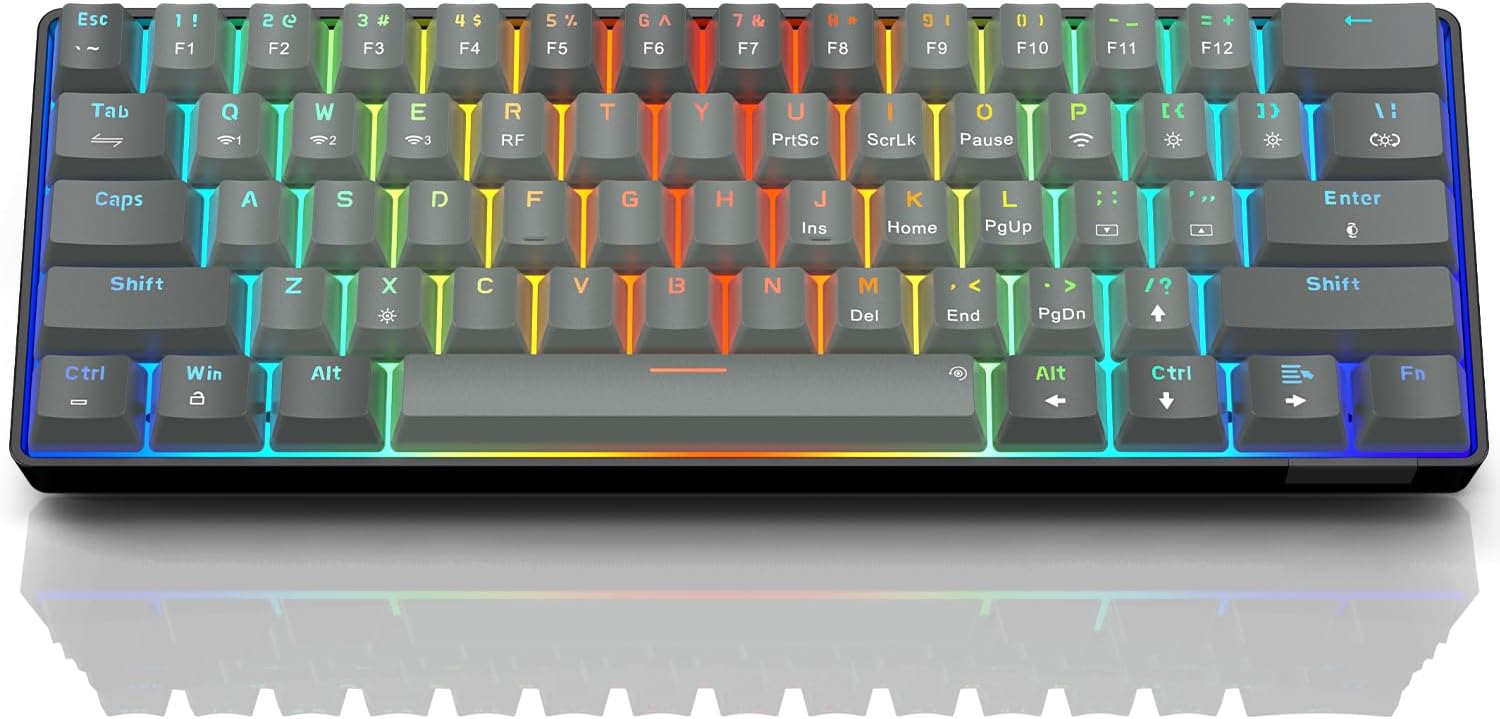
Image: The SABLUTE KM61 Wireless Mechanical Gaming Keyboard showcasinsen kompaktin muotoilun ja eloisan RGB-taustavalaistuksen ansiosta.
2. Mitä laatikossa on
Varmista, että pakkauksessa on kaikki tarvittavat osat:
- SABLUTE KM61 Wireless Mechanical Gaming Keyboard
- C-tyypin USB-kaapeli
- USB-A 2.4G Wireless Dongle
- Käyttöohje
3. Tärkeimmät ominaisuudet
- Kolmitilayhteys: Supports Bluetooth, 2.4G USB Wireless, and Wired (USB Type-C) connections.
- 60 % kompakti asettelu: 61-key design for space-saving and portability.
- Mekaaniset punaiset kytkimet: Linear switches designed for fast response and durability (100,000,000 keystroke test).
- Hot-Swapped: Allows for easy replacement of switches without soldering, supporting 3-pin/5-pin switches.
- RGB-taustavalo: Features 20 backlight effects, 7 pure colors, 5 brightness levels, and 5 speed adjustments.
- Älykäs virransäästö: Includes a 60-second smart sleep mode, offering up to 600 hours of working time (with lights off) and 365 days of standby time.
- Ergonominen muotoilu: Features a ladder key layout and adjustable height for comfortable typing.
- N-näppäimen vieritys: Varmistaa, että jokainen näppäinpainallus rekisteröidään tarkasti, jopa nopean kirjoittamisen tai pelaamisen aikana.
- Laaja yhteensopivuus: Compatible with Chrome OS, Android, Windows 7-11, Mac, and Linux systems.

Image: The compact 61-key layout of the SABLUTE KM61 keyboard, highlighting its space-saving design.
4. Asennus ja yhteys
The SABLUTE KM61 keyboard offers three connection modes: Wired, 2.4G Wireless, and Bluetooth. Ensure the keyboard is charged before initial wireless use.
4.1. Langallinen yhteys
- Liitä toimitettu USB Type-C -kaapeli näppäimistön Type-C-porttiin.
- Plug the other end of the USB Type-C cable into an available USB port on your computer.
- Näppäimistö siirtyy automaattisesti langalliseen tilaan ja alkaa latautua.
4.2. Langaton 2.4G-yhteys
- Locate the USB-A 2.4G wireless dongle. It is typically stored in a compartment on the back of the keyboard.
- Plug the 2.4G wireless dongle into an available USB-A port on your computer.
- Turn the power switch on the back of the keyboard to the 'ON' position.
- Paina
Fn+Rto activate 2.4G wireless mode. The keyboard should connect automatically.
4.3. Bluetooth-yhteys
Näppäimistö tukee jopa kolmea Bluetooth-laitetta.
- Turn the power switch on the back of the keyboard to the 'ON' position.
- Paina
Fn+Q,Fn+W, taiFn+Eto select a Bluetooth channel. The indicator light for the selected channel will flash rapidly, indicating pairing mode. - Ota Bluetooth käyttöön laitteellasi (tietokone, tabletti, älypuhelin) ja hae käytettävissä olevia laitteita.
- Select "SABLUTE KM61" or a similar name from the list to pair.
- Kun pariliitos on muodostettu, merkkivalo lakkaa vilkkumasta ja pysyy tasaisena.
- Vaihda paritettujen Bluetooth-laitteiden välillä painamalla
Fn+Q,Fn+W, taiFn+E.

Image: Visual representation of the three connection methods: Bluetooth, 2.4G USB Wireless, and Wired.
Video: Yliview of the SABLUTE KM61 Mini Mechanical Gaming Keyboard, demonstrating its features and connectivity options.
5. Käyttöohjeet
5.1. RGB-taustavalon säätö
The KM61 keyboard features customizable RGB backlighting:
- Muuta taustavalon tehostetta: Paina
Fn+|\to cycle through 20 different backlight effects. - Säädä kirkkautta: Paina
Fn+[{to decrease brightness, andFn+]}to increase brightness (5 levels). - Säädä nopeutta: Paina
Fn+;:to decrease effect speed, andFn+'"to increase effect speed (5 levels). - Vaihda väriä: Paina
Fn+Enterto cycle through 7 pure colors. - Taustavalon kytkeminen päälle/pois: Paina
Fn+Xkytkeäksesi taustavalon päälle/pois.
Video: Demonstration of the RGB lighting effects and color changes on the SABLUTE keyboard.
Video: Lähikuva view of the SABLUTE keyboard with its backlight turned off, showcasing the keycap design.
5.2. Älykäs virransäästö
The keyboard enters a 60-second smart sleep mode when inactive to conserve battery. It can provide up to 600 hours of working time with the backlight off and 365 days of standby time. Keystroke will wake up the keyboard. Note that the backlight does not turn off when connected via Type-C cable.

Image: The keyboard connected via its Type-C cable, illustrating the charging process.
6. Huolto
6.1. Puhdistus
To clean your keyboard, first disconnect it from all power sources. Use a soft, dry cloth to wipe down the keycaps and chassis. For deeper cleaning, use the provided keycap puller to remove keycaps and clean underneath with compressed air or a small brush.
6.2. Replacing Switches (Hot-Swappable)
The KM61 keyboard features hot-swappable switches, allowing you to easily replace them without soldering:
- Irrota haluamasi näppäinhattu varovasti näppäinhatun ulosvetäjällä.
- Käytä kytkimen ulosvetäjää tarttuaksesi kytkimeen varovasti ja vedä sitä suoraan ylöspäin irrottaaksesi sen piirilevystä.
- Kohdista uuden kytkimen nastat piirilevyn reikiin.
- Paina uutta kytkintä varovasti paikalleen, kunnes se napsahtaa tukevasti.
- Kiinnitä näppäinhattu takaisin.

Image: A close-up of the keyboard demonstrating the hot-swappable feature, with switches being removed and inserted.
7. Vianmääritys
- Näppäimistö ei vastaa: Ensure the keyboard is properly connected (wired, 2.4G dongle, or Bluetooth). Check battery level if using wireless modes. Try restarting your computer or device.
- Langattoman yhteyden ongelmat: Ensure the 2.4G dongle is securely plugged in or Bluetooth is enabled and paired correctly. Move closer to the receiver/device to reduce interference.
- Taustavalo ei toimi: Varmista, että taustavalo on päällä (
Fn+X). Adjust brightness levels (Fn+[{/]}). - Avaimet eivät rekisteröidy tai ne kirjoitetaan kahteen kertaan: Tämä voi viitata vialliseen kytkimeen. Vaihda viallinen kytkin hot swap -ominaisuuden avulla.
- MacOS compatibility: Some multimedia keys may not be fully compatible with Mac systems. Refer to your Mac's system preferences for keyboard settings.
8. Tekniset tiedot
| Ominaisuus | Erittely |
|---|---|
| Malli | KM61 |
| Yhteydet | Bluetooth, 2.4G USB Wireless, Wired (USB Type-C) |
| Kytkimen tyyppi | Mekaaninen punainen kytkin |
| Layout | 60 % (61 näppäintä) |
| Taustavalo | RGB (20 effects, 7 colors, 5 brightness, 5 speeds) |
| Kuumavaihdettava | Yes (3-pin/5-pin switches) |
| Akku | 1 litiummetalliparisto (mukana) |
| Working Time (Light Off) | Jopa 600 tuntia |
| Valmiusaika | 365 päivää |
| Latausaika | Noin 4 tuntia |
| Tuotteen mitat | 11.5 cm P x 4 cm L x 1.46 cm K |
| Tuotteen paino | 1.35 kiloa |
| Yhteensopivuus | Chrome OS, Android, Windows 7-11, Mac, Linux |
9. Takuu ja tuki
SABLUTE products are designed for quality and reliability. For warranty information, technical support, or any product-related inquiries, please contact SABLUTE customer support. Refer to the contact details provided in your product packaging or visit the official SABLUTE websivusto.
Thank you for your purchase and support!


