1. Johdanto
Thank you for choosing the HIKMICRO HEIMDAL H4D Digital Night Vision Monocular. This device is designed for observation in low light and complete darkness, featuring a high-resolution sensor and AMOLED display for clear imaging.
Tärkeimmät ominaisuudet:
- 1.39" AMOLED display with 454 x 454 resolution
- High-resolution 2560 x 1440 sensor
- Integrated 850 nm infrared illuminator with smart IR function
- Day/Night/Auto/Defog modes
- Elektroninen kuvanvakautus (EIS)
- Detection range up to 200 meters
- Replaceable and rechargeable battery with over 4 hours of use
- Compact and portable design, waterproof and dustproof (IP67)
- Integrated 32 GB EMMC for storing recorded videos and photos
- Wireless connection via HIKMICRO Sight app, local album function
Paketin sisältö:
- HIKMICRO HEIMDAL H4D Digital Night Vision Monocular
- Akku
- Pölyliina
- Suojalaukku
- Rannehihna
- USB-C-kaapeli
- Pikaopas
2. Tuote ohiview
Familiarize yourself with the components and controls of your HIKMICRO HEIMDAL H4D monocular.
Laitteen asettelu
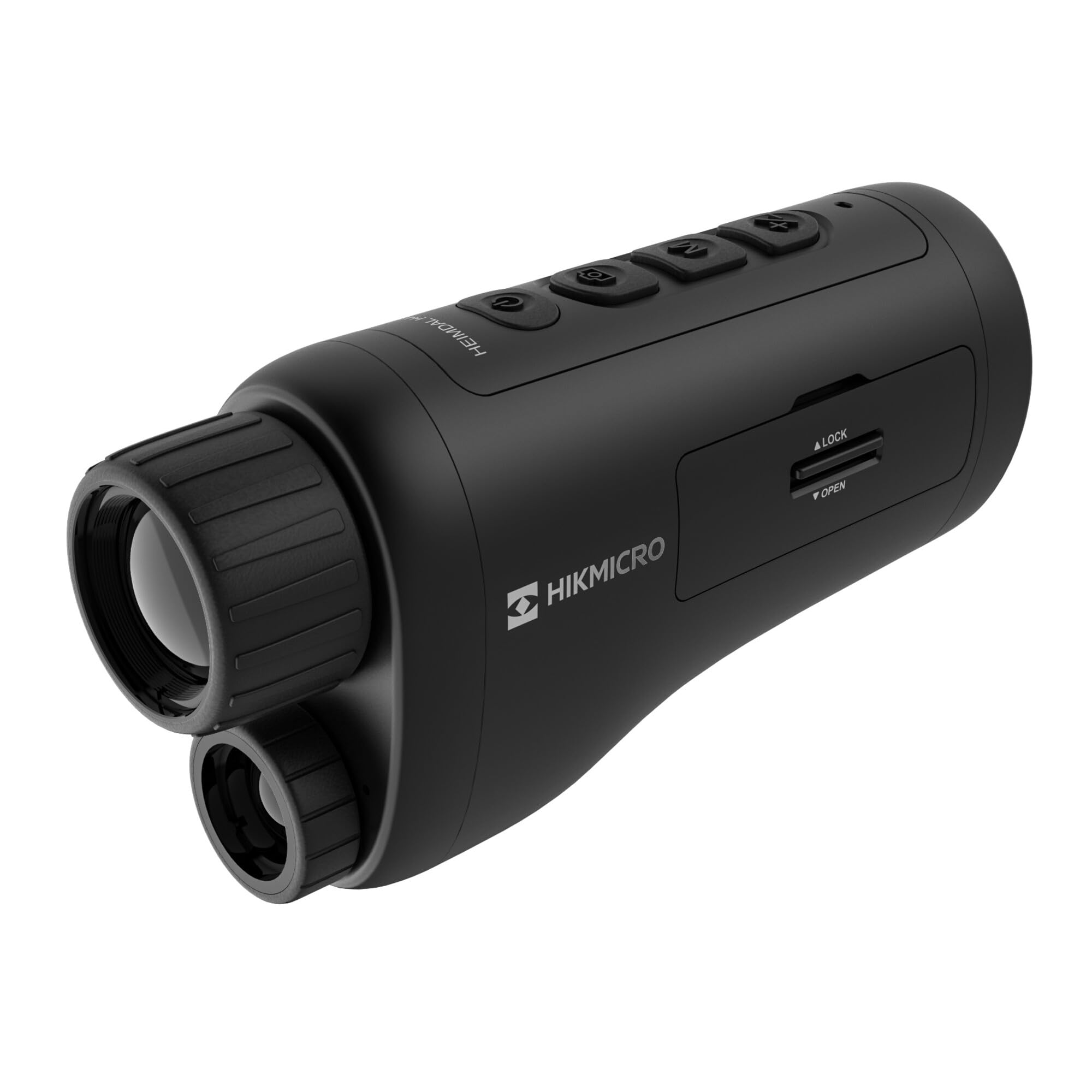
Kulmikas view of the HIKMICRO HEIMDAL H4D monocular, showing its compact, ergonomic design and the main lens.
Säätimet ja painikkeet

Yläosa view of the monocular showing the power button, photo/video record button, mode button, and zoom/IR adjustment buttons.
Lenses and Focus

Edessä view displaying the objective lens and the integrated infrared illuminator.
Paristokotelo

Sivu view showing the battery compartment with 'LOCK' and 'OPEN' indicators.
3. Asennus
Akun asennus
- Paikanna laitteen sivussa oleva paristolokero.
- Slide the lock mechanism to the 'OPEN' position.
- Aseta ladattava akku paikalleen varmistaen oikea napaisuus.
- Close the compartment and slide the lock mechanism to the 'LOCK' position.
Akun lataaminen
Connect the device to a power source using the provided USB-C cable. The charging indicator will show the charging status.
Alkuvirta päällä
Pidä virtapainiketta (yleensä merkitty symbolilla ) painettuna Ⓘ) until the HIKMICRO logo appears on the display.
4. Käyttöohjeet
Virta päälle/pois
- Virta päälle: Paina virtapainiketta ja pidä sitä painettuna noin 3 sekuntia.
- Virta pois: Press and hold the power button for approximately 3 seconds until the device shuts down.
Tarkennuksen säätö
Rotate the focus ring on the objective lens to achieve a clear image of your target.
Tilan valinta
Press the 'M' (Mode) button to cycle through observation modes: Day, Night, Auto, and Defog.
Zoom and IR Adjustment
Use the '+' and '-' buttons to adjust the digital zoom level. These buttons also control the intensity of the infrared illuminator in night mode.
Photo and Video Recording
- Ota valokuva: Press the photo/video button (usually marked with 📷) once to capture an image.
- Tallenna video: Press and hold the photo/video button to start recording. Press again to stop.
Connecting to HIKMICRO Sight App
Download the HIKMICRO Sight app from your device's app store. Follow the in-app instructions to connect your monocular for live view, remote control, and media management.
5. Huolto
Puhdistus
- Use the provided dust cloth or a soft, lint-free cloth to clean the lenses.
- For stubborn dirt, use a lens cleaning solution specifically designed for optics.
- Pyyhi laitteen runko pehmeällä,amp kangas. Älä käytä hankaavia puhdistusaineita tai liuottimia.
Varastointi
- Store the monocular in its protective bag in a cool, dry place when not in use.
- Poista akku, jos laitetta ei käytetä pitkään aikaan.
Akun hoito
- Charge the battery regularly, even if not in frequent use, to maintain its lifespan.
- Vältä äärimmäisiä lämpötiloja latauksen ja säilytyksen aikana.
6. Vianmääritys
Yleisiä ongelmia ja ratkaisuja
| Ongelma | Mahdollinen syy | Ratkaisu |
|---|---|---|
| Laite ei käynnisty. | Akku on tyhjä tai asennettu väärin. | Lataa akku. Varmista, että akku on asetettu paikalleen oikean napaisuuden mukaisesti. |
| Kuva on epäselvä. | Focus is not adjusted. | Rotate the focus ring on the objective lens until the image is clear. |
| Poor image quality in darkness. | IR illuminator is off or set to low intensity. | Activate the IR illuminator or increase its intensity using the '+' button. Ensure you are in Night mode. |
| Cannot connect to HIKMICRO Sight app. | Bluetooth/Wi-Fi is off on device or phone, or app is not updated. | Ensure Bluetooth/Wi-Fi is enabled on both devices. Restart the app and monocular. Check for app updates. |
| Laite jumiutuu tai lakkaa reagoimasta. | Väliaikainen ohjelmistohäiriö. | Perform a soft reset by holding the power button until the device restarts. If issue persists, contact support. |
7. Tekniset tiedot
| Ominaisuus | Yksityiskohta |
|---|---|
| Anturin resoluutio | 2560 x 1440 |
| Näytön tyyppi | AMOLED |
| Näytön resoluutio | 454 x 454 |
| Näytön koko | 1.39 tuumaa (3.5 cm) |
| Infrapunavalaisin | Integrated 850 nm |
| Havaintoalue | Jopa 200 metriä |
| Varastointi | 32 GB EMMC (internal) |
| Akun kesto | More than 4 hours (replaceable, rechargeable) |
| Vesitiivis luokitus | IP67 |
| Mitat | 153 mm x 50 mm x 80 mm (6.02" x 1.97" x 3.15") |
| Paino | 375 grammaa (0.83 lbs) |
| Materiaali | Muovi |
| Yhteensopivat laitteet | Rifle, Compound Bow |
| Asennustyyppi | Picatinny-kiinnike |
| Sport Use | Camping, vaellus |
| Väri | Valkoinen |
8. Takuu ja tuki
HIKMICRO products are covered by a limited warranty. For detailed warranty information, please refer to the official HIKMICRO websivustolta tai ota yhteyttä paikalliseen jälleenmyyjään.
For technical support, troubleshooting assistance, or service inquiries, please visit the official HIKMICRO support page or contact their customer service department.
Virallinen Websivusto: www.hikmicrotech.com