1. Johdanto
This manual provides essential information for the LILYGO T3S3 ESP32-S3 LoRa Development Board. This board integrates an ESP32-S3 microcontroller, a LoRa wireless module (SX1280 2.4G), and a 0.96 inch OLED display, making it suitable for various wireless communication and IoT projects, including Meshtastic applications. It supports Wi-Fi and Bluetooth 5.0 connectivity.

Kuva 1: Etuosa view of the LILYGO T3S3 ESP32-S3 LoRa Development Board, showing the integrated 0.96 inch OLED display.

Kuva 2: Takaosa view of the LILYGO T3S3 ESP32-S3 LoRa Development Board, highlighting the LoRa module and other components.
2. Tuotteen osat
The LILYGO T3S3 ESP32-S3 LoRa Development Board package typically includes the following items:
- 1 x LILYGO T3S3 ESP32-S3 LoRa Development Board
- 1 x Antenna (for LoRa communication)
- 1 x virtajohto
- 2 x pinnirimaa

Figure 3: Contents of the LILYGO T3S3 ESP32-S3 LoRa Development Board package, showing the board, antenna, power cable, and pin headers.
3. Asennusohjeet
Follow these steps to set up your LILYGO T3S3 development board:
- Kiinnitä antenni: Kierrä toimitettu LoRa-antenni varovasti piirilevyn SMA-liittimeen. Varmista, että se on sormin kiristetty vaurioiden välttämiseksi.
- Virtaliitäntä: Connect the board to a power source using the USB Type-C port. Alternatively, use the provided power cable for a 3.7V LiPo battery connection. The board supports USB/3.7V LiPo battery power supply.
- Initial Firmware: The board may come with pre-installed firmware (e.g., Meshtastic). To install or update firmware, refer to the official LILYGO Wiki or GitHub repository for detailed instructions and tools. A common method involves using the ESP-IDF or Arduino IDE.
- TF-kortin asettaminen (valinnainen): If your application requires external storage, insert a compatible TF card into the designated slot on the board.
- Pin Headers (Optional): Attach the included pin headers if you plan to integrate the board into a breadboard or custom circuit. Refer to the pinout diagram for correct connections.
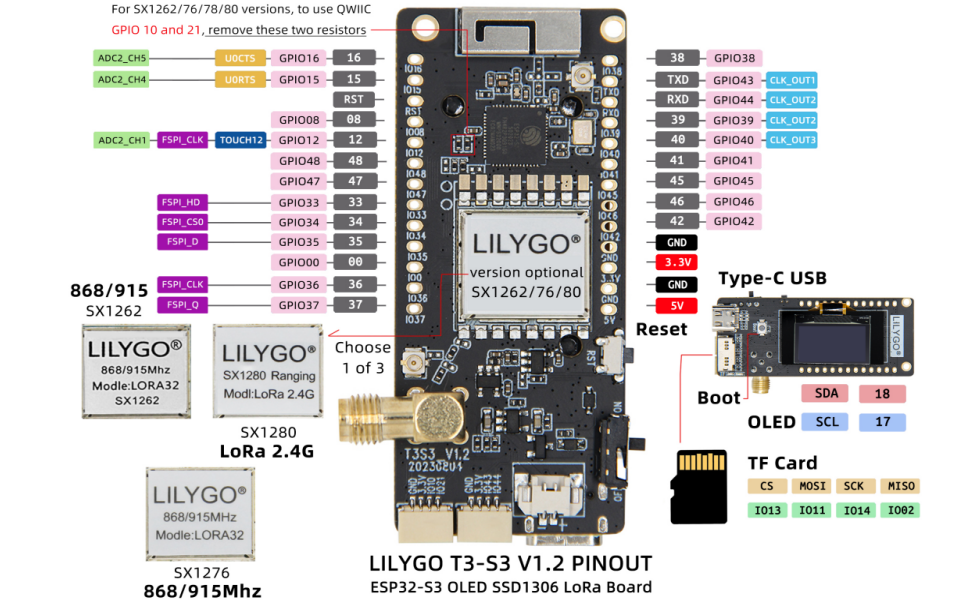
Figure 4: Detailed pinout diagram for the LILYGO T3S3 ESP32-S3 LoRa Development Board, showing GPIO assignments and component locations.
4. Käyttöohjeet
Once the board is set up and firmware is loaded, you can begin operation:
- Virta päälle: Connect the board to a power source. The OLED display should illuminate, showing information based on the loaded firmware (e.g., network status, messages for Meshtastic).
- OLED-näyttö: The 0.96 inch SSD1306 OLED display provides visual feedback. Its resolution is 128x64, and it uses an I2C interface (SDA-IO18, SCL-IO17).
- Langaton viestintä: Utilize the integrated Wi-Fi and Bluetooth 5.0 for local network connectivity or device pairing. The LoRa module (SX1280 2.4G) enables long-range, low-power communication.
- Nollaus- ja käynnistyspainikkeet: The board features a Reset button to restart the microcontroller and a Boot button, typically used for entering bootloader mode during firmware flashing.
- Ohjelmiston vuorovaikutus: Interact with the board through its serial interface (via USB) or wirelessly, depending on the firmware's capabilities. For Meshtastic, a mobile application or web interface is commonly used.
5. Huolto
Proper maintenance ensures the longevity and reliable operation of your development board:
- Pidä kuivana: Suojaa levy kosteudelta ja ilmankosteudelta.
- Puhdista hellävaraisesti: Use a soft, dry brush or compressed air to remove dust. Avoid liquid cleaners.
- Laiteohjelmistopäivitykset: Regularly check the official LILYGO GitHub repository (github.com/Xinyuan-LilyGO/LilyGo-LoRa-Series) for firmware updates and security patches.
- Antennihoito: Ensure the antenna is securely connected but do not overtighten. Avoid bending or damaging the antenna.
6. Vianmääritys
Jos kohtaat ongelmia LILYGO T3S3 -korttisi kanssa, ota huomioon seuraavat seikat:
- Levy ei käynnisty:
- Verify the USB cable is properly connected to a working power source.
- If using a LiPo battery, ensure it is charged and correctly connected to the battery switch.
- OLED Display Blank:
- Tarkista virtalähde.
- Ensure firmware is correctly loaded and configured to initialize the OLED.
- No Wireless Connectivity (Wi-Fi/Bluetooth/LoRa):
- Confirm the antenna is attached correctly for LoRa.
- Verify that the firmware includes the necessary drivers and configurations for the wireless modules.
- Tarkista paikalliset häiriöt.
- Laiteohjelmiston latausongelmat:
- Ensure correct drivers for the USB-to-serial chip are installed on your computer.
- Paina ja pidä painettuna Boot -painiketta samalla painettuna ja vapauta seasing Nollaa button, then release Boot to enter flashing mode.
- Consult the LILYGO Wiki (wiki.lilygo.cc) or GitHub for specific flashing instructions for your operating system and development environment.
7. Tekniset tiedot
Detailed technical specifications for the LILYGO T3S3 ESP32-S3 LoRa Development Board (SX1280 2.4G Without PA):
| Ominaisuus | Erittely |
|---|---|
| Prosessori | ESP32-S3FH4R2 (Dual-core Xtensa LX7) |
| Flash-muisti | 4 Mt |
| PSRAM | 2 Mt |
| Langattomat protokollat | Wi-Fi (802.11 b/g/n), Bluetooth 5.0 (LE) |
| LoRa-lähetin-vastaanotin | SX1280 (2.4 GHz) |
| LoRa TX Power | +13dBm |
| OLED-näyttö | 0.96 inch SSD1306, 128x64 pixels, I2C (SDA-IO18, SCL-IO17) |
| Sisäänrakennetut toiminnot | Reset Button, Boot Button, TF Card Support |
| Virtalähde | USB Type-C, 3.7V LiPo battery (with battery switch) |
| Käyttöjärjestelmä | FreeRTOS (typical) |
| Mitat (PxLxK) | 3.45 x 2.6 x 1.06 tuumaa (noin 87.6 x 66 x 26.9 mm) |
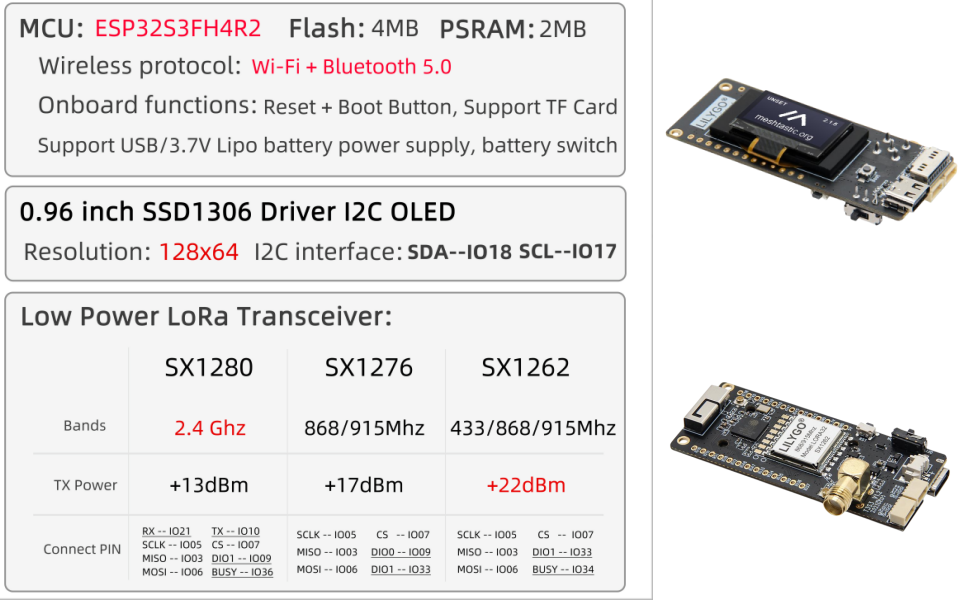
Figure 5: Comprehensive technical specifications for the LILYGO T3S3 series, highlighting the SX1280 2.4G module details.

Figure 6: Physical dimensions of the LILYGO T3S3 ESP32-S3 LoRa Development Board.
8. Tuki ja takuu
For any questions or suggestions regarding the LILYGO T3S3 ESP32-S3 LoRa Development Board, please contact LILYGO customer service. Detailed technical support and community resources can be found on the official LILYGO Wiki and GitHub pages:
- Virallinen wiki: wiki.lilygo.cc
- GitHub Repository: github.com/Xinyuan-LilyGO/LilyGo-LoRa-Series
Specific warranty information is not provided in the product details. Please refer to your point of purchase or contact LILYGO directly for warranty terms and conditions.


