Johdanto
This manual provides essential instructions for the proper use and maintenance of your Kawai Universal Mini HD Satellite Remote Control. This remote is designed for seamless compatibility with various Kawai satellite receiver models, including Kw 900, Kw 6820, Kn 650, Kw 2000, 6850, 6950, and 8400. Please read this manual thoroughly before operating the device to ensure optimal performance and longevity.
Tuote loppuview
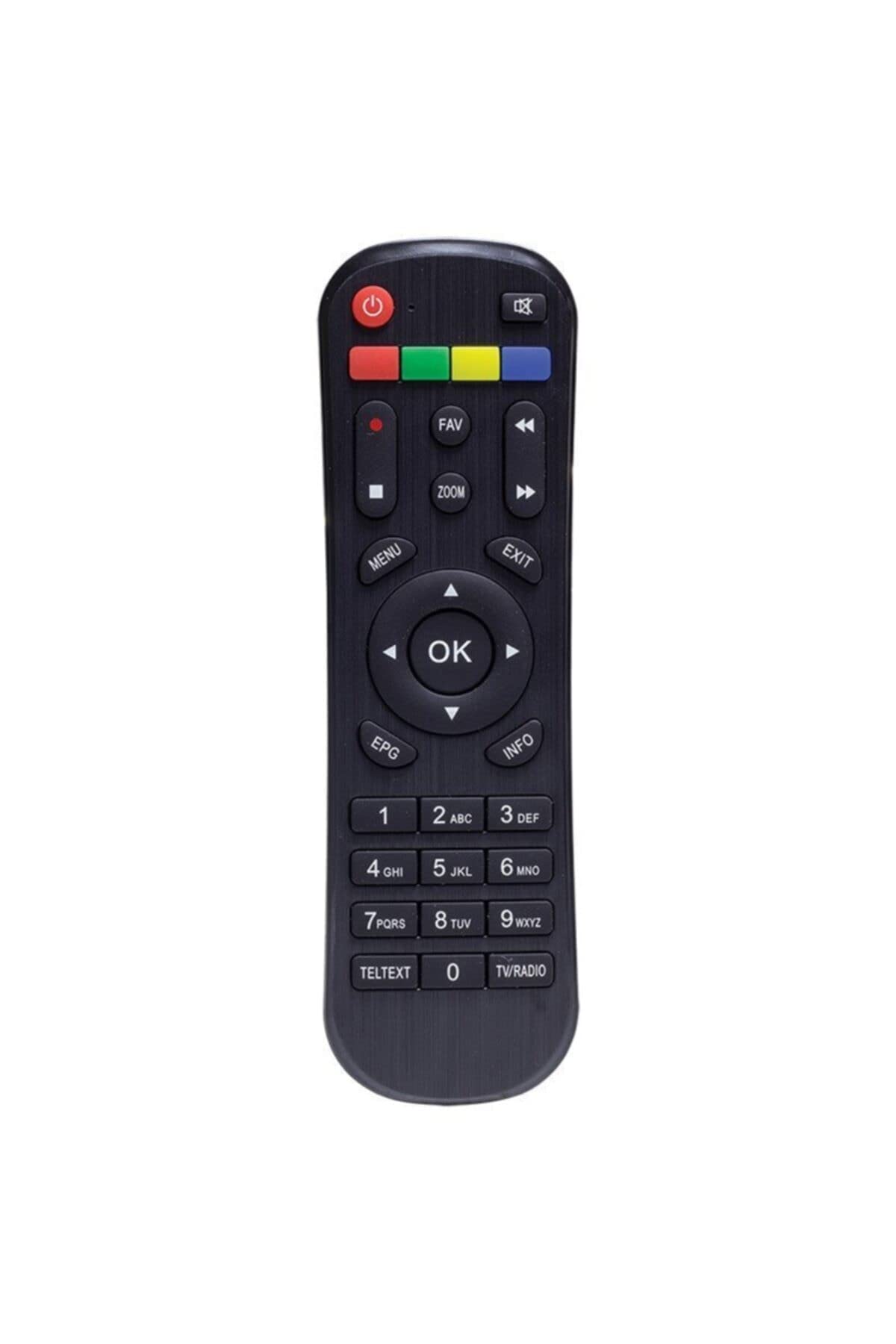
Kuva 1: Edessä view of the Kawai Universal Mini HD Satellite Remote Control. This image displays the ergonomic design and button layout of the remote, highlighting its compact size and standard control functions.
The Kawai Universal Mini HD Satellite Remote Control is a compact and efficient device designed to provide full control over your compatible Kawai satellite receiver. Its intuitive button layout ensures ease of use for channel navigation, volume control, menu access, and other essential functions.
Asennus
1. Akun asennus
- Paikanna paristolokero kaukosäätimen takana.
- Avaa paristokotelo liu'uttamalla sitä alaspäin tai nuolen osoittamaan suuntaan.
- Aseta kaksi AAA-paristoa (eivät sisälly toimitukseen) lokeroon varmistaen, että positiiviset (+) ja negatiiviset (-) navat vastaavat lokeron sisällä olevia kaavioita.
- Sulje paristokotelon kansi liu'uttamalla sitä takaisin paikalleen, kunnes se napsahtaa tukevasti.
2. Ensimmäinen käyttökerta
This remote control is pre-programmed for compatibility with the listed Kawai satellite receiver models. No additional pairing or setup is typically required. Simply point the remote at your satellite receiver and begin operation.
- Ensure there are no obstructions between the remote control and the satellite receiver.
- Confirm that the satellite receiver is powered on.
Käyttöohjeet
Familiarize yourself with the primary functions of the remote control buttons:
- Virtanappi (●): Turns the satellite receiver on or off.
- Kanava ylös/alas (CH +/-): Vaihtaa televisiokanavaa.
- Äänenvoimakkuus ylös/alas (VOL +/-): Säätää äänenvoimakkuutta.
- Mykistä (MYKISTÄ): Hiljentää äänentoiston.
- Numeropainikkeet (0-9): Syötä kanavanumerot suoraan.
- Valikko (MENU): Accesses the satellite receiver's main menu.
- Navigointipainikkeet (▲ ▼ ◀ ▶): Selaa valikon vaihtoehtoja.
- OK/Enter (OK): Vahvistaa valikoissa tehdyt valinnat.
- Exit/Back (EXIT): Poistuu nykyisestä valikosta tai palaa edelliseen näyttöön.
- Info (TIEDOT): Näyttää ohjelmatiedot.
Specific button functions may vary slightly depending on your Kawai satellite receiver model. Refer to your receiver's manual for detailed information on advanced features.
Huolto
Puhdistus
Puhdista kaukosäädin pehmeällä, kuivalla liinalla. Pinttyneeseen likaan pyyhi kevyestiampen the cloth with water or a mild, non-abrasive cleaner. Avoid using harsh chemicals, solvents, or abrasive materials, as these can damage the remote's surface and internal components.
Akun vaihto
Replace batteries when the remote control's response becomes sluggish or stops functioning. Always replace both batteries simultaneously with new ones of the same type (AAA). Do not mix old and new batteries, or different types of batteries, as this can lead to leakage or damage.
- Poista vanhat paristot viipymättä vuotojen estämiseksi.
- Hävitä käytetyt paristot paikallisten määräysten mukaisesti.
Vianetsintä
| Ongelma | Mahdollinen syy | Ratkaisu |
|---|---|---|
| Kaukosäädin ei toimi. |
|
|
| Jotkin painikkeet eivät toimi. |
|
|
Tekniset tiedot
- Merkki: Kawai (Listed as Generic by seller)
- Valmistaja: Yleinen
- ASIN: B0BW4KLTDS
- Ensimmäinen saatavilla oleva päivämäärä: 17. helmikuuta 2023
- Yhteensopivuus: Kawai Kw 900, Kw 6820, Kn 650, Kw 2000, 6850, 6950, 8400 Mini HD Satellite Receivers
- Virtalähde: 2 x AAA paristot (ei mukana)
Takuu ja tuki
For warranty information and technical support, please refer to the documentation provided with your original Kawai satellite receiver or contact the retailer from whom you purchased this remote control. Keep your purchase receipt as proof of purchase.
For further assistance, you may also visit the official Kawai website or contact their customer service department if available in your region.