1. Johdanto
The ENDGAME GEAR XM2we is a high-performance wireless gaming mouse designed for competitive play. It features a lightweight, ergonomic design, precise optical sensor, and durable switches to enhance your gaming experience. This manual provides detailed instructions for setup, operation, and maintenance of your XM2we mouse.
2. Pakkauksen sisältö
Varmista, että pakkauksessasi on kaikki tarvittavat osat:
- ENDGAME GEAR XM2we Langaton pelihiiri
- USB-C to USB-A Charging/Data Cable (180 cm) with Angled Connector
- 2.4 GHz Wireless USB Dongle

Image: The XM2we Wireless Gaming Mouse, showing its ergonomic shape and included USB-C cable.
3. Asennus
3.1 Hiiren kytkeminen
- Insert the 2.4 GHz wireless USB dongle into an available USB-A port on your computer.
- Turn on the XM2we mouse using the power switch located on the bottom of the mouse.
- The mouse should automatically connect to the dongle. If not, ensure the dongle is properly inserted and the mouse is powered on.
3.2 Langallinen tila
The XM2we can also be used in wired mode. Connect the supplied USB-C cable to the front port of the mouse and the USB-A end to your computer. The mouse will function as a wired device and charge simultaneously.

Kuva: Pohja view of the XM2we mouse, highlighting the USB-C port for charging and wired connection, and the PixArt PAW3370 optical sensor.
4. Käyttöohjeet
4.1 Painikkeiden toiminnot
The XM2we mouse features 5 programmable buttons:
- Vasen napsautuspainike: Ensisijainen toimenpide.
- Hiiren oikeanpuoleinen painike: Secondary action.
- Vierityspyörän napsautus: Middle button function.
- Sivupainike 1 (Eteenpäin): Oletusarvoinen eteenpäin navigointi.
- Side Button 2 (Back): Oletusarvoinen takaisin-navigointi.

Kuva: Yläosa view of the XM2we mouse, illustrating the main left and right click buttons and the scroll wheel.
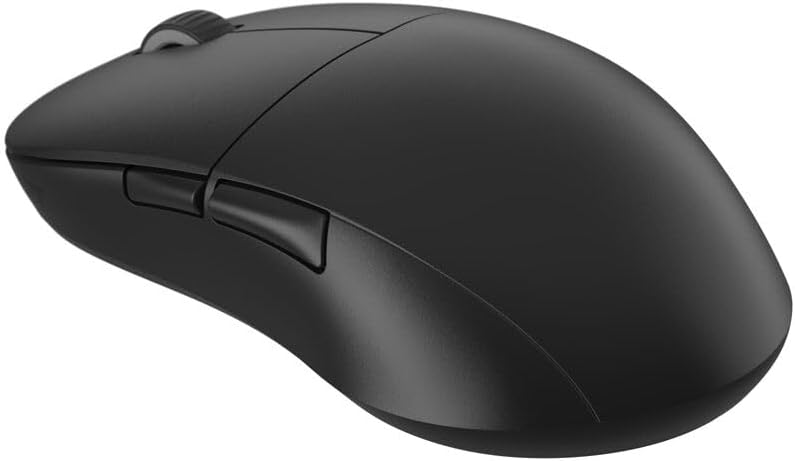
Kuva: Sivu view of the XM2we mouse, highlighting the two thumb buttons.
4.2 DPI and Polling Rate Adjustment
The XM2we features a PixArt PAW3370 optical sensor with up to 19,000 DPI. DPI and polling rate settings can be adjusted using the ENDGAME GEAR software. The mouse supports stable 1000 Hz polling rate for responsive performance.
5. Mukauttaminen ja ohjelmisto
To unlock the full potential of your XM2we mouse, download the official ENDGAME GEAR software from the manufacturer's websivusto. Ohjelmiston avulla voit:
- Remap all 5 buttons to custom functions or macros.
- Säädä DPI-tasoja ja luo useita DPI-pro-kuviafiles.
- Configure polling rate (125, 250, 500, 1000 Hz).
- Customize lift-off distance (LOD).
- Update mouse firmware.
6. Lataus ja akku
The XM2we is equipped with a 410 mAh Lithium Polymer battery, providing up to a week of gameplay on a single charge. To charge the mouse:
- Connect the supplied USB-C cable to the front port of the mouse.
- Connect the USB-A end of the cable to your computer or a USB power adapter.
- The angled connector on the USB-C cable is designed to minimize cable drag if you choose to use the mouse while charging.

Image: The USB-C charging cable with its angled connector, designed for comfortable use during charging.
7. Huolto
To ensure the longevity and optimal performance of your XM2we mouse:
- Puhdistus: Puhdista hiiren pinta pehmeällä, kuivalla liinalla. Pinttyneeseen likaan käytä hieman kuivaa liinaa.amp Kangasta voi käyttää, mutta varmista, ettei hiireen pääse kosteutta.
- Anturin hoito: Keep the optical sensor area on the bottom of the mouse clean and free from dust or debris.
- Teflon Feet: The large Teflon feet provide a smooth glide. Avoid scratching or damaging them. Replacement feet may be available from the manufacturer.
- Varastointi: Säilytä hiirtä viileässä, kuivassa paikassa, poissa suorasta auringonvalosta ja äärimmäisistä lämpötiloista.
8. Vianmääritys
- Hiiri ei vastaa:
- Varmista, että hiiri on päällä.
- Verify the USB dongle is securely plugged into your computer.
- Try connecting the mouse in wired mode to check if it functions.
- Lataa hiiri, jos akku on vähissä.
- Ajoittainen yhteys:
- Move the USB dongle closer to the mouse, ideally to a front USB port or via a USB extension cable.
- Ensure there are no strong wireless interference sources (e.g., Wi-Fi routers, other wireless devices) nearby.
- Update mouse firmware using the ENDGAME GEAR software.
- DPI/Button settings not applying:
- Ensure the ENDGAME GEAR software is installed and running.
- Apply changes within the software and save them to the mouse's onboard memory if available.
- Käynnistä tietokone uudelleen.
9. Tekniset tiedot
| Ominaisuus | Erittely |
|---|---|
| Malli | XM2we |
| Yhteydet | 2.4 GHz Wireless, USB-C Wired |
| Anturi | PixArt PAW3370 optinen anturi |
| DPI | Jopa 19,000 DPI |
| Äänestysprosentti | 125, 250, 500, 1000 Hz |
| Kytkimet | Kailh GO Optical Switches (Main Buttons) |
| Painikkeet | 5 ohjelmoitavaa painiketta |
| Akku | 410 mAh litiumpolymeeri |
| Paino | Under 64 g (2.22 oz) |
| Mitat (P x L x K) | 122 x 66 x 38 mm (4.80 x 2.59 x 1.50 tuumaa) |
| Kaapelin pituus | 180 cm |

Image: Diagram illustrating the dimensions of the XM2we mouse: 122 mm length, 66 mm width, and 38 mm height, with a weight of 63g.
10. Takuu ja tuki
For warranty information, technical support, or further assistance, please refer to the official ENDGAME GEAR websivustolta tai ota yhteyttä suoraan heidän asiakaspalveluunsa. Säilytä ostokuitti takuuvaatimuksia varten.


