1. Johdanto
Kiitos ostoksestasiasing the Shanrya Digital Mirror Alarm Clock. This manual provides essential information for the proper setup, operation, and maintenance of your device. Please read these instructions carefully before use and retain them for future reference.

Kuva 1: Etuosa view of the Shanrya Digital Mirror Alarm Clock displaying 4:30 in red LED digits.
2. Asennus
2.1 Pakkauksen sisältö
- Shanrya Digital Mirror Alarm Clock
- USB-virtakaapeli
- Käyttöopas (tämä asiakirja)
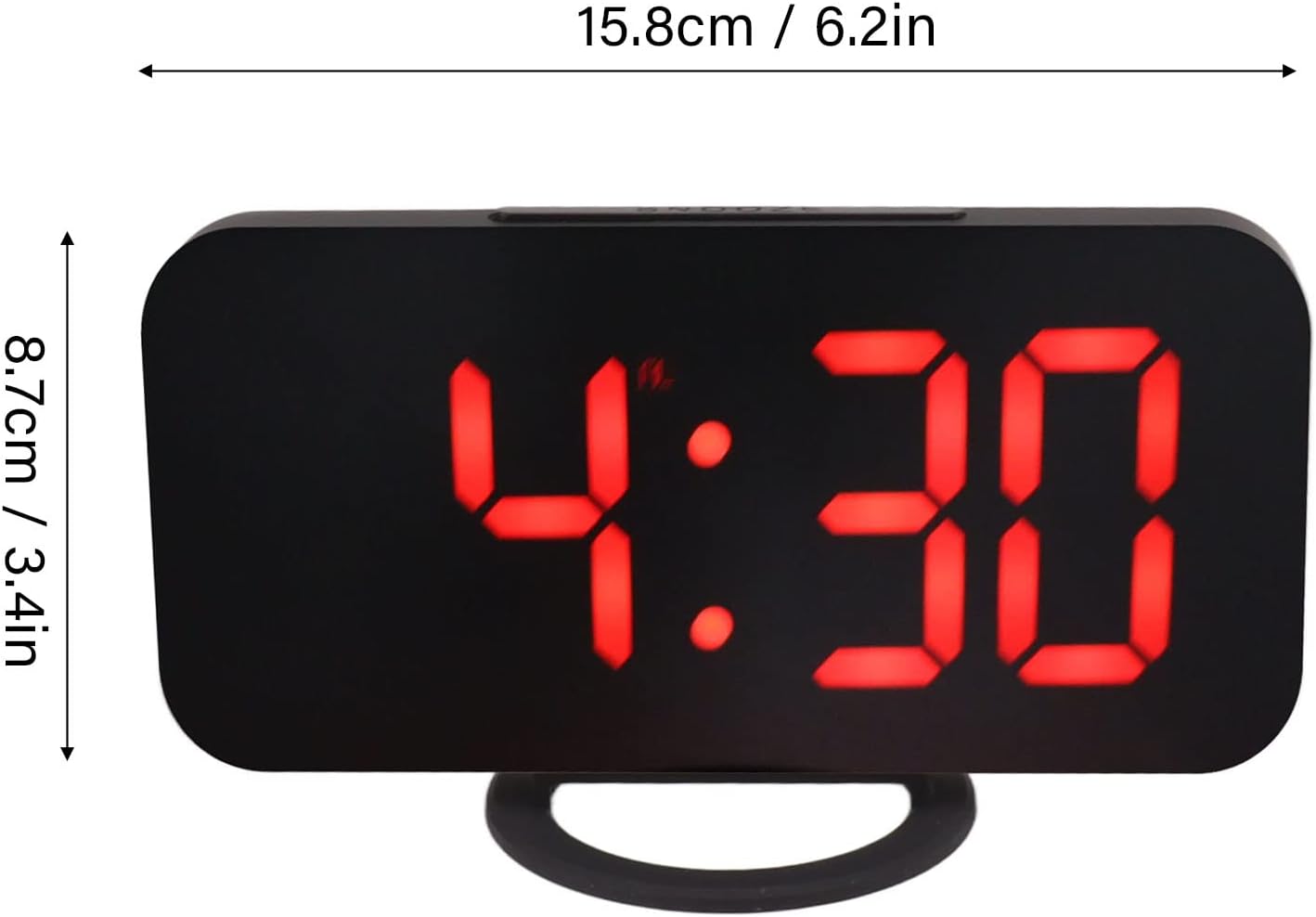
Figure 2: The alarm clock shown with its USB power cable, ready for connection.
2.2 Virtaliitäntä
- Connect the small end of the provided USB power cable to the DC 5V input port on the back of the alarm clock.
- Connect the standard USB end of the cable to a USB power adapter (not included) or a powered USB port.
- The display will light up, indicating the clock is powered on.
Huomautus: This clock requires continuous power via USB. It does not operate on batteries for primary function, but may have a small internal battery for time memory during power outages (not user-replaceable).
3. Käyttöohjeet
3.1 Painikkeiden toiminnot
The clock features several buttons, typically located on the top or side. Refer to Figure 3 for button identification.

Kuva 3: Yksityiskohtainen view of the clock's control buttons and examples of different display brightness levels.
- MODE-painike: Käytetään ajan näytön, herätysasetuksen ja muiden tilojen välillä vaihtamiseen.
- YLÖS/ALAS-painikkeet: Used to adjust values (time, alarm) or brightness levels.
- SNOOZE-painike: Aktivoi torkkutoiminnon, kun herätys soi.
3.2 Kellonajan asettaminen
- Paina MODE -painiketta, kunnes aikanäyttö vilkkuu.
- Käytä UP ja ALAS painikkeita säätääksesi tuntia.
- Paina MODE again to switch to minute adjustment.
- Käytä UP ja ALAS painikkeita minuuttien säätämiseksi.
- Paina MODE vahvistaaksesi ja poistuaksesi ajan asetustilasta.
3.3 Hälytyksen asettaminen
- Paina MODE button repeatedly until the alarm icon (e.g., a bell) appears and the alarm time flashes.
- Käytä UP ja ALAS -painikkeita halutun herätysajan asettamiseksi.
- Paina MODE again to switch to minute adjustment.
- Käytä UP ja ALAS -painikkeita haluttujen hälytysminuuttien asettamiseksi.
- Paina MODE to confirm and activate the alarm. The alarm icon will remain displayed.
- To deactivate the alarm, repeat the steps and press MODE kunnes hälytyskuvake katoaa.
3.4 Torkku -toiminto
Kun hälytys soi, paina TORKUTA button (usually located on top of the clock) to temporarily silence the alarm. The alarm will sound again after a preset interval (e.g., 5-10 minutes). To turn off the alarm completely, press any other button or let it ring for its full duration.
3.5 Kirkkauden säätö
The clock offers multiple brightness levels for its LED display, including manual adjustment, automatic adjustment, and a night mode. This allows for optimal visibility in various lighting conditions.
- Manuaalinen säätö: Aikanäyttötilassa paina UP or ALAS buttons to cycle through different brightness levels (e.g., Dark, Mid Gear, Bright).
- Automaattinen säätö: Some models may feature an ambient light sensor that automatically adjusts display brightness based on room lighting. Refer to Figure 3 for visual representation of brightness levels.
- Yötila: A specific setting that dims the display significantly during predefined night hours to prevent disturbance. Consult the specific button sequence for your model to activate/deactivate night mode.
4. Huolto
4.1 Puhdistus
Puhdista kello pyyhkimällä pinta varovasti pehmeällä, kuivalla tai hieman kostealla liinalla.amp cloth. Do not use abrasive cleaners, solvents, or chemical sprays, as these can damage the mirror finish and electronic components.
4.2 Varastointi
If storing the clock for an extended period, disconnect it from the power source and store it in a cool, dry place away from direct sunlight and extreme temperatures.
5. Vianmääritys
| Ongelma | Mahdollinen syy | Ratkaisu |
|---|---|---|
| Näyttö on tyhjä tai ei syty. | Ei virtaa tai löysä liitos. | Ensure the USB cable is securely connected to both the clock and a powered USB port/adapter. Try a different USB port or adapter. |
| Hälytys ei soi. | Alarm not set or deactivated. Volume too low (if applicable). | Verify the alarm is set and the alarm icon is displayed. Check if there's a volume setting (though most digital clocks have fixed alarm volume). |
| Aika on väärä. | Aikaa ei ole asetettu oikein tai sähkökatkos. | Reset the time according to section 3.2. If power was interrupted, the clock may need to be reset. |
| Näyttö on liian kirkas tai liian himmeä. | Kirkkausasetusta on säädettävä. | Adjust the brightness manually using the UP/DOWN buttons as described in section 3.5. |
6. Tekniset tiedot
- Mallinumero: Shanrya1am475rqfe-12
- ASIN: B0BVC2VWF3
- Merkki: Shanrya
- Näyttötyyppi: Digitaalinen LED (punainen)
- Ominaisuudet: Alarm, Snooze, Dimmable Display (Manual, Auto, Night Mode)
- Virtalähde: DC 5V via USB cable
- Mitat: Approximately 15.8 cm (6.2 in) x 8.7 cm (3.4 in) (Width x Height)
- Ensimmäinen saatavilla oleva päivämäärä: 25. maaliskuuta 2023

Figure 4: Diagram illustrating the approximate dimensions of the alarm clock.
7. Takuu ja tuki
Tällä tuotteella on valmistajan vakiotakuu. Tarkemmat takuuehdot löytyvät ostohetkellä toimitetuista asiakirjoista tai ottamalla yhteyttä jälleenmyyjään.
For technical support or inquiries, please contact the seller or manufacturer through the platform where the product was purchased. Please have your model number (Shanrya1am475rqfe-12) and ASIN (B0BVC2VWF3) ready when contacting support.


