1. Johdanto
Thank you for choosing the Gembird USB-C Gigabit Network Adapter with 3-Port USB 3.1 Hub. This device is designed to expand the connectivity of your USB-C enabled laptop, tablet, or computer, providing both high-speed Gigabit Ethernet and additional USB 3.1 ports. This manual provides essential information for setting up, operating, and maintaining your device.
2. Tuotteen ominaisuudet
- USB-C-liitäntä: Connects to your host device via a reversible USB-C port.
- Gigabit Ethernet-portti: Tarjoaa vakaan ja nopean langallisen verkkoyhteyden jopa 1000 Mbps:n nopeudella.
- 3-Port USB 3.1 Hub: Adds three USB 3.1 ports for connecting peripherals such as external hard drives, flash drives, keyboards, and mice.
- Nopea tiedonsiirto: USB 3.1 ports support data transfer rates up to 5 Gbps.
- Plug and Play: No driver installation required for most modern operating systems.
3. Pakkauksen sisältö
Please ensure the following items are included in your package:
- Gembird USB-C Gigabit Network Adapter with 3-Port USB 3.1 Hub (Model A-CMU3-LAN-01)
4. Tuote ohiview
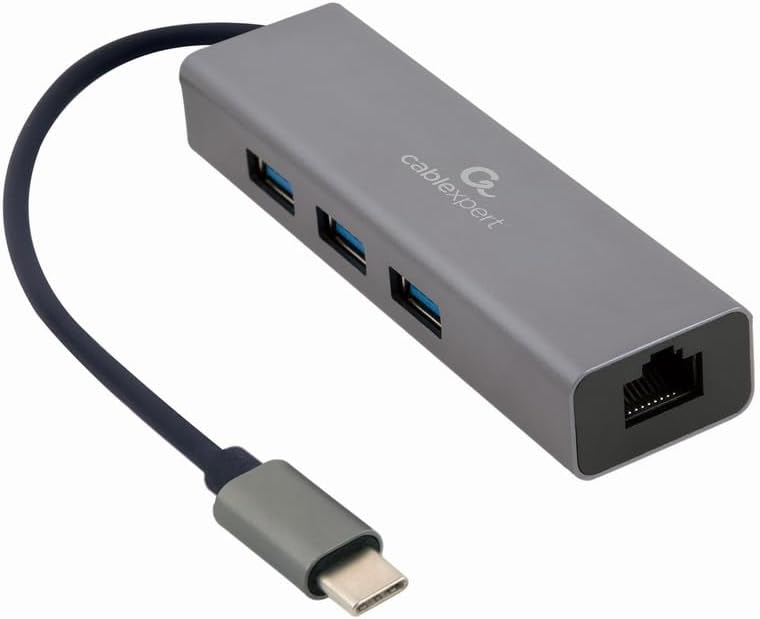
Kuva 1: Edessä view of the Gembird USB-C Gigabit Network Adapter, showing the USB-C cable, three USB 3.1 ports, and the RJ45 Gigabit Ethernet port.

Kuva 2: Retail packaging for the Gembird USB-C Gigabit Network Adapter, highlighting key features like USB Type-C, USB 3.1 x 3, RJ45, Gigabit, 1000 Mbps, and Plug & Play.
5. Asennus
Follow these steps to set up your Gembird USB-C Gigabit Network Adapter:
- Yhdistä isäntälaitteeseen: Plug the USB-C connector of the adapter into an available USB-C port on your laptop, tablet, or computer.
- Yhdistä verkkoon: Insert an Ethernet cable (RJ45) from your router or modem into the Gigabit Ethernet port on the adapter.
- Liitä USB-oheislaitteet: Plug your USB devices (e.g., flash drives, external hard drives, mouse, keyboard) into the three available USB 3.1 ports on the adapter.
- Ohjaimen asennus: The adapter is typically plug-and-play. Your operating system (Windows, macOS, Linux, Chrome OS) should automatically detect and install the necessary drivers. If prompted, allow the system to install drivers.
6. Käyttöohjeet
Once connected, the adapter functions automatically:
- Verkkoyhteys: Your host device should now have a wired network connection. You can verify this in your operating system's network settings.
- USB Device Access: Connected USB peripherals will be recognized by your host device and function as if directly connected.
7. Vianmääritys
Jos kohtaat ongelmia, tutustu seuraaviin yleisiin ongelmiin ja ratkaisuihin:
- Ei verkkoyhteyttä:
- Varmista, että Ethernet-kaapeli on kytketty kunnolla sekä sovittimeen että reitittimeen/modeemiin.
- Tarkista reitittimesi/modeemisi toiminta.
- Tarkista isäntälaitteesi verkkoasetukset.
- Kokeile liittää sovitin isäntälaitteesi toiseen USB-C-porttiin.
- USB-laitteita ei tunnisteta:
- Ensure USB devices are properly plugged into the adapter's USB 3.1 ports.
- Try connecting the USB device directly to your host computer to confirm it is functional.
- Some high-power USB devices may require an external power source if your host device's USB-C port does not provide sufficient power (this adapter does not have a dedicated power input).
- Hidas verkon nopeus:
- Ensure your Ethernet cable is rated for Gigabit speeds (Cat5e or higher).
- Tarkista internet-palveluntarjoajasi nopeus ja reitittimesi ominaisuudet.
- Ensure your host device's USB-C port supports USB 3.0/3.1 speeds.
8. Tekniset tiedot
| Mallinumero | A-CMU3-LAN-01 |
| Laitteistorajapinta | USB-C (Host), USB 3.1 (Hub), RJ45 (Ethernet) |
| USB-portteja yhteensä | 3 3.1 (USB XNUMX) |
| Ethernet-portit | 1 (Gigabit RJ45) |
| Tiedonsiirtonopeus (USB) | Jopa 5 Gbps (USB 3.1) |
| Data Transfer Rate (Ethernet) | 10/100/1000 Mbps |
| Tuotteen mitat | 10 x 2 x 2.7 tuumaa |
| Tuotteen paino | 2.46 unssia |
9. Huolto
Varmistaaksesi sovittimen pitkän käyttöiän ja optimaalisen suorituskyvyn:
- Puhdistus: Puhdista laitteen ulkopinta pehmeällä, kuivalla liinalla. Vältä nestemäisiä puhdistusaineita tai liuottimia.
- Varastointi: Säilytä sovitinta viileässä, kuivassa paikassa, poissa suorasta auringonvalosta ja äärimmäisistä lämpötiloista, kun sitä ei käytetä.
- Käsittely: Avoid dropping or subjecting the device to strong impacts. Do not attempt to disassemble the adapter.
10. Takuu ja tuki
This Gembird product comes with a kahden vuoden takuu tehdasvirheitä vastaanSäilytä ostokuittisi takuuvaatimuksia varten.
For technical support or warranty inquiries, please contact your retailer or visit the official Gembird websivustolta yhteystiedot.