1. Johdanto
This manual provides detailed instructions for the assembly, operation, and maintenance of your VIVO STAND-TV22B Aluminum Mobile TV Cart. This heavy-duty stand is designed to securely hold screens from 32 to 100 inches, weighing up to 220 lbs, with VESA patterns ranging from 200x200mm to 1000x600mm. It features mobile casters, a sturdy middle shelf, and tilt/height adjustment for optimal viewing.
2. Turvallisuustiedot
WARNING: Read and understand all instructions before use. Failure to follow these instructions may result in serious injury or damage.
- Varmista, että kaikki osat ovat mukana ja vahingoittumattomia ennen kokoamista.
- Älä ylitä suurinta sallittua painokapasiteettia, joka on 100 kg (220 lbs).
- Do not exceed the maximum screen size of 100 inches.
- Verify VESA compatibility (200x200mm to 1000x600mm) with your television.
- Kokoa yksikkö tasaiselle ja vakaalle alustalle.
- Use appropriate tools and tighten all fasteners securely.
- Lukitse pyörät aina, kun kärry on paikallaan, jotta se ei pääse liikkumaan vahingossa.
- Exercise caution when moving the cart, especially on uneven surfaces or with a TV mounted.
- Keep children and pets away from the cart during assembly and operation.
- Tämä tuote sisältää kemikaaleja, joiden Kalifornian osavaltio tietää aiheuttavan syöpää ja synnynnäisiä epämuodostumia tai muita lisääntymisterveydellisiä haittoja (ehdotus 65 -varoitus).
3. Pakkauksen sisältö
Please verify that all parts are included in your package. If any parts are missing or damaged, contact VIVO customer support.
- Base frame with 4 locking casters
- Vertical support columns (2)
- TV mounting plate
- TV mounting brackets (2)
- Keskimmäinen hylly
- Top shelf (for webcam/camera)
- Cable management covers
- Assembly hardware (screws, washers, nuts, Allen wrench, open-end wrench)
4. Tekniset tiedot
| Merkki | VIVO |
| Mallinumero | STAND-TV22B |
| Materiaali | Alumiini, Teräs |
| Väri | Musta |
| Näytön koon yhteensopivuus | 32–100 tuumaa |
| Paino Kapasiteetti | Jopa 220 paunaa (100 kg) |
| VESA-yhteensopivuus | 200x200mm - 1000x600mm |
| Korkeuden säätö | 48" to 68" (center of screen) |
| Kallistuskulma | +5° - -10° |
| Tuotteen mitat | 45" x 27.5" x 94" (L x W x H, top shelf to floor) |
| Tuotteen paino | 70.4 lbs |
Note: All measurements are approximate.
5. Asennus ja kokoonpano
Follow these steps carefully to assemble your VIVO Mobile TV Cart. It is recommended to have assistance during certain steps, especially when mounting the television.
Kokoamisvideo-opas
Videon kuvaus: This official VIVO assembly video provides a visual guide for setting up the mobile TV cart. While the video references model STAND-TV22S, the assembly process is highly similar to the STAND-TV22B. It demonstrates each step from unboxing to final TV mounting, covering assembling the base, columns, shelves, and attaching the TV.
Vaiheittaiset kokoonpanoohjeet
Vaihe 1: Kokoa alusta
Attach the four locking casters to the base frame using the provided hardware. Ensure they are securely tightened with the open-end wrench.

Kuvan kuvaus: Lähikuva view of the sturdy base of the VIVO mobile TV cart, highlighting one of the quad locking casters. The caster is black with a metal bracket, designed for stability and mobility.
Step 2: Extend the Vertical Support Columns
Carefully extend the inner sections of the vertical support columns. Secure them in the extended position using the provided pins or locking mechanisms.
Step 3: Attach Columns to Base and Handles
Secure the two extended vertical support columns to the assembled base using the designated screws and the Allen wrench. Attach the decorative handles to the top of the columns.
Kuvan kuvaus: The VIVO mobile TV cart with a large television mounted, positioned in a modern office setting. The dual vertical support columns are visible, extending from the base to the TV mounting plate.
Step 4: Install TV Mounting Plate
Attach the horizontal TV mounting plate to the top of the vertical support columns. Use the provided screws and ensure it is level and securely fastened.
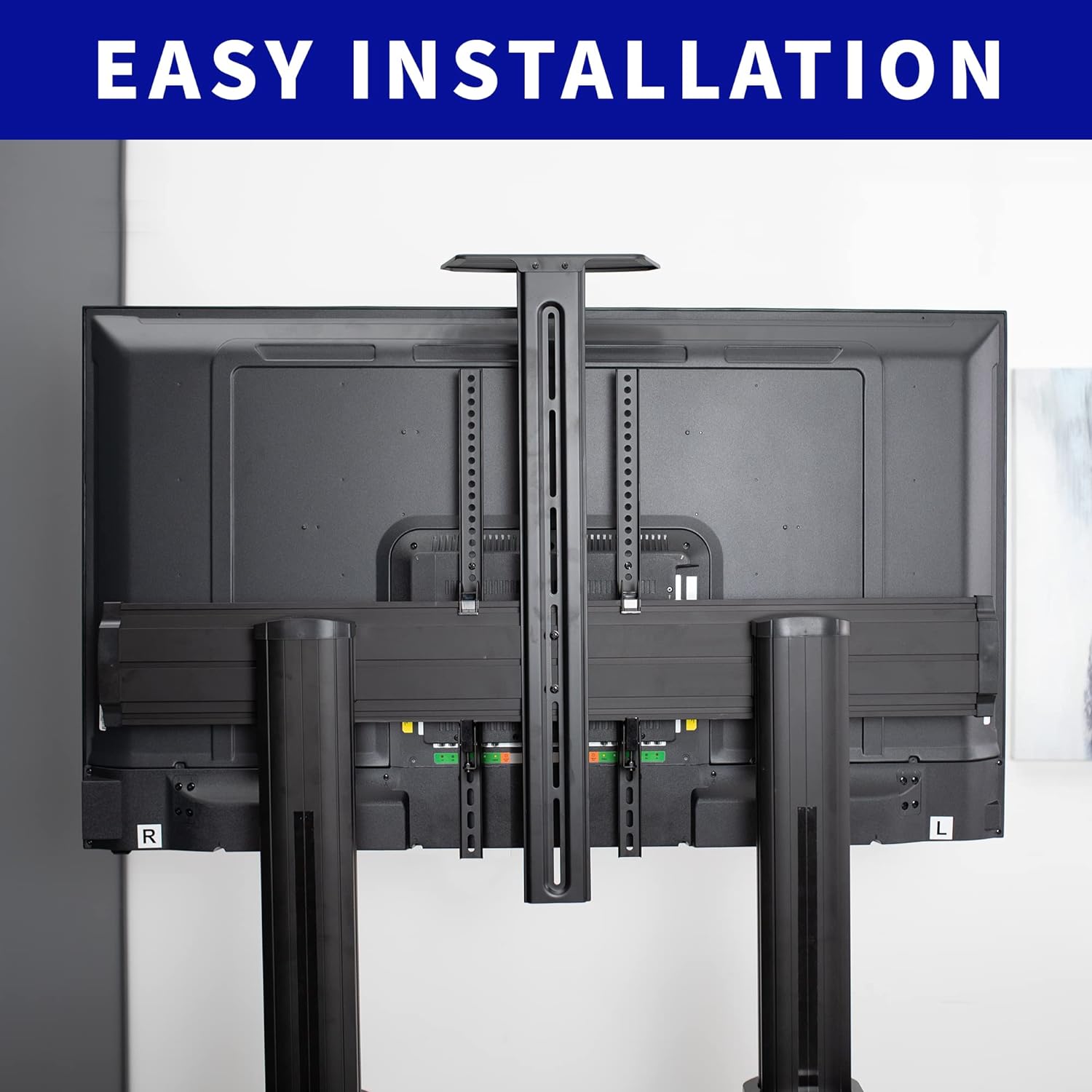
Kuvan kuvaus: Takaosa view of a television mounted on the VIVO TV cart, showcasing the horizontal mounting plate and the vertical brackets attached to the TV. This illustrates the "Easy Installation" feature.
Step 5: Secure Columns to the Base (Covers)
Place the plastic covers over the base connections of the vertical columns and secure them with the appropriate fasteners to complete the base assembly.
Step 6: Attach Middle Shelf (DVD Tray)
Attach the middle shelf to the desired height on the vertical columns using the provided hardware. This shelf is suitable for laptops, DVD players, or streaming devices.

Kuvan kuvaus: The VIVO mobile TV cart in an office setting, displaying a laptop on its adjustable middle shelf and a webcam on the top shelf, demonstrating its utility for presentations or video conferencing.
Step 7: Install the Television
Carefully attach the TV mounting brackets to the back of your television using the appropriate VESA screws and spacers from the hardware kit. Refer to your TV's manual for specific VESA hole patterns. With assistance, lift your television and hook the attached mounting brackets onto the horizontal mounting plate. Secure the TV to the plate using the safety screws or locking mechanisms provided.
Vaihe 8: Kiinnitä ylähylly
The smaller top shelf can be installed above the TV for a webcam or camera, securing it with the provided hardware.
Vaihe 9: Kaapelin hallinta
Utilize the integrated cable management system within the vertical columns to route and conceal cables for a clean and organized appearance.
6. Käyttöohjeet
Kärryn siirtäminen
To move the TV cart, unlock all four casters by flipping their locking levers. Carefully push the cart to your desired location. Once positioned, lock all casters to ensure stability.
Korkeuden säätö
The TV cart allows for height adjustment from 48" to 68" (center of screen). To adjust, loosen the locking mechanisms on the vertical columns, carefully raise or lower the TV to the desired height, and then securely tighten the locking mechanisms. It is recommended to remove the TV before significant height adjustments for safety.

Kuvan kuvaus: Yksi puoli view of the VIVO mobile TV cart with a television, illustrating the telescoping height adjustment feature and the tilt range of +5° to -10° for optimal viewkulmat.
Kallistuksen säätö
The TV mounting brackets allow for a tilt range of +5° to -10°. Loosen the tilt adjustment knobs on the side of the TV brackets, adjust the screen to your preferred angle, and then tighten the knobs to secure the position.
7. Huolto
- Tarkista säännöllisesti kaikki ruuvit ja kiinnikkeet varmistaaksesi, että ne ovat tiukasti kiinni.
- Clean the cart surfaces with a soft, damp kangas. Vältä hankaavia puhdistusaineita.
- Inspect casters periodically for smooth operation and clean any debris.
- Ensure cables routed through the management system are not pinched or strained.
8. Vianmääritys
| Ongelma | Mahdollinen syy | Ratkaisu |
|---|---|---|
| Kärry on epävakaa tai heiluu. | Löysät kiinnikkeet; epätasainen lattia; ylikuormitettu. | Tarkista ja kiristä kaikki ruuvit. Siirrä televisio tasaiselle alustalle. Varmista, että television paino on sallituissa rajoissa. |
| Vaikeuksia kärryn siirtämisessä. | Casters are locked; debris in casters. | Unlock all casters. Clean any debris from the wheels. |
| Televisio ei ole vaakasuorassa. | Mounting plate or brackets are uneven. | Adjust the TV mounting brackets or re-level the horizontal mounting plate. |
| Johdot ovat näkyvissä tai sotkuisia. | Kaapelinhallintaa ei käytetä. | Route cables through the integrated cable management system in the vertical columns. |
9. Takuu ja tuki
VIVO products are designed for quality and durability. For specific warranty information, please refer to the product packaging or the official VIVO website. If you encounter any issues or require assistance, please contact VIVO customer support.
- Asiakastuki: VIVO offers customer support for product inquiries and assistance.
- Palautukset: Tällä tuotteella on 30 päivän helppo palautusoikeus.
- Suojaussuunnitelmat: Extended protection plans (2-Year, 3-Year) may be available for purchase.
For the most up-to-date information, visit the official VIVO store or contact their support directly.


