1. Johdanto
The AeroCool Blade is an ATX semi-tower PC case designed for optimal airflow and aesthetic appeal. It features an RGB front panel with preset lighting modes, a full tempered glass side window, and ample space for component installation. This manual provides essential information for the proper setup, operation, and maintenance of your PC case.
Turvallisuustiedot: Always disconnect power from your system before performing any installation or maintenance. Handle components with care to avoid damage. Refer to individual component manuals for specific installation instructions.
2. Pakkauksen sisältö
- AeroCool Blade ATX Semi-Tower PC Case
- 1 x 120mm RGB Rear Fan (pre-installed)
- 3 x 120mm Front Fans (pre-installed)
- Lisävarustesarja (ruuvit, tuet, nippusiteet)
3. Asennus ja asennus
3.1 Asian valmistelu
Carefully remove the case from its packaging. Place it on a stable, flat surface. Remove the tempered glass side panel by unscrewing the thumb screws at the rear of the case and gently pulling the panel away.

Kuva 3.1: Sisäinen view of the AeroCool Blade PC case, illustrating the layout for component installation.
3.2 Emolevyn asennus
- Install the necessary motherboard standoffs into the motherboard tray according to your motherboard's form factor (ATX, Micro-ATX, Mini-ITX).
- Asenna I/O-suoja kotelon takaosaan.
- Aseta emolevy varovasti tukien päälle ja kohdista ruuvinreiät.
- Kiinnitä emolevy mukana toimitetuilla ruuveilla.
3.3 Virtalähteen (PSU) asennus
The AeroCool Blade supports bottom-mounted PSUs. Slide your PSU into the dedicated compartment at the bottom rear of the case. Secure it with screws from the rear of the case.
3.4 Tallennusaseman asennus
- 3.5 tuuman kiintolevyt: Install 3.5" hard drives into the drive cage located beneath the PSU shroud.
- 2.5" SSDs/HDDs: Install 2.5" drives onto the dedicated mounting points on the motherboard tray or behind it.

Kuva 3.2: Takaosan sisäosa view, highlighting cable management routes and 2.5-inch drive mounting locations.
3.5 Laajennuskortin (GPU) asentaminen
Irrota tarvittavat laajennuspaikkojen suojat kotelon takaosasta. Aseta näytönohjain tai muut laajennuskortit emolevyn PCIe-paikkoihin ja kiinnitä ne ruuveilla.
3.6 Tuulettimen ja jäähdytyksen asennus
The case comes with one 120mm RGB fan pre-installed at the rear and three 120mm fans pre-installed at the front. Ensure all fan cables are connected to appropriate headers on your motherboard or fan controller.

Figure 3.3: A 120mm RGB fan, similar to those pre-installed in the AeroCool Blade case.
3.7 Etupaneelin I/O-liitännät
Connect the front panel cables (USB 3.0, USB 2.0, HD Audio, Power Switch, Reset Switch, LED Switch, Power LED, HDD LED) to the corresponding headers on your motherboard. Refer to your motherboard manual for exact pin configurations.
4. Käyttöohjeet
4.1 Virran kytkeminen päälle
Once all components are installed and connected, replace the side panel. Connect your monitor, keyboard, mouse, and power cable to the PSU. Press the Power button located on the top panel of the case to turn on your system.

Kuva 4.1: Ylhäältä eteenpäin view of the case, indicating the location of the power button and front I/O ports.
4.2 RGB-valaistuksen ohjaus
The AeroCool Blade features an RGB front panel. Use the dedicated LED button on the top panel to cycle through various preset lighting modes and effects. Pressing the button will change the lighting pattern or color.

Kuva 4.2: Etuosa view of the AeroCool Blade case with its distinctive RGB lighting.
4.3 Etupaneelin portit
Yläpaneeli tarjoaa kätevän pääsyn seuraaviin kohteisiin:
- 1 x USB 3.0 portti
- 2 x USB 2.0 -porttia
- HD Audio output
- Mikrofonin sisääntulo
Connect your USB devices, headphones, and microphone to these ports as needed.
5. Huolto
5.1 Pölysuodattimen puhdistus
Regularly check and clean the dust filters to maintain optimal airflow and prevent dust buildup inside the case. Dust filters are typically located at the top, front, and bottom (under the PSU). Gently remove them and clean with compressed air or rinse with water (ensure they are completely dry before re-installation).
5.2 Ulkopuolen puhdistus
Pyyhi kotelon ulkopinnat pehmeällä, d:lläamp liinalla. Vältä voimakkaiden kemikaalien tai hankaavien materiaalien käyttöä, jotka voivat vahingoittaa pintakäsittelyä tai karkaistua lasia.
6. Vianmääritys
- Järjestelmä ei käynnisty:
Ensure the PSU is switched on and properly connected to the wall outlet. Verify all power cables from the PSU are correctly connected to the motherboard and components. Check the front panel power switch connection to the motherboard. - RGB-valo ei toimi:
Ensure the RGB controller (if applicable) and fan RGB cables are securely connected. Press the LED button on the top panel to cycle through modes. If connected to a motherboard header, check motherboard software settings. - Tuulettimet eivät pyöri:
Verify that all fan power cables are securely connected to the motherboard fan headers or a fan controller. Check BIOS/UEFI settings for fan speed control. - Etupaneelin USB/ääni ei toimi:
Ensure the USB and HD Audio cables from the front panel are correctly connected to the corresponding headers on your motherboard.
7. Tekniset tiedot
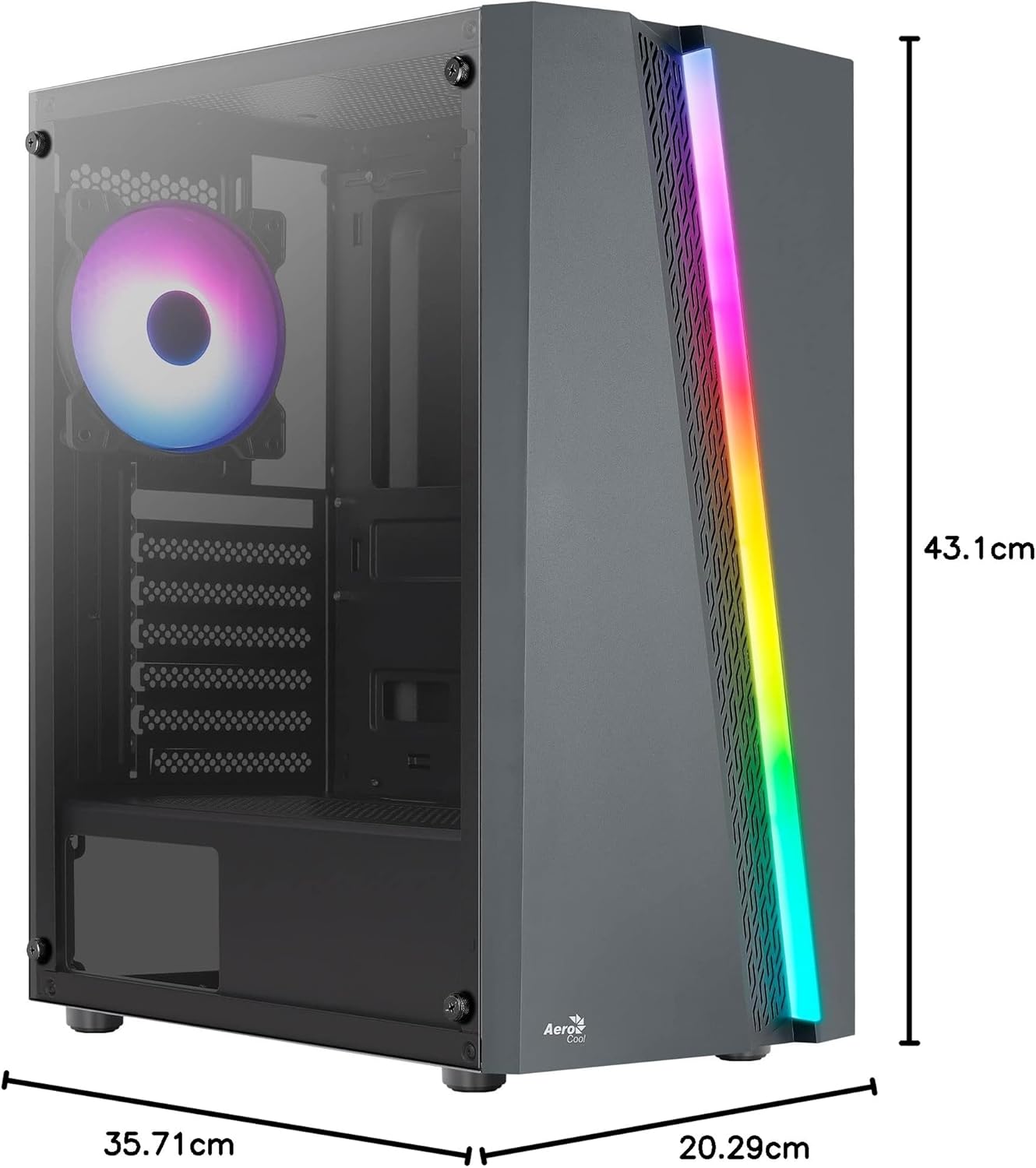
Figure 7.1: Dimensions of the AeroCool Blade PC Case.
| Ominaisuus | Erittely |
|---|---|
| Merkki | AeroCool |
| Mallin nimi | BLADEBK |
| Asian tyyppi | Semi-Tower |
| Emolevyn yhteensopivuus | ATX, Micro ATX, Mini ITX |
| Materiaali | Karkaistu lasi (sivupaneeli) |
| Tuotteen mitat (P x L x K) | 43.1 x 20.3 x 35.7 cm |
| Tuotteen paino | 4 kg |
| Drive Bays | 2 x 3.5", 2 x 2.5" |
| GPU:n tyhjennys | Jopa 307 mm |
| CPU:n jäähdyttimen korkeus | Jopa 155 mm |
| Edessä olevat I / O-portit | 1 x USB 3.0, 2 x USB 2.0, HD Audio, Mic, LED Control, Power |
| Esiasennetut tuulettimet | 1 x 120mm RGB Rear, 3 x 120mm Front |
| Jäähdytysmenetelmä | ilmaa |
8. Takuu ja tuki
Takuutietoja ja teknistä tukea varten katso AeroCool-yhtiön virallinen verkkosivusto. websivustolta tai ota yhteyttä paikalliseen jälleenmyyjään. Säilytä ostokuitti takuuvaatimuksia varten.
Yhteystiedot: Saat lisäapua osoitteesta www.aerocool.io.