Johdanto
This manual provides comprehensive instructions for the installation, operation, and maintenance of your Kensington SD4839P USB-C Triple Video Dock. Please read this manual thoroughly before using the product to ensure proper functionality and to prevent damage.
Turvallisuustiedot
- Älä altista laitetta vedelle tai liialliselle kosteudelle.
- Älä yritä purkaa tai muokata laitetta. Tämä mitätöi takuun ja voi aiheuttaa vahinkoa.
- Use only the power adapter supplied with the dock.
- Ensure proper ventilation around the dock to prevent overheating.
- Pidä poissa lasten ulottuvilta.
Pakkauksen sisältö
Varmista, että pakkauksessa on kaikki tarvittavat osat:
- Kensington SD4839P USB-C Triple Video Dock
- USB-C-USB-C-kaapeli
- Virtalähde
- Pikaopas (ei sisälly tähän digitaaliseen käyttöoppaaseen)
Tuote loppuview
The Kensington SD4839P is a USB-C triple video docking station designed to expand the connectivity of your laptop. It provides multiple video outputs, USB ports, and power delivery through a single USB-C connection.
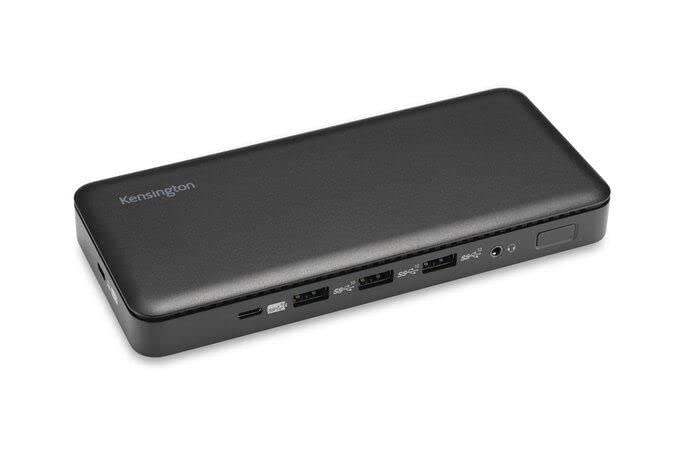
Kuva 1: Edessä view of the Kensington SD4839P USB-C Triple Video Dock. This image displays the compact design of the docking station, highlighting its various ports for connecting peripherals and displays.
Portin asettelu:
- Edessä: USB-A ports, USB-C data port.
- Taka: Power input, USB-C host port (with power delivery), DisplayPort outputs, HDMI output, USB-A ports, Ethernet port, Audio jack.
Asennus
- Liitä virta: Connect the included power adapter to the DC-in port on the back of the dock, then plug the adapter into a power outlet.
- Yhdistä isäntälaitteeseen: Connect one end of the supplied USB-C to USB-C cable to the USB-C host port on the back of the dock and the other end to a compatible USB-C port on your laptop. Ensure your laptop's USB-C port supports DisplayPort Alternate Mode and Power Delivery for full functionality.
- Yhdistä näytöt:
- Connect your monitors to the available DisplayPort and/or HDMI ports on the dock using appropriate cables.
- The dock supports up to three external displays, depending on your host device's capabilities and operating system.
- Liitä oheislaitteet: Connect your USB devices (keyboard, mouse, external drives, etc.) to the USB-A and USB-C data ports on the dock.
- Yhdistä verkkoon (valinnainen): For a wired network connection, connect an Ethernet cable from your router or network switch to the Ethernet port on the dock.
Toiminnassa
Ensimmäinen yhteys:
Upon initial connection, your operating system (Windows, macOS, Chrome OS) should automatically detect the dock and connected devices. The SD4839P is designed to be driverless for most basic functions.
Näytön kokoonpano:
- Windows: Right-click on the desktop and select "Display settings" to arrange your monitors, change resolution, and set display modes (extend, duplicate, second screen only).
- MacOS: Siirry osoitteeseen Järjestelmäasetukset (tai Järjestelmäasetukset) > Näytöt to configure your external monitors.
Virran toimitus:
The dock provides power delivery to your connected laptop through the USB-C host cable, charging it while you work. The wattage provided is listed in the specifications section.
Huolto
- Puhdistus: Disconnect the dock from power and all devices before cleaning. Use a soft, dry, lint-free cloth to wipe the exterior. Do not use liquid cleaners or aerosols.
- Varastointi: Store the dock in a cool, dry place away from direct sunlight and extreme temperatures when not in use for extended periods.
- Kaapelin hallinta: Vältä kaapeleiden teräviä mutkia tai kiertymiä vaurioiden välttämiseksi.
Vianetsintä
| Ongelma | Mahdollinen ratkaisu |
|---|---|
| No power to the dock or laptop. |
|
| Ei näyttöä ulkoisissa näytöissä. |
|
| USB-laitteita ei tunnisteta. |
|
| Verkkoyhteysongelmat. |
|
Tekniset tiedot
- Mallinumero: K33480EU
- Tuotteen mitat: 19.69 x 19.69 x 11.02 tuumaa
- Tuotteen paino: 2.29 puntaa (1.04 kiloa)
- Merkki: Kensington
- Laitteiston käyttöliittymä: USB-tyyppi C
- USB-portteja yhteensä: 3 (plus 1 USB-C data port)
- Porttien määrä: 5 (referring to primary functional ports)
- HDMI-portit yhteensä: 1
- DisplayPort Outputs: 2 (for triple video output capability)
- Wattage (Power Delivery): 85 wattia
- Yhteensopivat laitteet: Dell Precision 5510, Google Pixelbook, HP EliteBook Folio 9470m, MacBook Air, MacBook Pro, Microsoft Surface series, iPad, iPhone series, iPod series (See product page for full list)
Takuu ja tuki
Kensington products are designed for reliability and performance. For warranty information, technical support, or to register your product, please visit the official Kensington websivustolta tai ota yhteyttä suoraan heidän asiakastukeen. Säilytä ostokuitti takuuvaatimuksia varten.
Official Kensington Websivusto: www.kensington.com


