Tuote loppuview
The Mesqool Digital Alarm Clock is a versatile device designed to enhance your living space with its multi-functional display and convenient features. It provides accurate time, date, temperature, and humidity readings, along with dual alarm capabilities and charging ports for your electronic devices.

Figure 1: Mesqool Digital Alarm Clock with charging capabilities.
Mitä laatikossa on
- Puinen digitaalinen herätyskello
- US AC Power Adapter
- Latauskaapeli
- Paperinen käsikirja

Kuva 2: Pakkauksen sisältö.
Tärkeimmät ominaisuudet
- Suuri näyttö: An 8.7-inch screen clearly displays time, date, and day of the week.
- Lämpötilan ja kosteuden valvonta: Assists in monitoring indoor environment conditions.
- Loud Alarm with Snooze: Adjustable alarm volume from 65dB to 120dB with a 9-minute snooze function.
- Multiple Alarm Settings: Four alarm modes available: Every day, Weekend, Weekdays, or One Time Alarm. Supports dual alarm settings.
- USB- ja Type-C-latausportit: Equipped with both USB and Type-C ports to charge two electronic devices simultaneously.
- 5 Levels Dimmer: Easily adjust display brightness with five levels to suit various lighting conditions.
- Tyylikäs muotoilu: Features a wood grain pattern and metal buttons for a modern aesthetic.
- Power Cord Operated with Battery Backup: Primarily AC powered, with 2x AAA batteries (not included) for memory backup during power outages.
Video 1: Yliview of Mesqool Digital Alarm Clock features, including dual alarm, adjustable brightness, charging ports, and environmental monitoring.
Asennus
1. Virtaliitäntä
Connect the provided AC power adapter to the clock's power input port and plug it into a standard wall outlet. The clock is primarily AC powered.

Figure 3: Power connection and battery backup.
2. Vara-akun asennus
For memory backup during power outages, install 2x AAA batteries (not included) into the battery compartment located at the back of the clock. This ensures that time and alarm settings are retained.
Käyttöohjeet
1. Kellonajan ja päivämäärän asettaminen
- Paina DATE button to cycle through date display modes (e.g., MM-DD-YYYY).
- Paina TIME 12/24H button to switch between 12-hour and 24-hour time formats.
- Aseta aika pitämällä -näppäintä painettuna TIME 12/24H button until the hour digits flash. Use the +HOUR ja -MIN -painikkeita säätääksesi tunteja ja minuutteja. Paina TORKKU/OK jokaisen asetuksen vahvistamiseksi.
- To set the date, press and hold the DATE button until the year digits flash. Use the +HOUR ja -MIN buttons to adjust the year, month, and day. Press TORKKU/OK jokaisen asetuksen vahvistamiseksi.

Figure 4: Multiple display styles and unit switching.
2. Hälytysten asettaminen
The clock supports dual alarms (ALM1 and ALM2).
- Paina ALM1 or ALM2 button to select the alarm you wish to set.
- Press and hold the selected alarm button (e.g., ALM1) until the alarm time flashes. Use +HOUR ja -MIN to set the desired alarm time. Press TORKKU/OK vahvistaaksesi.
- After setting the time, the alarm mode will flash. Use +HOUR or -MIN to select one of the four alarm modes:
- ma-su: Hälytys soi joka päivä.
- ma-pe: Hälytys soi vain arkipäivisin.
- La-su: Hälytys soi vain viikonloppuisin.
- Kerran: Alarm sounds once.
- To turn an alarm ON/OFF, short press the corresponding ALM1 or ALM2 -painiketta. Hälytyskuvake ilmestyy/häviää näytöltä.

Figure 5: Dual alarm settings and modes.
3. Adjusting Brightness (Dimmer)
Paina HIMMENNIN button to cycle through 5 levels of display brightness. Select the level that best suits your environment and preference.

Kuva 6: Näytön kirkkauden säätö.
4. Hälytyksen äänenvoimakkuuden säätäminen
Paina VOL DST button to adjust the alarm volume. The volume can be set between 65dB and 120dB across 5 levels.

Figure 7: Alarm volume adjustment and snooze button.
5. Torkkutoiminto
Kun hälytys soi, paina isoa TORKKU/OK button on top of the clock to activate the snooze function. The alarm will pause for 9 minutes and then sound again.
6. Lämpötilan ja kosteuden näyttö
The clock displays indoor temperature and humidity. Press the °F/°C button to switch between Fahrenheit and Celsius temperature units.
7. Elektronisten laitteiden lataaminen
Utilize the USB and Type-C charging ports located at the back of the clock to charge your smartphones, tablets, or other compatible electronic devices.

Figure 8: USB and Type-C charging ports in use.
Huolto
- Puhdista kello pehmeällä, kuivalla liinalla. Älä käytä hankaavia puhdistusaineita tai liuottimia.
- Vältä kellon altistamista äärimmäisille lämpötiloille, suoralle auringonvalolle tai korkealle kosteudelle.
- Ensure proper ventilation around the clock, especially if using the charging ports for extended periods.
Vianetsintä
| Ongelma | Mahdollinen syy | Ratkaisu |
|---|---|---|
| Näyttö on tyhjä tai himmeä. | Ei virtaa, virta lopputage, or brightness set too low. | Check power adapter connection. Ensure batteries are installed for backup. Press the HIMMENNIN -painiketta lisätäksesi kirkkautta. |
| Hälytys ei soi. | Alarm is off, volume is too low, or incorrect alarm mode. | Ensure the alarm is activated (icon visible). Increase alarm volume using VOL DST. Verify the alarm mode (Mon-Sun, Mon-Fri, etc.) is correctly set. |
| Aika/päivämäärä on virheellinen. | Not set correctly or power interruption without battery backup. | Follow the "Setting Time and Date" instructions to reset. Install fresh AAA batteries for backup. |
| Laitteet eivät lataudu. | Incorrect cable, device not compatible, or clock not powered. | Ensure correct USB/Type-C cable is used. Verify the clock is powered on. Check device compatibility. |
Tekniset tiedot
- Merkki: mesquool
- Mallinumero: MQL-CR1019
- Näyttötyyppi: Digitaalinen
- Tuotteen mitat: 8.07 cm L x 3.62 cm K
- Virtalähde: Johdollinen sähkökäyttöinen (verkkolaite sisältyy hintaan)
- Akun varmuuskopiointi: 2 x AAA paristot (eivät sisälly)
- Hälytyksen äänenvoimakkuus: 65dB - 120dB (5 levels)
- Näytön kirkkaus: 5 tasoa säädettävissä
- Latausportit: 1 x USB, 1 x Type-C
- Materiaali: Plastic (wood grain finish)
- Erikoisominaisuudet: Calendar Display, Temperature Display, Humidity Display, Dual Alarm, Large Screen Display, Snooze
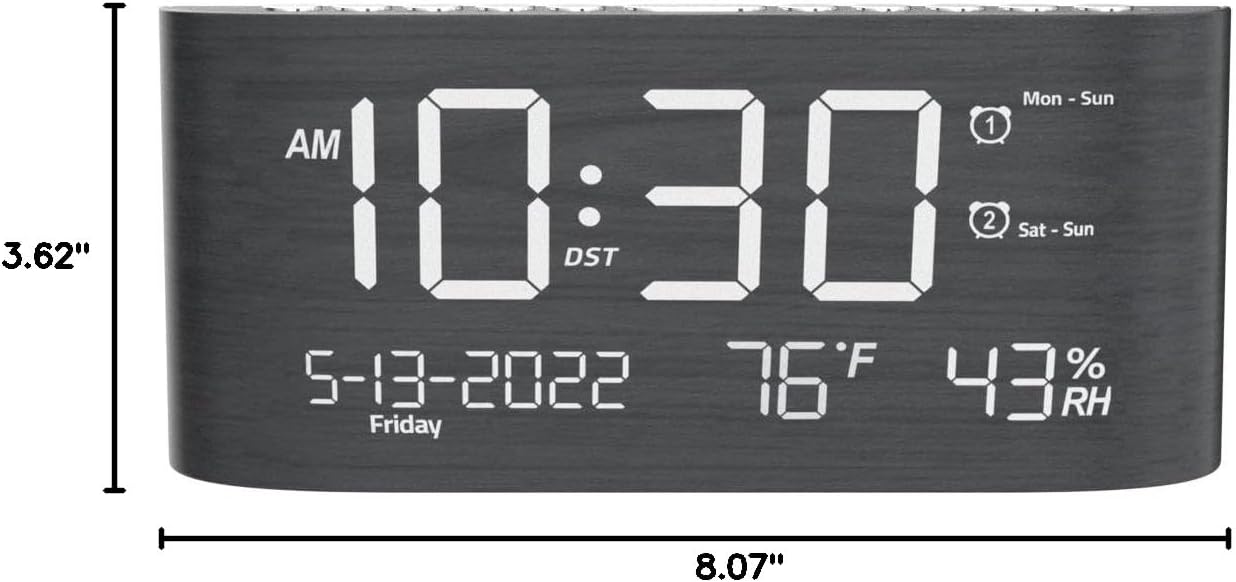
Kuva 9: Tuotteen mitat.
Takuu ja tuki
This Mesqool product comes with a 2 Years Exchange Warranty. For any support inquiries, troubleshooting assistance, or warranty claims, please refer to the official Mesqool websivustolta tai ota yhteyttä suoraan heidän asiakaspalveluunsa.
Tämän käyttöoppaan sähköinen versio on ladattavissa: Lataa käyttöohje (PDF)


