1. Johdanto
The Amazon Echo Show 5 (3rd Gen) is a smart display designed to integrate seamlessly into your daily life. It features a 5.5-inch screen and enhanced audio capabilities, providing visual and auditory interactions with Alexa. This device is refurbished, tested, and certified to function like a new unit, and comes with the same limited warranty.
The device is constructed with sustainability in mind, utilizing 100% post-consumer recycled polyester yarn for its fabric and 100% recycled aluminum. Its packaging is also 100% recyclable.
2. Mitä laatikossa on
Upon unboxing your Amazon Echo Show 5 (3rd Gen), you should find the following items:
- Echo Show 5 (3. sukupolvi) -laite
- Power adapter (22W) and cable (4.9ft)
- Pika-aloitusopas
3. Asennusopas
Asenna Echo Show 5 seuraavasti:
- Virta päälle: Connect the included power adapter to your Echo Show 5 and plug it into a wall outlet. The device will automatically power on.
- Seuraa näytön ohjeita: The device will guide you through the initial setup process on its 5.5-inch touch screen.
- Yhdistä Wi-Fi-verkkoon: Select your Wi-Fi network from the list and enter the password. The Echo Show 5 supports dual-band Wi-Fi (802.11a/b/g/n/ac). It does not support ad-hoc (peer-to-peer) networks.
- Log in to Amazon Account: Enter your Amazon account credentials when prompted.
- Mukauta asetuksia: Configure your time zone, location, and other preferences.
- Tutustu ominaisuuksiin: Once setup is complete, you can begin interacting with Alexa and exploring the device's capabilities.
The device utilizes Amazon Wi-Fi Simple Setup technology for an easier connection process to your Wi-Fi network.
4. Echo Show'n käyttö 5
The Echo Show 5 allows for various interactions through voice commands and its touch screen.
4.1. Näytön ominaisuudet
The 5.5-inch touch screen provides visual information and controls:
- Tietoa yhdellä silmäyksellä: View news headlines, weather forecasts, and calendar events.
- Valokuvanäyttö: Set the background to a rotating slideshow of your favorite photos. You can invite family and friends to share photos.
- Sisältö Viewing: Stream shows, view song titles, and follow along with recipes.

4.2. Ääniominaisuudet
The device features a full-range 1.75-inch built-in speaker, offering enhanced bass and clearer vocals for audio playback.
- Musiikki ja podcastit: Stream audio content from services like Amazon Music and Spotify.
- Bluetooth-yhteys: Tukee Advanced Audio Distribution Protafile (A2DP) for streaming audio from your mobile device to the Echo Show 5, or from the Echo Show 5 to a Bluetooth speaker. Audio/Video Remote Control Profile (AVRCP) allows voice control of connected mobile devices. Bluetooth speakers requiring PIN codes are not supported.


4.3. Kameran ominaisuudet
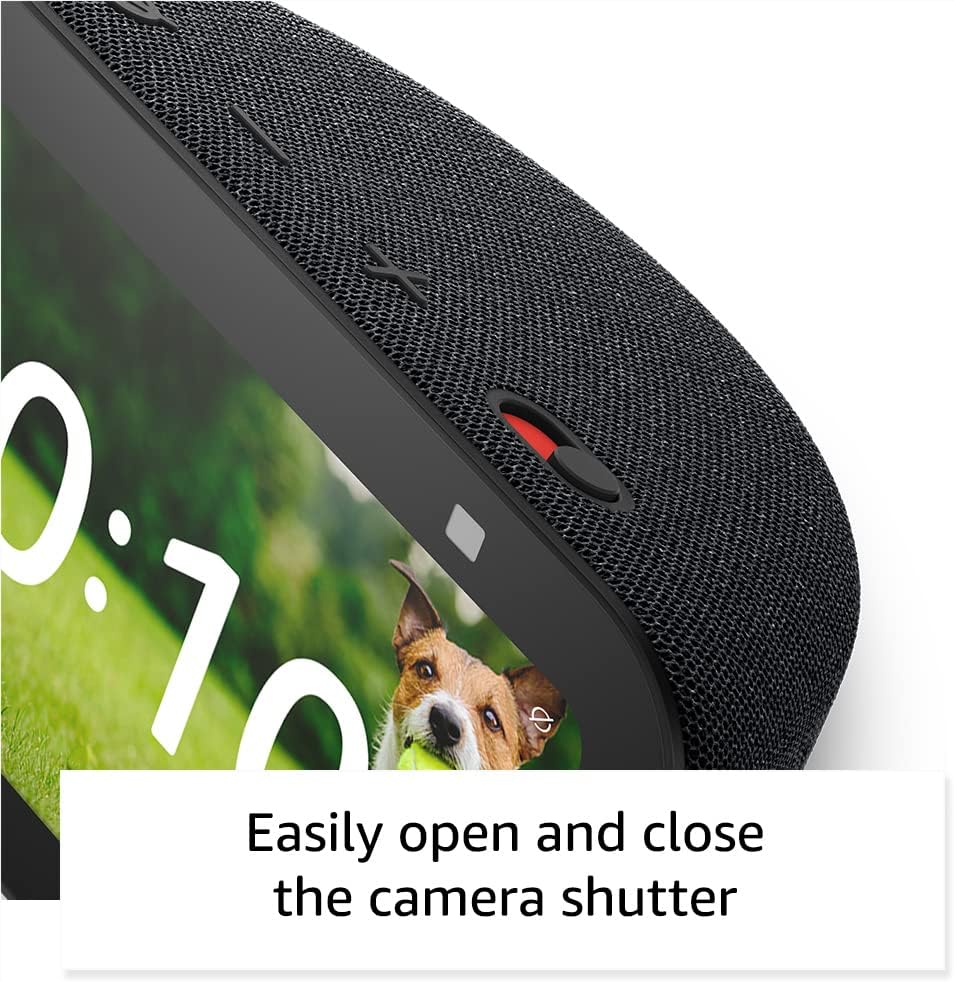
The Echo Show 5 includes a 2 MP camera with a built-in shutter.
- Videopuhelu: Use the camera to make video calls to friends and family who have the Alexa app or another Echo device with a screen.
- Kodin valvonta: Check in on your home, family, or pets using the built-in camera. You can also view yhteensopivat video-ovikellot.


4.4. Älykodin ohjaus
Control compatible smart devices such as lights and thermostats using voice commands or the touch screen, even when you are away from home. The device supports Wi-Fi, Bluetooth Low Energy Mesh, and Matter for smart home compatibility.
4.5. Tietosuojaominaisuudet
The Echo Show 5 incorporates multiple layers of privacy controls:
- Mic/Camera Off Button: A physical button to electronically disconnect the microphone and camera.
- Sisäänrakennettu kameran suljin: Fyysinen liukusäädin kameran linssin peittämiseksi.
- Wake Word -teknologia: The device only begins recording and sending audio to the cloud after detecting the wake word (e.g., "Alexa").
- Suoratoiston indikaattorit: Visual indicators show when the device is actively streaming to the cloud.
- Äänitallenteiden hallinta: Kyky view ja poista äänitallenteesi.
- Ring Video Encryption: Tukee viewing end-to-end encrypted Ring video.
4.6. Esteettömyysominaisuudet
The Echo Show 5 includes various accessibility features to personalize Alexa to your abilities. These can be accessed via Asetukset → Esteettömyys.
- Napauta Alexaa varten: Access Alexa via touch through on-screen tiles or a keyboard.
- Adaptiivinen kuuntelu: Antaa enemmän aikaa puhua loppuun ennen kuin Alexa vastaa.
- Toivottu puhenopeus: Hallitse Alexan puhenopeutta.
- Tekstitys: Alexa Captioning, Call Captioning, and Closed Captioning provide text captions for supported content.
- Näytä ja kerro: Helps users who are blind or visually impaired identify products by saying "Alexa, what am I holding."
- ÄäniView Näytönlukija: Mahdollistaa käytön sokeille tai näkövammaisille käyttäjille.
- Näytön suurennuslasi: Mahdollistaa zoomauksen sisään/ulos ja panoroinnin näytöllä.
- Ilmoita, kun lähellä: Toistaa ilmoitusääniä, kun se havaitaan laitteen lähellä.
- Kindle Lue ääneen: Alexa voi lukea Kindle-kirjoja ääneen.
- Reaaliaikainen teksti: Enables typing live text in a video call.
- Additional features include Color Inversion, Color Correction, and Request Sound.
5. Huolto
Varmistaaksesi Echo Show 5:n pitkän käyttöiän ja optimaalisen suorituskyvyn, noudata näitä huolto-ohjeita:
- Puhdistus: Use a soft, lint-free cloth to gently wipe the screen and exterior. Avoid abrasive cleaners, solvents, or aerosol sprays.
- Sijoitus: Aseta laite vakaalle ja tasaiselle alustalle, poissa suorasta auringonvalosta, lämmönlähteistä ja liiallisesta kosteudesta. Varmista riittävä ilmanvaihto laitteen ympärillä.
- Ohjelmistopäivitykset: The device receives guaranteed software security updates for at least four years after its last availability for purchase as a new unit. Ensure your device is connected to Wi-Fi to receive these updates automatically.
- Tehosykli: If the device becomes unresponsive, unplug it from the power outlet, wait for 10 seconds, and then plug it back in.
6. Vianmääritys
Jos kohtaat ongelmia Echo Show 5:n kanssa, kokeile seuraavia ratkaisuja:
- Ei virtaa: Varmista, että virtalähde on kytketty kunnolla sekä laitteeseen että toimivaan pistorasiaan. Kokeile toista pistorasiaa.
- Wi-Fi-yhteysongelmat:
- Tarkista, toimiiko Wi-Fi-reitittimesi oikein.
- Käynnistä reititin ja modeemi uudelleen.
- On the Echo Show 5, go to Settings → Network and try reconnecting to your Wi-Fi network.
- Varmista, että laite on Wi-Fi-reitittimesi kantaman sisällä.
- Alexa ei vastaa:
- Ensure the microphone is not muted (the light ring will be red). Press the mic/camera off button if it is.
- Puhu selkeästi ja suoraan laitteelle.
- Try restarting the device by unplugging and replugging it.
- Näyttöongelmat: Jos näyttö ei reagoi tai jumiutuu, yritä käynnistää laite uudelleen.
- Ääniongelmat:
- Check the volume level on the device.
- Ensure no external Bluetooth speakers are connected if you intend to use the internal speaker.
- Kamera ei toimi: Ensure the camera shutter is open and the camera is not disabled via the mic/camera off button.
Lisätietoja saat Amazonin tukipalvelusta websivustolla tai ota yhteyttä asiakaspalveluun.
7. Tekniset tiedot
| Ominaisuus | Yksityiskohta |
|---|---|
| Malli | Echo Show 5 (3. sukupolvi) - julkaisu vuonna 2023 |
| Mitat (L x S x K) | 5.8 x 3.6 x 3.2 tuumaa (147 x 91 mm x 82 mm) |
| Paino | 16.1 unssia (456 grammaa) |
| Näyttö | 5.5 ”kosketusnäyttö |
| Kamera | 2 megapikseliä sisäänrakennetulla sulkimella |
| Prosessori | MediaTek MT 8169 B |
| Wi-Fi-yhteys | Dual-band 802.11a/b/g/n/ac (does not support ad-hoc networks) |
| Bluetooth-yhteys | A2DP support for audio streaming, AVRCP for voice control (Bluetooth speakers requiring PIN codes not supported) |
| Audio | Täyden äänialueen 1.75 tuuman sisäänrakennettu kaiutin |
| Smart Home -yhteensopivuus | Wi-Fi, Bluetooth Low Energy Mesh, Matter |
| Kielituki | Englanti ja espanja |
8. Takuu ja tuki
Your Amazon Echo Show 5 (3rd Gen) comes with a 1-year limited warranty and service. As a refurbished device, it receives the same limited warranty as a new device.
For detailed warranty information and terms of service, please refer to the documentation provided with your device or visit the official Amazon support website. Information regarding software security updates is also available through Amazon's official channels.