1. Johdanto
This manual provides comprehensive instructions for the setup, operation, and maintenance of your Tera 9200-Wired Omnidirectional Desktop Barcode Scanner. This device is designed for efficient and hands-free scanning of 1D, 2D, and QR barcodes in various environments such as retail stores, warehouses, and offices.
2. Tuote ohiview
The Tera 9200-Wired scanner is a high-performance, plug-and-play device engineered for reliability and ease of use. Its omnidirectional scanning capability allows for quick and accurate barcode reading from various angles.
2.1 Tärkeimmät ominaisuudet
- Plug and Play: No driver or software installation required. Simply connect the USB cable to your computer, POS system, or cash register.
- Hands-Free Scanning: Designed as a desktop platform scanner, it allows for convenient, hands-free operation, improving efficiency for both cashiers and customers.
- Vakaa muotoilu: Equipped with four small non-slip pads on the bottom and an internal iron slab, ensuring stability during operation.
- Laaja yhteensopivuus: Compatible with various operating systems including Windows XP, Windows 7, Windows 8, Windows 10, Android, and Linux. Works with PCs, laptops, iPads, and smartphones.
- Multi-Language Keyboard Support: Supports keyboard layouts for US, UK, German, French, Italian, Spanish, Japanese, and more.
- Powerful Decoding Ability: Capable of reading a wide range of 1D and 2D barcodes, including those that are reflective, smudged, damaged, or fuzzy.
2.2 Pakkauksen sisältö
- Tera 9200-Wired Desktop Barcode Scanner
- USB 2.0 Data Cable (integrated)
- Käyttöohje (tämä asiakirja)
2.3 Tuotekaavio

Kuva 2.3.1: Etuosa view of the Tera 9200-Wired Desktop Barcode Scanner, showing its compact, black and white design with the scanning window.
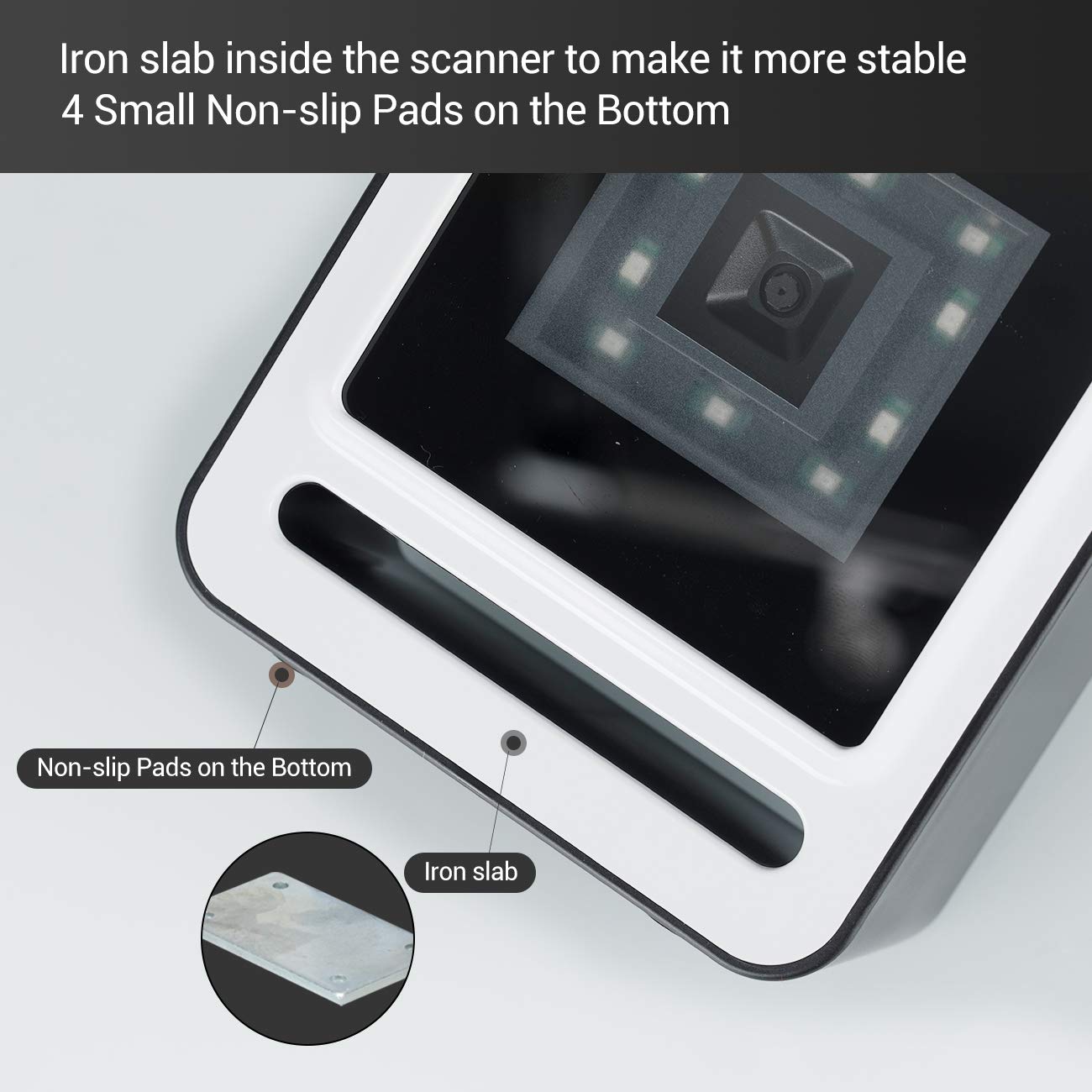
Kuva 2.3.2: Lähikuva view of the scanner's base, highlighting the four non-slip pads and the internal iron slab designed for enhanced stability.
3. Asennus
The Tera 9200-Wired barcode scanner is designed for quick and easy setup, requiring no special drivers or software installation.
- Skannerin purkaminen pakkauksesta: Poista skanneri varovasti pakkauksestaan.
- Liitä USB-kaapeli: Insert the integrated USB 2.0 data cable into an available USB port on your computer, POS system, or cash register.
- Järjestelmän tunnistus: The operating system will automatically detect and configure the scanner. This process typically takes a few seconds.
- Valmis käytettäväksi: Once recognized, the scanner is ready for immediate use.

Figure 3.1: The scanner connected via USB to a laptop, demonstrating its plug-and-play functionality and compatibility with Windows, Android, and Linux systems, as well as PCs, laptops, iPads, and phones.
4. Käyttöohjeet
The Tera 9200-Wired scanner offers hands-free operation for efficient barcode reading.
4.1 Perusskannaus
- Position the Item: Place the barcode of the item directly in front of the scanner's window.
- Automaattinen skannaus: The scanner will automatically detect the barcode and emit a successful scan indication (e.g., a beep or light change).
- Tiedonsiirto: The scanned data will be transmitted to your connected device (computer, POS system) as if typed via a keyboard.

Figure 4.1: A smartphone displaying a QR code being scanned by the Tera 9200-Wired scanner, illustrating its hands-free capability for digital barcodes.
4.2 Tuetut viivakoodityypit
The scanner supports a wide array of 1D and 2D barcode symbologies:
- 1D-dekoodausominaisuus: Codabar, Code 11, Code93, MSI, Code 128, UCC/EAN-128, Code 39, EAN-8, EAN-13, UPC-A, ISBN, Industrial 25, Interleaved 25, Standard 25, 2/5 Matrix.
- 2D-dekoodausominaisuus: QR Code, PDF417, Data Matrix, Aztec code, Maxi Code.

Figure 4.2: Visual representation of the scanner's advanced decoding capabilities, showing its ability to read challenging barcodes such as reflective, smudged, damaged, and fuzzy ones.
4.3 Advanced Settings (via Configuration Codes)
The scanner can be configured for various settings by scanning specific configuration barcodes (not provided in this manual, refer to a separate programming guide if available from manufacturer). These settings may include:
- Näppäimistön kieli: Adjust the output keyboard language to match your system (e.g., US, UK, German, French, Italian, Spanish, Japanese).
- Virtuaalinen COM-portti: Enable virtual COM port mode for specific software applications.
- Etuliite/Pääte: Lisää mukautettuja merkkejä skannattujen tietojen eteen tai jälkeen.
- Piilota merkit: Configure the scanner to hide certain characters from the output.
- Äänenvoimakkuuden säätö: Adjust the volume of the scan confirmation beep.

Figure 4.3: The scanner illustrating its support for multiple keyboard languages, including English, Spanish, German, Japanese, French, and Italian, allowing for versatile international use.
5. Huolto
Proper maintenance ensures the longevity and optimal performance of your barcode scanner.
- Skannausikkunan puhdistaminen: Regularly clean the scanning window with a soft, lint-free cloth. For stubborn smudges, slightly dampKostuta liina vedellä tai miedolla, hankaamattomalla puhdistusaineella. Älä käytä voimakkaita kemikaaleja tai hankaavia materiaaleja.
- Yleinen puhdistus: Pyyhi skannerin ulkopinta kuivalla tai hieman kostealla liinalla.amp liina pölyn ja lian poistamiseksi.
- Vältä äärimmäisiä olosuhteita: Do not expose the scanner to extreme temperatures, humidity, or direct sunlight for prolonged periods.
- Käsittele varovasti: Vältä skannerin pudottamista tai sen altistamista voimakkaille iskuille.
6. Vianmääritys
If you encounter issues with your Tera 9200-Wired scanner, refer to the following common problems and solutions:
| Ongelma | Mahdollinen syy | Ratkaisu |
|---|---|---|
| Skanneri ei käynnisty. | USB-kaapeli ei ole kytketty oikein tai USB-portti on viallinen. | Varmista, että USB-kaapeli on kytketty kunnolla sekä skanneriin että tietokoneeseen. Kokeile toista USB-porttia. |
| Skanneri ei lue viivakoodeja. | Barcode is damaged, smudged, or poorly printed. Scanner window is dirty. Incorrect barcode symbology enabled. | Try scanning a different, known-good barcode. Clean the scanning window. Ensure the barcode type is supported and enabled (if configurable). |
| Skannatut tiedot ovat virheellisiä tai puutteellisia. | Keyboard language mismatch. Data format settings incorrect. | Verify your computer's keyboard language matches the scanner's setting. Check for any prefix/suffix settings. |
| Skanneri piippaa, mutta tietoja ei lähetetä. | Application not in focus or not accepting input. | Ensure the cursor is in the correct input field of your application (e.g., notepad, word processor, POS software). |
7. Tekniset tiedot
| Ominaisuus | Yksityiskohta |
|---|---|
| Merkki | Tera |
| Malli | 9200-johdollinen |
| Tyyppi | 1D 2D QR Omnidirectional Desktop Barcode Scanner |
| Yhteydet | Langallinen USB 2.0 |
| Decode Capability (1D) | Codabar, Code 11, Code93, MSI, Code 128, UCC/EAN-128, Code 39, EAN-8, EAN-13, UPC-A, ISBN, Industrial 25, Interleaved 25, Standard 25, 2/5 Matrix |
| Decode Capability (2D) | QR Code, PDF417, Data Matrix, Aztec code, Maxi Code |
| Yhteensopivuus | Windows XP/7/8/10, Android, Linux (PC, Laptops, iPad, Phone) |
| Näppäimistön kielet | US, UK, German, French, Italian, Spanish, Japanese, etc. |
| Pakkauksen mitat | 18.21 x 12.29 x 8.61 cm |
| Tuotteen paino | 449 g |
| Paristot vaaditaan | Ei |
8. Takuu ja tuki
For warranty information and technical support, please refer to the documentation provided with your purchase or contact Tera customer service directly. Keep your purchase receipt as proof of purchase for warranty claims.
For the most up-to-date support resources, visit the official Tera websivusto.


