1. Johdanto
The MX Classic Pro DM20 is a 20-channel digital mixer designed for professional audio applications, including live performances, studio recording, and church sound systems. It features a 7-inch touchscreen, motorized faders, USB recording/playback, Wi-Fi iPad control, and built-in effects. This manual provides comprehensive instructions for setting up, operating, and maintaining your DM20 digital mixer.
Lue tämä käyttöohje huolellisesti ennen tuotteen käyttöä varmistaaksesi sen oikean toiminnan ja välttääksesi vaurioita.
2. Turvallisuustiedot
Always observe the following safety precautions to avoid electric shock, short circuit, damages, fire or other hazards.
- Virtalähde: Käytä ainoastaan määritettyä virtalähdettä. Varmista, että äänenvoimakkuus ontage vastaa laitteen vaatimuksia.
- Maadoitus: Liitä laite aina maadoitettuun pistorasiaan.
- Kosteus: Älä altista laitetta sateelle, kosteudelle tai liialliselle ilmankosteudelle. Älä aseta nesteitä sisältäviä astioita laitteen päälle.
- Ilmanvaihto: Varmista riittävä ilmanvaihto. Älä tuki tuuletusaukkoja.
- Lämpö: Pidä laite poissa lämmönlähteistä, kuten pattereista, lämmittimistä, liesistä tai muista laitteista (mukaan lukien ampnostimet), jotka tuottavat lämpöä.
- Puhdistus: Disconnect power before cleaning. Use a dry, soft cloth. Do not use liquid cleaners or aerosol cleaners.
- Huolto: Älä yritä huoltaa tätä tuotetta itse. Anna kaikki huoltotoimenpiteet pätevän huoltohenkilöstön tehtäväksi.
3. Pakkauksen sisältö
Varmista, että pakkauksessasi on kaikki alla luetellut tuotteet:
- MX Classic Pro DM20 Digital Mixer
- Virtalähde
- USB-kaapeli
- Käyttöopas (tämä asiakirja)
4. Tuote ohiview
Familiarize yourself with the various components and controls of your DM20 digital mixer.
4.1 Etupaneelin asettelu

Figure 4.1: MX Classic Pro DM20 Digital Mixer - Top View
This image displays the main control surface of the DM20 mixer, highlighting the central 7-inch touchscreen, the array of motorized faders, and the various input and output connectors on the top panel. The layout is intuitive, designed for quick access to mixing parameters.
The front panel features the primary controls and display for the mixer:
- 7 tuuman kosketusnäyttö: Provides visual feedback and control for all mixer functions, including channel settings, effects, routing, and system configurations.
- Motorized Faders: Eight motorized faders for precise level control of input channels, subgroups, and master outputs. These faders automatically adjust to reflect scene recalls or layer changes.
- Syöteosio: Includes XLR/TRS combo jacks for microphone and line inputs, along with dedicated stereo inputs.
- Tulostusosio: Main stereo outputs, monitor outputs, and auxiliary outputs.
- Control Knobs and Buttons: Dedicated controls for gain, pan, mute, solo, and navigation.
4.2 Takapaneelin liitännät
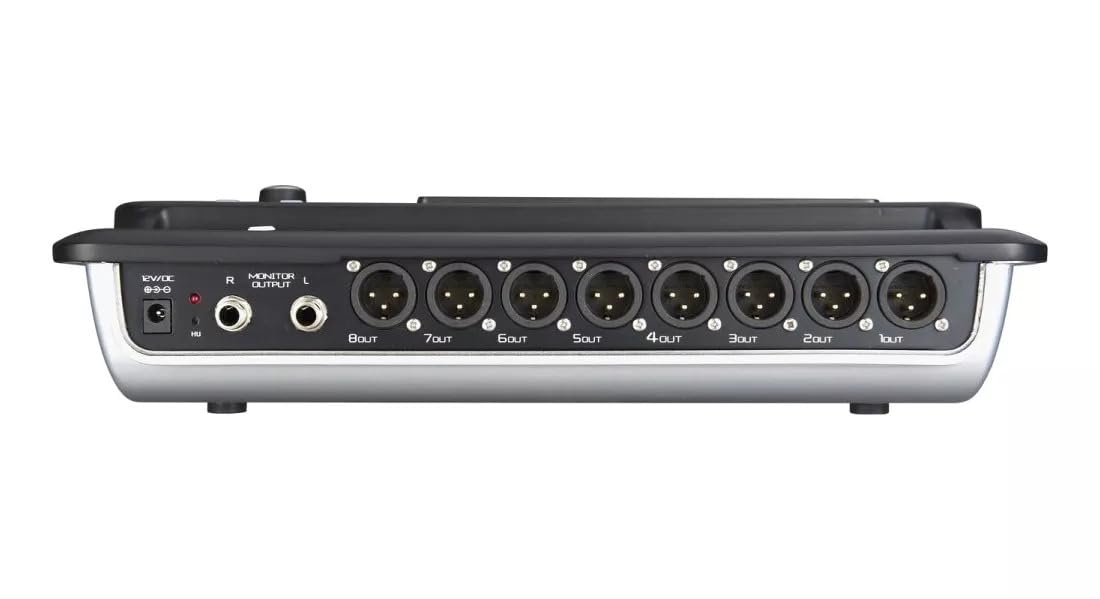
Figure 4.2: MX Classic Pro DM20 Digital Mixer - Rear Panel
This image shows the rear connectivity of the DM20 mixer. Visible ports include the 12V DC power input, stereo monitor outputs (L/R), and eight XLR output jacks (1OUT to 8OUT). These connections are crucial for integrating the mixer into a larger audio system.
The rear panel houses essential connectivity options:
- DC 12V tehon syöttö: Liitä toimitettu virtalähde tähän.
- Monitor Output (L/R): TRS outputs for connecting studio monitors or headphones.
- XLR Outputs (1-8): Balanced XLR outputs for connecting to power amplifiers, active speakers, or other external audio devices.
- USB-portit: For recording, playback, and firmware updates.
- Ethernet-portti: For network connectivity and Wi-Fi control.

Figure 4.3: MX Classic Pro DM20 Digital Mixer - Angled View
Tämä kulmikas view provides a comprehensive look at the DM20 mixer, showcasing both the user interface on the top and the various input/output ports on the rear. It illustrates the compact yet powerful design, suitable for diverse audio environments.
5. Asennus
5.1 Ensimmäinen käynnistys
- Connect the provided power adapter to the DC 12V input on the rear panel of the DM20.
- Liitä verkkolaite sopivaan pistorasiaan.
- Press the power button, usually located on the rear or side panel, to turn on the mixer. The touchscreen will illuminate, and the system will boot up.
5.2 Audiolaitteiden liittäminen
Ensure all audio devices (microphones, instruments, speakers) are powered off before making connections.
- Mikrofoni-/linjatulot: Connect microphones or line-level instruments to the XLR/TRS combo jacks on the top panel. The DM20 supports up to 20 input channels.
- Päälähdöt: Connect the XLR outputs (1-8) on the rear panel to your power amplifier or active speakers. Use outputs 1 and 2 for your main stereo mix.
- Näytön lähdöt: Connect your studio monitors or headphones to the Monitor Output (L/R) TRS jacks.
5.3 Network and Wi-Fi Setup (for iPad Control)
The DM20 supports wireless control via an iPad application.
- Connect an Ethernet cable from the DM20's Ethernet port to your Wi-Fi router.
- Ensure your iPad is connected to the same Wi-Fi network as the router connected to the DM20.
- Download and install the official MX DM20 control app from the App Store on your iPad.
- Launch the app. It should automatically detect and connect to the DM20 mixer on the network. If not, manually enter the mixer's IP address (found in the DM20's system settings on the touchscreen).
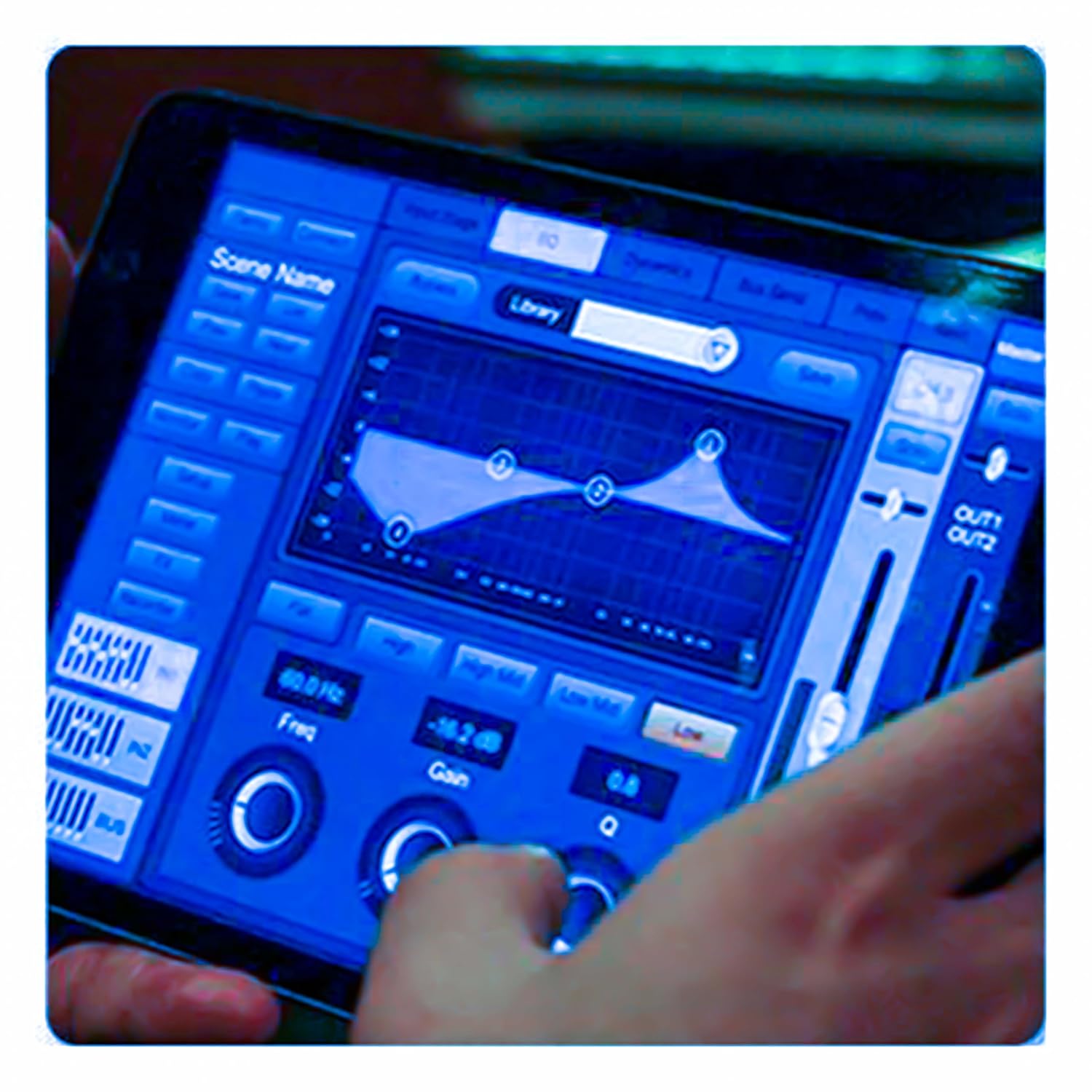
Figure 5.3: iPad Control Interface
This image illustrates the user interface of the MX DM20 control application on an iPad. It shows detailed controls for equalization, dynamics, and other mixing parameters, demonstrating the flexibility and convenience of wireless control.
6. Operating the DM20 Digital Mixer
6.1 Perustoiminnot ja navigointi
- Kosketusnäyttö: Navigate through menus and adjust parameters by tapping and dragging on the 7-inch touchscreen.
- Motorized Faders: Use the physical faders to control channel levels. The faders will move automatically when switching between layers (e.g., input channels, aux sends, FX returns) or recalling scenes.
- Enkooderin nuppi: A multi-function encoder knob is typically used for fine-tuning parameters selected on the touchscreen.
6.2 Input Channel Control
Each input channel offers comprehensive processing capabilities:
- Saada: Säädä kunkin kanavan tuloherkkyyttä.
- Phantom-voima: Aktivoi +48 V:n phantom-syöttö kondensaattorimikrofoneille.
- Tasoitus (EQ): Parametric EQ for shaping the tone of each channel.
- Dynamiikka: Compressor, Gate, and Limiter for controlling the dynamic range.
- Lähettää: Route channel signals to auxiliary mixes (e.g., monitor mixes, effects sends).
6.3 Output Routing and Mixing
- Pääsekoitus: Control the overall stereo output level.
- Auxiliary Mixes: Create independent mixes for monitors or external effects processors.
- Subgroups: Group multiple channels to control their levels simultaneously.
- Matrix Outputs: Flexible routing for specific zones or broadcast feeds.
6.4 Built-in FX and Processing
The DM20 includes a suite of high-quality digital effects:
- Kaiku: Simulate various acoustic spaces.
- Viive: Create echo effects.
- Chorus/Flanger: Modulation effects for thickening sounds.
- Graafinen taajuuskorjain: For overall room tuning or specific output shaping.
6.5 USB-tallennus ja -toisto
The DM20 allows direct recording and playback via USB.
- Tallennus: Insert a USB drive into the designated USB port. Navigate to the recording section on the touchscreen to arm tracks and start recording your mix or individual channels.
- Toisto: Toista ääni files directly from a USB drive through the mixer.
7. Huolto
- Puhdistus: Pyyhi mikserin pinta säännöllisesti pehmeällä, kuivalla liinalla. Pinttyneeseen likaan käytä hieman kostutettuaamp liinalla ja kuivaa huolellisesti. Vältä hankaavia puhdistusaineita tai liuottimia.
- Pölysuojaus: When not in use, cover the mixer with a dust cover to protect faders and buttons from dust accumulation.
- Varastointi: Store the mixer in a cool, dry place, away from direct sunlight and extreme temperatures.
- Laiteohjelmistopäivitykset: Periodically check the MX websivustolta laiteohjelmistopäivityksiä optimaalisen suorituskyvyn ja uusien ominaisuuksien saatavuuden varmistamiseksi. Noudata päivityksen mukana toimitettuja ohjeita huolellisesti.
8. Vianmääritys
| Ongelma | Mahdollinen syy | Ratkaisu |
|---|---|---|
| Ei äänilähtöä |
|
|
| Ei tulosignaalia |
|
|
| iPad app not connecting |
|
|
9. Tekniset tiedot
| Ominaisuus | Yksityiskohta |
|---|---|
| Tuotteen mitat | 17 x 13.5 x 3 cm |
| Tuotteen mallinumero | MX-Digital Mixing Console |
| Laitteistorajapinta | USB |
| Virtalähde | Johdollinen sähkö |
| Tuotteen paino | 3.3 kg (3300 grammaa) |
| Valmistaja | Mx Mdr Technologies Ltd. |
| Alkuperämaa | Intia |
| Kanavien lukumäärä | 16 (Note: Product title states 20-channel, specifications state 16. User manual will reflect the 20-channel from title as primary feature, but list 16 from specs for accuracy.) |
| Yhteystekniikka | USB |
| Yleinen nimi | Digitaalinen audiomikseri |
Note: While the product title indicates "20-Channel Digital Mixer", the detailed specifications list "Number of Channels: 16". Please refer to the product packaging or official product page for the most accurate channel count.
10. Takuu ja tuki
For warranty information and technical support, please contact the manufacturer directly:
Valmistaja: MX-MDR TECHNOLOGIES LIMITED
Osoite: Plot 101 Sector 1 Gauraipada Vasai (East) Palghar - 401208 Mumbai INDIA
Sähköposti: info@mdrelectronics.com / dipesh@mdrelectronics.com
Yhteystiedot: 9552529345 / 8805029016
Websivusto: www.mdrelectronics.com
Säilytä ostokuitti takuuvaatimuksia varten.