1. Johdanto
Lenovo 510 FHD Webcam is designed to provide high-definition video and clear audio for teleconferencing, streaming, and video calls. This manual outlines the product's features, setup, operation, and maintenance to ensure optimal performance.
2. Turvallisuustiedot
Please read and follow all safety instructions to prevent damage to the device or personal injury.
- Älä paljasta webcam to water or excessive moisture.
- Vältä pudottamasta tai altistamasta webnokka voimakkaille iskuille.
- Do not attempt to disassemble or repair the webcam yourself. Contact qualified service personnel.
- Pidä webcam away from heat sources and direct sunlight.
3. Pakkauksen sisältö
Varmista, että pakkauksessa on kaikki tarvittavat osat:
- Lenovo 510 FHD Webnokka
- USB-C–USB-A-kaapeli (1.8 metriä)
- Dokumentaatio (pikaopas, takuutiedot)
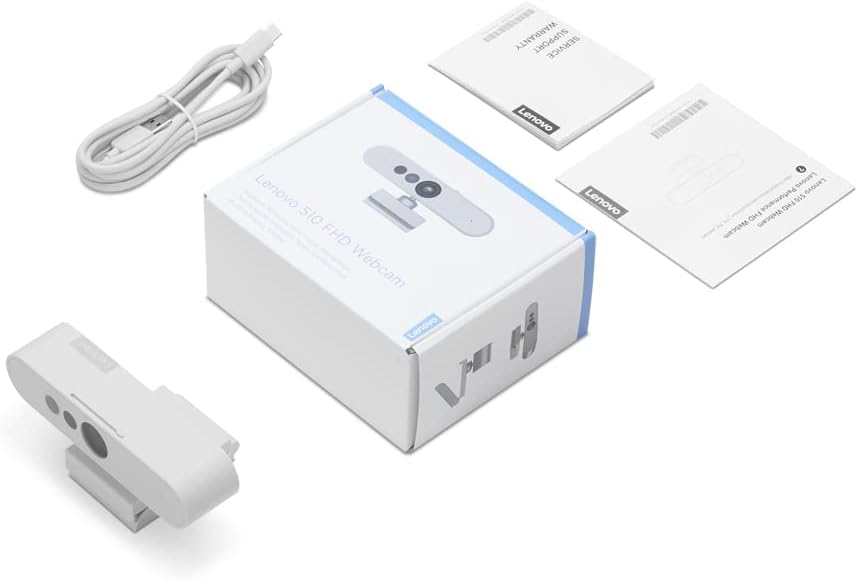
Kuva 3.1: Pakkauksen sisältö
4. Tuote ohiview
Lenovo 510 FHD Webcam features a sleek design with integrated components for enhanced functionality.

Kuva 4.1: Webnokka-akselin komponentit
- RGB-objektiivi: Tallentaa 1080p Full HD -videota.
- IR Lens & IR LED: Used for Windows Hello facial recognition.
- Kaksi mikrofonia: Integrated for clear audio capture.
- Built-in Shutter: Provides physical privacy control.
- Universal Clip Mount: Attaches securely to laptops, monitors, or tripods.
- USB-C-portti: Liittämistä varten webcam to your device.
5. Asennusohjeet
Setting up your Lenovo 510 FHD Webcam is a simple plug-and-play process.
- Asennus Webnokka:
- Open the universal clip mount.
- Aseta webcam on top of your laptop screen or monitor, ensuring it is stable.
- Alternatively, attach the webcam to a tripod using the integrated tripod mount.

Kuva 5.1: Asennus Webnokka
- Yhdistäminen laitteeseen:
- Connect the USB-C end of the provided cable to the webcam's USB-C port.
- Connect the USB-A end of the cable to an available USB 2.0 port on your computer (Windows or Mac).
- The webcam is UVC-compliant, meaning it is plug-and-play and does not require additional driver installation for most operating systems.

Kuva 5.2: Liittäminen Webnokka
6. Käyttöohjeet
Utilize the full capabilities of your Lenovo 510 FHD Webkamera näiden käyttöohjeiden mukaisesti.
6.1 Video- ja ääniominaisuudet
- Teräväpiirtovideo: The webcam delivers crisp 1080p Full HD video at 30 frames per second, suitable for various communication needs.
- Laajakulmainen View: A 95-degree wide-angle lens captures more of your environment, ideal for group calls or showcasing a broader background.
- Digitaalinen zoom: Use the 4X digital zoom feature within your video conferencing software to focus on specific areas.
- 360° kierto: The webcam head can rotate 360 degrees, allowing you to easily adjust the camera angle without repositioning the entire unit.
- Kaksi mikrofonia: Integrated stereo microphones pick up clear audio from up to 2 meters away, ensuring your voice is heard during calls.

Figure 6.1: Video and Audio Capabilities
6.2 Yksityisyyssuljin
For enhanced privacy, the webcam includes a physical sliding privacy shutter.
- To block the camera lens, slide the shutter to the closed position.
- To open the camera lens, slide the shutter to the open position.
6.3 Windows Hello Facial Recognition
Lenovo 510 FHD Webcam supports Windows Hello for secure and convenient login.
- Ensure your computer is running a compatible version of Windows.
- Navigate to your Windows settings and configure Windows Hello facial recognition.
- Once set up, you can log in to your device using facial recognition.

Figure 6.2: Windows Hello in Action
7. Huolto
Asianmukainen huolto varmistaa laitteen pitkän käyttöiän ja optimaalisen suorituskyvyn webnokka.
- Linssin puhdistus: Use a soft, lint-free cloth to gently wipe the camera lens. Avoid abrasive materials or harsh chemicals.
- Kehon puhdistus: Pyyhi webcam body with a dry, soft cloth.
- Varastointi: Kun et käytä sitä, säilytä webcam in a cool, dry place, away from dust and extreme temperatures.
8. Vianmääritys
Jos kohtaat ongelmia webkamera, katso seuraavat yleiset ratkaisut:
| Ongelma | Mahdollinen syy | Ratkaisu |
|---|---|---|
| Webkameraa ei havaittu | Loose USB connection, incompatible port, driver issue. | Ensure the USB cable is securely connected. Try a different USB port. Restart your computer. Check device manager for driver updates. |
| Huono kuvanlaatu | Insufficient lighting, dirty lens, software settings. | Ensure adequate lighting in your environment. Clean the camera lens. Adjust video settings within your application (e.g., brightness, contrast). |
| Ei ääntä mikrofonista | Microphone muted, incorrect audio input selected. | Check if the microphone is muted in your operating system or application. Select the Lenovo 510 FHD Webcam as the default audio input device. |
| Windows Hello not working | Incorrect setup, environmental factors. | Ensure Windows Hello is properly configured in settings. Verify sufficient lighting and that your face is clearly visible to the camera. |
9. Tekniset tiedot
| Ominaisuus | Yksityiskohta |
|---|---|
| Mallinumero | GXC1D66063 |
| Videon sieppaustarkkuus | 1080p Full HD |
| Kuvataajuus | 30 kuvaa sekunnissa |
| Kenttä View | 95 astetta |
| Digitaalinen zoom | 4X |
| Kierto | 360 degrees Pan & Tilt |
| Mikrofonit | Dual, Integrated Stereo |
| Yhteydet | USB 2.0 (USB-C on webcam, USB-A on computer) |
| Kaapelin pituus | 1.8 metriä |
| Tietosuojaominaisuus | Sliding Privacy Shutter |
| Kasvojen tunnistus | Windows Hello 4.1 compatible |
| Tuotteen mitat | 5.5 x 4.5 x 2.4 tuumaa |
| Tuotteen paino | 0.5 unssia |
| Väri | Valkoinen |
Kuva 9.1: Webnokka Mitat
10. Takuu ja tuki
Lenovo provides a standard limited warranty for this product. For detailed warranty terms and conditions, please refer to the documentation included in your package or visit the official Lenovo support websivusto.
For technical assistance, driver downloads, or further inquiries, please contact Lenovo customer support.