1. Johdanto
Thank you for choosing the Yard Force EasyMow 260B Robotic Lawn Mower. This manual provides essential information for the safe operation, installation, maintenance, and troubleshooting of your new robotic lawn mower. Please read this manual thoroughly before first use and keep it for future reference.
2. Turvallisuusohjeet
Always observe basic safety precautions to reduce the risk of fire, electric shock, and personal injury. This robotic lawn mower is designed for cutting grass only. Any other use is considered contrary to the intended purpose.
Yleinen turvallisuus
- Lue kaikki ohjeet huolellisesti ennen laitteen käyttöä.
- Keep children and pets away from the working area of the robotic mower.
- Do not operate the mower if the blades are damaged or worn.
- Ensure the boundary wire is correctly installed and secured to prevent tripping hazards.
- Never lift the mower while it is operating. Always press the STOP button before handling.
- Irrota virtalähde ennen puhdistusta tai huoltoa.
Sähköturvallisuus
- Use only the original power adapter and charging station provided with the mower.
- Do not expose the charging station or power adapter to rain or wet conditions.
- Regularly inspect the power cable for damage. If damaged, it must be replaced by a qualified technician.
3. Pakkauksen sisältö
Pura laatikko varovasti pakkauksesta ja varmista, että kaikki osat ovat mukana ja vahingoittumattomia. Jos jokin puuttuu tai on vaurioitunut, ota yhteyttä jälleenmyyjään.
- 1x Yard Force EasyMow 260B Robotic Lawn Mower
- 1x latausasema
- 80 m rajalanka
- 100x Fixing Pegs
- 9 m virtajohto
- 3x Vaihtoterät
- 3x Vaihtoruuvit
- 3x kaapeliliittimet
- 1x Väliviivain
- 1x käyttöopas
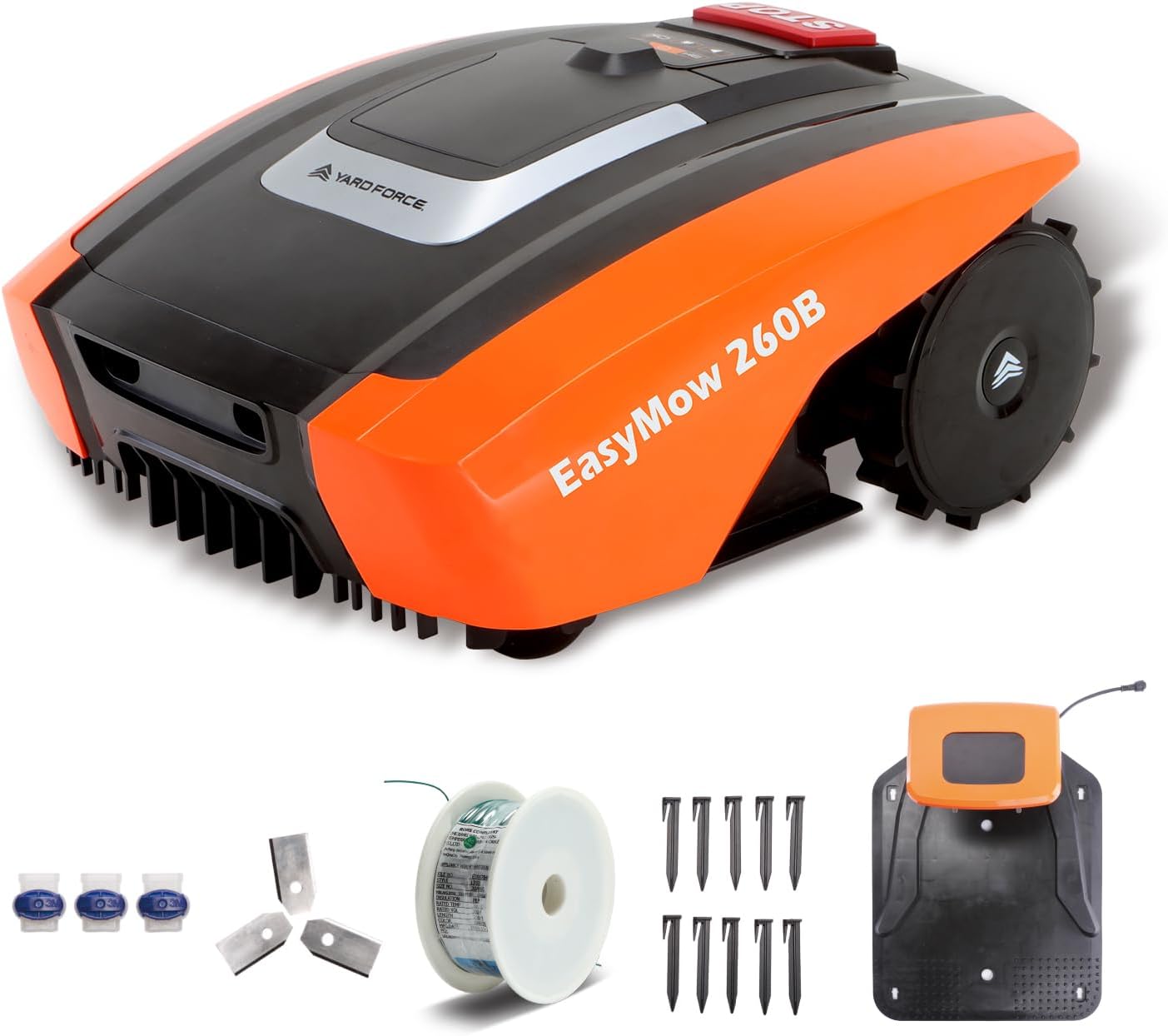
Image: The Yard Force EasyMow 260B robotic lawn mower shown with its charging station, boundary wire, fixing pegs, replacement blades, and cable connectors.
4. Tuote ohiview
Familiarize yourself with the main components of your robotic lawn mower.
Mower Components
- STOP Button: Immediately stops the mower and cutting blades.
- Control Panel: For manual operation and settings.
- Cutting Height Adjustment Dial: To set the desired grass cutting height.
- Charging Contacts: For connecting with the charging station.
- Blades: Located underneath the mower for cutting grass.
- Drive Wheels: Provide traction for movement.
- Front Wheel: Steering and balance.
Latausaseman komponentit
- Charging Pins: Connect with the mower's charging contacts.
- Boundary Wire Terminals: For connecting the boundary wire.
- Virtaliitäntä: Virtalähteen kytkemistä varten.
- LED Indicator: Shows the status of the charging station.
5. Asennus
5.1 Latausaseman sijoittaminen
Choose a flat, level area for the charging station, preferably in the shade and close to an outdoor power outlet. Ensure there is enough clear space around the station for the mower to dock easily (at least 1.5m in front and 0.5m on each side).
5.2 Rajalangan asennus
The boundary wire defines the mowing area for your robot. Lay the wire around the perimeter of your lawn, securing it with the provided fixing pegs. Use the spacer ruler to maintain the correct distance from obstacles like walls, fences, and flowerbeds. Ensure the wire forms a continuous loop and is connected securely to the charging station terminals.

Image: The Yard Force EasyMow 260B robotic lawn mower is shown operating on a well-maintained lawn, demonstrating its ability to cover the designated area.
5.3 Ensimmäinen lataus
Once the charging station is powered and the boundary wire is installed, place the robotic mower manually onto the charging station. Ensure the charging contacts align. The mower will begin charging. Allow it to fully charge before its first operation, which typically takes a few hours.
5.4 Bluetooth and App Connection
The EasyMow 260B can be controlled via Bluetooth using the dedicated Yard Force app. Download the app from your smartphone's app store. Follow the in-app instructions to pair your mower. This allows for easy scheduling, cutting height adjustment, and monitoring of the mower's status.

Image: The Yard Force EasyMow 260B robotic lawn mower is displayed alongside a smartphone showing the intuitive mobile application interface, highlighting its Bluetooth control capabilities.
6. Käyttö
6.1 Käynnistys ja pysäytys
- Aloittaa: Ensure the mower is within the boundary wire. Press the START button on the control panel or initiate mowing via the app.
- Pysähtyä: Press the large red STOP button on top of the mower. The mower will immediately cease operation and the blades will stop rotating.

Image: A hand is shown pressing the prominent red STOP button on the top of the Yard Force EasyMow 260B robotic lawn mower, indicating an immediate halt to operation for safety.
6.2 Mowing Schedule
Use the Yard Force app to set a customized mowing schedule. You can define specific days and times for the mower to operate, ensuring your lawn is always neatly trimmed without manual intervention.
6.3 Leikkuukorkeuden säätö
The cutting height can be adjusted between 20mm and 55mm in 3 levels. Rotate the cutting height adjustment dial located on the top of the mower to your desired setting. For best results, avoid cutting more than one-third of the grass blade length at a time.
6.4 Reunanleikkaustoiminto
The EasyMow 260B features an edge cutting function to ensure clean and tidy lawn borders. The mower is designed to cut close to the boundary wire, minimizing the need for manual trimming.

Image: The Yard Force EasyMow 260B robotic lawn mower is shown with graphical overlays highlighting its key specifications: 20V battery, 2Ah capacity, 30% slope capability, and suitability for areas up to 260m².
7. Huolto
Regular maintenance ensures optimal performance and extends the lifespan of your robotic lawn mower.
7.1 Terän vaihto
The blades should be replaced regularly, typically every 1-3 months depending on usage and grass type. Always wear protective gloves when handling blades. Turn off the mower and disconnect it from the charging station before replacing blades. Use the provided replacement blades and screws.
7.2 Puhdistus
- Puhdista ruohonleikkurin ulkopinta mainosaineellaamp cloth. Do not use high-pressure washers or running water.
- Regularly clean grass clippings from the underside of the mower, especially around the blades and wheels. Use a brush or scraper.
- Pidä sekä ruohonleikkurin että latausaseman latauskoskettimet puhtaina varmistaaksesi oikean latauksen.
7.3 Akun hoito
The mower is equipped with a 20V / 2.0 Ah lithium-ion battery. For optimal battery life:
- Store the mower in a dry, frost-free environment during winter months.
- Lataa akku täyteen ennen pitkää varastointia.
- Recharge the battery every 3-4 months during storage to prevent deep discharge.
8. Vianmääritys
Tässä osiossa on ratkaisuja yleisiin ongelmiin, joita saatat kohdata.
| Ongelma | Mahdollinen syy | Ratkaisu |
|---|---|---|
| Ruohonleikkuri ei käynnisty | Battery low; STOP button pressed; Boundary wire issue; Safety sensor triggered. | Charge battery; Release STOP button; Check boundary wire connection/integrity; Clear obstacles. |
| Ruohonleikkuri pysyy latausasemassa | Scheduled mowing time not reached; Battery not fully charged; Charging contacts dirty. | Check schedule; Allow full charge; Clean charging contacts. |
| Epätasainen leikkaustulos | Blades dull or damaged; Cutting height too low for grass length. | Vaihda terät; Säädä leikkuukorkeutta. |
| Ruohonleikkuri juuttuu usein | Esteitä leikkuualueella; Epätasainen maasto; Rajoituskaapeli liian lähellä esteitä. | Remove obstacles; Adjust boundary wire placement; Level uneven areas if possible. |
9. Tekniset tiedot
| Ominaisuus | Erittely |
|---|---|
| Mallinumero | EasyMow 260B |
| Akun tyyppi | Litium-ioni |
| Akku Voltage / Kapasiteetti | 20 V / 2.0 Ah |
| Leikkausleveys | 160 mm |
| Leikkuukorkeus | 20 mm - 55 mm (3 tasoa) |
| Max. Slope Capability | 30 % |
| Suositeltu nurmikkoalue | Jopa 260 m² |
| Valvontamenetelmä | Bluetooth- ja sovellusohjaus |
| Tuotteen mitat (P x L x K) | 44 x 38.4 x 20.6 cm |
| Paino | 8.1 kg |
| Materiaali | Muovi |
10. Takuu ja tuki
Yard Force products are manufactured to high-quality standards. For warranty information, technical support, or spare parts, please refer to the warranty card included with your product or visit the official Yard Force websivusto. Säilytä ostokuitti takuuvaatimuksia varten.


