Johdanto
Thank you for choosing the MageGee GT860 96-Key Wired RGB Backlit Gaming Keyboard. This keyboard is designed for both gaming and daily use, featuring a compact layout, ergonomic design, and customizable RGB backlighting. This manual will guide you through the setup, operation, and maintenance of your new keyboard to ensure optimal performance and user experience.
Pakkauksen sisältö
- MageGee GT860 96-Key Wired RGB Backlit Gaming Keyboard
- Käyttöopas
Tuote loppuview
Näppäimistön asettelu
The MageGee GT860 features a 92% compact layout, retaining essential keys while offering a space-saving design. It includes a full numeric keypad and function keys.

Image: The MageGee GT860 keyboard showcasing its 96-key layout with RGB backlighting and black and yellow keycaps.

Kuva: Yksityiskohtainen view of the standard 96-key layout with full RGB backlighting, highlighting the compact yet functional design.
Tärkeimmät ominaisuudet
- 92 % kompakti asettelu: Offers a balance between full functionality and a space-saving design.
- Mekaaninen tuntumakalvo: Utilizes advanced imitation mechanical technology for a tactile typing experience.
- Ergonominen muotoilu: Key layout is engineered for comfortable use during extended periods, reducing fatigue.
- RGB-taustavalo: Features multiple lighting modes and colors, with adjustable brightness and breathing speed.
- Plug and Play: No drivers required for basic functionality.
- Laaja yhteensopivuus: Supports Windows 10, 8, 7, XP, VISTA, and Mac OS.
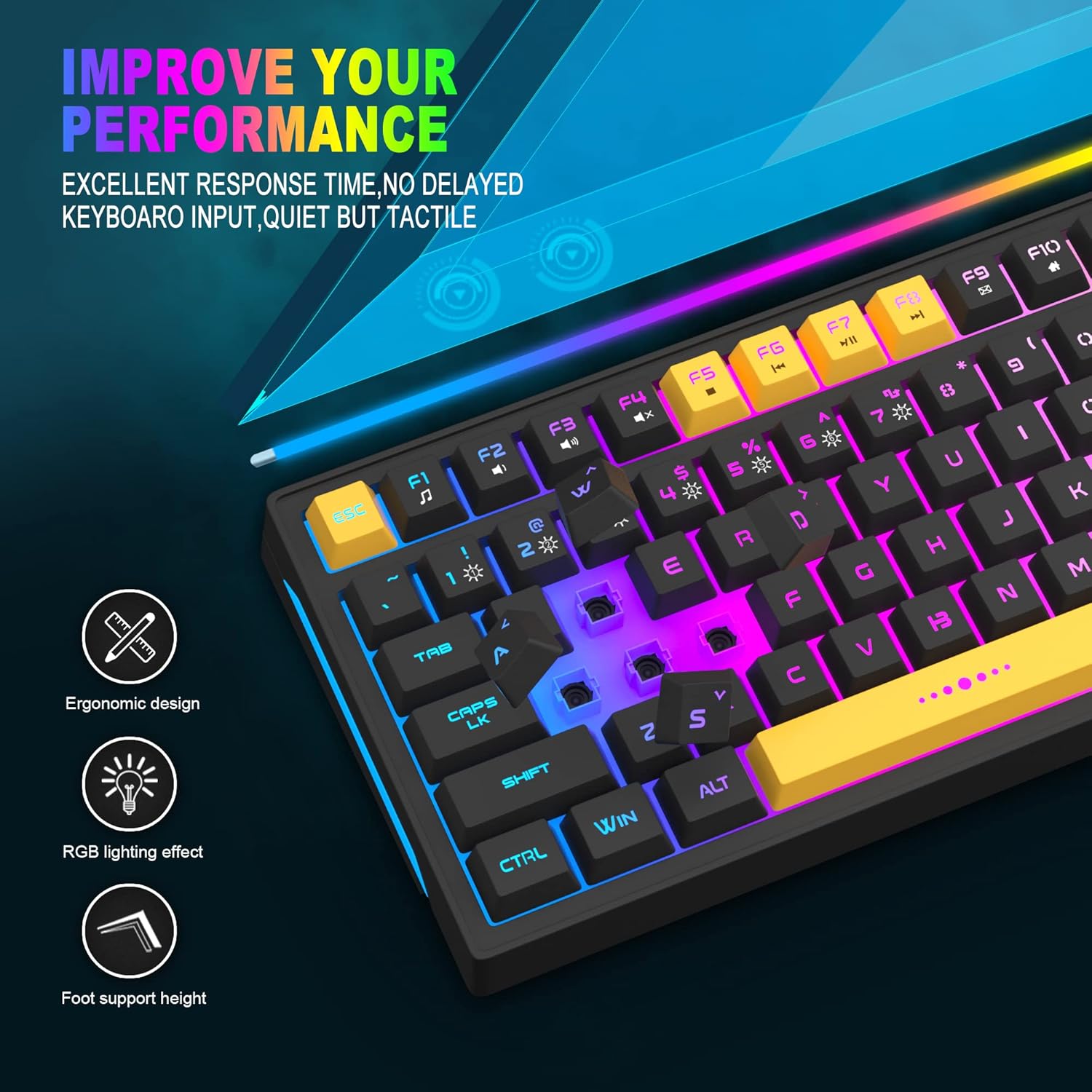
Image: Close-up showing the ergonomic design and RGB lighting effect of the keyboard, emphasizing comfort and visual appeal.

Kuva: Puoli view of the keyboard illustrating its thoughtful ergonomic design with a 7-degree tilt for improved typing posture.
Asennusohjeet
- Unpack the keyboard and ensure all package contents are present.
- Liitä näppäimistön USB-kaapeli tietokoneen vapaaseen USB-porttiin.
- The keyboard is plug-and-play and should be automatically recognized by your operating system (Windows, Mac OS). No additional drivers are typically required for basic functionality.
- Once connected, the RGB backlighting will illuminate, indicating the keyboard is powered on and ready for use.
Käyttöohjeet
RGB-taustavalon säätö
The MageGee GT860 keyboard features customizable RGB backlighting with various modes and effects.
- Valaistustilojen muuttaminen: Paina FN key combined with keys 1 kautta 6 to cycle through different RGB lighting effects and colors.
- Kirkkauden säätö: Use specific key combinations (refer to keyboard legends or experiment with FN + Arrow keys if not explicitly labeled) to increase or decrease backlight brightness.
- Hengitysnopeuden säätäminen: Some modes allow adjustment of the breathing or animation speed.

Image: The keyboard displaying various RGB backlit lighting modes, illustrating the range of color options available.

Image: A dynamic view näppäimistönäyttelystäasing its 18 RGB LED light effects, highlighting the vibrant backlighting.
Multimedia- ja toimintonäppäimet
The keyboard includes dedicated function keys (F1-F12) that can be accessed by pressing the FN samanaikaisesti halutun F-näppäimen kanssa.
| Näppäinyhdistelmä | Toiminto |
|---|---|
| FN + F1 | Mediasoitin |
| FN + F2 | Äänenvoimakkuuden vähentäminen |
| FN + F3 | Äänenvoimakkuuden lisääminen |
| FN + F4 | Mykistä |
| FN + F5 | Edellinen kappale |
| FN + F6 | Seuraava kappale |
| FN + F7 | Toista/Tauko |
| FN + F8 | Stop |
| FN + F9 | Sähköposti |
| FN + F10 | Kotisivu |
| FN + F11 | Scroll Lock |
| FN + F12 | Laskin |

Image: Diagram illustrating the various multimedia and function key combinations using the FN key (FN + F1-F12).
Huolto
To ensure the longevity and optimal performance of your MageGee GT860 keyboard, follow these maintenance guidelines:
- Puhdistus: Regularly clean the keyboard with a soft, dry cloth. For deeper cleaning, use compressed air to remove dust and debris from between the keys. A slightly damp cloth (not wet) can be used for keycap surfaces.
- Vältä nesteitä: Älä läikytä nesteitä näppäimistölle. Jos nesteitä läikkyy, irrota näppäimistö välittömästi tietokoneesta ja anna sen kuivua kokonaan ennen uudelleenkytkemistä.
- Varastointi: Säilytä näppäimistöä viileässä, kuivassa paikassa, poissa suorasta auringonvalosta ja äärimmäisistä lämpötiloista, kun sitä ei käytetä pitkään aikaan.
- Kaapelihuolto: Vältä USB-kaapelin liiallista taivuttamista tai kiertämistä, jotta se ei vaurioidu sen sisällä.

Kuva: Lähikuva view of the keyboard with some keycaps removed, showing the underlying switches. This illustrates the internal structure for cleaning purposes.
Vianetsintä
If you encounter issues with your MageGee GT860 keyboard, please refer to the following common troubleshooting steps:
- Näppäimistö ei vastaa:
- Ensure the USB cable is securely connected to both the keyboard and your computer's USB port.
- Kokeile kytkeä näppäimistö tietokoneen toiseen USB-porttiin.
- Testaa näppäimistöä toisella tietokoneella selvittääksesi, onko ongelma näppäimistössä vai järjestelmässäsi.
- Taustavalo ei toimi tai on virheellinen:
- Varmista, että näppäimistö on kytketty oikein ja että se saa virtaa.
- Cycle through the RGB lighting modes using FN + 1-6 to ensure a mode is selected.
- Adjust the brightness settings.
- Avaimet eivät rekisteröidy:
- Puhdista vialliset näppäimet ja poista mahdolliset roskat, jotka saattavat estää kytkimen toiminnan.
- Varmista, ettei ohjelmistoissa ole ristiriitoja (esim. muiden näppäimistöohjainten tai peliohjelmistojen kanssa).
- Odottamaton käyttäytyminen:
- Käynnistä tietokone uudelleen.
- If the issue persists, contact MageGee customer support for further assistance.
Tekniset tiedot
| Ominaisuus | Yksityiskohta |
|---|---|
| Merkki | MageGee |
| Malli | GT860 |
| Layout | 96 näppäintä (92 % kompakti) |
| Yhteydet | Langallinen USB |
| Taustavalo | RGB Backlit (Multiple modes) |
| Avaimen tyyppi | Membrane with Mechanical Feeling |
| Ergonomia | Ergonominen muotoilu |
| Yhteensopiva käyttöjärjestelmä | Windows 10, 8, 7, XP, VISTA, Mac OS |
| Tuotteen mitat | 35.56 x 10.16 x 5.08 cm (14 x 4 x 2 tuumaa) |
| Paino | 744 g (1.64 lbs) |
| Voitage | 5 volttia |
| Väri | Musta Keltainen |
Takuu ja tuki
For warranty information or technical support, please refer to the documentation provided with your purchase or contact MageGee customer service directly. Contact details can typically be found on the manufacturer's official websivustolla tai tuotepakkauksessa.
Säilytä ostokuittisi mahdollisten takuuvaatimusten varalta.


