
1. Johdanto
The Keychron V1 is a highly customizable wired mechanical keyboard designed for enthusiasts and users seeking a personalized typing experience. This barebone version provides the foundation for a custom build, allowing you to choose your preferred switches and keycaps. Featuring a compact 75% layout, a programmable knob, QMK/VIA support, and hot-swappable switch sockets, the V1 offers extensive flexibility and performance for various operating systems including Mac, Windows, and Linux.

Yläkulut view of the Keychron V1 barebone mechanical keyboard, showcasing its 75% layout and the USB-C connection port. This image illustrates the keyboard's design without switches or keycaps installed.
2. Pakkauksen sisältö
Please verify that all items listed below are included in your Keychron V1 Barebone Knob package:
- 1x Keyboard Kit (without keycaps & switches)
- 1x piirilevy (piirilevy)
- 1x teräslevy
- 1x ääntä vaimentava vaahto
- 1x Case Silicone Pad
- 4 sarjaa x stabilisaattorit
- 1x Type-C - Type-C -kaapeli
- 1x Type-A–C-sovitin
- 1x kytkimen vedin
- 1x avaimenperän vedin
- 1x ruuvimeisseli
- 1x kuusioavain
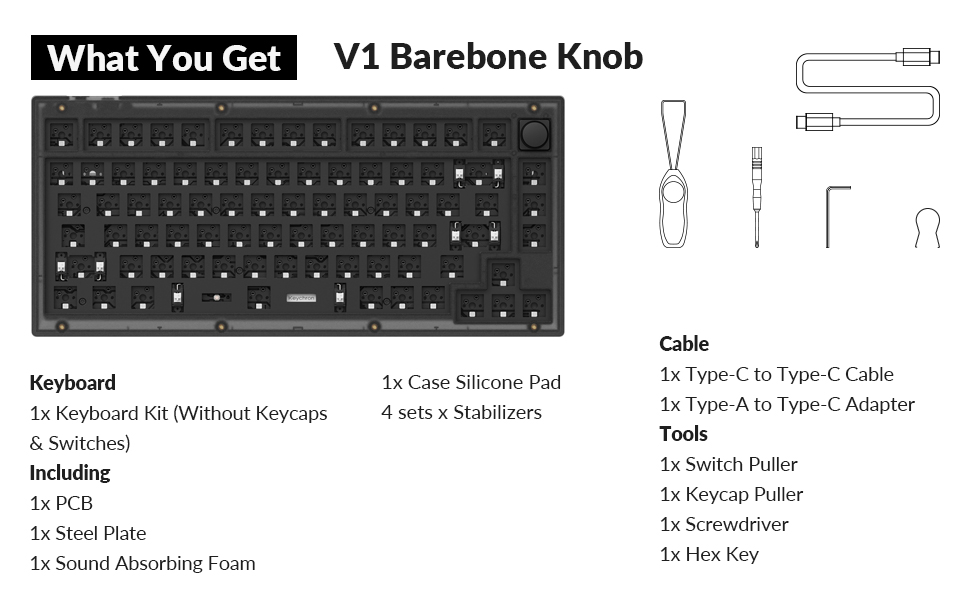
A visual list of items included in the Keychron V1 Barebone Knob package, such as the keyboard kit, case silicone pad, stabilizers, Type-C to Type-C cable, Type-A to Type-C adapter, switch puller, keycap puller, screwdriver, and hex key.
3. Asennus
3.1 Disassembly and Assembly Overview
The Keychron V1 is designed for easy customization. The following diagram illustrates the main components and their arrangement:
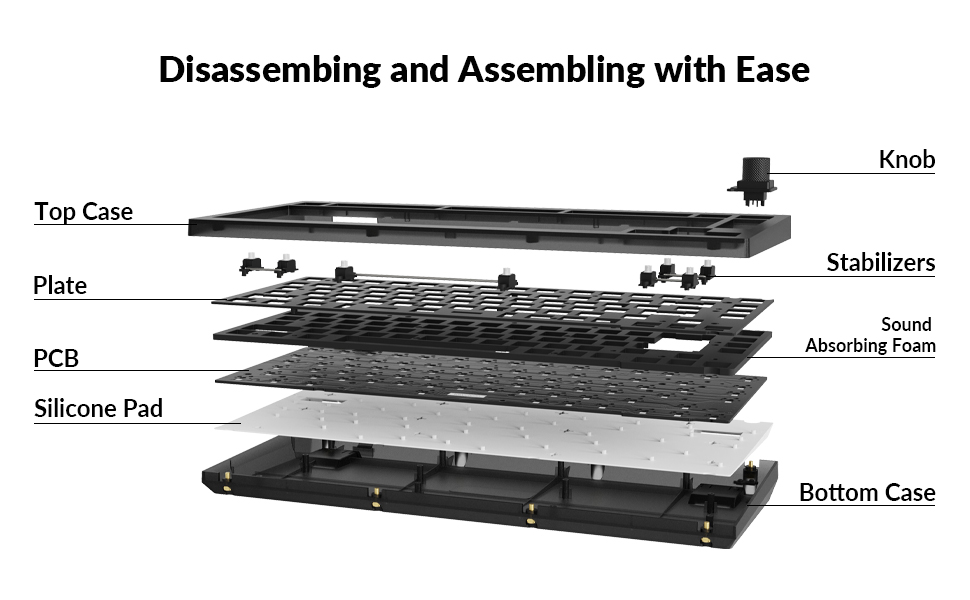
A diagram showing the disassembled components of the Keychron V1 keyboard, including the top case, knob, plate, PCB, sound absorbing foam, silicone pad, and bottom case. This illustrates the modular design.
3.2 Kytkinten asentaminen
The V1 features hot-swappable sockets, allowing you to install and remove 3-pin or 5-pin MX mechanical switches without soldering.
- Align the pins of your chosen mechanical switch with the corresponding holes on the PCB.
- Paina kytkintä varovasti alaspäin, kunnes se napsahtaa paikalleen. Varmista, että kytkin on kokonaan paikallaan eivätkä tapit ole taipuneet.
- Toista kaikille halutuille näppäimille.

Lähikuva view of the hot-swappable sockets on the keyboard's printed circuit board (PCB). These sockets allow for easy installation and removal of mechanical switches without soldering.
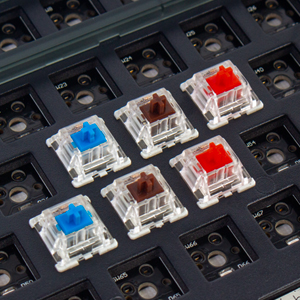
A close-up image showing various mechanical switches (red, blue, brown) being inserted into the hot-swappable sockets of the Keychron V1 keyboard, demonstrating the ease of switch installation.
3.3 Stabilisaattoria
The V1 includes PCB-mounted screw-in stabilizers for larger keys (e.g., Space Bar, Shift, Enter, Delete) to ensure stability and smooth performance. These are pre-installed but can be adjusted or replaced if desired.
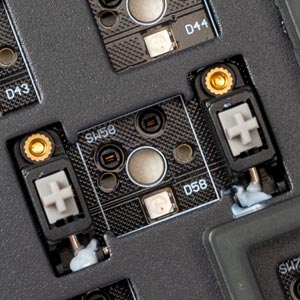
Yksityiskohtainen view of the PCB-mounted screw-in stabilizers for larger keys like the space bar, shift, and enter, designed to reduce wobbling and improve typing stability.
3.4 Näppäinhattujen asentaminen
After installing switches, place your desired keycaps onto the switches. Ensure they are firmly pressed down.
3.5 Näppäimistön kytkeminen
- Paikanna näppäimistön takaosassa oleva USB-C-portti.
- Connect the provided Type-C to Type-C cable (or Type-A to Type-C adapter with your own Type-A cable) to the keyboard and your computer.
- Ensure the operating system switch (located near the USB-C port) is set to the correct position (Mac or Windows) for your system.

A close-up image showing the USB-C port and the operating system mode switch (Mac/Windows) on the side of the Keychron V1 keyboard, indicating where to connect the cable and select the correct mode.
3.6 Ergonominen kulman säätö
The Keychron V1 features adjustable feet to provide two ergonomic typing angles for enhanced comfort during extended use.

Sivuammattilainenfile diagram of the Keychron V1 keyboard, highlighting its adjustable feet that provide two ergonomic typing angles: 8.5 degrees and 11 degrees.
4. Käyttöohjeet
4.1 QMK and VIA Programming
The Keychron V1 supports QMK and VIA firmware, allowing for extensive customization of key functions, macros, and lighting effects. VIA is a graphical user interface that simplifies the programming process.
- Lataa VIA-ohjelmisto: Vieraile virallisessa Keychronissa websivusto tai VIA website to download the latest compatible software for your operating system.
- Yhdistä näppäimistö: Ensure your V1 keyboard is connected to your computer via USB.
- Lataa näppäinkartta: Open the VIA software. It should automatically detect your V1 keyboard. If not, you may need to load the appropriate JSON keymap file from the Keychron websivusto.
- Mukauta: Use the intuitive interface to remap individual keys, create complex macros, and configure different layers for various functions. You can also adjust backlight effects.

A screenshot of the VIA software interface, demonstrating how users can remap keys, configure macros, and adjust lighting settings for the Keychron V1 keyboard. The interface shows different layers and key assignments.
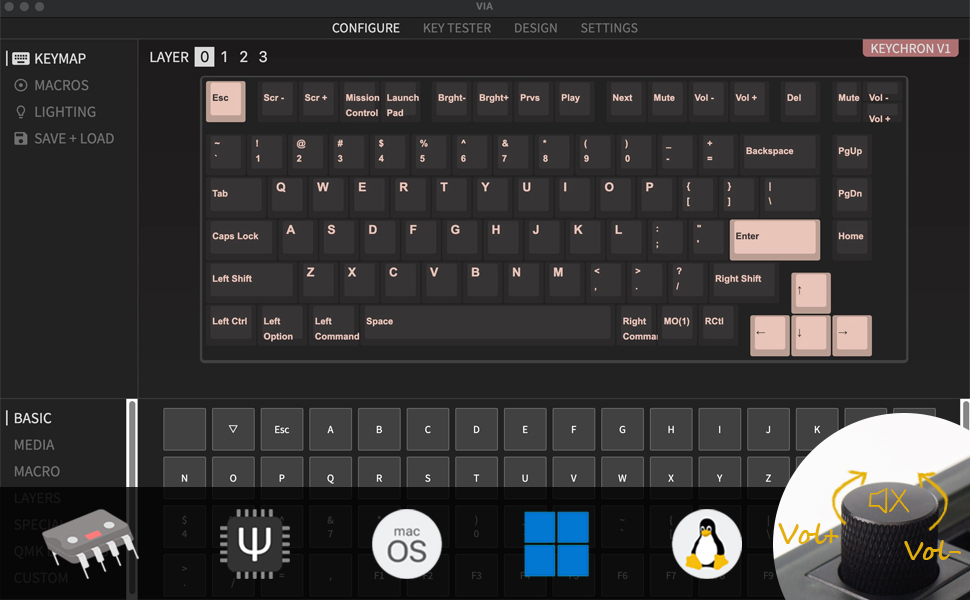
Kattava view of the VIA software interface, showing the keyboard layout with keycaps and options for remapping keys, creating macros, and managing different layers for advanced customization.
4.2 Ohjelmoitava nuppi
The V1 includes a versatile programmable knob, typically used for volume control by default. Its function can be customized using the VIA software to perform various actions, such as scrolling, zooming, or media control.
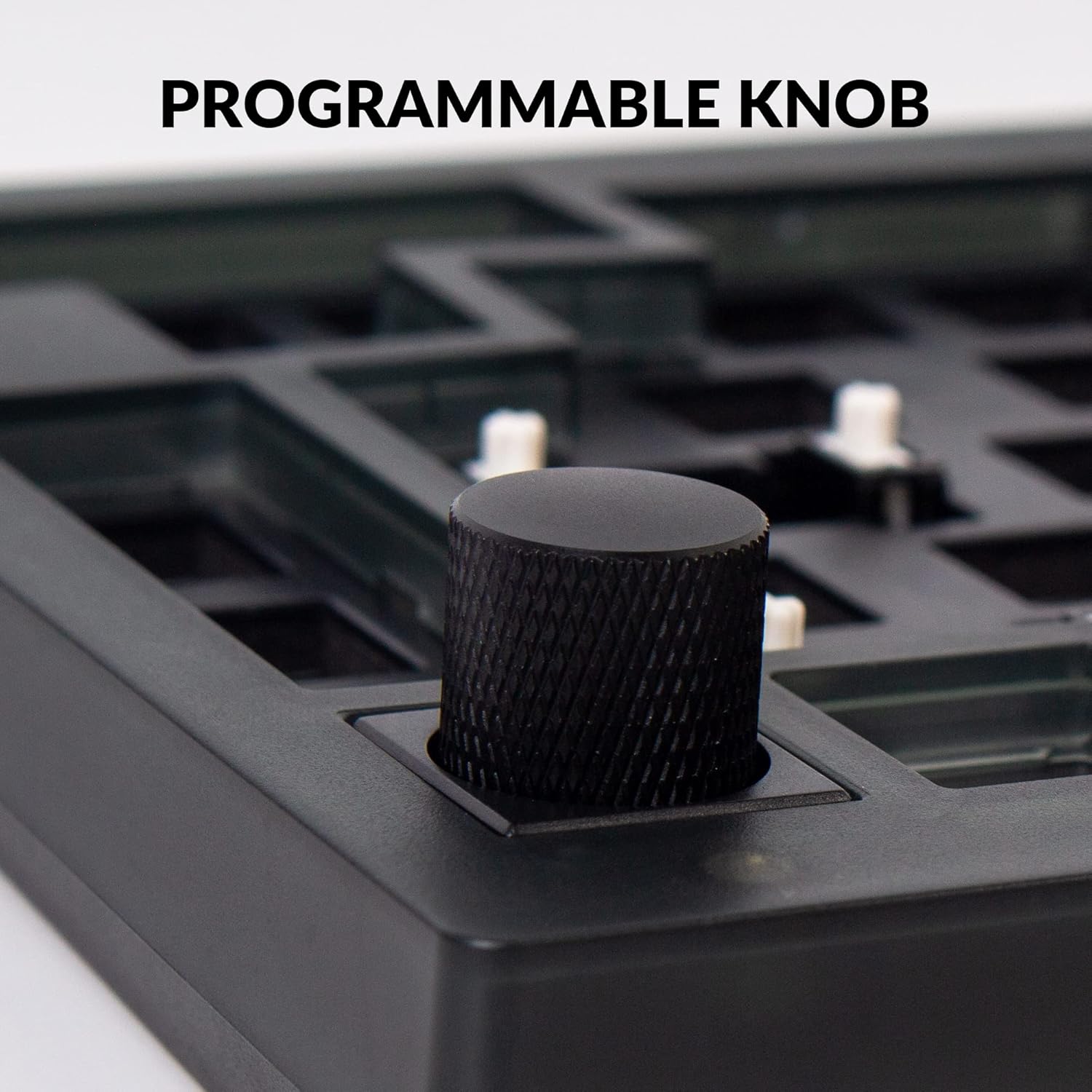
Yksityiskohtainen view of the textured, black programmable knob located on the top right corner of the Keychron V1 keyboard. This knob allows for customizable functions, such as volume control.
4.3 RGB-taustavalo
The V1 features south-facing RGB backlighting, designed to provide optimal illumination from the typist's perspective. The lighting effects, colors, and brightness can be adjusted through the VIA software or using onboard key combinations (refer to the Keychron V1 user manual for specific key combinations).
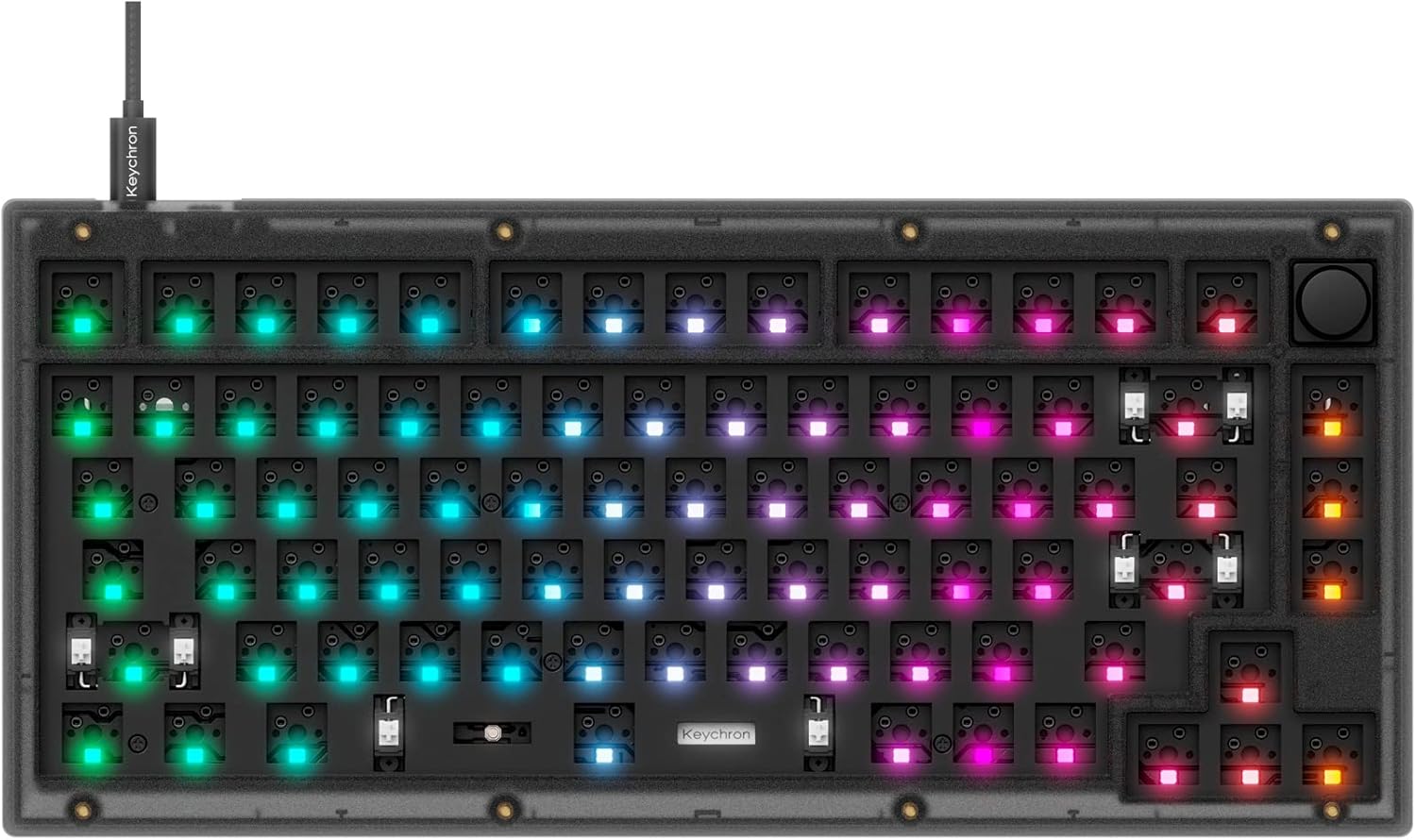
An image of the Keychron V1 barebone keyboard with its south-facing RGB backlighting illuminated in various colors, demonstrating the customizable lighting effects.
5. Huolto
- Puhdistus: Use a soft, dry cloth to wipe down the keyboard surface. For deeper cleaning, remove keycaps and use compressed air to clear debris from between switches.
- Näppäinhatun hoito: If using PBT keycaps, they are generally durable. Avoid harsh chemicals.
- Kytkimen hoito: Hot-swappable switches can be removed for cleaning or replacement using the provided switch puller. Be gentle to avoid bending switch pins.
- Kaapelin hallinta: Varmista, ettei USB-C-kaapeli ole liikaa taivutettu tai jännittynyt, jotta se ei vaurioidu.
6. Vianmääritys
- Näppäimistö ei vastaa:
- Check the USB-C cable connection to both the keyboard and the computer.
- Ensure the operating system switch (Mac/Windows) is set correctly.
- Kokeile liittää laite toiseen USB-porttiin tai tietokoneeseen.
- Tietyt näppäimet eivät toimi:
- Irrota näppäinhattu ja kytkin kyseiselle näppäimelle.
- Inspect the switch pins for bends or damage. Straighten gently if bent.
- Reinsert the switch firmly. If the issue persists, try swapping with a known working switch.
- VIA-ohjelmisto ei tunnista näppäimistöä:
- Ensure the keyboard is connected via USB.
- Restart the VIA software and/or your computer.
- Verify you have the correct VIA firmware and JSON file for the Keychron V1.
- RGB Backlight Issues:
- Check backlight settings in VIA software.
- Ensure no key combinations have accidentally turned off the backlight.
7. Tekniset tiedot
| Ominaisuus | Yksityiskohta |
|---|---|
| Mallinumero | V1-Z3 |
| Layout | 75 % (82 näppäintä) |
| Yhteydet | Langallinen (USB-C) |
| Hot-vaihdettava | Yes (3-pin & 5-pin MX mechanical switches) |
| Ohjelmoitavuus | QMK/VIA-tuki |
| Taustavalo | South-facing RGB |
| Äänestysprosentti | 1000 Hz |
| Yhteensopivat laitteet | Laptop, Mac, PC (Windows, Linux) |
| Tuotteen mitat | 12.93 x 5.85 x 1.02 tuumaa (32.84 x 14.86 x 2.59 cm) |
| Tuotteen paino | 2.59 puntaa (1.17 kg) |
| Materiaali | Polybuteenitereftalaatti, silikoni |
8. Takuu ja tuki
Keychron products typically come with a manufacturer's warranty. For specific warranty terms, duration, and to initiate a support request, please refer to the official Keychron website or contact Keychron customer service directly. Keep your proof of purchase for warranty claims.
For additional resources, firmware updates, and community support, visit the official Keychron websivusto: www.keychron.com


