1. Johdanto
Thank you for choosing the MageGee 60% Wired Gaming Keyboard. This ultra-compact keyboard is designed for gamers, typists, and travelers, offering a blend of performance, portability, and customizable RGB backlighting. This manual provides essential information for setting up, operating, maintaining, and troubleshooting your new keyboard.

Yliview of the MageGee 60% Wired Gaming Keyboard, showcasinsen kompaktin muotoilun ja eloisan RGB-taustavalaistuksen ansiosta.
2. Pakkauksen sisältö
- MageGee 60% Wired Gaming Keyboard
- USB Type-C - USB-A -kaapeli
- Käyttöopas (tämä asiakirja)
3. Asennusohjeet
3.1 Näppäimistön kytkeminen
- Locate the USB Type-C port on the back or side of the keyboard.
- Liitä mukana toimitetun USB Type-C -kaapelin pienempi pää näppäimistön porttiin.
- Liitä kaapelin suurempi USB-A-pää tietokoneen vapaaseen USB-porttiin.
- Näppäimistö on plug-and-play-tyyppinen, ja käyttöjärjestelmäsi pitäisi tunnistaa se automaattisesti.
3.2 Järjestelmän yhteensopivuus
The MageGee 60% Wired Gaming Keyboard is compatible with a wide range of operating systems, including:
- Windows 10, Windows 8, Windows 7, Windows XP, Windows VISTA
- Mac OS
For use with gaming consoles such as XBOX, PlayStation, or Nintendo Switch, a compatible converter adapter is recommended (not included).

This image illustrates the core features of the keyboard, including its 61 anti-ghosting keys, detachable Type-C cable for connectivity, multiple backlight modes, compact 60% layout, ergonomic design, and durable construction.
4. Käyttöohjeet
4.1 Näppäimistön asettelu ja näppäimet
This keyboard features a 60% compact layout with 61 keys. It includes anti-ghosting technology for all 61 keys, ensuring accurate registration of multiple simultaneous key presses, which is beneficial for gaming.
4.2 taustavalon ohjaus
The keyboard features customizable RGB backlighting with multiple effects. You can adjust the backlight modes, brightness, and speed using specific key combinations.
- Taustavalotilojen vaihtaminen: The keyboard offers various backlight effects, including normal light, wave, horse riding, and breathing modes. Specific key combinations (often involving the 'FN' key) are used to cycle through these modes. Refer to the keycaps for symbols indicating backlight functions.
- Kirkkauden säätö: There are 5 levels of brightness control. Use the designated key combinations (typically 'FN' + arrow keys or other function keys) to increase or decrease the backlight intensity.
- Nopeuden säätö: The speed of dynamic backlight effects can also be adjusted across 5 levels. Use the designated key combinations (typically 'FN' + arrow keys or other function keys) to modify the effect speed.

The keyboard's customizable RGB backlighting is shown, demonstrating different lighting patterns and the ability to adjust brightness and speed to suit user preferences.
4.3 Ergonominen muotoilu
The keyboard is designed with an ergonomic key layout that adapts to the natural movement arc of your hands. The key height is optimized to provide comfort and reduce fatigue during long periods of use.
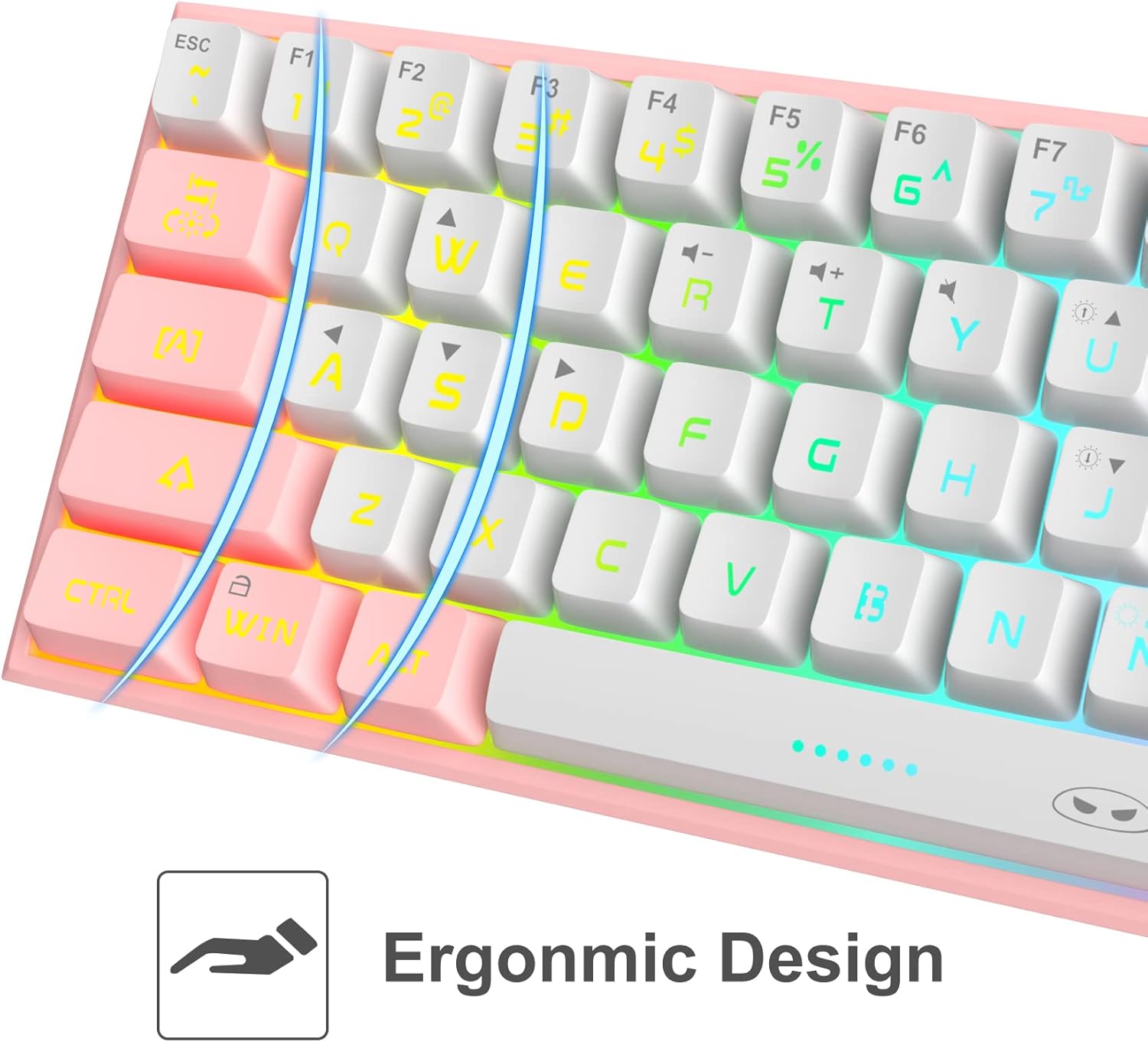
Yksityiskohtainen view of the keyboard's keycaps, emphasizing the ergonomic design that contributes to comfortable and reduced-fatigue use during extended periods.
5. Huolto
To ensure the longevity and optimal performance of your MageGee keyboard, follow these maintenance guidelines:
- Puhdistus: The keyboard features a waterproof design, which helps protect against accidental spills. For general cleaning, disconnect the keyboard from your computer. Use a soft, damp cloth to wipe down the keycaps and chassis. For stubborn dirt, a small amount of mild soap can be used. Ensure the keyboard is completely dry before reconnecting.
- Pölynpoisto: Poista pöly ja roskat näppäinhattujen välistä paineilmalla.
- Varastointi: Kun näppäimistöä ei käytetä pitkään aikaan, säilytä sitä kuivassa, viileässä paikassa, suojassa suoralta auringonvalolta.
6. Vianmääritys
If you encounter issues with your MageGee keyboard, refer to the following common problems and solutions:
| Ongelma | Mahdollinen syy | Ratkaisu |
|---|---|---|
| Näppäimistö ei vastaa | Löysä kaapeliliitäntä, väärä USB-portti, ajuriongelma. | Varmista, että USB-kaapeli on kytketty kunnolla sekä näppäimistöön että tietokoneeseen. Kokeile toista USB-porttia. Käynnistä tietokone uudelleen. |
| Taustavalo ei toimi | Taustavalo pois päältä, kirkkaus asetettu minimiin. | Use the designated key combinations to turn on the backlight or increase brightness. |
| Tietyt avaimet eivät rekisteröidy | Roskia näppäinhatun alla, ohjelmistoristiriita. | Clean the affected key area with compressed air. Test the keyboard on another computer to rule out software issues. |
| Keyboard input lag | USB port issue, system performance. | Try a different USB port. Ensure your computer meets the system requirements for your applications. |
7. Tekniset tiedot
| Ominaisuus | Yksityiskohta |
|---|---|
| Malli | B09LV96L71 |
| Merkki | MageGee |
| Yhteystekniikka | Langallinen (USB Type-C) |
| Näppäimistön asettelu | 60 % kompakti, 61 näppäintä |
| Taustavalo | RGB Backlit (multiple modes, adjustable brightness/speed) |
| Erikoisominaisuudet | Waterproof, Anti-ghosting (all 61 keys), Ergonomic Design |
| Tuotteen mitat | 12 x 5 x 2 tuumaa |
| Tuotteen paino | 1.05 kiloa |
| Materiaali | Akryylinitriilibutadieenistyreeni (ABS) |
| Väri | Valkoinen Pinkki |
| Yhteensopivat laitteet | PC, Mac, Gaming Consoles (with adapter) |
8. Takuu ja tuki
8.1 Takuutiedot
Specific warranty details for the MageGee 60% Wired Gaming Keyboard may vary by region and retailer. Please refer to the warranty card included with your purchase or contact your point of sale for detailed information regarding warranty coverage and terms.
8.2 Asiakastuki
For technical assistance, troubleshooting beyond this manual, or inquiries about your product, please contact MageGee customer support through their official website or the retailer from whom you purchased the product. Have your model number (B09LV96L71) and purchase details ready when contacting support.


