1. Tuote ohiview
The Anderic OEM NSRCFNA21 Smart Remote is an original equipment manufacturer (OEM) replacement remote control specifically designed for various Insignia TV models. This remote provides seamless functionality and user-friendly operation, ensuring reliable control over your television.
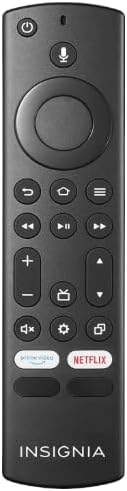
Kuva 1.1: The Anderic OEM NSRCFNA21 Smart Remote. This image displays the front view of the black remote control, featuring various buttons for power, voice control, navigation, volume, channel, and dedicated streaming service buttons.
Keskeisiä ominaisuuksia ovat:
- Original Quality: An authentic OEM product, ensuring performance and reliability comparable to the remote originally supplied with your TV.
- Käyttäjäystävällinen muotoilu: Intuitive buttons and controls for easy navigation, volume adjustment, channel changes, and access to various TV functions.
- Luotettava suorituskyky: Provides a stable and responsive connection for accurate command execution.
2. Asennus- ja pariliitosohjeet
To ensure proper functionality, the remote control must be paired with your Insignia TV. Follow these steps carefully:
- Nollaa TV: Unplug your Insignia TV from its power source. Wait for approximately 30 seconds.
- Television virran kytkeminen päälle: Plug the TV back into the power source and turn it on. Allow the TV to fully boot up.
- Aloita pariliitos: Once the TV has completely booted up and is displaying content, press and hold the Kotiin button on the Anderic NSRCFNA21 remote control for up to 30 seconds.
- Remote Update (if prompted): Your TV may display a message indicating that the remote needs an update. If prompted, allow the TV to proceed with the update. This process may take 1 to 3 minutes to complete.
- Vahvistus: After the update (if any) and pairing process, test the remote's functions (e.g., volume, channel, navigation) to confirm successful pairing.
If the remote does not pair after following these steps, repeat the process or refer to the troubleshooting section.
3. Kaukosäätimen käyttö
The Anderic NSRCFNA21 remote control features an intuitive layout for easy operation of your Insignia TV. Below are the general functions of the primary buttons:
- Virtapainike: Kytkee television päälle tai pois päältä.
- Ääniohjauspainike: Activates voice commands for searching content or controlling the TV.
- Navigation Pad (Directional Buttons and Select): Käytetään valikoissa liikkumiseen ja kohteiden valitsemiseen.
- Koti näppäin: Returns to the TV's main home screen.
- Takaisin-painike: Palaa edelliseen näyttöön tai valikkoon.
- Valikko/Asetukset-painike: Accesses additional menu options or settings.
- Äänenvoimakkuus ylös/alas: Adjusts the TV's audio volume.
- Kanava ylös/alas: Vaihtaa TV-kanavia.
- Mykistyspainike: Mykistää tai poistaa television äänen mykistyksen.
- Asetukset -painike: Avaa television asetusvalikon.
- Tulo-/lähdepainike: Changes the TV's input source (e.g., HDMI 1, HDMI 2).
- Dedicated Streaming Service Buttons: Provides quick access to popular streaming applications (e.g., Amazon Prime Video, Netflix).
4. Yhteensopivuus
The Anderic OEM NSRCFNA21 Smart Remote is compatible with the following Insignia TV models:
- NS24DF310NA21
- NS39DF310NA21
- NS50DF710NA21
- NS55DF710NA21
This remote also replaces the following models:
- NSRCFNA19 Rev B Fire
- NSRCFNA19revB
- NSRCFNA21 Fire
- NSRCFNA21 Rev E
- NSRCFNA21-Rev-E
Ensure your TV model is listed above for optimal performance.
5. Huolto
Proper maintenance can extend the life and functionality of your remote control.
- Akun vaihto: The remote requires two AAA batteries. Replace batteries when the remote's responsiveness decreases or it stops functioning. Ensure correct polarity when inserting new batteries.
- Puhdistus: Use a soft, dry cloth to clean the remote's surface. Avoid using liquid cleaners or abrasive materials, as these can damage the remote.
- Varastointi: Säilytä kaukosäädintä kuivassa paikassa, poissa äärimmäisistä lämpötiloista ja suorasta auringonvalosta.
6. Vianmääritys
If you encounter issues with your Anderic NSRCFNA21 Smart Remote, try the following troubleshooting steps:
- Kaukosäädin ei vastaa:
- Check the batteries. Replace them with fresh AAA batteries, ensuring correct polarity.
- Varmista, ettei kaukosäätimen ja television sensorin välissä ole esteitä.
- Yritä pariliitosprosessia uudelleen osiossa 2 kuvatulla tavalla.
- Ajoittainen toiminnallisuus:
- Tämä voi viitata paristojen alhaiseen varaukseen. Vaihda paristot.
- Varmista, että olet television anturin tehokkaalla alueella.
- Pairing Fails:
- Confirm your TV model is listed in the compatibility section (Section 4).
- Ensure the TV is fully booted up before attempting to hold the Home button.
- Try unplugging the TV for a longer period (e.g., 1-2 minutes) before plugging it back in and re-attempting pairing.
Jos ongelmat jatkuvat näiden vaiheiden kokeilemisen jälkeen, ota yhteyttä asiakastukeen saadaksesi lisäapua.
7. Tekniset tiedot
| Merkki | Anderic |
| Mallinumero | NSRCFNA21 Rev B |
| Yhteensopivat laitteet | Insignia Televisions |
| Virtalähde | 2 AAA-paristoa (tarvitaan) |
| Tuotteen paino | 1.76 unssia |
| Pakkauksen mitat | 6.3 x 2.95 x 0.67 tuumaa |
| Väri | Musta |
| Valmistaja | Dan's Electronics Etc., Inc. |
8. Takuu ja tuki
For warranty information or technical support, please contact the manufacturer, Anderic (Dan's Electronics Etc., Inc.). Refer to the product packaging or the official Anderic websivustolta tarkemmat yhteystiedot ja takuuehdot.
Voit vierailla Anderic-kauppa Amazonissa saadaksesi lisätietoja.


