1. Tuotteiden yhteensopivuus
This keyboard case is designed for specific iPad models. Please verify your iPad's model number, typically found on the back of your device, to ensure compatibility.
- iPad 9th Generation (2021) 10.2 inch: Mallit A2602, A2603, A2604, A2605
- iPad 8th Generation (2020) 10.2 inch: Mallit A2270, A2428, A2429
- iPad 7th Generation (2019) 10.2 inch: Mallit A2197, A2198, A2200
- iPad Air 3rd Generation (2019): Mallit A2152, A2123, A2153
- iPad Pro 10.5 inch (2017): Models A1701, A1709
This product is not compatible with any other iPad models.
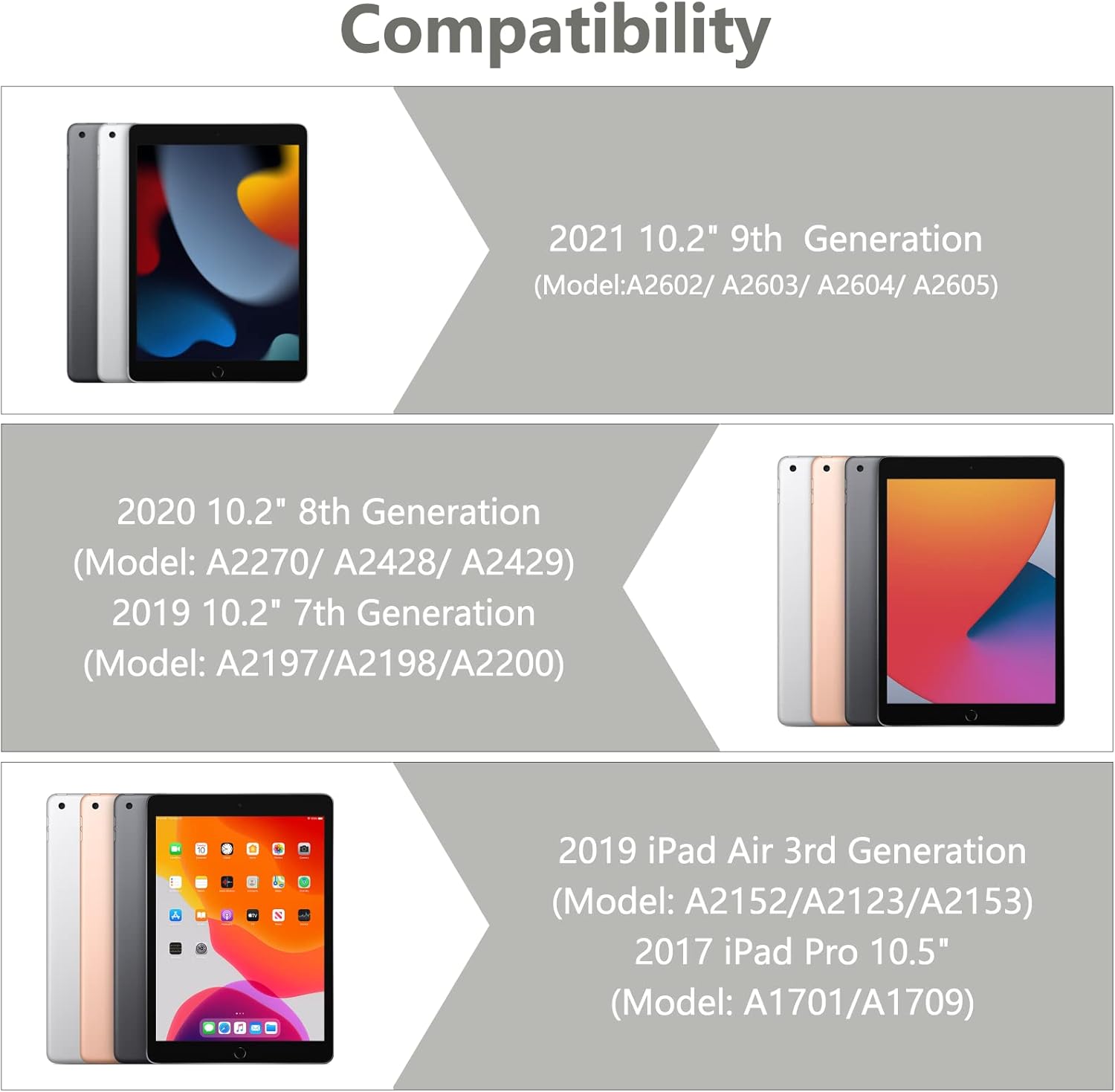
Image 1.1: Visual guide illustrating the compatible iPad models for this keyboard case.
2. Pakkauksen sisältö
Varmista, että pakkauksessa on kaikki tarvittavat osat avattaessa:
- 1 x iPad Case with Keyboard (integrated)
- 1 x Wireless Bluetooth Keyboard (detachable)
- 1 x Transparent Keyboard Protector
- 1 x USB-latauskaapeli
- 1 x Käyttöopas

Kuva 2.1: ohiview kaikista tuotepakkaukseen sisältyvistä osista.
3. Asennusohjeet
3.1 iPadin asentaminen
- Gently align your iPad with the case's frame.
- Press the iPad firmly into the case, ensuring all edges are securely seated. The precise cutouts will align with your iPad's ports and buttons.
3.2 Connecting the Wireless Bluetooth Keyboard
The keyboard connects to your iPad via Bluetooth. Follow these steps to pair the devices:
- Varmista, että näppäimistö on ladattu täyteen.
- Turn on the keyboard by sliding the power switch to the 'ON' position. The indicator light will illuminate.
- Press the 'Connect' button on the keyboard. The Bluetooth indicator light will begin to flash, indicating it is in pairing mode.
- Siirry iPadillasi osoitteeseen Asetukset > Bluetooth.
- Ota Bluetooth käyttöön. iPadisi etsii käytettävissä olevia laitteita.
- Select 'Bluetooth Keyboard' (or a similar name) from the list of devices.
- If prompted, enter the pairing code displayed on your iPad onto the keyboard and press 'Enter'.
- Once paired, the Bluetooth indicator light on the keyboard will stop flashing and remain solid or turn off, and your iPad will show the keyboard as 'Connected'.

Image 3.1: The BAIBAO keyboard case with an iPad inserted and the detachable keyboard positioned for typing.
4. Käyttöohjeet
4.1 Irrotettavan näppäimistön toiminnallisuus
The keyboard is magnetically attached to the case, allowing for easy detachment and repositioning. This provides flexibility for various usage scenarios.

Image 4.1: Illustration of the magnetic adsorption mechanism that secures the keyboard to the case.
4.2 Useita Viewkulmat
The case features a thoughtful design that allows you to adjust your iPad to various comfortable viewing angles. This is ideal for typing, watching videos, or making presentations.

Image 4.2: Diagram demonstrating the adjustable viewing angles of the iPad when placed in the case.
4.3 Automaattinen nukkumis-/herätystoiminto
The smart cover automatically puts your iPad to sleep when closed and wakes it up when opened, helping to conserve battery life.

Image 4.3: Visual representation of the automatic sleep and wake functionality when opening and closing the case.
4.4 Integroitu kynäteline
The case includes a dedicated slot for your Apple Pencil, preventing it from being lost and keeping it readily accessible.
4.5 Näppäimistön ominaisuudet
- Tactile Response: Each key features a spring mechanism for a responsive typing experience.
- Hotkeys and Media Keys: The keyboard includes special function keys for quick access to common iPad features.
- Usean järjestelmän tuki: The keyboard supports Android, iOS, and Windows systems, enhancing its versatility.
5. Huolto
5.1 Näppäimistön lataaminen
The keyboard is powered by a built-in Li-ion battery. Use the provided USB charging cable to charge it.
- Connect the small end of the USB cable to the charging port on the keyboard.
- Liitä USB-kaapelin suurempi pää USB-virtalähteeseen (ei sisälly toimitukseen) tai tietokoneen USB-porttiin.
- The keyboard power indicator will flash red when charging is required.
- Täysi lataus kestää yleensä 2-3 tuntia.
- The keyboard can operate for at least 80 hours on a full charge and has a standby time of 130 days.
5.2 Kotelon ja näppäimistön puhdistaminen
To maintain the appearance and functionality of your product:
- Pyyhi kotelo pehmeällä,amp liinalla. Vältä voimakkaita kemikaaleja tai hankaavia puhdistusaineita.
- For the keyboard, use a soft, dry cloth. A transparent keyboard protector is included to help keep the keys clean.
- Varmista, että näppäimistö on sammutettu ennen puhdistamista.
6. Vianmääritys
6.1 Keyboard Not Connecting to iPad
- Varmista, että näppäimistö on päällä ja täyteen ladattu.
- Verify that Bluetooth is enabled on your iPad.
- Make sure the keyboard is in pairing mode (Bluetooth indicator flashing).
- Forget the device on your iPad's Bluetooth settings and attempt to re-pair.
- Käynnistä sekä iPad että näppäimistö uudelleen.
6.2 Näppäimet eivät vastaa
- Tarkista näppäimistön akun varaustaso ja lataa se tarvittaessa.
- Varmista, että näppäimistö on yhdistetty oikein Bluetoothin kautta.
- Remove the keyboard protector to ensure it is not interfering with key presses.
6.3 Auto Sleep/Wake Not Functioning
- Ensure your iPad is correctly seated within the case.
- Check your iPad's settings to ensure 'Lock/Unlock' is enabled under 'Display & Brightness' (or similar, depending on iOS version).
7. Tekniset tiedot
| Tuotteen mitat | 11.38 x 8.15 x 1.18 tuumaa |
| Tuotteen paino | 1.9 kiloa |
| Yhteystekniikka | Bluetooth |
| Näppäimistön kuvaus | Monitoiminen |
| Erikoisominaisuus | Hotkeys, Media Keys, Ergonomic |
| Materiaali | Akryylinitriilibutadieenistyreeni (ABS) |
| Akun tyyppi | 1 litiumioniakku (mukana) |
| Akun kesto (käytössä) | Jopa 80 tuntia |
| Akun kesto (valmiustila) | Jopa 130 päivää |
8. Takuu ja tuki
This product is designed for durability and performance. While specific warranty details are not provided in this manual, BAIBAO is committed to customer satisfaction.
If you encounter any issues with your product, have questions regarding its model or function, or require assistance, please contact BAIBAO customer service. We are eager to resolve any problems you may experience.
Please refer to the contact information provided with your purchase or visit the official BAIBAO webtukisivusto.


