1. Tuote ohiview
The Braun Digital Weather Station Clock (Model BC13WP) is designed to provide accurate time, indoor and outdoor temperature, humidity readings, and a weather forecast. It features a clear LCD display, a crescendo beep alarm, and a continuous backlight function for enhanced visibility.

Image: The Braun Digital Weather Station Clock BC13WP, showcasing its main unit and separate outdoor sensor.
2. Asennus ja asennus
2.1 Akun asennus
The main clock unit requires 2 x AA batteries, and the outdoor sensor unit requires 2 x AAA batteries. Batteries are not included and must be purchased separately. Ensure correct polarity when inserting batteries.

Image: The Braun BC13WP Weather Station Clock and its outdoor sensor unit, as packaged.
2.2 Anturin pariliitos
After installing batteries in both the main clock unit and the outdoor sensor, the units will automatically attempt to pair. Place the outdoor sensor within a 30-meter range of the main unit for optimal connection. The outdoor sensor has its own LCD display for outdoor temperature and humidity.

Image: The main clock unit displaying indoor and outdoor readings alongside the compact outdoor sensor unit.
3. Käyttöohjeet
3.1 Kellonajan ja päivämäärän asetus
Refer to the buttons on the back of the unit to set the current time and date. The clock supports both 12-hour and 24-hour display formats. Consult the detailed manual included in the product packaging for specific button functions.
3.2 Hälytystoiminto
The clock features a crescendo beep alarm. This means the alarm sound will gradually increase in frequency and volume if not turned off. To activate or deactivate the alarm, use the designated alarm button on the unit.

Image: The clock display showing the time and a musical note icon, indicating the crescendo alarm is active.
3.3 Snooze and Backlight
Press the 'snooze/light' button on the top of the clock to activate the snooze function, which provides a 5-minute delay before the alarm sounds again. This button also manually activates the backlight for 10 seconds. The clock also features a continuous backlight function that illuminates the display in low-light environments for improved legibility at night.

Image: The clock display highlighting the snooze function, with a 'Zzz 5 min' icon.
3.4 Temperature and Humidity Units
The display shows both indoor and outdoor temperature and humidity. You can switch between Celsius (°C) and Fahrenheit (°F) temperature units using the appropriate button, typically located on the back of the unit.
3.5 Sääennusteen näyttö
The clock's positive LCD display includes a weather forecast icon, which provides an indication of upcoming weather conditions based on atmospheric pressure changes. This forecast is for the next 12 to 24 hours and should be used as a general guide.

Image: The clock display featuring the weather forecast icon, showing a sun and cloud symbol.
4. Ominaisuudet Yliview
- Positive LCD Display: Shows time, forecast, indoor/outdoor temperature (°C or °F), and humidity.
- Continuous Backlight: Illuminates the display in low-light conditions for maximum legibility.
- 12/24 Hour Setting: Option to choose preferred time format.
- Crescendo-hälytysääni: Alarm sound increases in frequency and volume until turned off.
- Torkkutoiminto: 5-minute snooze interval, activated by the top button.
- Outdoor Sensor Unit: Displays outdoor temperature and humidity, with a range of up to 30m.
Video: An official product video demonstrating the key features and design of the Braun BC13 Weather Station.
5. Huolto
5.1 Pariston vaihto
When the display dims or functions become erratic, it is time to replace the batteries. Replace all batteries in both the main unit and the outdoor sensor simultaneously to ensure proper operation and pairing. Use new, high-quality alkaline batteries for best performance.
5.2 Puhdistus
Clean the clock and sensor units with a soft, dry cloth. Avoid using abrasive cleaners or solvents, as these can damage the display or casing.
6. Vianmääritys
- Clock Resets Frequently: Ensure batteries are fresh and correctly installed. Avoid placing the unit in areas with strong electromagnetic interference. If the issue persists, try removing batteries for a few minutes and reinserting them to perform a hard reset.
- Display Not Bright Enough: The continuous backlight is designed for low-light legibility. If the display appears dim during the day, this is normal. Ensure the auto backlight sensor (usually on the back) is not obstructed if you rely on automatic illumination.
- Ulkoanturi ei muodosta yhteyttä: Verify that both units have fresh batteries. Ensure the outdoor sensor is within the 30-meter range and there are no significant obstructions (e.g., thick walls, large metal objects) between the units. Try repositioning the sensor.
- Epätarkat lämpötila-/kosteuslukemat: Allow the units some time (up to 24 hours) to stabilize after initial setup. Ensure the outdoor sensor is placed in a shaded area, away from direct sunlight or heat sources, which can affect readings.
7. Tekniset tiedot
| Merkki | Braun |
| Mallinumero | BC13WP |
| Näytön tyyppi | Digitaalinen nestekidenäyttö |
| Product Dimensions (Clock) | W13.5cm x H7.5cm x D4.5cm (5.31"W x 2.95"H) |
| Sensor Unit Dimensions | L6.2cm x K6.2cm x S2.6cm |
| Virtalähde (kello) | 2 x AA paristot (ei sisälly) |
| Virtalähde (anturi) | 2 x AAA paristot (eivät sisälly) |
| Materiaali | Akryylinitriilibutadieenistyreeni (muovi) |
| Erikoisominaisuudet | Alarm, Clock, Indoor/Outdoor Temperature & Humidity, Weather Forecast, Backlight |
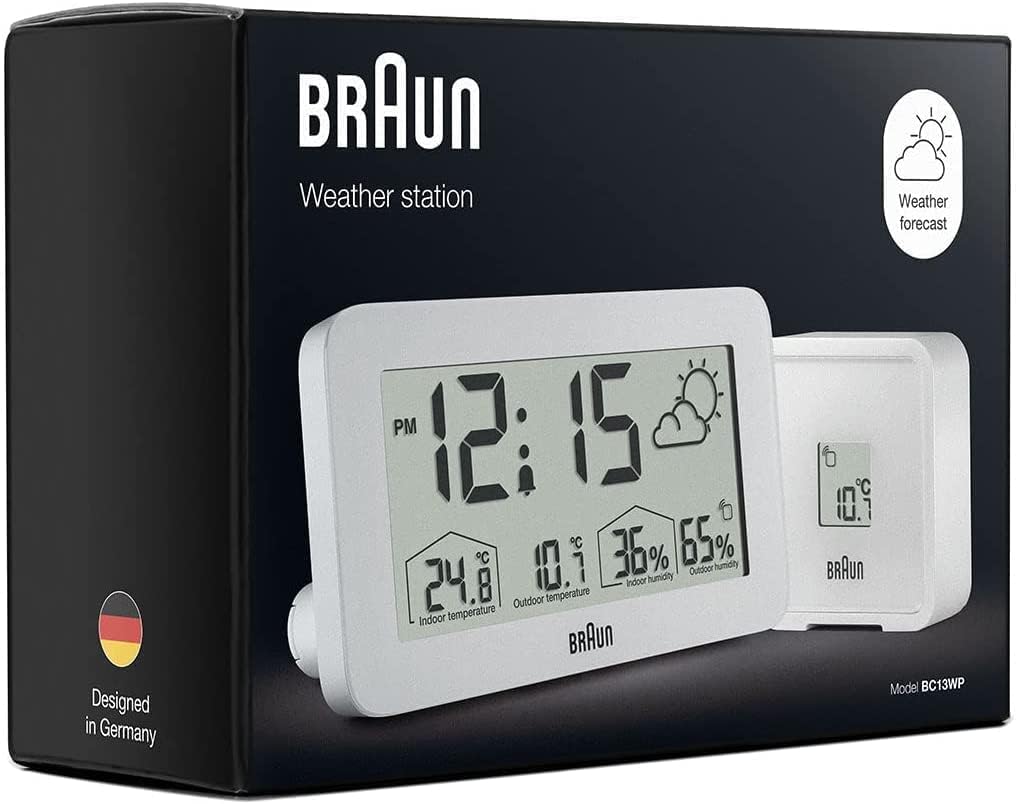
Image: The Braun BC13WP clock unit displayed against a measurement grid, illustrating its physical dimensions.
8. Takuu ja tuki
Takuutietoja ja asiakastukea varten katso tuotteen mukana toimitettuja asiakirjoja tai käy Braunin virallisella verkkosivustolla. websivusto. Säilytä ostokuitti ostotodistuksena mahdollisten takuuvaatimusten varalta.


