1. Tuote ohiview
The BYTECH BYOPCA223BK Car LED Bulb Strip is designed to enhance your vehicle's interior ambiance with vibrant, customizable lighting. This kit includes multiple LED strips that can be easily installed to create a dynamic and colorful atmosphere.
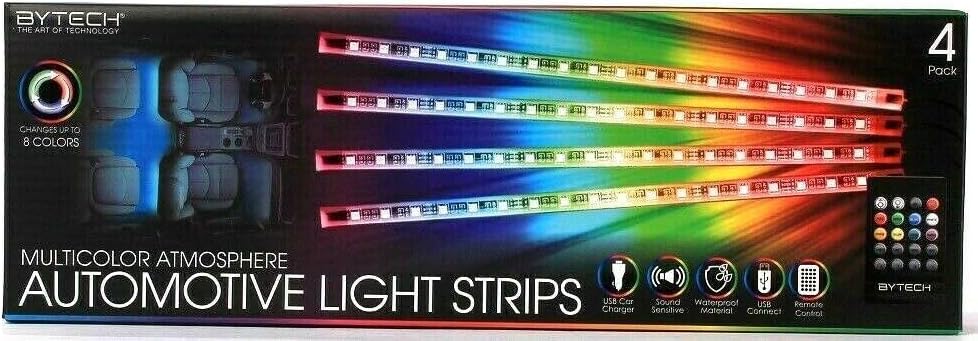
Image 1.1: Packaging of the BYTECH BYOPCA223BK Car LED Bulb Strip, displaying four individual LED light strips and a remote control. The packaging highlights features such as "Changes up to 8 Colors" and "Multicolor Atmosphere."
2. Pakkauksen sisältö
Please verify that all items listed below are present in your package.
- 4 x BYTECH Car LED Light Strips
- 1 x USB Car Charger Adapter
- 1 x kaukosäädin
- Installation Accessories (e.g., adhesive tape, cables)
3. Tekniset tiedot
| Ominaisuus | Yksityiskohta |
|---|---|
| Mallinumero | BYOPCA223BK |
| Merkki | BYTECH |
| Valonlähteen tyyppi | LED |
| Voitage | 12 volttia |
| Muototekijä | Strip |
| Kappaleiden lukumäärä | 4 |
| Värivaihtoehdot | Up to 8 colors (as per packaging) |
| Äänen herkkä | Yes (as per packaging icon) |
| Materiaali | Waterproof (as per packaging icon) |
| Tuotteen paino | 277 g |
| UPC | 805112076291 |
4. Turvallisuustiedot
- Varmista, että ajoneuvon virta on katkaistu ennen asennusta.
- Älä peitä turvatyynyjä tai muita turvaominaisuuksia asennuksen aikana.
- Keep wiring away from moving parts or heat sources.
- Use only with 12-volt DC power sources.
- Vältä suoraa silmien altistumista LED-valoille.
- Jos tuote on vaurioitunut, lopeta käyttö välittömästi.
5. Asennus ja asennus
The BYTECH Car LED Bulb Strips are designed for easy installation. Follow these steps for optimal placement and connection.
5.1 Choosing Installation Location
Identify flat, clean surfaces within your vehicle's interior where you wish to install the LED strips. Common locations include under the dashboard, beneath seats, or along door panels. Ensure the chosen locations do not interfere with vehicle operation or passenger movement.
5.2 Pinnan puhdistaminen
Before applying the strips, thoroughly clean the chosen surfaces with an alcohol wipe or a mild cleaner. Allow the surface to dry completely to ensure proper adhesion.
5.3 Attaching the LED Strips
Peel off the protective backing from the adhesive tape on the back of each LED strip. Carefully press the strip firmly onto the cleaned surface, holding it in place for a few seconds to secure adhesion.
5.4 Johdotus ja liitäntä
Route the cables from each LED strip to a central connection point, typically near the vehicle's 12V power outlet (cigarette lighter socket). Use cable clips or ties to secure the wiring and keep it tidy, preventing interference with pedals or other vehicle controls.
Connect the main power cable from the LED strips to the provided USB car charger adapter.
5.5 Virran kytkeminen päälle
Insert the USB car charger adapter into your vehicle's 12V power outlet. The LED strips should illuminate, indicating a successful connection.
6. Käyttö
The BYTECH Car LED Bulb Strips are controlled via the included remote control.
6.1 Kaukosäätimen toiminnot
The remote control allows you to power the lights on/off, change colors, adjust brightness, and select various lighting modes.
- Virtapainike: Turns the LED strips on or off.
- Värin valintapainikkeet: Choose from up to 8 distinct colors (e.g., red, green, blue, white, purple, cyan, yellow, orange).
- Kirkkauden säätö: Lisää tai vähennä valon voimakkuutta.
- Tilapainikkeet: Select different lighting effects such as fading, strobing, or sound-activated modes.
- Sound Sensitive Mode: Activates lighting that reacts to music or ambient sounds within the vehicle.
6.2 Changing Colors and Modes
Press the desired color button on the remote to switch the LED strip color. Use the mode buttons to cycle through available lighting effects.
6.3 Sound Activation
To activate the sound-sensitive feature, press the designated sound mode button on the remote. The lights will then synchronize with the rhythm of music or other sounds.
7. Huolto
- Puhdistus: Gently wipe the LED strips with a soft, dry cloth to remove dust. For stubborn dirt, use a slightly damp cloth and dry immediately. Do not use harsh chemicals or abrasive cleaners.
- Tarttuvuuden tarkistus: Periodically check the adhesive on the back of the strips to ensure they remain securely attached. Reapply or reinforce with stronger adhesive if necessary.
- Johdon tarkastus: Regularly inspect the wiring for any signs of wear, fraying, or damage. Ensure all connections are secure.
- Varastointi: If removing the strips for extended periods, store them in a cool, dry place away from direct sunlight.
8. Vianmääritys
| Ongelma | Mahdollinen syy | Ratkaisu |
|---|---|---|
| Valot eivät syty. | No power to the USB adapter. Löysä yhteys. Faulty LED strip. | Check if the vehicle's 12V outlet is active. Ensure the USB adapter is fully inserted. Varmista, että kaikki kaapeliliitännät ovat tukevasti kiinni. Test with another 12V power source if available. |
| Kaukosäädin ei toimi. | Dead battery in remote. Kaukosäätimen ja vastaanottimen välissä on este. | Vaihda kaukosäätimen paristo. Ensure a clear line of sight to the LED strip receiver (if applicable). |
| Lights flicker or change colors erratically. | Epävakaa virransyöttö. Löysä johto. | Check the vehicle's 12V outlet for stable power. Kiinnitä kaikki johdotusliitännät. |
| Liima ei tartu. | Pinta ei ole puhdas tai kuiva. Riittämätön paine asennuksen aikana. | Re-clean and dry the surface thoroughly. Apply firm pressure for a longer duration. Consider using additional automotive-grade adhesive tape. |
9. Takuu ja tuki
For warranty information or technical support, please contact BYTECH customer service. Refer to your purchase receipt for specific warranty terms and conditions.
Websivusto: www.bytechintl.com
Sähköposti: support@bytechintl.com
Puhelin: Please refer to the BYTECH webalueellisten puhelinnumeroiden sivusto.


