Johdanto
This manual provides detailed instructions for the MOFii 2.4GHz Wireless Keyboard and Mouse Combo, Model 4056. Please read this manual carefully before using the product to ensure proper operation and longevity.
Pakkauksen sisältö
- MOFii Wireless Keyboard
- MOFii Wireless Mouse
- 2.4 GHz:n USB-nanovastaanotin
- Käyttöopas (tämä asiakirja)
Asennusohjeet
- Asenna paristot:
- Open the battery compartment on the underside of the keyboard and mouse.
- Aseta tarvittavat paristot.
- Varmista oikea napaisuus (+/-).
- Sulje paristolokero.
- Liitä USB-vastaanotin:
- Locate the 2.4GHz USB Nano Receiver. It is often stored within the mouse's battery compartment.
- Plug the USB receiver into an available USB port on your computer, laptop, or smart TV.
- Järjestelmän pitäisi automaattisesti tunnistaa ja asentaa tarvittavat ajurit.
- Virta päälle:
- Turn on the keyboard and mouse using their respective power switches (if available).
- The devices should connect automatically to the receiver.

Image: MOFii Wireless Keyboard and Mouse connected to a laptop, illustrating the 2.4GHz USB receiver connection.

Image: Diagram illustrating the 2.4GHz wireless connection between the keyboard, mouse, and a laptop, highlighting stable connection up to 10m/33ft.
Käyttöohjeet
Yleinen käyttö
The keyboard features a full-size layout with colorful round keys, designed for comfortable typing. The mouse is ergonomically shaped for ease of use.
Pikanäppäintoiminnot
The keyboard includes 13 hotkey functions for quick access to various features. Refer to the keycap legends for specific functions (e.g., media control, volume adjustment, web selainkäyttö).

Image: The MOFii keyboard highlighting its 13 hotkey functions, designed to enhance productivity and entertainment.
Automaattinen virransäästö
To conserve battery life, both the keyboard and mouse will automatically enter sleep mode after 5 minutes of inactivity. To wake them up, simply press any key on the keyboard or move the mouse.

Image: The keyboard and mouse in a low-light setting, illustrating the intelligent auto-sleep feature that conserves battery power.
Huolto
Näppäimistön puhdistus
The keyboard features detachable keycaps for easy cleaning. A brush is included to help remove dust and debris from between the keys.
- Gently pull up the keycaps to remove them.
- Use the provided brush or a soft, dry cloth to clean the keyboard base and keycaps.
- Ensure all parts are dry before reattaching the keycaps.

Kuva: Lähikuva view of the keyboard demonstrating detachable keycaps and the included cleaning brush for thorough maintenance.
Ergonominen muotoilu
The keyboard is designed with ergonomic considerations, including foldable stands on the underside to adjust the typing angle for improved comfort and reduced wrist pressure.

Image: The underside of the keyboard, highlighting foldable stands and silicone non-slip pads for adjustable height and stability.
Vianetsintä
- Ei yhteyttä/viive:
- Varmista, että USB-vastaanotin on kytketty tukevasti toimivaan USB-porttiin.
- Check if the keyboard and mouse have fresh batteries and are powered on.
- Move the devices closer to the USB receiver to ensure they are within the 10m/33ft operating range.
- Yritä kytkeä USB-vastaanotin toiseen USB-porttiin.
- Näppäimet eivät vastaa:
- Tarkista akun taso ja vaihda tarvittaessa.
- Varmista, ettei näppäimistö ole lepotilassa (herätä se painamalla mitä tahansa näppäintä).
- Re-pair the keyboard by unplugging and re-plugging the USB receiver.
- Hiiri ei vastaa:
- Tarkista akun taso ja vaihda tarvittaessa.
- Ensure the mouse is not in sleep mode (move the mouse to wake).
- Verify the optical sensor on the bottom of the mouse is clean and unobstructed.
- Re-pair the mouse by unplugging and re-plugging the USB receiver.
Tekniset tiedot
| Ominaisuus | Yksityiskohta |
|---|---|
| Tuotteen mitat | 17.52 x 5.35 x 1.38 tuumaa |
| Tuotteen paino | 2.03 kiloa |
| Mallinumero | 4056 |
| Yhteystekniikka | 2.4 GHz:n USB-langaton verkko |
| Erikoisominaisuus | Round Keycaps, Auto-Sleep Function |
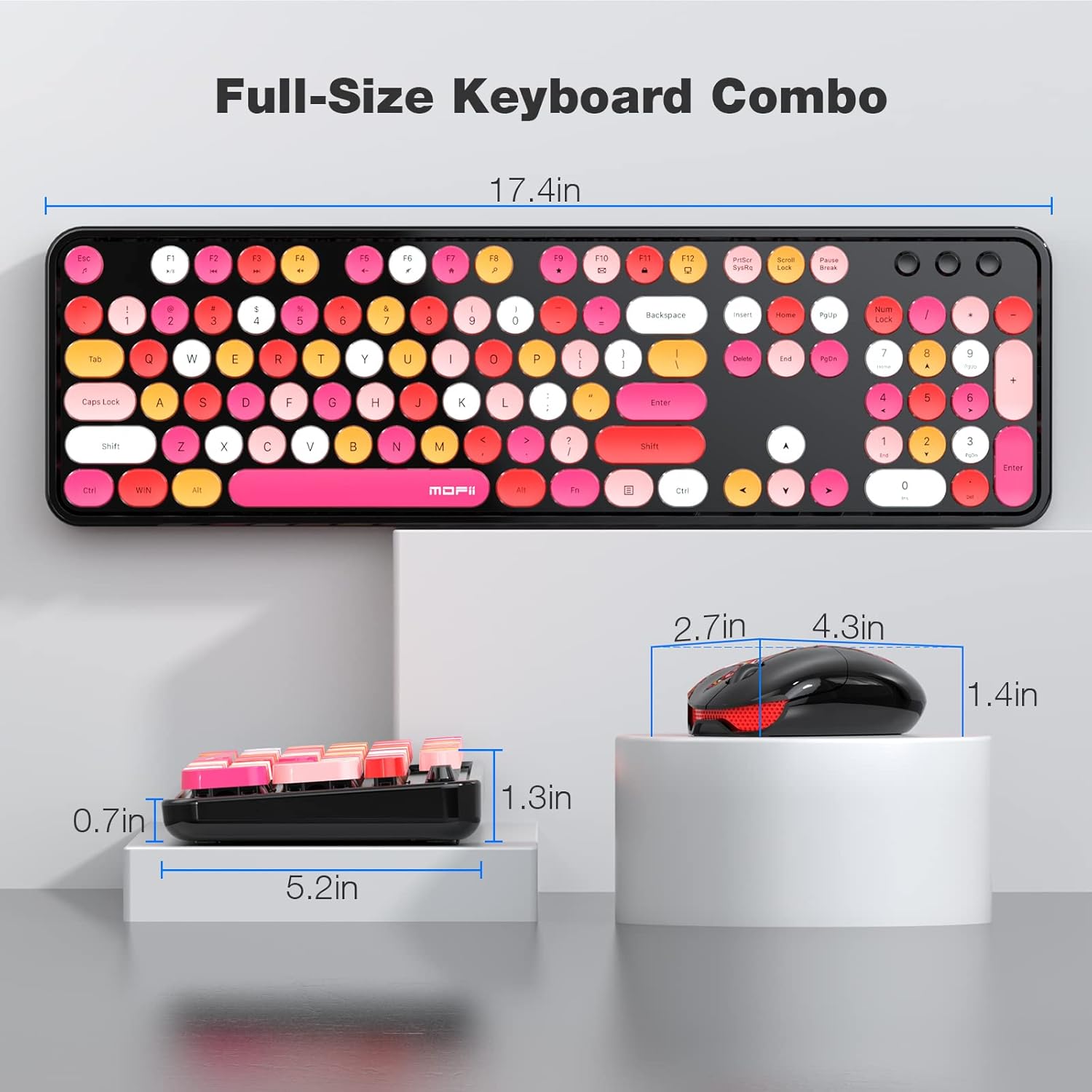
Image: Technical diagram displaying the full-size dimensions of the keyboard (17.4 inches) and mouse (2.7 x 4.3 x 1.4 inches).
Yhteensopivuus
The MOFii Wireless Keyboard and Mouse Combo is compatible with the following operating systems:
- Windows 7
- Windows 8
- Windows 10
- Windows XP/Vista
- Works with PC, Laptop, Smart TV.
Note: Not compatible with Apple systems.

Image: Visual representation of the product's wide compatibility with various Windows operating systems and devices like PCs and laptops.
Viralliset tuotevideot
Video: "Colorful wireless keyboard and mouse" - A seller-provided video showcasing the vibrant design and wireless functionality of the MOFii keyboard and mouse combo.
Video: "Stylish Comfort for Everyday Work" - A seller-provided video highlighting the ergonomic design and comfortable typing experience of the MOFii combo.
Video: "MOFii Wireless Keyboard and Mouse Retro Typewriter Keyboard" - A seller-provided video demonstrating the retro typewriter-style keys and overall aesthetic of the product.
Takuu ja tuki
Takuutietoja ja asiakastukea varten katso valmistajan virallinen website or contact their customer service directly. The product typically comes with a standard manufacturer's warranty against defects in materials and workmanship.
Lisätietoja saat osoitteesta MOFII Store on Amazon.


