1. Johdanto
This manual provides essential information for setting up, operating, maintaining, and troubleshooting your HP EliteOne 800 G5 24-inch All-in-One Touchscreen PC. Please read this guide thoroughly before using your device to ensure proper functionality and longevity.

Kuva 1: HP EliteOne 800 G5 All-in-One -tietokone, johon kuuluu näppäimistö ja hiiri.
2. Pakkauksen sisältö
Varmista, että pakkauksessa on kaikki tarvittavat osat:
- HP EliteOne 800 G5 -monitoimitietokone
- HP USB Keyboard
- HP USB Mouse
- Virtajohto
- Dokumentaatio (tämä käyttöohje, turvallisuustiedot)
3. Tuote ohiview
3.1 Edessä View

Kuva 2: Etuosa view of the HP EliteOne 800 G5, showing the 24-inch touchscreen display and integrated speakers.
- 23.8-inch FHD IPS WLED-backlit Touchscreen Display: Main interactive display area.
- 2 MP FHD Pop-up Webnokka: Located at the top center, retracts when not in use.
- Integrated Dual Array Digital Microphone: For clear audio input during calls or recordings.
- Bang & Olufsen Speakers: Located below the screen for high-quality audio output.
3.2 Sivu View (oikealla)

Kuva 3: Oikea puoli view illustrating the optical disk drive and audio ports.
- Optical Disk Drive: CD-/DVD-levyjen lukemiseen ja kirjoittamiseen.
- Disc drive eject button: To open the optical disk drive tray.
- Standard lock slot (10 mm): For security cables.
- Universal Audio Jack with CTIA headset support: For connecting headsets with a microphone.
- Kuulokkeiden liitin: Kuulokkeiden liittämiseen.
3.3 Taka View ja satamat
Kuva 4: Yksityiskohtainen takaosa view showing all available ports and connections.
- USB 3.1 Gen 2 Type-A port: High-speed USB connection.
- USB 3.1 Gen 2 Type-A port (charge support up to 5V/1.5A): High-speed USB with charging capability.
- Audio line-out connector: Ulkoisten kaiuttimien tai äänentoistojärjestelmien liittämiseen.
- USB 3.1 Gen 1 Type-A ports (2): Standard USB connections.
- RJ-45 (network) jack: Langallista Ethernet-yhteyttä varten.
- Virtaliitin: Virtajohdon kytkemistä varten.
- USB 3.1 Gen 2 Type-A ports (2) wake capable: High-speed USB ports that can wake the system.
- Dual-Mode DisplayPort™ 1.2 (DP++): Ulkoisten näyttöjen liittämiseen.
- HDMI 2.0a connector: Ulkoisten näyttöjen liittämiseen.
- SD card reader 4.0 (NOT INCLUDED on all models): SD-muistikorttien lukemiseen.
- USB 3.1 Type-C™ Gen 2 port (charge support up to 5V/3A): Reversible USB-C port with charging capability.
- Dual-state power button: To power on/off or put the system to sleep.
- Varma View Button (optional): Activates HP Sure View integrated privacy screen.

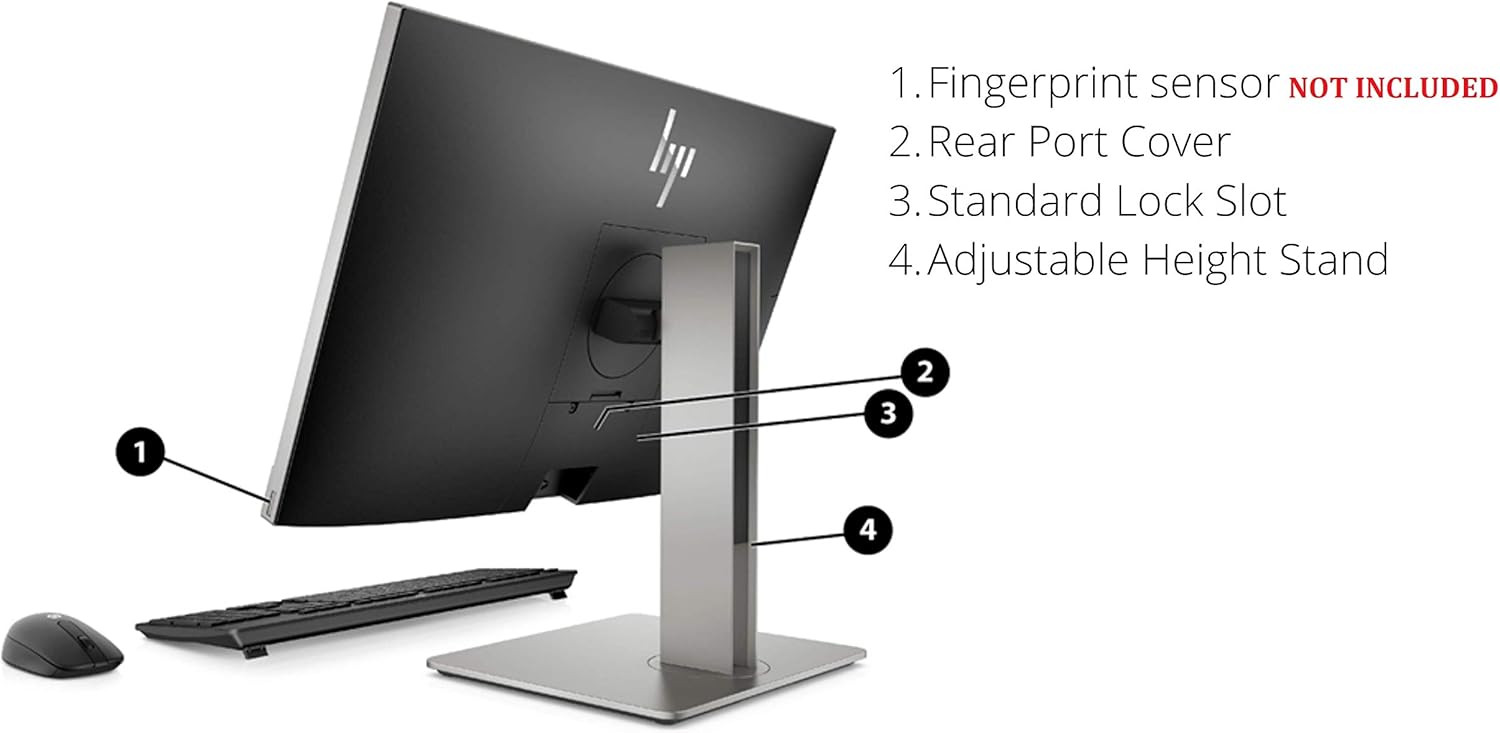
Kuva 5: Takaosa view highlighting the adjustable height stand and other features.
- Fingerprint sensor (NOT INCLUDED on all models): Biometristä todennusta varten.
- Rear Port Cover: Conceals and protects rear ports.
- Standard Lock Slot: For security cables.
- Säädettävä korkeus jalusta: Allows for ergonomic positioning of the display.
4. Asennus
Follow these steps to set up your HP EliteOne 800 G5 PC:
- Tietokoneen purkaminen pakkauksesta: Poista kaikki osat varovasti pakkauksesta.
- Tietokoneen sijoittaminen: Place the All-in-One PC on a stable, flat surface. Ensure adequate ventilation around the device.
- Näppäimistön ja hiiren liittäminen: Plug the USB keyboard and mouse into any available USB Type-A ports on the rear of the PC.
- Liitä virta: Connect the power cord to the power connector on the rear of the PC, then plug the other end into a grounded electrical outlet.
- Yhdistä verkkoon (valinnainen): For a wired internet connection, connect an Ethernet cable from your router or modem to the RJ-45 (network) jack on the rear of the PC.
- Virta päälle: Press the dual-state power button, located on the rear of the PC, to turn on the system.
- Alkuasennus: Follow the on-screen instructions to complete the Windows 10 Pro setup, including language, region, network connection (if not wired), and user account creation.
5. Käyttöohjeet
5.1 Virranhallinta
- Virta päälle: Press the power button on the rear of the PC.
- Nukkumismoodi: Briefly press the power button or select 'Sleep' from the Windows Start menu.
- Sammuta: Valitse Windowsin Käynnistä-valikosta 'Sammuta'.
- Käynnistä uudelleen: Select 'Restart' from the Windows Start menu.
5.2 Kosketusnäytön käyttö
The 24-inch display supports multi-touch gestures. Common gestures include:
- Napauta: Vastaa hiiren napsautusta.
- Kaksoisnapauta: Vastaa kaksoisnapsautusta.
- Paina ja pidä painettuna: Vastaa hiiren kakkospainikkeen napsautusta.
- Nipistä/Venytä: Lähennä tai loitonna.
- Pyyhkäise: Vieritä sisältöä tai navigoi.
5.3 Webkamera ja ääni
- Webnokka: The 2 MP FHD pop-up webcam automatically extends when an application requires it (e.g., video calls). Gently push it down to retract when not in use for privacy.
- Mikrofoni: The integrated dual array digital microphone is active when the webcam is in use or when voice input is required.
- Kaiuttimet: The Bang & Olufsen speakers provide audio output. Volume can be adjusted via Windows settings or keyboard shortcuts.
5.4 Optical Disk Drive
To use the DVD+/-RW SM DL 9.5mm slim tray:
- Press the eject button on the right side of the PC.
- Place a CD or DVD onto the tray, ensuring it is seated correctly.
- Gently push the tray back into the PC until it clicks shut.
6. Huolto
6.1 Puhdistus
- Näyttö: Käytä pehmeää, nukkaamatonta liinaa hieman dampvedellä tai näytönpuhdistusliuoksella. Älä suihkuta nestettä suoraan näytölle.
- Runko: Pyyhi pehmeällä, kuivalla liinalla. Vältä hankaavia puhdistusaineita.
- Ilmanvaihto: Varmista, että tuuletusaukot ovat puhtaita pölystä ja esteistä ylikuumenemisen estämiseksi.
6.2 Ohjelmistopäivitykset
Päivitä käyttöjärjestelmäsi ja ajurit säännöllisesti varmistaaksesi optimaalisen suorituskyvyn ja suojauksen:
- Windows-päivitykset: Siirry osoitteeseen Asetukset > Päivitys ja suojaus > Windows Update tarkistamaan ja asentamaan päivityksiä.
- HP Support Assistant: Use the pre-installed HP Support Assistant software to check for driver and firmware updates specific to your HP EliteOne PC.
7. Vianmääritys
| Ongelma | Mahdollinen syy | Ratkaisu |
|---|---|---|
| Tietokone ei käynnisty | Ei virtaa, löysä liitos | Check power cord connection to PC and outlet. Ensure outlet is functional. |
| Ei näyttöä näytöllä | PC in sleep mode, display settings issue | Press any key or move mouse to wake. If connected to external display, check display input source. |
| Kosketusnäyttö ei reagoi | Software glitch, dirty screen | Restart the PC. Clean the screen with a soft, lint-free cloth. |
| Ei ääntä kaiuttimista | Volume muted, incorrect audio output device | Check volume levels in Windows. Ensure 'Speakers (Bang & Olufsen)' is selected as the default playback device. |
| Webkamera ei toimi | Webcam retracted, privacy settings, driver issue | Varmista webcam is extended. Check Windows privacy settings for camera access. Update webcam drivers via HP Support Assistant. |
8. Tekniset tiedot
Key technical specifications for the HP EliteOne 800 G5 24-inch All-in-One PC:
| Ominaisuus | Yksityiskohta |
|---|---|
| Mallinumero | 2D9S5UW#ABA |
| Näyttö | 23.8" diagonal FHD IPS widescreen WLED-backlit touch screen (1920 x 1080) |
| Prosessori | Intel Core i5-9500 (9M Cache, up to 4.40 GHz) |
| Grafiikka | Intel UHD Graphics 630 (integroitu) |
| RAM | 8 Gt DDR4-2666 SDRAM |
| Varastointi | 256 GB M.2 2280 PCIe NVMe TLC SSD |
| Käyttöjärjestelmä | Windows 10 Pro |
| Webnokka | 2 MP FHD pop-up webnokka |
| Audio | Bang & Olufsen Speakers, Integrated Dual Array Digital Microphone |
| Optinen asema | DVD+/-RW SM DL 9.5mm slim tray |
| Portit (takana) | USB 3.1 Gen 2 Type-A (x3), USB 3.1 Gen 1 Type-A (x2), USB 3.1 Type-C Gen 2 (x1), DisplayPort 1.2 (x1), HDMI 2.0a (x1), RJ-45 (x1), Audio line-out (x1), Power connector (x1) |
| Ports (Side) | Universal Audio Jack (x1), Headphone connector (x1) |
| Mitat (PxLxK) | 18.4 x 7.1 x 21.2 tuumaa |
| Paino | 19.24 kiloa |
9. Takuu ja tuki
Your HP EliteOne 800 G5 PC comes with a standard manufacturer's warranty. Please refer to the warranty card included in your package for specific terms and conditions, including coverage duration and service options.
For technical support, driver downloads, and additional product information, please visit the official HP support websivusto:
When contacting support, have your product model number (2D9S5UW#ABA) and serial number ready.