1. Johdanto
This manual provides detailed instructions for the Redragon K598 TKL Wireless Mechanical Keyboard. Please read this guide thoroughly to ensure proper setup, operation, and maintenance of your device. The K598 is a compact 87-key tenkeyless keyboard designed for gaming and general use, featuring RGB backlighting and Outemu Brown mechanical switches.
2. Pakkauksen sisältö
Varmista, että pakkauksessasi on kaikki tarvittavat osat:
- Redragon K598 TKL Wireless Mechanical Keyboard
- USB-kaapeli (latausta ja langallista yhteyttä varten)
- Käyttöopas (tämä asiakirja)
3. Asennus ja liitettävyys
3.1 Näppäimistön lataaminen
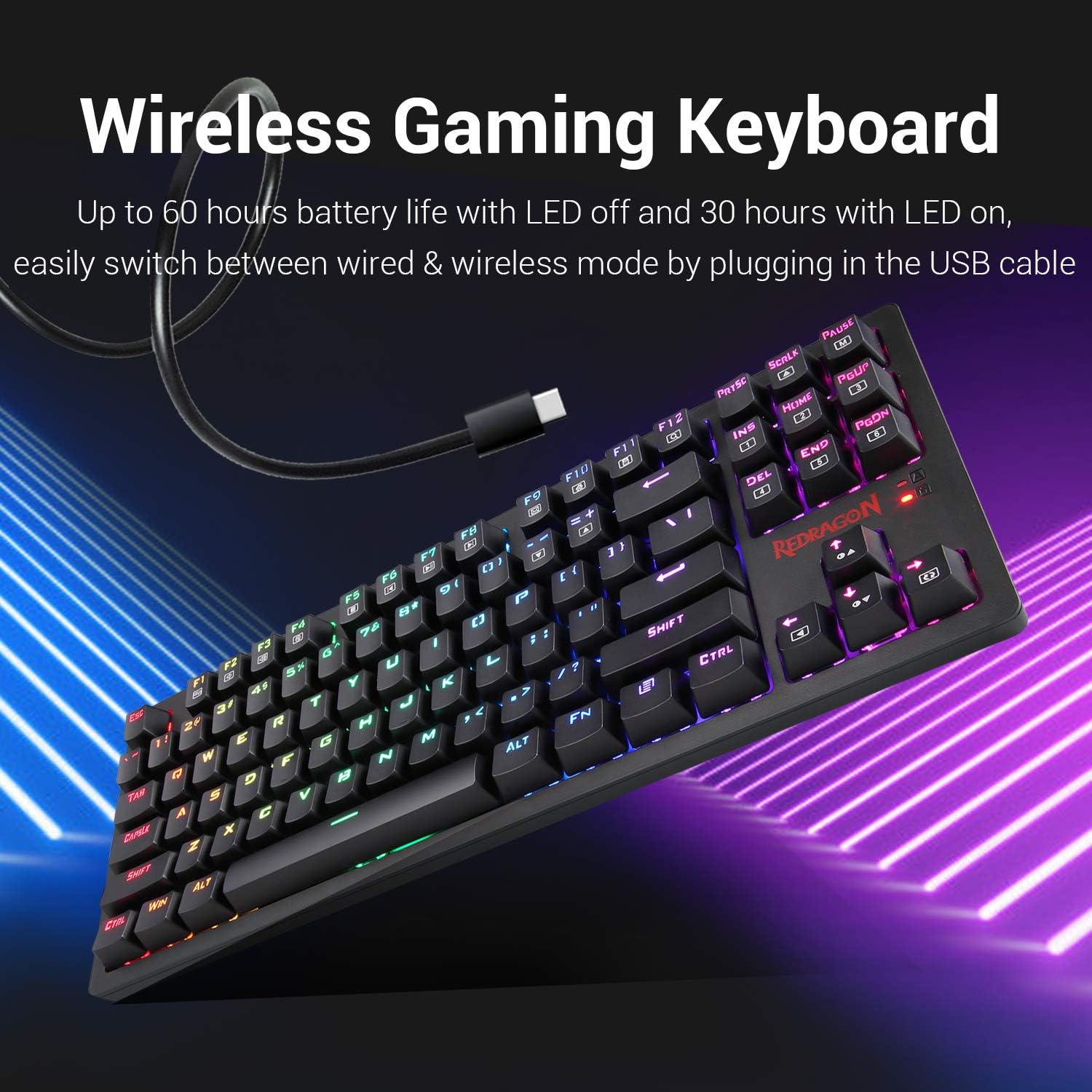
Before initial use, fully charge the keyboard. Connect the provided USB cable to the keyboard's USB port and to a powered USB port on your computer or a USB wall adapter. The keyboard features a built-in Lithium Polymer battery. A full charge provides approximately 60 hours of use with LEDs off, or 30 hours with LEDs on.
3.2 Langaton yhteys (2.4 GHz)
- Locate the wireless USB receiver, typically stored in a compartment on the keyboard.
- Liitä USB-vastaanotin tietokoneesi vapaaseen USB-porttiin.
- Ensure the power switch on the keyboard is set to the "ON" position.
- Näppäimistön pitäisi muodostaa yhteys tietokoneeseen automaattisesti.
3.3 Langallinen yhteys
To use the keyboard in wired mode, simply connect the USB cable from the keyboard to your computer. The keyboard will function as a wired device and charge simultaneously. This also allows for seamless switching between wired and wireless modes.
4. Käyttöohjeet
4.1 Näppäimistön perustoiminnot
The Redragon K598 is a standard 87-key layout. All keys function as labeled. For specific multimedia or function key combinations, refer to the keycap legends, often used in conjunction with the FN avain.
4.2 RGB-taustavalon säätö
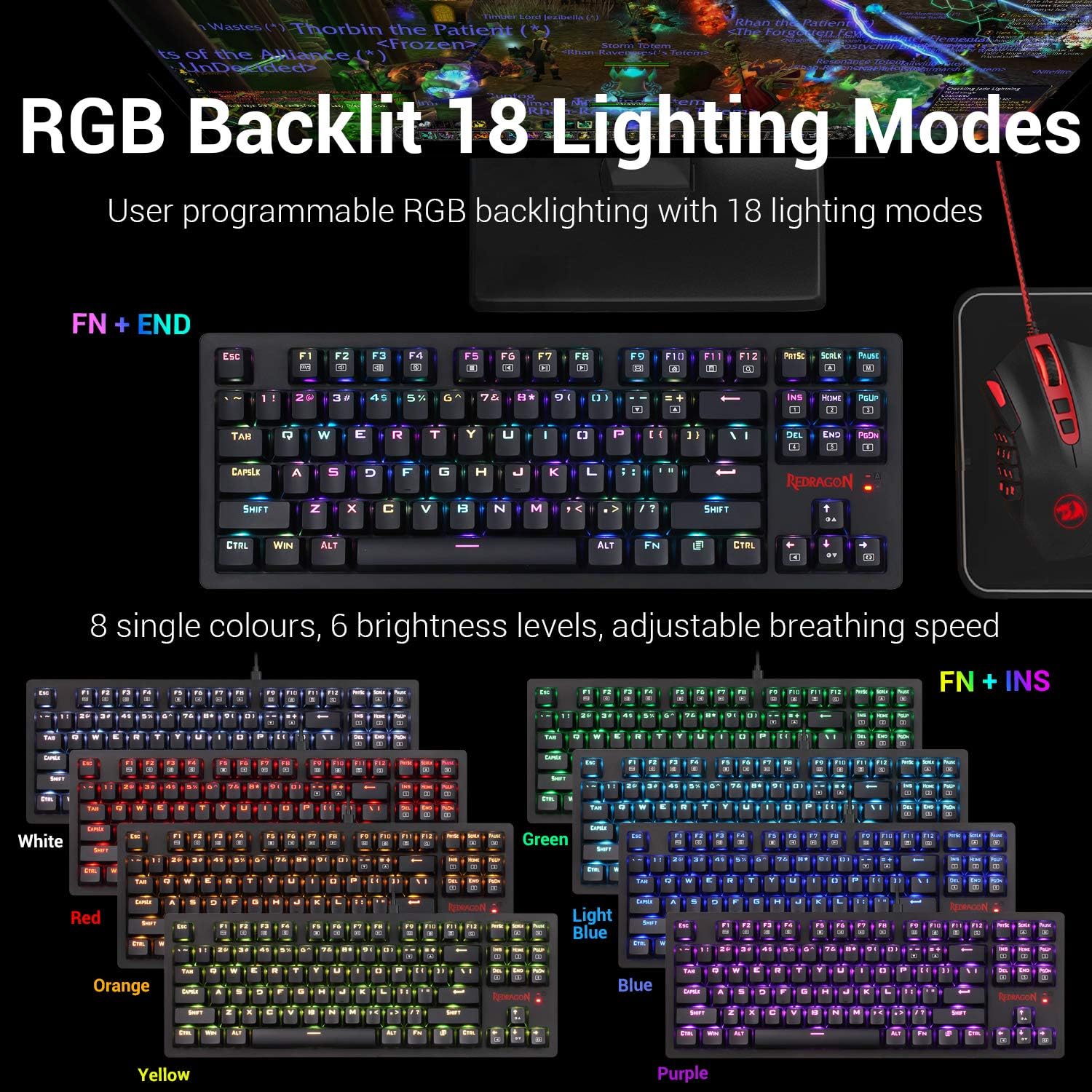
The keyboard features user-programmable RGB backlighting with 18 distinct lighting modes. You can customize colors, brightness, and animation speed.
- To cycle through lighting modes: Press FN + END.
- To change single colors (8 options): Press FN + INS.
- To adjust brightness (6 levels): Use dedicated brightness control keys or FN + Nuoli ylös/alas (if available, otherwise implied by "6 brightness levels").
- To adjust breathing speed: Use dedicated speed control keys or FN + Arrow Left/Right (if available, otherwise implied by "adjustable breathing speed").
4.3 Key Switch Characteristics
The K598 keyboard is equipped with Outemu Brown mechanical switches. These switches are characterized by a tactile bump, medium resistance, and quiet travel, providing precise tactile feedback suitable for both typing and gaming.
- Käyttövoima: 45gf +/- 10gf
- Keystroke Travel: 2.2 mm +/- 0.6 mm
- Kestävyys: Ultra-durable keys tested to 50 million keystrokes.


4.4 Keyboard Construction and Keycaps
The K598 features a solid ABS construction with plate-mounted mechanical keys, designed for durability under demanding use. The keycaps are precision-engineered to provide crystal clear uniform backlighting and are resistant to wear, ensuring legends do not scratch off over time.

4.5 Tenkeyless Design
The compact 87-key tenkeyless (TKL) design of the K598 saves desk space without compromising performance. This layout is preferred by many gamers for its ergonomic benefits and reduced footprint, allowing more room for mouse movement.

5. Huolto
5.1 Näppäimistön puhdistaminen
Optimaalisen suorituskyvyn ja ulkonäön ylläpitämiseksi puhdista näppäimistö säännöllisesti. Käytä pehmeää, nukkaamatonta liinaa, joka on hieman kostutettuampened with water or a mild cleaning solution. Avoid harsh chemicals, abrasive materials, or excessive moisture. For cleaning between keycaps, use compressed air or a small brush.
5.2 Varastointi
When not in use for extended periods, store the keyboard in a dry, cool environment away from direct sunlight and extreme temperatures. Ensure the keyboard is powered off to conserve battery life.
6. Vianmääritys
If you encounter issues with your Redragon K598 keyboard, refer to the following common problems and solutions:
- Keyboard not responding (Wireless Mode):
- Varmista, että näppäimistön virtakytkin on ON-asennossa.
- Varmista, että USB-vastaanotin on kytketty tukevasti tietokoneen toimivaan USB-porttiin.
- Check the keyboard's battery level. Connect the USB cable to charge if the battery is low.
- Yritä kytkeä USB-vastaanotin toiseen USB-porttiin.
- Käynnistä tietokone uudelleen.
- Keyboard not responding (Wired Mode):
- Varmista, että USB-kaapeli on kytketty kunnolla sekä näppäimistöön että tietokoneeseen.
- Kokeile käyttää tietokoneesi toista USB-porttia.
- Testaa eri USB-kaapelilla, jos sellainen on saatavilla.
- Käynnistä tietokone uudelleen.
- RGB Backlighting not working or incorrect:
- Varmista, että näppäimistö on päällä ja ladattu.
- Selaa valaistustiloja käyttämällä FN + END.
- Säädä kirkkaustasoja.
- If using wireless mode, low battery can affect LED performance. Charge the keyboard.
- Keys repeating or not registering:
- Clean the affected key switch area with compressed air to remove debris.
- Varmista, että näppäinhattu on kunnolla paikallaan.
- Jos ongelma jatkuu, se voi viitata laitteistovika.
- Software installation issues:
- Ensure you download the correct software version for your specific keyboard model from the official Redragon websivusto.
- Temporarily disable antivirus or firewall software during installation if it interferes.
- Suorita asennusohjelma järjestelmänvalvojana.
7. Tekniset tiedot
| Ominaisuus | Yksityiskohta |
|---|---|
| Merkki | Redragon |
| Mallinumero | K598 |
| Tuotteen mitat | 14.37 x 5.31 x 1.36 tuumaa (36.5 x 13.5 x 3.45 cm) |
| Tuotteen paino | 1.57 puntaa (0.71 kg) |
| Yhteystekniikka | USB (Wired) / 2.4GHz Wireless |
| Yhteensopivat laitteet | PC (Windows) |
| Näppäimistön kuvaus | Gaming, Tenkeyless (87-key) |
| Erikoisominaisuudet | Backlit, Ergonomic, Rechargeable |
| Näppäimistön taustavalo | RGB (18 modes, 8 single colors) |
| Avainkytkimet | Outemu Brown Mechanical Switches |
| Akun tyyppi | 1 litiumpolymeeriakku (mukana) |
| Virtalähde | Ladattava akku |
| Mukana olevat komponentit | USB-kaapeli |
| Ensimmäinen vapaapäivä | 25. joulukuuta 2024 |
8. Takuu ja tuki
8.1 Takuutiedot
Specific warranty details for the Redragon K598 TKL Wireless Mechanical Keyboard are typically provided with the product packaging or available on the official Redragon websivusto. Säilytä ostokuitti takuuvaatimuksia varten.
8.2 Asiakastuki
For technical assistance, troubleshooting beyond this manual, or warranty inquiries, please contact Redragon customer support. Visit the official Redragon websivustolta yhteystietoja ja lisäresursseja.
Virallinen Redragon Websivusto: www.redragonusa.com


